Introduction
In today’s world, businesses interact with their clients through various media like websites, email, calls, social media, and online stores. Handling all the conversations manually becomes hard as the businesses keep growing.
This is the reason why modern day businesses find it more preferable to use CRM software when dealing with customer interaction and data management.
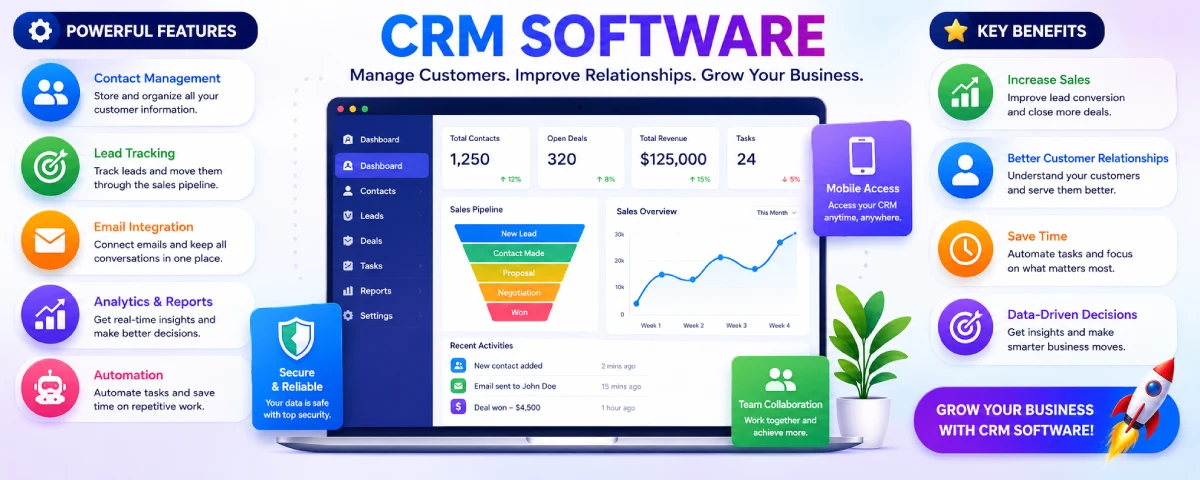
For those who would like to learn more about what is crm software, they should know that crm software is nothing but software used by businesses for managing all the facets of their customer relations. The abbreviation ‘CRM’ stands for customer relationship management.
There has been a growing need for crm software meaning since there is a lot of digital competition nowadays. Customers want fast responses and proper management of customer relations. Businesses failing to meet customers’ expectations might find themselves losing customers to other competing businesses.
AI and automation will further transform the nature of CRMs even in the year 2026. The latest CRM platforms have been integrated with automated functions like chatbots, AI algorithms, predictions, and automated follow-ups that enable organizations to make their lives easier and provide a better customer experience.
Consider a scenario where an ecommerce company is getting numerous messages from its customers on Instagram, email, and WhatsApp. It is challenging for the firm to handle this task without using the services of CRM tools as these platforms keep all customer interactions under a single roof.
Many companies now use crm software examples such as:
- Salesforce
- HubSpot CRM
- Zoho CRM
- Freshsales
These platforms help businesses improve customer management, sales tracking, support services, and marketing communication.
CRM Software Resource Center
Explore our complete collection of guides covering CRM fundamentals, types of CRM systems, key features, solutions for small businesses, CRM vs ERP comparisons, cloud-based CRM, benefits, and tips for choosing the right CRM software.
What is CRM Software?
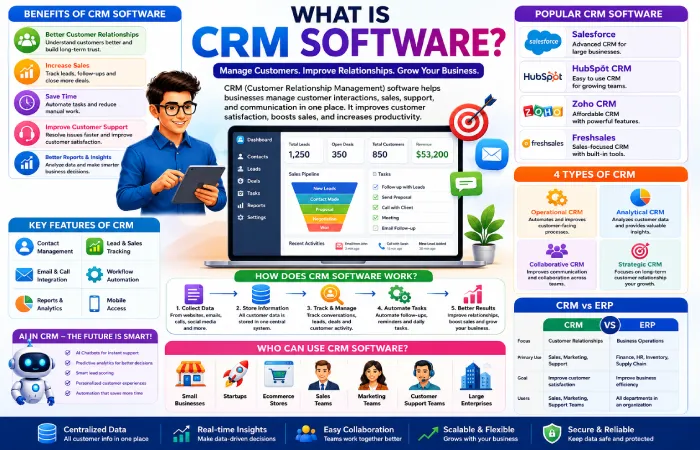
CRM stands for Customer Relationship Management.
CRM software is computer applications that help businesses manage customer interactions, sales, customer service, and communication. According to Salesforce CRM Guide, CRM systems help businesses improve customer relationships, sales management, and communication efficiency. In other words, a company does not have to rely on spreadsheet sheets or note pads for managing its customer details; everything is managed within the CRMs.
A crm software definition would revolve around the improvement of business-customer relationships. CRMs allow companies to analyze customer behavior, lead management, sales activities, and customer service.
Simple Definition of CRM Software
In simple words, CRM software helps businesses:
- Store customer information
- Track customer communication
- Manage leads and sales
- Improve customer support
- Organize team collaboration
- Automate daily tasks
CRM is currently being used by both small and large companies. Examples of small companies include startups, e-commerce firms, agencies, local companies, and even large corporations.
Real-World CRM Example
For instance, consider that a customer visits an electronics firm that has its own website online. The client contacts the firm using live chat regarding a specific product.
Without CRM software:
- Employees may not remember previous conversations.
- Customer information may become difficult to track.
With CRM software:
- All conversations are stored in one dashboard.
- Employees can view customer history instantly.
- Follow-ups become easier and faster.
It enables organizations to enhance their level of customer satisfaction and to prevent any kind of miscommunication.
How Businesses Use CRM Daily
CRM systems are used daily by many companies in relation to the activities involving customers.
Common Daily CRM Activities
| Business Activity | How CRM Helps |
| Customer communication | Stores emails, calls, and messages |
| Lead management | Tracks potential customers |
| Sales management | Monitors deals and conversions |
| Customer support | Handles support requests |
| Marketing campaigns | Organizes customer outreach |
| Reporting | Creates business reports |
Main Functions of CRM Software
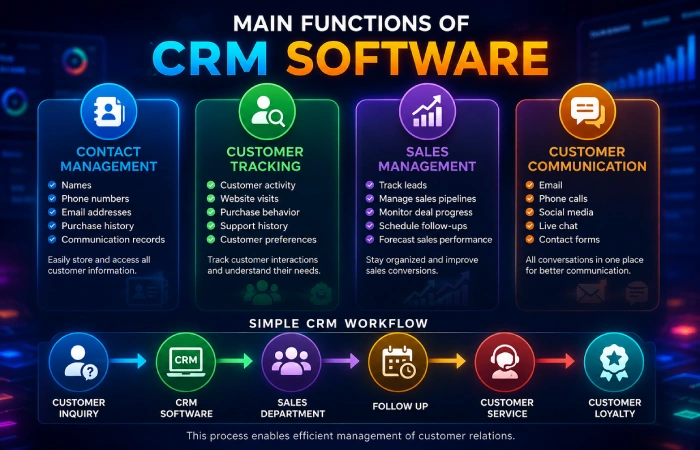
Contact Management
CRM software stores customer details such as:
- Names
- Phone numbers
- Email addresses
- Purchase history
- Communication records
This makes customer information easier to access.
Customer Tracking
CRM systems help businesses monitor:
- Customer activity
- Website visits
- Purchase behavior
- Support history
- Customer preferences
This information helps businesses understand customers better.
Sales Management
Sales teams use CRM software to:
- Track leads
- Manage sales pipelines
- Monitor deal progress
- Schedule follow-ups
- Forecast sales performance
CRM tools help sales teams stay organized and improve conversions.
Customer Communication
CRM platforms store communication from different channels including:
- Phone calls
- Social media
- Live chat
- Contact forms
This creates a centralized communication system for businesses.
Simple CRM Workflow Diagram
A basic CRM process usually works like this:
Customer Inquiry → CRM Software → Sales Department → Follow Up → Customer Service → Customer Loyalty
This process enables efficient management of customer relations.
Why is CRM Important for Businesses?
Customer relations are among the key aspects in successful business expansion. Companies that recognize their customers’ needs and maintain effective communications are more likely to create strong bonds with customers.
The purpose of CRM software is to facilitate professional customer relations management along with improved sales and communication capabilities.
Better Customer Relationships
The history and communication records of customers are recorded in CRM systems, making it easy for staff to know their requirements and offer personalized help accordingly.
Businesses can:
- Respond faster
- Remember customer preferences
- Provide better service
- Improve customer satisfaction
Faster Communication
Many businesses receive messages from multiple platforms every day. CRM software organizes communication from:
- Emails
- Phone calls
- Websites
- Social media
- Messaging apps
This reduces confusion and helps teams respond quickly.
Better Sales Tracking
CRM software helps businesses track:
- Leads
- Sales opportunities
- Customer inquiries
- Follow-up tasks
- Deal progress
Sales managers can monitor performance more effectively.
Business Growth Support
As organizations expand, manual management of customer information becomes increasingly hard. CRM solutions enable organizations to expand their business processes without losing any customer information and records of communication.
Team Collaboration
CRM technology facilitates collaboration for sales, marketing, and customer service departments through customer data.
Customer Retention
Retaining the current customer base is much more efficient than acquiring new customers. CRM tools assist companies:
- Build stronger customer relationships
- Follow up regularly
- Solve problems faster
- Improve customer satisfaction
How CRM Improves Customer Interactions Across Departments
CRM software assists various departments to collaborate by accessing customer information from the same source. The sales, marketing, and customer service departments can access customer history, communication history, and transaction history from a single source.
For example:
- Sales teams can track customer inquiries
- Marketing teams can manage campaigns
- Support teams can solve customer problems faster
This shared information helps businesses provide more consistent communication and better customer experiences across every department.
Why This Position Is Best
Because nearby sections already discuss:
- communication
- collaboration
- customer relationships
So this topic fits naturally there and does not break article flow.
Why CRM is Essential for Businesses of All Sizes
CRM software is useful for many types of businesses.
Small Businesses
Small enterprises adopt CRMs to keep their clients’ information organized and enhance communication without having huge staffs.
Startups
Startups leverage CRMs to handle lead generation, grow their business, and automate various activities to save time.
Ecommerce Stores
The e-commerce websites use CRM technology to manage their customer orders, customer support cases, and marketing campaigns.
Large Companies
Big corporations apply CRMs to automate processes, generate reports, manage their customers, and collaborate within a team.
Learn Beginner CRM Concepts
If you want to understand CRM basics more deeply, read:
“CRM Software Basics for Beginners”
How Does CRM Software Work?
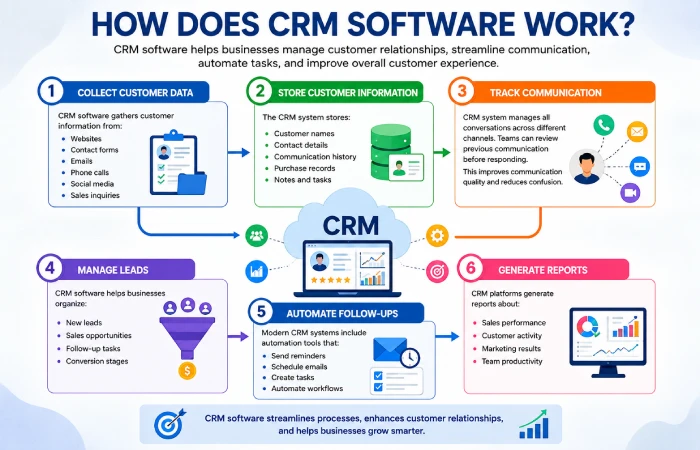
This CRM technology is founded on the basis of collecting data, managing data, communicating, and improving CRM. Helps firms analyze customers’ information and buying behavior.
Most CRM systems follow a similar workflow.
Step 1: Collect Customer Data
CRM software gathers customer information from:
- Websites
- Contact forms
- Emails
- Phone calls
- Social media
- Sales inquiries
This creates a centralized customer database.
Step 2: Store Customer Information
The CRM system stores:
- Customer names
- Contact details
- Communication history
- Purchase records
- Notes and tasks
Businesses can access customer information quickly whenever needed.
Step 3: Track Communication
CRM technology helps track all the communications carried out through different communications channels. The team can review previous communication with the clients before answering back.
This improves communication quality and reduces confusion.
Step 4: Manage Leads
CRM software helps businesses organize:
- New leads
- Sales opportunities
- Follow-up tasks
- Conversion stages
Sales teams can track which leads need attention.
Step 5: Automate Follow-Ups
Modern CRM systems include automation tools that:
- Send reminders
- Schedule emails
- Create tasks
- Automate workflows
This saves time and improves productivity.
Step 6: Generate Reports
CRM platforms generate reports about:
- Sales performance
- Customer activity
- Marketing results
- Team productivity
Businesses use these reports to improve decision-making.
CRM Dashboard Explanation
A CRM dashboard is the main control panel inside the system. It displays:
- Leads
- Sales progress
- Customer activity
- Reports
- Tasks
- Notifications
Dashboards help teams monitor business activity in real time.
Sales Pipeline Explanation
A sales pipeline shows the journey from:
Lead → Contact → Proposal → Negotiation → Customer
This helps sales teams track deal progress more efficiently.
Customer Journey Flow
CRM software also helps businesses understand the customer journey, including:
- First contact
- Product interest
- Purchase process
- Support interactions
- Repeat purchases
A customer’s journey enables organizations to enhance customer experiences.
Key Features of CRM Software
Various CRM systems have various features. However, some key functions can be found in most of these systems.
Contact Management
Stores customer details and communication history.
Lead Tracking
Tracks potential customers through different sales stages.
Email Integration
Connects CRM systems with email platforms for easier communication.
Workflow Automation
Automates repetitive tasks like reminders and follow-up emails.
Analytics and Reporting
Provides reports about sales, customers, and marketing performance.
AI Tools
Modern CRM systems now include:
- AI chatbots
- Predictive analytics
- Smart recommendations
Mobile CRM
Many CRM systems provide mobile apps for remote access.
Reporting Dashboards
Dashboards display important business data in one place.
Read More About CRM Features
For detailed explanations, comparisons, and feature guides, read:
“Best CRM Software Features to Look For”
What Are the 4 Types of CRM?
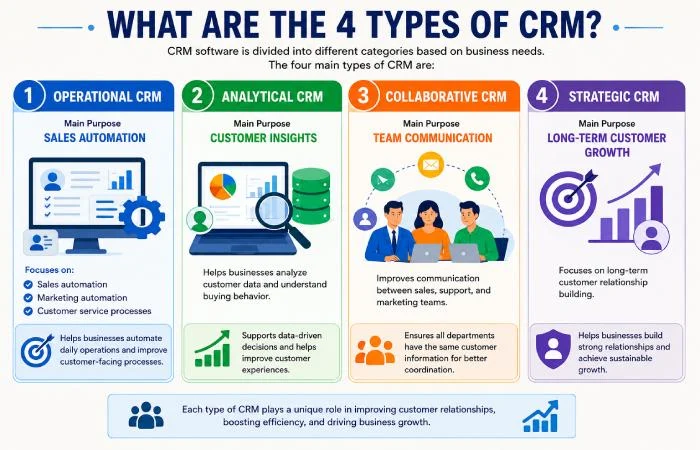
CRM software is divided into different categories based on business needs.
The four main types of CRM are:
| CRM Type | Main Purpose |
| Operational CRM | Sales automation |
| Analytical CRM | Customer insights |
| Collaborative CRM | Team communication |
| Strategic CRM | Long-term customer growth |
Operational CRM
Focuses on:
- Sales automation
- Marketing automation
- Customer service processes
Analytical CRM
Facilitates analysis of customer data to determine buying habits.
Collaborative CRM
Enhances communication among sales, service, and marketing teams.
Strategic CRM
Focuses on long-term customer relationship building.
To understand each CRM category in greater detail, read our complete guide on Types of CRM Software Explained.
CRM Software Examples
There is an array of different CRM systems that companies select depending on their size, budget, and other considerations. Some CRM systems are geared towards startups, whereas some are intended for big companies that have complex needs.
Popular CRM software examples include:
- Salesforce
- HubSpot CRM
- Zoho CRM
- Freshsales
Such tools will allow companies to keep track of their communications with customers, sales performance, marketing efforts, automation, and customer support using one software suite.
Salesforce
Salesforce is one of the most widely used CRM software solutions, which is commonly implemented by mid-sized and large companies.
Why Businesses Choose Salesforce
- Advanced automation tools
- AI-powered insights
- Large integration ecosystem
- Scalable for growing companies
Best For
- Enterprise businesses
- Large sales teams
- Global companies
HubSpot CRM
HubSpot is a very intuitive and easy-to-use CRM software. HubSpot provides free CRM services and allows customers to easily automate certain aspects of their business process.
Why Businesses Choose HubSpot CRM
- Free starter plan
- Easy user interface
- Marketing integration
- Beginner-friendly tools
Best For
- Startups
- Small businesses
- Marketing teams
Zoho CRM
Zoho CRM is a very customizable CRM software designed especially for small and medium businesses. The software offers several services such as automation, reporting, leads management, and communications through several channels.
Why Businesses Choose Zoho CRM
- Affordable pricing
- Customization options
- Mobile CRM support
- Workflow automation
Best For
- Small businesses
- Growing companies
- Budget-focused teams
Freshsales
Freshsales is a sales-oriented CRM solution which helps in lead management and customer communication.
Why Businesses Choose Freshsales
- Sales-focused dashboard
- AI lead scoring
- Easy communication tracking
- Built-in phone and email tools
Best For
- Sales teams
- Service businesses
- Mid-sized companies
Small Business CRM vs Enterprise CRM
| Feature | Small Business CRM | Enterprise CRM |
| Setup Process | Simple and fast | More advanced |
| Pricing | Lower cost | Higher cost |
| Features | Basic automation | Advanced analytics |
| Team Size | Small teams | Large organizations |
| Customization | Limited | Extensive customization |
Small business firms normally opt for basic and cheap CRMs, whereas corporate firms require more complex automation, integration, and reports systems.
Why Many Businesses Test CRM Software Before Buying
CRM companies have begun to offer free demo, trial account, or tour of their product platforms. This is done so that businesses know about dashboard features, automated features, customer tracking, and sales pipeline management.
Why Many Businesses Test CRM Software Before Buying
CRM platforms have started offering free demo, trial account, or tour of their product platforms. This is because they want businesses to be aware of dashboard features, automated features, customer tracking, and sales pipeline management.
CRM Software for Small Business
Small businesses often need affordable and easy-to-use CRM systems.
Many CRM platforms now offer:
- Free plans
- Simple dashboards
- Cloud access
- Mobile apps
- Automation tools
Cloud based crm software is especially useful for small businesses because it reduces hardware costs and supports remote work.
Businesses looking for affordable CRM solutions can explore our guide on Best CRM Software for Small Business to compare popular options.
Cloud-Based CRM Software Explained
Cloud CRM systems store data online instead of local servers.
Benefits include:
- Remote access
- Easy updates
- Lower maintenance
- Mobile support
- Flexible scalability
| Cloud CRM | Traditional CRM |
| Online access | Local installation |
| Remote-friendly | Office-based |
| Lower setup costs | Higher infrastructure costs |
To learn more about cloud technology, scalability, and remote access benefits, read Cloud-Based CRM Software Explained.
CRM vs ERP Software
CRM and ERP systems serve different business purposes.
| CRM | ERP |
| Manages customers | Manages operations |
| Sales-focused | Resource-focused |
| Improves customer relationships | Improves business efficiency |
Who Can Use CRM Software?
The CRM software application can be beneficial for various kinds of companies or groups that need to communicate with customers or sell to them.
All kinds of firms use CRM solutions in order to better keep organized about their customers and improve communication.
Many businesses compare these two systems before investing. Learn more in our detailed CRM Software vs ERP Software comparison guide.
Common Users of CRM Software
Small Businesses
Small companies make use of CRM applications to control contacts and sales operations from one place.
Startups
Startups utilize CRM applications to organize leads and automate processes within a small team.
Ecommerce Businesses
CRM software solutions can be implemented by online shops to keep track of order information, handle client inquiries, and run marketing campaigns.
Sales Teams
CRM systems are used by the sales teams to manage their leads, pipelines, and conversion rates.
Marketing Teams
Marketing teams make use of CRM technology for campaign management, customer data management, and communication with their audience.
Customer Support Teams
Support teams use CRM platforms to access customer history and solve problems more efficiently.
Large Enterprises
Big corporations adopt advanced CRM technology for automations, analysis, and cross-department collaboration.
| Business Type | How CRM Helps |
| Startup | Lead management |
| Ecommerce Store | Customer support |
| Sales Team | Sales tracking |
| Marketing Agency | Campaign management |
| Enterprise Company | Automation and analytics |
Benefits of CRM Software
CRM systems offer many business advantages.
The Value of CRM
Main benefits include:
- Better customer relationships
- Increased sales
- Faster communication
- Automation
- Improved customer support
- Better reporting
- Improved marketing performance
AI in CRM Software
AI is becoming a major part of CRM technology in 2026.
For a deeper understanding of business advantages, explore our complete guide on CRM Software Benefits for Businesses.
CRM Benefits by Business Type
| Business Type | CRM Benefit |
| Small Business | Better customer organization |
| Ecommerce Store | Faster order support |
| Sales Team | Improved lead tracking |
| Startup | Saves time with automation |
| Large Company | Better team collaboration |
Industries Using AI CRM Tools in 2026
Some industries that make use of AI CRM software include:
- Ecommerce
- Real estate
- Healthcare
- Marketing agencies
- Education businesses
- Customer support centers
What’s Different About AI-Based CRM Systems?
Modern AI CRM systems provide:
- AI chatbots
- Predictive analytics
- AI lead scoring
- Personalized recommendations
- Smart automation
AI tools help businesses improve efficiency and customer experience.
Mobile CRM Systems
The mobile CRM software can be accessed via smart devices
Benefits include:
- Real-time updates
- Remote access
- Notifications
- Faster communication
- Support for field employees
How CRM Improves Sales
CRM software helps sales teams:
- Track leads
- Manage pipelines
- Automate follow-ups
- Monitor conversions
- Forecast sales performance
How CRM Helps Reduce Manual Work
In almost all organizations, the staff spend most of their time executing tedious processes like maintaining spreadsheet files, sending emails, managing customer interactions, etc. This becomes more challenging when customer information increases.
The CRM system makes automation of repetitive business activities easy. In other words, customer data doesn’t have to be updated manually through several different systems.
Modern CRM tools can automatically:
- Send follow-up reminders
- Update customer records
- Track sales activities
- Organize communication history
- Assign tasks to employees
- Generate reports
This helps businesses save time and reduce human errors.
Why Automation Matters in CRM
The automation process enables workers to spend more time on client communication, increasing sales and business strategy rather than wasting time on tedious tasks.
For example:
- Sales teams can spend more time talking with potential customers
- Support teams can solve customer issues faster
- Marketing teams can automate campaign tracking
In the case of CRM, automation becomes particularly helpful for organizations that deal with many leads and clients daily.
Common Manual Tasks CRM Can Automate
| Manual Task | CRM Automation Benefit |
| Follow-up emails | Automatic reminders |
| Spreadsheet updates | Real-time data updates |
| Customer data entry | Centralized information storage |
| Task assignments | Automated workflows |
| Sales tracking | Pipeline management |
How CRM Drives Sales Growth
CRM applications help business organizations improve their sales structure and handle relationships with their customers effectively. The sales department will be able to organize its leads, track deals, and manage its customers’ communications from one single dashboard.
In the absence of assistance from CRM software, the sales team might find it difficult to manage its data in several ways, including through emails and spreadsheets…
With CRM systems, businesses can:
- Track potential customers
- Organize sales pipelines
- Monitor customer activity
- Schedule follow-ups
- Improve conversion rates
The result is a more organized sale process, as well as a fast response to queries from customers
Lead Tracking and Sales Pipelines
CRM applications assist sales teams in managing their leads at different levels of the customer journey.
Example sales pipeline:
Lead → Contact → Proposal → Negotiation → Customer
This helps businesses understand where potential customers are in the sales process.
Automated Follow-Ups
The major advantage of using CRM software is follow-up management through automation. It enables businesses to send out alerts and automatic emails so that all client conversations can be followed up on.
Sales Forecasting and Reporting
Another feature offered by CRM software includes reporting:
- Track sales performance
- Identify high-performing products
- Measure conversion rates
- Predict future sales trends
How CRM Improves Sales Efficiency
| CRM Feature | Sales Benefit |
| Lead tracking | Better customer management |
| Sales pipeline | Organized deal tracking |
| Automation tools | Faster follow-ups |
| Reporting dashboards | Better decision-making |
| Customer history | Personalized communication |
How CRM Improves Customer Service
Customer service is a critical component of growth and retaining existing customers. CRM software enables companies to streamline their customer service efforts, allowing for faster service since all client information is available in one system.
The support team can fast refer to the client’s history of transactions, communication, and past requests before replying to the client.
This can allows for efficient and personalized interactions with the costumer
Organizing Customer Support Requests
CRM systems help businesses manage:
- Support tickets
- Customer complaints
- Product inquiries
- Service requests
- Follow-up communication
This reduces confusion and improves response time.
Access to Customer History
With access to past customer communication, support teams will be able to resolve issues much faster without having to make customers repeat themselves several times.
It is clear that communication will be better in such cases.
Personalized Customer Communication
CRM systems will help companies learn about the needs and behavior patterns of their customers.
Faster Response Management
Many CRM tools include:
- Automated ticket routing
- Live chat integration
- Smart notifications
- Workflow automation
AI for Customer Service
The role of AI in contemporary CRM systems has increased greatly by 2026. Numerous companies have integrated artificial intelligence into their systems for improving customer care services and minimizing the manual work involved..
AI tools can help businesses provide:
- Faster replies
- Automated chat support
- Smart ticket routing
- Customer behavior analysis
- Personalized recommendations
AI Chatbots in CRM
AI chatbots can generate automated answers to the most common questions without any assistance from humans. It is possible to ensure round-the-clock availability of support to customers with this option.
Smart Ticket Ro
AI systems can automatically send support requests to the correct department based on customer needs. This reduces delays and improves issue resolution speed.
Predictive Customer Support
Some CRM systems now use predictive analytics to identify customer issues before they become major problems.
Benefits of AI Customer Service Tools
| AI Feature | Customer Service Benefit |
| AI chatbots | Faster customer replies |
| Smart routing | Better support organization |
| Predictive analytics | Early issue detection |
| Automated workflows | Reduced manual work |
CRM Pricing Overview
CRMs can have different prices based on business size, number of features offered, automation capabilities, and storage needs. Some CRMs can offer their products for free to new users, whereas others can give personalized options to customers.
Organizations need to check out the functionality of the chosen CRM.
Factors That Affect CRM Pricing
CRM costs often depend on:
- Number of users
- Automation features
- AI capabilities
- Storage limits
- Customer support access
- Third-party integrations
Larger organizations generally need CRM software that is more sophisticated and customized.
How Much Does CRM Cost?
Different CRM systems offer different pricing structures depending on features and business needs.
| CRM Type | Typical Pricing |
| Free CRM | Limited features |
| Small business CRM | Monthly subscription |
| Enterprise CRM | Custom pricing |
Free CRM Platforms
There are several CRM providers who offer their products on free trial basis. The free version normally comes with the basics like customer management and lead generation. It is well suited for young companies.
Small Business CRM Pricing
Small business CRM systems usually charge monthly subscription fees based on:
- Number of users
- Storage capacity
- Automation features
Enterprise CRM Pricing
Enterprise CRM systems typically include:
- Advanced automation
- AI analytics
- Large-scale reporting
- Team collaboration tools
- Custom integrations
CRM Pricing Comparison
| Business Size | Recommended CRM Type |
| Startup | Free or low-cost CRM |
| Small Business | Cloud-based subscription CRM |
| Large Enterprise | Advanced custom CRM platform |
Where Businesses Buy CRM Software
The procurement of CRM software is most likely done through company websites. There are many CRM vendors that offer free trials, subscription models per month, and cloud services without having to go through complicated installations.
Some popular CRMs include Salesforce, HubSpot CRM, and Zoho CRM that can be purchased via the internet.
Many companies also test free demos before selecting a long-term CRM solution.
CRM Software Buying Tips
Before choosing a CRM platform, businesses should compare:
- Pricing plans
- Features
- Ease of use
- Mobile access
- Automation tools
- Customer support
- Integration options
- Scalability for future growth
A basic CRM system is recommended for starters and small companies.
Before Buying CRM |
Why It Matters |
| Free trial availability | Helps test the platform |
| Mobile support | Useful for remote teams |
| Automation tools | Saves time |
| Easy dashboard | Faster learning process |
| Customer support | Helps during setup |
Challenges with CRM
Although CRM systems provide many benefits, businesses may also face challenges.
Common CRM Challenges Businesses Face
- Employee training difficulties
- Data migration problems
- High setup costs
- Poor system adoption
- Incorrect implementation
Proper planning helps reduce these challenges.
Common CRM Problems and Solutions
| Problem | Simple Solution |
| Employees not using CRM | Provide proper training |
| Poor customer data | Clean data regularly |
| Too many manual tasks | Use automation tools |
| Difficult software setup | Start with simple CRM tools |
How to Choose the Right CRM Software
Choosing the right CRM depends on:
- Business size
- Budget
- Features
- Scalability
- Integrations
- Ease of use
Before making a final decision, read our detailed guide on How to Choose the Right CRM Software for step-by-step recommendations.
What Are the Steps to Getting Started with CRM?
- Define business goals
- Choose the CRM platform
- Import customer data
- Train employees
- Automate workflows
- Monitor results
Proper implementation improves CRM success.
Beginner Mistakes to Avoid
Common mistakes include:
- Choosing expensive CRM too early
- Ignoring employee training
- Poor data organization
- Using too many tools
- Incorrect automation setup
Businesses should start simple and scale gradually.
CRM Industry Trends in 2026
CRM technology continues evolving rapidly.
| Year | CRM Industry Trend |
| 2022 | Moderate CRM adoption |
| 2023 | Cloud CRM expansion |
| 2024 | AI integration growth |
| 2025 | Advanced automation |
| 2026 | Intelligent AI-powered CRM |
Major trends include:
- Voice AI integration
- Mobile-first CRM
- Hyper-personalization
- Predictive analytics
- Automation growth
Who Uses CRM Software?
CRM software is used by:
- Small businesses
- Startups
- Ecommerce companies
- Sales teams
- Marketing agencies
- Customer support teams
- Large enterprises
Almost every business that manages customer relationships can benefit from CRM systems.
How Businesses Can Prepare for Future CRM Updates
CRM technology is advancing yearly with new AI systems, automation systems, and customer communication methods. Companies should be updated with CRM advancements to boost efficiency and customer experience.
Future CRM updates may include:
- Smarter AI automation
- Voice-based CRM tools
- Advanced predictive analytics
- Better mobile CRM systems
- Improved customer personalization
- Faster workflow automation
Businesses that adapt early to new CRM features may improve customer service, sales performance, and operational efficiency.
Tips to Stay Ready for CRM Feature Updates
Businesses can prepare for future CRM changes by:
- Training employees regularly
- Choosing scalable CRM platforms
- Using cloud-based CRM systems
- Following CRM software updates
- Testing automation features gradually
- Keeping customer data organized
Regular learning and system updates help businesses use CRM technology more effectively.
| Future CRM Trend | Business Benefit |
| AI automation | Saves time |
| Predictive analytics | Better sales planning |
| Mobile CRM updates | Remote access |
| Voice AI tools | Faster communication |
| Smart personalization | Better customer experience |
Frequently Asked Questions
What is CRM software for?
The CRM software is used to handle relationships, sales, customer support, and communications.
What are CRM examples?
Here are some CRM systems: Salesforce, HubSpot CRM, Zoho CRM.
Is CRM software beneficial for small businesses?
Yes, CRM system is very handy for small businesses
What is CRM pricing?
The pricing of the CRM software depends on features, number of users, etc.
Which is better cloud CRM?
Cloud CRM provides more flexibility for working remotely and reduced hardware costs.
Does CRM boost sales?
CRM can increase sales by helping track leads and improving sales processes.
How does AI benefit CRM?
AI helps automate various tasks, customer support, improve analytics, etc.
Is CRM easy to use?
Yes
Final Conclusion
Knowledge of crm software is very important to businesses aiming at improving their customer relations, communications, and efficiency in sales. Through the use of crm software, companies can be able to automate most of their processes and operations.
In 2026, AI-powered crm systems have advanced with automation, predictive analytics, mobile, and smarter customer intelligence. Today, companies of any size employ the power of crm software solutions.
No matter if you own an entrepreneurial venture, e-commerce site, small business, or a corporation, there are many advantages in using the benefits of crm software solutions.