Introduction
Today’s firms make use of several software solutions in managing their customers, sales, finances, inventories, staffs, and other everyday tasks. In large organizations, manual management processes tend to become hard, hence the reason behind several businesses opting for management software solutions like CRM and ERP.
Those who are unfamiliar with customer relationship management solutions should read What Is CRM Software as it explains what businesses do with their clients through CRM before making a comparison between the two systems.
CRM vs ERP from our what is CRM software pillar.
CRM vs ERP — What is the Difference?
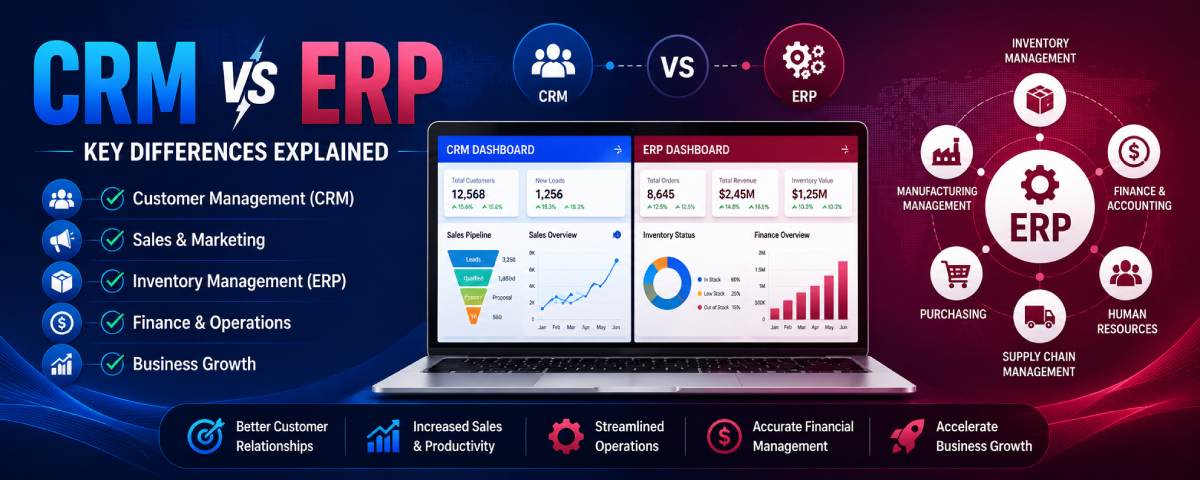
Whereas both the systems play an important role in making businesses efficient, their applications are totally different. The CRM system deals with customer relationship management and sales process whereas ERP deals with internal business processes and resources.
Having information about the distinction between CRM and ERP software is quite helpful for a business to make a wise decision.
This is applicable irrespective of whether you have started your business recently or are a seasoned businessman dealing with either a startup or a large enterprise.
What Is CRM Software?
CRM stands for Customer Relationship Management. For beginners to CRM technology, it would be helpful to read “What Is CRM Software.” It gives details on how CRM technology can assist businesses in managing customer relations.
Our guide, “CRM Software Basics for Beginners,” is highly recommended to newcomers interested in finding out more about CRM software. It will give them an idea of what is meant by CRM solutions.
CRM software aids business in managing their interaction with clients, leads, and prospects. The software captures customer information, manages their interactions, deals with opportunities, and develops customer relationships.
Consider CRM as a central repository for all your customer information.
A CRM system typically stores:
- Customer names
- Contact information
- Emails
- Phone calls
- Sales activities
- Support requests
- Purchase history
For example, when a client fills up a contact form on your website, the information of the customer is recorded by the CRM automatically, an agent is allocated to the lead, and follow-ups are scheduled.ERP software helps businesses manage internal operations across multiple departments from a single system.
Popular CRM functions include:
- Lead management
- Contact management
- Sales pipelines
- Customer support tracking
- Marketing automation
- Reporting and analytics
The primary goal of CRM software is simple:
Help businesses attract, manage, and retain customers.
What Is ERP Software?
ERP stands for Enterprise Resource Planning.
An ERP system assists organizations in managing internal business processes using one single program.
While CRM focuses on customers, ERP focuses on organizational resources.
According to Microsoft Dynamics 365 Business Applications, the two are different and play unique roles within an organization.
An ERP system often manages:
- Inventory
- Accounting
- Finance
- Purchasing
- Manufacturing
- Supply chain management
- Human resources
- Procurement
For example, when a product is sold, an ERP system can automatically:
- Update inventory levels
- Record revenue
- Generate invoices
- Update financial reports
- Trigger purchasing requests
ERP incorporates accounting, inventory management, and operational processes all into one system.
The primary goal of ERP software is:
Improve operational efficiency and business management.
Why Businesses Compare CRM vs ERP
Businesses have found that as they seek ways to improve operations, they inevitably encounter CRM and ERP systems.
As both systems work towards the goal of data acquisition and efficiency improvement, it is very easy to think that they are working towards achieving the same goal
This is not true.
- CRM concentrates on the customer aspect of the business.
- ERP concentrates on the operational aspects of the business.
Consider a growing ecommerce company.
The sales team wants to:
- Track leads
- Manage customers
- Improve follow-ups
They need CRM software.
At the same time, the operations team wants to:
- Manage inventory
- Process orders
- Handle accounting
They need ERP software.
This difference is why businesses often compare CRM and ERP before making software investments.
CRM vs ERP in Simple Words
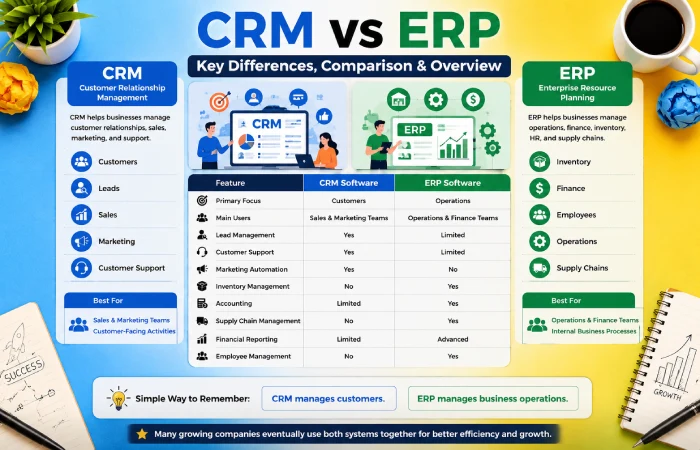
The best way for beginners to understand CRM and ERP is by comparing the two.
CRM
CRM helps businesses manage:
- Customers
- Leads
- Sales
- Marketing
- Customer support
ERP
ERP helps businesses manage:
- Inventory
- Finance
- Employees
- Operations
- Supply chains
A simple way to remember the difference is:
CRM manages customers. ERP manages business operations.
CRM vs ERP Key Differences
Even though there might be some connection between CRM and ERP, each of these terms has completely different objectives.
Core Purpose of CRM
CRM software is designed to improve customer relationships.
Its main goals include:
- Increasing sales
- Improving customer service
- Tracking leads
- Managing communication
- Improving customer retention
Sales and marketing are normally the two areas where CRM is implemented.
Core Purpose of ERP
ERP software focuses on improving operational efficiency.
Its main goals include:
- Managing inventory
- Improving accounting accuracy
- Streamlining procurement
- Optimizing production
- Managing resources
Operations, finance, and management teams typically use ERP systems.
Main Functional Differences
- The most important difference between CRM and ERP is the part of the business they manage.
- CRM focuses on external relationships.
- ERP focuses on internal processes.
For example:
- A CRM system tracks customer conversations and sales opportunities.
- An ERP system tracks inventory levels and financial transactions.
- Both are important, but they solve different business problems.
CRM vs ERP Comparison
| Feature | CRM Software | ERP Software |
| Primary Focus | Customers | Operations |
| Main Users | Sales & Marketing Teams | Operations & Finance Teams |
| Lead Management | Yes | Limited |
| Customer Support | Yes | Limited |
| Marketing Automation | Yes | No |
| Inventory Management | No | Yes |
| Accounting | Limited | Yes |
| Supply Chain Management | No | Yes |
| Financial Reporting | Limited | Advanced |
| Employee Management | No | Yes |
CRM vs ERP Quick Overview
Before choosing software, businesses should understand their primary challenge.
If the biggest challenge involves:
- Finding customers
- Managing leads
- Increasing sales
- Improving customer service
CRM is usually the better choice.
If the biggest challenge involves:
- Inventory control
- Financial management
- Procurement
- Manufacturing processes
ERP is often the better solution.
Many growing companies eventually use both systems together.
How CRM and ERP Work
- Both the CRM system and the ERP system gather business information, but they make use of this information differently.
- CRM system gathers customer information.
ERP system gathers operational information. - This brings about increased visibility, effective decision making, and efficient operations.
How CRM Software Works
CRM software works on a customer-centric process.
The usual process is as follows:
Lead → Contact → Opportunity → Customer → Repeat Customer
The CRM software keeps all customer data and records all interactions with customers.
For example:
A customer submits a website inquiry.
The CRM:
- Creates a lead record
- Assigns the lead
- Tracks communication
- Schedules follow-ups
- Records purchases
This creates a complete customer history.
How ERP Software Works
ERP software is designed using an operational flow.
A standard ERP flow includes:
Order → Inventory Check → Production → Shipping → Invoice → Financial Reporting
The ERP software manages the processes within various departments.
Upon taking a certain step, information will be provided to relevant departments.
This will eliminate the need for manual processes and improve accuracy.
Real Business Workflow Example
Imagine an online furniture company.
A customer visits the website and requests a quote.
CRM Handles:
- Lead creation
- Customer communication
- Sales follow-ups
- Deal tracking
Once the customer purchases:
ERP Handles:
- Inventory updates
- Order processing
- Shipping management
- Invoice generation
- Financial reporting
This demonstrates how CRM and ERP often work together throughout the customer lifecycle.
Customer Journey vs Business Operations
One of the easiest ways to understand CRM and ERP is to compare customer journeys with business operations.
Customer Journey (CRM Focus)
- Lead generation
- Customer communication
- Sales opportunities
- Customer support
- Customer retention
Business Operations (ERP Focus)
- Inventory control
- Purchasing
- Manufacturing
- Accounting
- Resource planning
CRM helps businesses win customers.
ERP helps businesses fulfill customer needs efficiently.
CRM Features vs ERP Features
After grasping the fundamental distinction between the two types of applications, the question most people ask themselves is:
What features do they actually provide?
- While both of these technologies deal with business data and boost effectiveness, their spheres of activity differ from one another completely.
- CRM concentrates on clients, leads, sales, and communications.
- ERP concentrates on production, stock management, financial affairs, purchasing, and resources management.
- It is necessary to distinguish the difference between these features to prevent mistakes regarding buying unnecessary software.
CRM Features
The CRM software is specifically designed to assist organizations in managing their customers’ relations from beginning till end during the life cycle of their relationship.
Starting from the initial inquiry to repeat orders, CRM ensures that all information of your clients remains properly organized and easily available.
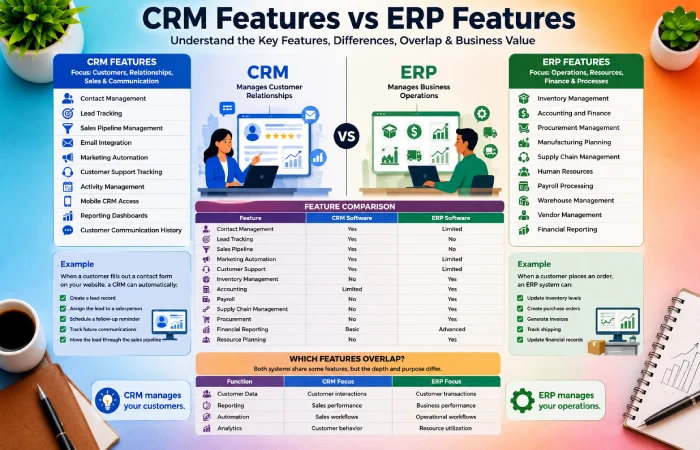
Common CRM Features
- Contact management
- Lead tracking
- Sales pipeline management
- Email integration
- Marketing automation
- Customer support tracking
- Activity management
- Mobile CRM access
- Reporting dashboards
- Customer communication history
Example
Imagine a customer fills out a contact form on your website.
A CRM system can automatically:
- Create a lead record
- Assign the lead to a salesperson
- Schedule a follow-up reminder
- Track future communications
- Move the lead through the sales pipeline
ERP Features
ERP software focuses on managing internal business operations.
Customer interaction is not part of ERP; rather, ERP assists organizations with process management.
Brush up on the types of CRM software.
Common ERP Features
- Inventory management
- Accounting and finance
- Procurement management
- Manufacturing planning
- Supply chain management
- Human resources
- Payroll processing
- Warehouse management
- Vendor management
- Financial reporting
Example
When a customer places an order:
An ERP system can:
- Update inventory levels
- Create purchase orders
- Generate invoices
- Track shipping
- Update financial records
Everything happens inside one centralized system.
Feature Comparison
| Feature | CRM Software | ERP Software |
| Contact Management | Yes | Limited |
| Lead Tracking | Yes | No |
| Sales Pipeline | Yes | No |
| Marketing Automation | Yes | Limited |
| Customer Support | Yes | Limited |
| Inventory Management | No | Yes |
| Accounting | Limited | Yes |
| Payroll | No | Yes |
| Supply Chain Management | No | Yes |
| Procurement | No | Yes |
| Financial Reporting | Basic | Advanced |
| Resource Planning | No | Yes |
Which Features Overlap?
A number of businessmen are shocked by the fact that both CRM and ERP have some similarities in their functionality.
Both systems may provide:
- Customer records
- Reporting dashboards
- Workflow automation
- User management
- Analytics
- Mobile access
- Integrations
However, the depth of these features differs significantly.
Overlap Comparison
| Function | CRM Focus | ERP Focus |
| Customer Data | Customer interactions | Customer transactions |
| Reporting | Sales performance | Business performance |
| Automation | Sales workflows | Operational workflows |
| Analytics | Customer behavior | Resource utilization |
Although overlap exists, the business objective remains different.
CRM vs ERP for Small Business
Small companies face difficulties when choosing whether to use CRM or ERP first.
The answer usually depends on current business priorities.
For most startups and small businesses, customer acquisition is the immediate challenge.
That is why CRM software often becomes the first investment.
Many smaller organizations begin with customer management tools before expanding into operational software. See our recommendations for the Best CRM Software for Small Business to explore suitable options.
Why Small Businesses Often Start With CRM
Most small businesses need to:
- Generate leads
- Manage customer communication
- Track sales opportunities
- Improve follow-ups
- Increase conversions
CRM directly supports these activities.
Example
A local digital marketing agency may have:
- Hundreds of leads each month
- Multiple communication channels
- Several sales representatives
A CRM helps organize all these activities efficiently.
When Small Businesses Need ERP
As a business grows, operational complexity increases.
Businesses begin managing:
- Inventory
- Vendors
- Purchasing
- Accounting
- Warehousing
- Financial reporting
At this stage, ERP becomes more valuable.
Example
A growing ecommerce company may need to:
- Track thousands of products
- Monitor stock levels
- Manage suppliers
- Process orders
ERP software helps manage these operational requirements.
Cost Considerations
Budget is often one of the biggest deciding factors.
CRM solutions are generally easier and cheaper to implement. Businesses should also review “How to Choose the Right CRM Software“ before comparing implementation costs and features.
ERP systems often require:
- Longer setup periods
- More training
- Higher implementation costs
- Custom integrations
Cost Comparison
| Category | CRM | ERP |
| Setup Complexity | Low | High |
| Initial Cost | Lower | Higher |
| Training Required | Moderate | Extensive |
| Maintenance Cost | Lower | Higher |
| Time to Deploy | Days or Weeks | Weeks or Months |
For this reason, many small businesses begin with CRM and later expand into ERP.
Small Business Comparison
| Business Situation | Recommended System |
| Need more leads | CRM |
| Improve customer support | CRM |
| Track sales opportunities | CRM |
| Manage inventory | ERP |
| Handle procurement | ERP |
| Manage accounting | ERP |
| Manufacturing operations | ERP |
| Customer communication | CRM |
When to Use CRM Over ERP
CRM should be the priority when customer relationships drive business growth.
Lead Management Needs
If your company receives inquiries from:
- Website forms
- Social media
- Email campaigns
- Advertising campaigns
CRM is usually the better solution.
Lead management is one of the strongest CRM capabilities.
CRM helps businesses:
- Capture leads automatically
- Assign leads to sales teams
- Monitor follow-ups
- Improve conversions
Sales Team Requirements
Sales teams need visibility into customer interactions.
CRM helps sales representatives:
- View customer history
- Manage pipelines
- Schedule tasks
- Forecast sales
ERP systems generally do not provide advanced sales pipeline management.
Customer Support Focus
The advantage of customer-centric organizations is that they tend to enjoy greater benefits from CRM.
CRM helps support teams:
- Access communication history
- Track support requests
- Monitor customer satisfaction
This improves response times and customer experiences.
Marketing Automation Needs
Modern CRM systems often include:
- Email campaigns
- Customer segmentation
- Lead nurturing
- Marketing automation
ERP software rarely provides advanced marketing capabilities.
CRM-First Business Scenarios
CRM should typically come first for:
- Marketing agencies
- Real estate businesses
- Consulting firms
- SaaS companies
- Service providers
- Insurance agencies
- Recruitment firms
These businesses depend heavily on customer relationships.
When to Use ERP Over CRM
ERP becomes more important when operational efficiency drives business success.
Inventory Management
Businesses with large inventories often need ERP.
ERP helps:
- Track stock levels
- Prevent shortages
- Manage warehouses
- Automate purchasing
Manufacturing Operations
Manufacturers rely heavily on ERP systems.
ERP helps manage:
- Production schedules
- Materials planning
- Factory operations
- Quality control
These functions are outside the scope of most CRM systems.
Financial Management
ERP systems provide strong financial capabilities.
Examples include:
- General ledger
- Accounts payable
- Accounts receivable
- Budget management
- Financial forecasting
These features help businesses maintain financial control.
Supply Chain Control
Companies with complex supply chains often require ERP.
ERP can manage:
- Vendors
- Procurement
- Shipping
- Distribution
- Inventory forecasting
CRM alone cannot manage these operational requirements effectively.
ERP-First Business Scenarios
ERP may be the better starting point for:
- Manufacturing companies
- Wholesale distributors
- Logistics businesses
- Supply chain organizations
- Large retailers
Can CRM Replace ERP Software?
- There is a popular misconception that CRM software can entirely replace ERP software.
- ERP software deals with internal processes rather than external customer interaction.
- Instead of opting for one software over another, organizations use both.
Situations Where CRM Is Enough
CRM may be sufficient when:
- Inventory is minimal
- Operations are simple
- Customer relationships drive revenue
- Financial processes are basic
Examples include:
- Marketing agencies
- Freelancers
- Consultants
- Coaches
- Small service businesses
Situations Where ERP Is Necessary
ERP becomes necessary when businesses need:
- Inventory tracking
- Manufacturing management
- Procurement systems
- Financial controls
- Supply chain visibility
At this stage, CRM alone is usually not enough.
Common Misconceptions
Misconception 1
“CRM manages my entire business.”
Reality:
CRM primarily manages customers and sales.
Misconception 2
“ERP automatically improves customer relationships.”
Reality:
ERP focuses on internal operations, not customer engagement.
Misconception 3
“I only need one system forever.”
Reality:
Growing businesses often adopt both systems over time.
Growth Stage Analysis
| Business Stage | Recommended Solution |
| Freelancer | CRM |
| Startup | CRM |
| Small Business | CRM |
| Growing Business | CRM + ERP |
| Mid-Sized Company | CRM + ERP |
| Enterprise | CRM + ERP |
With increasing company size, integration of CRM and ERP may be the most effective solution
Can ERP Replace CRM Software?
ERP software contains some customer data, but it does not have a relationship management function like CRM.
The main focus of ERP solutions is transaction processing, while CRM systems handle interactions.
ERP Customer Management Limitations
ERP systems usually store:
- Customer names
- Billing information
- Order history
However, they often lack:
- Lead management
- Sales pipelines
- Marketing automation
- Customer journey tracking
This limits their effectiveness for sales-driven organizations.
Sales Team Challenges
Without CRM, sales teams may struggle with:
- Tracking opportunities
- Managing pipelines
- Monitoring follow-ups
- Measuring conversion rates
These challenges can slow revenue growth.
Marketing Challenges
Marketing teams often need:
- Customer segmentation
- Email automation
- Campaign analytics
- Lead nurturing
CRM systems provide these capabilities more effectively than ERP.
Customer Relationship Issues
Businesses relying only on ERP may experience:
- Slower follow-ups
- Less personalization
- Poor lead visibility
- Fragmented customer communication
CRM addresses these challenges directly.
CRM and ERP Integration Benefits
Rather than choosing one system over the other, many organizations integrate both.
This approach provides the best of both worlds.
Why Companies Integrate Both Systems
CRM manages customer-facing activities.
ERP manages operational activities.
Together they create a unified business environment.
Data Synchronization Benefits
Integration allows information to flow automatically.
Examples include:
- Customer data updates
- Order synchronization
- Invoice sharing
- Inventory visibility
This reduces manual work and improves accuracy.
Improved Reporting
Integrated systems provide a complete business picture.
Management can view:
- Sales performance
- Inventory status
- Revenue trends
- Customer activity
from one reporting environment.
Better Customer Experience
Integration enables employees to act quickly since they have information from both systems.
Customers receive:
- Faster updates
- Better communication
- More accurate information
This improves satisfaction and loyalty.
Cross-Department Collaboration
Sales, finance, operations, and support teams can work from shared data.
This reduces communication gaps and improves efficiency.
CRM + ERP Integration Workflow Example
Lead Creation
A potential customer submits a website inquiry.
The CRM automatically creates a lead record.
Sales Process
The sales team manages communication and closes the deal using CRM.
Order Processing
After the sale, order details automatically transfer to ERP.
Inventory Updates
ERP checks stock levels and reserves inventory.
Customer Support
Customer support teams will be able to view interactions with the CRM and information about orders in the ERP.
This will ensure a consistent experience for the customer from their initial contact through ongoing support.
CRM vs ERP by Business Size
Sometimes the best choice between CRM and ERP depends on the size of the company.
| Business Size | Recommended Solution | Primary Focus |
| Freelancer | CRM | Client management and lead tracking |
| Startup | CRM | Customer acquisition and sales growth |
| Small Business | CRM First | Customer relationships and follow-ups |
| Medium Business | CRM + ERP | Sales and operational efficiency |
| Enterprise | CRM + ERP | Full business management and scalability |
What This Means
The freelancers and startups derive more advantage from CRM since customer acquisition is one of their main concerns.
As firms develop, the tasks of managing inventory, accounting, procurement, and operations become more complicated.
CRM vs ERP by Industry
Different industries have different software requirements.
| Industry | CRM Priority | ERP Priority |
| Ecommerce | High | High |
| Manufacturing | Medium | Very High |
| Healthcare | High | Medium |
| Real Estate | Very High | Low |
| Education | High | Medium |
| Retail | High | High |
| Financial Services | High | High |
Industry Insights
- Real estate businesses often depend heavily on CRM for lead management.
- Manufacturing companies usually prioritize ERP due to inventory and production needs.
- Ecommerce companies often use both systems together.
- Healthcare organizations use CRM for patient communication and ERP for administration.
CRM Adoption vs ERP Adoption (2022–2026)
Graph/Table Placement #1
| Year | CRM Adoption | ERP Adoption |
| 2022 | 58% | 42% |
| 2023 | 64% | 47% |
| 2024 | 71% | 53% |
| 2025 | 78% | 60% |
| 2026 | 84% | 67% |
Analysis
The CRM system has always been ahead of ERP due to the fact that businesses usually place customer acquisition and sales before operational management.
ERP adoption increases along with business development and need for control over inventory and operations.
CRM vs ERP Cost Comparison (2026)
Graph/Table Placement #2
| Business Size | CRM Cost | ERP Cost |
| Startup | Low | Medium |
| Small Business | Low-Medium | Medium |
| Mid-Size Business | Medium | High |
| Enterprise | High | Very High |
Cost Insights
CRM systems are generally easier and cheaper to implement.
ERP solutions often require:
- Longer deployment times
- More employee training
- Additional customization
- Higher maintenance costs
This is one reason many businesses adopt CRM before ERP.
CRM vs ERP Feature Comparison
Graph/Table Placement #3
| Feature | CRM | ERP |
| Lead Management | ✓ | Limited |
| Customer Tracking | ✓ | Limited |
| Marketing Automation | ✓ | No |
| Inventory Management | No | ✓ |
| Accounting | Limited | ✓ |
| Supply Chain Management | No | ✓ |
| Customer Support | ✓ | Limited |
Key Takeaway
CRM specializes in customer-facing activities.
ERP specializes in operational activities.
Businesses often gain the greatest value when both systems work together.
CRM vs ERP Pros and Cons
CRM Advantages
- Better lead management
- Improved customer communication
- Sales automation
- Marketing integration
- Faster follow-ups
- Better customer retention
CRM Disadvantages
- Limited inventory management
- Basic accounting capabilities
- Not designed for manufacturing
- Limited operational planning
ERP Advantages
- Inventory control
- Financial management
- Supply chain visibility
- Production planning
- Resource management
- Operational efficiency
ERP Disadvantages
- Higher implementation cost
- Longer setup process
- More complex training
- Can be excessive for small businesses
Pros and Cons Comparison
| Category | CRM | ERP |
| Easy to Implement | High | Medium |
| Sales Support | High | Low |
| Customer Management | High | Medium |
| Inventory Control | Low | High |
| Financial Management | Low | High |
| Operational Management | Low | High |
Signs Your Business Needs CRM
Many businesses wait too long before implementing CRM software.
Common warning signs include:
Missed Leads
People interested in buying from you are reaching out to you, but no one is following up properly.
Ineffective Follow-Ups
The reasons sales are missed include inadequate reminders and lack of organization in communicating.
Lack of Customer Information Organization
Customer data is scattered among various sources.
Weak Sales Tracking
Management cannot clearly see sales pipelines or conversion rates.
If these problems sound familiar, CRM software may provide immediate value.
Signs Your Business Needs ERP
ERP becomes important when operational challenges begin affecting growth.
Inventory Problems
Products frequently run out of stock or inventory records are inaccurate.
Financial Complexity
Accounting and financial reporting become difficult to manage manually.
Operational Inefficiencies
The departments are creating independent systems, and duplicity of tasks occurs frequently.
Supply Chain Issues
Coordinating with suppliers and managing procurement and logistics gets more difficult.
The departments are creating independent systems, and duplicity of tasks occurs frequently.
Common CRM vs ERP Buying Mistakes
Businesses commit mistakes in choosing a solution due to a misplaced emphasis on functionality.
Buying ERP Too Early
Many startups purchase ERP software before operational complexity justifies the investment.
Ignoring CRM Adoption
Employees may resist using CRM if proper training is not provided.
Poor Integration Planning
Businesses often fail to consider how future systems will connect.
Choosing Based on Features Alone
It is not always true that the richest product is the right product.
The right software must address business problems.
Troubleshooting CRM and ERP Selection Problems
| Problem | Recommended Solution |
| Missed sales | CRM |
| Inventory issues | ERP |
| Poor customer service | CRM |
| Financial complexity | ERP |
| Multiple business systems | CRM + ERP |
Quick Rule
If the problem involves customers, sales, or communication, CRM is usually the answer.
If the problem involves operations, inventory, finance, or resources, ERP is usually the answer.
CRM and ERP Trends in 2026
Business software continues evolving rapidly.
Major trends include:
AI Integration
AI technology has also been utilized by companies in making predictions related to sales trends, inventory requirements, and consumer behavior.
Predictive Analytics
Businesses have started using AI technology for making predictions related to sales trends, inventory requirements, and consumer behavior.
Cloud-based Software Solutions
Cloud CRM and ERP solutions have been steadily replacing conventional systems deployed locally.
Mobile Business Applications
Modern workers demand mobile access to their enterprise applications.
Integrated Enterprise Software Systems
Vendors are integrating CRM and ERP functionalities into single solutions.
Future CRM and ERP Forecast (2026–2030)
Graph/Table Placement #4
| Technology Trend | Growth Outlook |
| AI CRM | Very High |
| AI ERP | Very High |
| Cloud ERP | High |
| Mobile CRM | High |
| Unified Platforms | Very High |
Future Outlook
From 2026 to 2030, there would be increased AI automation and more integration between the CRM system and the ERP system.
Early adoption of these innovations can help firms achieve greater efficiency and customer satisfaction.
Conclusion
There are distinct differences between CRM and ERP software when used by businesses, where CRM handles customer relations and sales management, while ERP takes care of operational activities such as inventory management and accounting. Companies start off by focusing on CRM to generate revenue, but when they grow larger, ERP becomes important to deal with the complexity of their processes. Most companies use both systems quite successfully, and with the advancements in AI, decision-making and supporting sustainable growth.
Compare core CRM software features.