Introduction
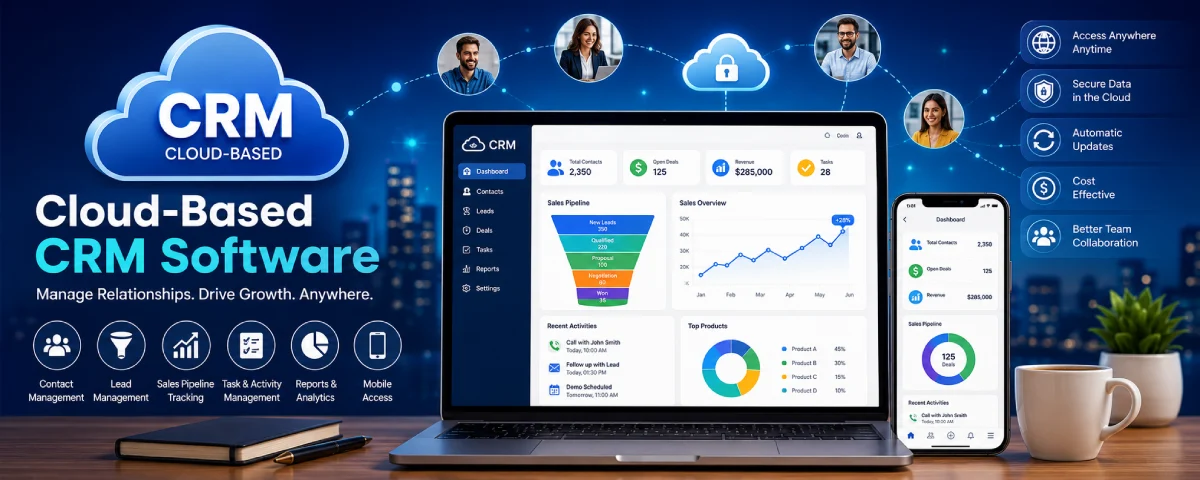
Cloud-based CRM software is a popular choice among all types of organizations owing to its availability over the internet; thus, there is no requirement for installation at the local level. It helps organizations in managing their relationships with customers, especially when working from distant locations. This guide explores cloud-based CRM software – its meaning, functions, features, and advantages.
Those who are new to the concept of CRM systems should start by learning the CRM Software Basics for Beginners guide before exploring cloud-based CRM solutions.
Cloud CRM from our what is CRM software guide
What Is Cloud-Based CRM Software?
Cloud CRM software refers to customer relationship management software that runs on remote computers and can be accessed using a web browser or app installed on your mobile device.
While conventional CRM software must be installed on your firm’s computer equipment, cloud CRM takes care of all maintenance for you, requiring only a subscription plan.
A cloud CRM stores important customer information such as:
- Contact details
- Customer interactions
- Sales opportunities
- Purchase history
- Support tickets
- Marketing activities
The cloud-based CRM makes it possible for employees to get customer data from any part of the world, as long as there is an internet connection. This has been one of the factors that have contributed to the growing popularity of cloud CRM.
To understand how cloud CRM compares with other CRM categories, see our Types of CRM Software Explained guide.
Why Businesses Are Moving to Cloud CRM
- Companies are moving toward cloud-based CRM rather than using software-based CRM.
- This is mainly because of several reasons including:
- Cost Effectiveness: Using cloud CRM will eliminate the need for costly hardware or other technical requirements.
- Remote Working: Employees have easy access to client details remotely through cloud CRM.
- Fast Setup: Compared to software, cloud CRM can be set up much faster and becomes productive within days.
- Automatic Updates: Vendors offer automatic updates for cloud-based systems without any manual efforts.
- Paying Fees Only: Monthly or annual subscription models offer convenient payment options as opposed to huge costs at one time.
- For companies that grow quickly, cloud CRM offers an easier setup without upgrading hardware or software.
How Cloud CRM Works
Cloud CRM software operates through a centralized online platform.
With cloud CRM software, all customer data is securely hosted in servers owned by the CRM service provider. Access to the system can be made via web browsers or applications.
The basic process works as follows:
- Customer information is entered into the CRM.
- Data is stored securely in the cloud.
- Employees access information through secure login credentials.
- Updates are synchronized automatically across all devices.
- Teams collaborate using shared customer records.
For example, when the salesperson updates any information relating to that client, then this change will be visible immediately for all the departments such as marketing, customer services, and management.
Such synchronicity enhances communication and reduces data redundancy and errors.
Most modern cloud CRM systems also integrate with:
- Email platforms
- Marketing tools
- Ecommerce systems
- Accounting software
- Customer support applications
- Business intelligence tools
These integrations create a centralized hub for customer management activities.
Features of Cloud CRM
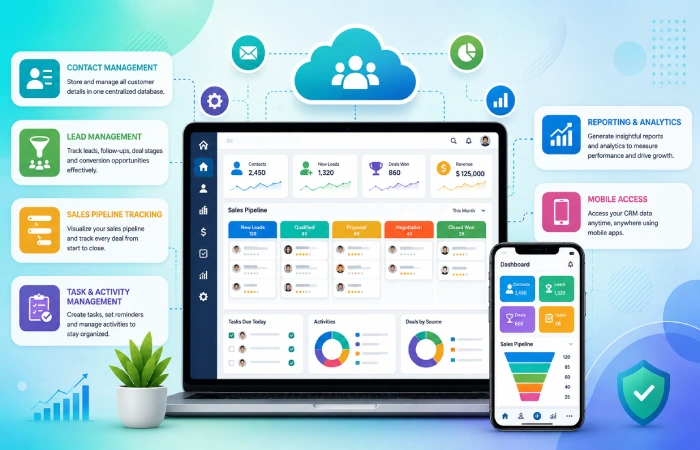
Cloud CRM platforms offer a wide range of features designed to improve customer relationship management.
Although features vary by provider, most systems include several core capabilities.
Contact Management
Contact management enables companies to maintain the details of their customers in one single database.
Users can store:
- Names
- Email addresses
- Phone numbers
- Company details
- Communication history
This helps teams quickly access customer information whenever needed.
Lead Management
Lead management is an integral part of CRM software that assists organizations in managing their prospective customers.
Sales teams can monitor:
- Lead sources
- Follow-up activities
- Deal stages
- Conversion opportunities
This improves sales organization and reduces missed opportunities.
Sales Pipeline Tracking
Cloud CRM software provides visual sales pipelines that help teams monitor deal progress.
Users can track:
- New leads
- Qualified prospects
- Negotiations
- Closed deals
Pipeline visibility helps businesses forecast revenue more accurately.
Task and Activity Management
Users can set tasks, appointments, and reminders within the system itself.
This ensures that all crucial interactions with the customers are accounted for.
Reporting and Analytics
Cloud CRM platforms generate reports that help businesses understand performance.
Common reports include:
- Sales performance
- Lead conversion rates
- Customer acquisition trends
- Revenue forecasts
These insights support better decision-making.
Mobile Access
- Cloud CRM services usually offer their customers applications for using their customer databases through their smartphones or tablets.
- It is particularly beneficial for salespeople working on-site.
- Learning about this feature will help you determine which Best CRM Software Features to Look For.
Benefits of Cloud-Based CRM Software
Cloud CRM offers numerous advantages that make it attractive to businesses of all sizes.
Lower Initial Costs
When you use a customer relationship management system it usually costs a lot of money to get started. You have to buy computers and software and you also have to pay people to set it all up.
Cloud customer relationship management is different. It usually charges a fee so you do not have to spend a lot of money at the beginning.
This means that cloud customer relationship management is something that new companies and small businesses can actually afford to use.
Easy Accessibility
One of the biggest benefits of cloud CRM is accessibility.
Employees can access customer information from:
- Offices
- Homes
- Client locations
- Mobile devices
This flexibility supports remote work and improves productivity.
Automatic Updates
Cloud CRM vendors handle software updates automatically.
Businesses receive:
- New features
- Security improvements
- Performance enhancements
without requiring manual installations.
Better Collaboration
- When we have all the information about our customers in one place it is easier for people to work together.
- Teams can share information. Get things done.
- The sales team and the marketing team and the customer support team can all look at the information, about our customers.
- This helps us give our customers an experience when they deal with us.
Improved Scalability
When businesses get bigger cloud CRM systems can grow with them. They can handle users, more data and more features.
Companies can upgrade their plans easily. They do not need to replace hardware or move systems around.
Enhanced Security
Leading cloud CRM providers invest heavily in cybersecurity measures such as:
- Data encryption
- Multi-factor authentication
- Regular backups
- Access controls
These features help protect sensitive customer information.
Faster Implementation
The deployment time of cloud-based CRMs is usually much faster compared to those of on-premise CRM systems.
Firms can start operating their CRMs in just a matter of days after their purchase and installation.
Cloud CRM vs Traditional Customer Management Systems
Before cloud technology became popular businesses used spreadsheets and paper records to keep track of customer information. This was a problem as they got bigger. The old way of managing customer information was not very good because it needed to be updated by hand and people could not easily share information. This made it hard for employees who worked from places to get the latest information about customers. Cloud CRM is a way to do things because it puts all the customer information in one place online. This means that people who are allowed to see the information can get to it from as long as they have internet. Cloud CRM is really helpful, for businesses because it makes it easy for people to see customer information. Businesses can use Cloud CRM to manage customer information in a way.
Traditional Customer Management Challenges
Common limitations include:
- Scattered customer records
- Manual data entry
- Limited collaboration
- Higher maintenance effort
- Difficulty scaling operations
- Increased risk of data loss
Why Cloud CRM Is Replacing Traditional Systems
Businesses are increasingly choosing cloud CRM because it offers:
- Real-time customer updates
- Remote accessibility
- Automated backups
- Easier collaboration
- Better scalability
- Integration with modern business tools
For instance, a salesperson may use his/her mobile phone to update the customer information, and the whole group will be able to see the information instantaneously.
Cloud CRM vs On-Premise CRM
When we talk about managing relationships with customers one thing that always comes up is Cloud CRM, versus On-Premise CRM.
Both Cloud CRM and On-Premise CRM are used to manage customer relationships. But Cloud CRM and On-Premise CRM actually differ from each other in terms of their architecture, costs, maintenance, and scalability. Cloud CRM vs. On-Premise CRM have some important features to distinguish one from another.
What Is On-Premise CRM?
On-premise CRM system is installed at an organization’s internal server.
Businesses maintain complete control over the system but are also responsible for:
- Hardware management
- Software updates
- Security maintenance
- Data backups
- System upgrades
What Is Cloud CRM?
Cloud CRM is hosted by a third-party provider and accessed through the internet.
The CRM vendor handles:
- Hosting
- Updates
- Maintenance
- Security patches
- Data backups
This allows businesses to focus on customers instead of technical management.
Cloud CRM vs On-Premise CRM Comparison Table
| Feature | Cloud CRM | On-Premise CRM |
| Initial Cost | Low | High |
| Setup Time | Fast | Longer |
| Maintenance | Vendor Managed | Internal Team |
| Remote Access | Yes | Limited |
| Scalability | High | Moderate |
| Updates | Automatic | Manual |
| Hardware Required | No | Yes |
| IT Resources Needed | Low | High |
Which Option Is Better?
In most cases, it is the best choice for most startups and small companies because it provides more cost-efficiency and flexibility in implementation.
The on-premise CRM system would only work for large corporations that have specific infrastructure requirements due to their regulatory needs.
Cloud CRM Adoption Trends (2022–2026)
More firms are shifting towards cloud CRMs as flexibility, automation, and remote working gain popularity.
Most organizations opt for cloud software on subscription plans since they lower infrastructure costs while increasing access.
Cloud CRM Adoption Trends (2022–2026)
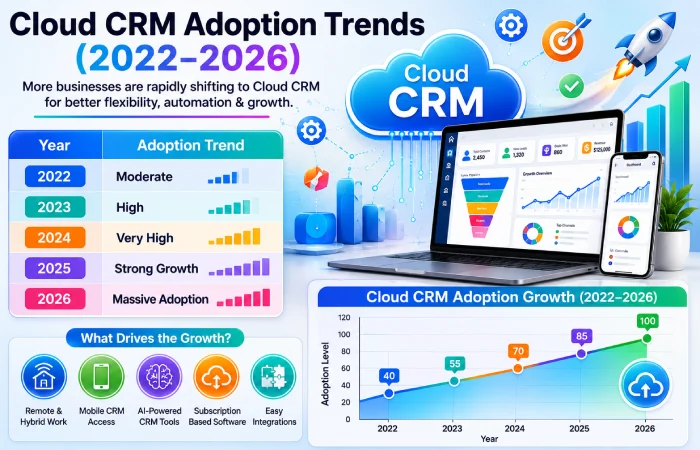
| Year | Adoption Trend |
| 2022 | Moderate |
| 2023 | High |
| 2024 | Very High |
| 2025 | Strong Growth |
| 2026 | Massive Adoption |
What the Trend Shows
The growth of cloud CRM adoption is being driven by several factors:
- Expansion of remote and hybrid work
- Rising demand for mobile CRM access
- Increased use of AI-powered CRM tools
- Growth of subscription-based software
- Easier integration with marketing and sales platforms
Small companies use cloud CRM to enhance their productivity, and large organizations use cloud CRM for coordinating their global teams and more complicated consumer experience paths.
Data Points:
| Year | Score |
| 2022 | 40 |
| 2023 | 55 |
| 2024 | 70 |
| 2025 | 85 |
| 2026 | 100 |
This graph visually demonstrates the rapid increase in cloud CRM adoption and helps improve engagement for readers while supporting SEO-rich content.
Top Cloud CRM Platforms 2026
The cloud CRM market is really taking off in 2026. This means businesses have a lot of options to choose from. Some cloud CRM platforms are great for things like keeping track of contacts, which is perfect for new companies. On the hand some platforms are better for big companies that need advanced tools to analyze data and automate tasks.
Some of the popular cloud CRM platforms are:
- Salesforce – it is known for being very customizable and having automation and tools for big companies.
- HubSpot – a lot of companies and startups like HubSpot because it has a free cloud CRM plan and is easy to use.
- Zoho CRM – this one is affordable. Works well with a lot of other business tools.
- Pipedrive – it is mainly used for managing sales and tracking leads.
- Microsoft Dynamics 365 – this one combines CRM and business management tools, which is great for larger organizations.
Each cloud CRM platform gives you access, to your information from anywhere works on your phone and has tools to automate tasks and create reports. Each cloud CRM platform also has features that let you connect it to tools you use. The cloud CRM platforms all have these things in common, like cloud access and integration capabilities which’re important for cloud CRM platforms.
Cloud CRM Platform Comparison Table (Table #2)
| Platform | Best For | Ease of Use | Pricing Level |
| Salesforce | Enterprises | Medium | High |
| HubSpot CRM | Small Businesses | High | Low-Medium |
| Zoho CRM | SMBs | High | Affordable |
| Pipedrive | Sales Teams | High | Medium |
| Microsoft Dynamics 365 | Large Organizations | Medium | High |
What This Comparison Shows
In the case of small businesses, they may prefer something that is affordable, easy to implement, whereas big organizations may prefer to have something which is customized and scalable.
Businesses also compare CRM platforms with other business systems. Read our detailed comparison of CRM Software vs ERP Software
Who Should Use Cloud-Based CRM?
Cloud CRM is appropriate for most companies dealing with customer relations.
This type of CRM is especially helpful for those businesses that require accessibility, collaborative work, and scalability of customer management systems.
Businesses that commonly benefit from cloud CRM include:
- Startups
- Small businesses
- Ecommerce stores
- Marketing agencies
- Service providers
- Sales teams
- Growing enterprises
- Remote and hybrid workforces
As cloud CRM can be accessed from any place around the world, it increases productivity of business representatives.
Cloud CRM for Small Businesses
For most small businesses, cloud CRM provides an affordable way to organize customer information without investing in expensive infrastructure.
A small business can use cloud CRM to:
- Track leads
- Manage customer contacts
- Schedule follow-ups
- Automate emails
- Monitor sales performance
- Improve customer service
Another important benefit is the ability for companies to begin with simple plans and then move up to more complex options if necessary.
In addition, cloud-based CRM decreases the amount of administrative tasks, thus giving business owners and employees more time to concentrate on customer satisfaction and sales generation.
Small companies evaluating CRM solutions should also review our guide on the Best CRM Software for Small Business.
Cloud CRM for Startups
Startups often operate with limited budgets and small teams. Because of this, flexibility and affordability are critical when choosing software.
Cloud CRM helps startups by:
- Centralizing customer data
- Managing sales pipelines
- Automating repetitive tasks
- Supporting remote teams
- Tracking business growth
- Scaling as the company expands
Most startups start using a basic or even free cloud-based CRM system and then upgrade it with more functionalities afterwards.
With increasing customer numbers, cloud-based CRM will provide scalability to help accommodate such growth without needing large-scale technological improvements. This is how cloud-based CRM sets itself apart from other highly regarded customer management tools in 2026.
Cloud CRM for Medium-Sized Companies
When a company gets bigger it becomes really hard to keep track of customer information and transactions. Companies of size start to understand that simple things, like spreadsheets and basic customer management tools are not good enough to handle their customer information and transactions. Sized companies need something better to manage their customer information and transactions.
Cloud CRM helps growing businesses by providing:
- Centralized customer records
- Sales pipeline visibility
- Marketing automation
- Team collaboration tools
- Advanced reporting
- Customer support management
For instance, with a company having several salespeople, all activities such as lead generation, tracking, and customer management could be handled using one solution.
Cloud CRM for Enterprises
The large enterprise handles hundreds of thousands of clients, various departments, and complex sales processes. Cloud CRM meets their needs.
Enterprise cloud CRM solutions often include:
- Advanced workflow automation
- AI-powered analytics
- Global team access
- Multi-location management
- Custom integrations
- Enterprise-grade security
Large enterprises leverage cloud CRM solutions in order to achieve uniformity in customer experience and remain transparent within sales, marketing, support, and management teams.
Scalable Cloud CRM for Growing Businesses
Scalability is one of the key benefits provided by cloud CRM systems.
Companies have the ability to begin with simple CRM functionality and gradually increase the scope of CRM solutions according to their development. This eliminates the need for purchasing new software packages on a regular basis.
Signs Your Business Needs a Scalable CRM
- Rapid customer growth
- Increasing sales volume
- Expanding teams
- Multiple business locations
- Growing customer support requirements
A scalable cloud CRM helps businesses avoid disruptions while supporting long-term growth.
Compelling Reasons To Embrace Cloud CRM
Organizations across industries continue moving to cloud CRM because it offers significant business advantages.
Key Reasons Businesses Choose Cloud CRM
- Lower upfront investment
- Faster implementation
- Remote accessibility
- Automatic software updates
- Improved collaboration
- Enhanced customer visibility
- Better scalability
- Reduced IT maintenance costs
Surprisingly enough, cloud CRM helps not only to manage clients effectively but also increases general business productivity.
With an increasing number of remote workplaces, cloud CRM is becoming more relevant and suitable for contemporary companies.
Cloud CRM Cost Comparison (2026)
The cost of cloud CRM depends on many factors, including the size of the organization.
Cloud CRM Cost Comparison (2026)
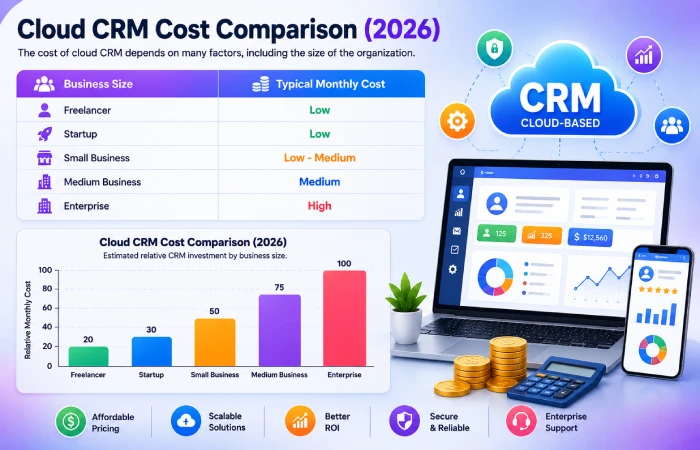
| Business Size | Typical Monthly Cost |
| Freelancer | Low |
| Startup | Low |
| Small Business | Low-Medium |
| Medium Business | Medium |
| Enterprise | High |
What This Shows
Generally, most start-ups and small firms have the capability to implement cloud-based CRM with fairly low monthly expenses. But when companies start growing and they need more automation, more sophisticated analysis, integration, and enterprise support, they will definitely need to invest more in CRM. Nevertheless, these advantages often make cloud CRM quite affordable for any type of company.
Cloud CRM Security Best Practices
With companies storing more customer information on their cloud servers, security has been given the highest importance. A secure cloud CRM system can help safeguard customer information from getting leaked or used for malicious purposes and ensure that the business remains operational.
Some of the key security best practices related to cloud CRM systems are:
- Use of strong passwords/MFA
- User access control based on job role
- Encryption of customer information
- Software and security configuration updates
- Monitoring user activity
- Cybersecurity training for staff members
- Security audits
These help in lowering business risks without affecting consumer confidence.
Common Cloud CRM Security Risks
Despite cloud CRM applications being quite secure, business owners should know of possible dangers.
Common risks include:
- Weak passwords
- Phishing attacks
- Unauthorized user access
- Data breaches
- Misconfigured permissions
- Malware infections
- Insider threats
Security threats often happen due to errors made by people as opposed to being caused by any vulnerabilities in the CRM software. Training employees will help mitigate such threats.
Data Backup and Disaster Recovery
Data loss may be caused by cybersecurity issues, accidental deletion, software malfunction, or even natural calamities. For that reason, all firms must plan for data backup and disaster recovery.
Luckily, most of the well-respected CRM software providers through the cloud will automatically back up their clients’ data.
In doing so, client data is safeguarded from any possible losses.
Benefits of cloud CRM disaster recovery include:
- Reduced downtime
- Faster data restoration
- Improved business continuity
- Better protection against ransomware attacks
A good backup solution enables organizations to maintain their activities despite any unforeseen events.
Choosing the Right Cloud-Based CRM Solution
The selection of a suitable cloud CRM depends on various factors.
When evaluating CRM platforms, consider:
- Ease of use
- Scalability
- Automation features
- Reporting capabilities
- Mobile access
- Integration options
- Security standards
- Customer support quality
- Pricing structure
business owners might prefer cheaper and simpler solutions, while bigger corporations could prefer something that can be customized and offer advanced analytical tools.
Before making a final decision, follow our complete guide on How to Choose the Right CRM Software.
Common Cloud CRM Buying Mistakes
Too many companies buy CRM solutions without analyzing their needs.
Common mistakes include:
- Choosing based only on price
- Ignoring future scalability
- Overlooking security features
- Buying unnecessary features
- Failing to involve employees in selection
- Not testing the CRM before purchase
If you avoid making these errors, you will have saved yourself valuable time and money, along with increasing your chances of CRM adoption.
Troubleshooting Cloud CRM Problems
Occasionally, organizations experience problems following the installation of a cloud CRM solution.
| Problem | Solution |
| Slow user adoption | Provide employee training |
| Poor data quality | Clean and standardize records |
| Integration issues | Use supported integrations |
| Security concerns | Enable MFA and access controls |
| Reporting inaccuracies | Improve data entry processes |
System checks ensure problems are caught in advance of affecting productivity.
Future of Cloud CRM Technology
Cloud CRM systems continue to develop at a rapid pace. The expectation from businesses is for the CRM system to offer automation, predictions, and personalization.
Future cloud CRM innovations will likely focus on:
- Artificial intelligence
- Predictive analytics
- Real-time customer insights
- Advanced workflow automation
- Voice-enabled CRM interfaces
- Enhanced mobile experiences
This would assist businesses in managing customer relationships better.
AI-Powered Cloud CRM Trends in 2026
Artificial intelligence is becoming one of the biggest drivers of CRM innovation.
Popular AI-powered CRM capabilities include:
- Automated lead scoring
- Predictive sales forecasting
- AI chatbots
- Customer sentiment analysis
- Intelligent workflow automation
- Personalized marketing recommendations
AI helps companies in making faster decisions as well as boosting customer engagement and sales performances.
Cloud CRM Forecast (2026–2030)
| Technology Trend | Growth Outlook |
| AI-Powered CRM | Very High |
| Predictive Analytics | Very High |
| Mobile CRM | High |
| Voice CRM | Growing |
| Hyper-Personalization | Very High |
| Workflow Automation | Very High |
The future cloud-based CRM solutions will definitely incorporate AI and automation features. Companies that use Artificial Intelligence and automation and predictive analytics will be better than others. This is because they will be good at making customers happy making decisions and getting things done quickly. Artificial Intelligence and automation will really help these companies. They will be good at making decisions. They will make customers happy, with Artificial Intelligence and automation.
Frequently Asked Questions
What is cloud CRM software?
Cloud CRM software refers to web-based customer relationship management software that enables users to access customer information, sales activities, and other business information through the internet.
What are the benefits of cloud CRM software?
Among others are cost savings, easy accessibility, automatic updates, scalability, increased cooperation and speed of deployment.
Is cloud CRM software safe to use?
Yes. Most providers of cloud-based CRM applications use security methods like encryption, multiple levels of authentication, monitoring and backups to ensure the safety of their clients’ data.
What distinguishes cloud CRM from on-premise CRM software?
The latter is installed locally on computers while the former is offered online over the web.
Who uses cloud CRM software?
Cloud CRM software is adopted by start-ups, small businesses, large businesses, ecommerce retailers, service providers, and remote tea
Conclusion
CRM software based on cloud computing has transformed the concept of customer relationship management through its features like availability, automatic updates, and scalability. Its benefits range from increased productivity to real-time analysis and efficient workflow management. The potential offered by the evolution of artificial intelligence makes it evident that the future holds a lot of promise for this technology.
Whether you’re evaluating cloud CRM for the first time or comparing providers, understanding CRM Software Benefits for Businesses and learning How to Choose the Right CRM Software will help you make a better decision.