

Constructing a startup in 2026 requires not having the ultimate idea but rather having the right tools around it. The choice of your tools in the beginning determines the speed at which you can work, the quality of your perception, and the amount of time you can save from wasting it on administration.
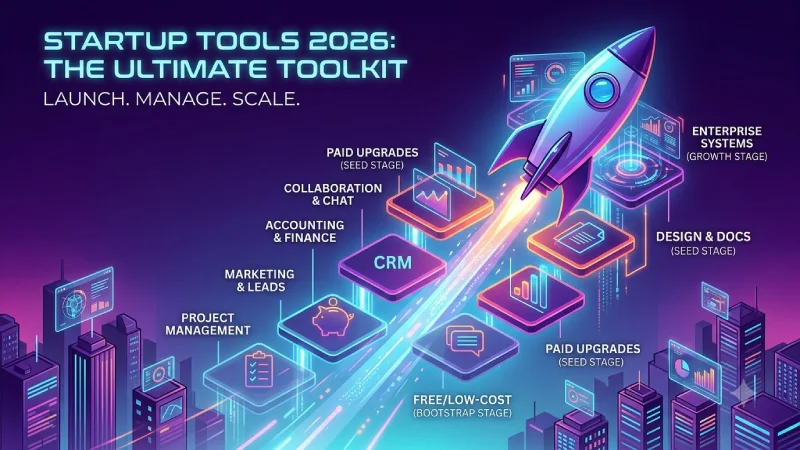
This guide will give you an insight into all those important startup tools – from free versions to premium ones, and how to make your own tech stack that will grow with your business. It covers the main tool categories you need in the beginning of your journey.
Startup Tools Resource Center
Explore our complete collection of guides covering project management, marketing, accounting and finance, CRM, team communication, collaboration, analytics, and reporting tools for startups.
Best startup tools 2026 (by category)
Here’s a high-level view of the tools that keep showing up in real startup stacks this year:
| Category | Top free / low-cost pick | Strong paid upgrade | Best for |
| Project Management | ClickUp free / Notion free | ClickUp or Linear | Organizing tasks & sprints |
| Marketing | Brevo + Canva + GA4 | HubSpot / Buffer paid | Getting leads & content |
| Accounting & Finance | Wave | QuickBooks Online or Xero | Books, invoices, expenses |
| CRM | HubSpot free | Pipedrive or Attio | Pipeline & customer relationships |
| Collaboration & Chat | Slack free / Google Workspace | Slack Pro or Microsoft Teams | Daily team communication |
| Analytics & Reporting | Google Analytics 4 + PostHog | Mixpanel or Metabase | Understanding users & growth |
| Design & Docs | Canva + Google Docs / Notion | Figma / Notion paid | Visuals & knowledge base |
There isn’t any perfect solution to everything. Successful startups use one good method per category and don’t add anything new until they have a problem.
For website and user measurement, Google Analytics provides analytics tools that help businesses understand traffic, user behavior, and performance.
Free tools for startups
You can run a surprisingly complete operation for $0 (or very close) in the early months. Here’s a realistic free stack that many bootstrapped teams use:
Core free tools that actually work:
- Project & docs: Notion free or ClickUp free + Google Docs
- Communication: Slack free (or Discord) + Google Meet / Zoom free
- Marketing: Brevo (email), Canva, Google Analytics 4, Buffer free
- Finance: Wave (accounting + invoicing)
- CRM: HubSpot free CRM
- Analytics: Google Analytics 4 + PostHog free tier
- Design: Canva free
- Forms & simple sites: Tally, Carrd, or Google Forms
It provides for task management, team chat, email marketing, basic bookkeeping, lead management, website analytics, and design. Teams normally begin to pay after they have exhausted their allowances for message history, emails, storage capacity, and advanced options.
The biggest mistake is paying for tools before the free versions are clearly holding you back.
Essential software for startups
These are the categories almost every startup needs at some point:
- Project management — So tasks don’t live in Slack threads or someone’s head.
- Communication — One place for team chat and one reliable video tool.
- CRM — Once you have more than a handful of leads or customers.
- Accounting / invoicing — Clean books from day one make fundraising and taxes less painful.
- Analytics — Website traffic (GA4) + product usage (PostHog/Mixpanel) so you know what’s working.
- Email marketing — Own your list instead of relying only on social algorithms.
- Document & knowledge base — Notion or Google Drive so processes and decisions aren’t lost.
You don’t need all of them on day one. Start with communication, docs, and basic tracking. Add the rest as the problems appear.
Productivity tools for startups
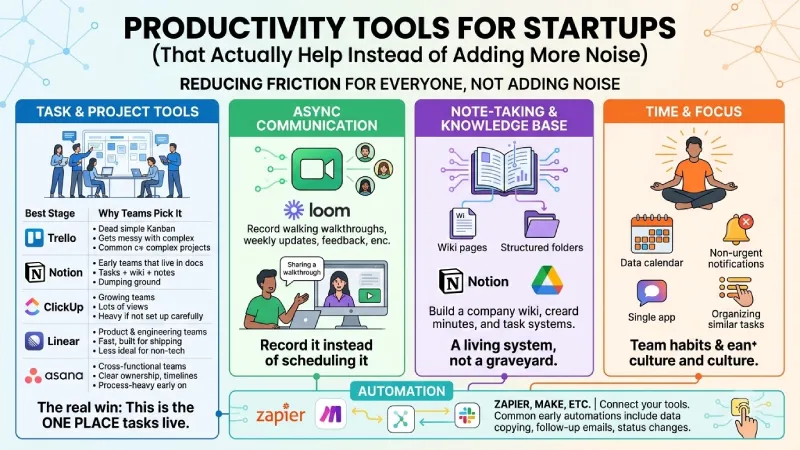
It is hardly ever about individual hacks when being productive within the startup ecosystem; rather, it is all about reducing friction for everybody else involved in the process.
Productivity Tools for Startups (That Actually Help Instead of Adding More Noise)
Founders rarely find themselves in trouble due to lack of tools. They struggle because everything lives in too many places. Tasks in Slack, decisions in random Google Docs, files scattered across Drive and someone’s desktop, and meetings that could have been a two-minute Loom. The result is constant context switching and the feeling that you’re always busy but not moving forward.
Here’s a clearer look at the productivity categories that matter most for early teams, with practical options and when each one starts to pay off.
Task & Project Tools
This is usually the first category that needs structure.
To begin with, using Trello board or Notion database will be sufficient. However, once you get past three people or several projects going on at the same time, you will likely find yourself using tools that have better visualization and ownership options.
| Tool | Best stage | Why teams pick it | Common complaint |
| Trello | Solo or 2–3 people | Dead simple Kanban, almost zero learning | Gets messy with complex projects |
| Notion | Early teams that live in docs | Tasks + wiki + notes in one place | Can become a dumping ground |
| ClickUp | Growing teams | Lots of views and features for the price | Feels heavy if you don’t set it up carefully |
| Linear | Product & engineering teams | Fast, clean, built for shipping | Less ideal for non-tech teams |
| Asana | Cross-functional teams | Clear ownership and timelines | Can feel process-heavy early on |
The real win isn’t the tool itself — it’s deciding that this is the one place tasks live. Everything else (Slack messages, meeting notes, random ideas) should eventually get pulled into it or ignored.
Async Communication
Meetings are costly. One 30-minute meeting with five participants takes two and a half hours altogether. Async tools cut a lot of that waste.
With Loom (or other similar applications such as Claap or video clips via Slack/Teams), one can record the screen and face, explain whatever is needed just once, and share the link. The other members view it at their convenience. It works especially well for:
- Walkthroughs of new features or bugs
- Weekly updates
- Feedback on designs or documents
- Onboarding explanations
Many remote and hybrid startups now treat Loom as a core tool rather than a nice-to-have. The habit of “record it instead of scheduling it” saves more time than almost any other productivity change.
Note-Taking & Knowledge Base
In case all the decisions, processes, and minutes are stored only in people’s minds or random documents, people will keep learning the same information again and again.
Notion became popular among many startups because it allows building a company wiki, minutes’ storage, and a task management system within one application. A good structured Google Drive with the proper folder structure and file names works just fine for smaller teams.
The core principle is to consider the knowledge base as a living system and not as a graveyard. If a person asks the same question twice, the answer is saved in the wiki. When a process changes, the page gets updated. Over time this compounds and reduces the “where do we keep that?” tax.
Time & Focus
Individual productivity tools matter less than team habits, but a few things consistently help:
- Calendar blocking for deep work (especially for founders and product people)
- Turning off non-urgent notifications during focus blocks
- Keeping the number of chat tools to one main channel (Slack or Teams, not both for daily work)
- Batching similar work instead of constant switching
While some teams use basic techniques of focus management or browser blocking apps, the real power lies with culture—treasuring one’s focus time and saying no to unnecessary meetings.
Automation
Repetitive work is a quiet productivity killer. Copying and pasting data from one program to another, repeating your follow-up emails, manually changing the status – it all accumulates.
Zapier (or Make, or automation tools within Slack, HubSpot, ClickUp, etc.) can connect your existing tools. Common early automations include
Startup tech stack (by stage)
Pre-seed / solo or 2-person team
- Docs & tasks: Notion free
- Chat: Slack free or Discord
- Video: Google Meet or Zoom free
- Analytics: Google Analytics 4
- Email: Brevo free
- Design: Canva free
- Finance: Wave or spreadsheet Total cost: $0–30/month
Seed stage (small team, first revenue or funding)
- Project management: ClickUp or Linear
- CRM: HubSpot free → paid or Pipedrive
- Finance: QuickBooks Online or Xero
- Product analytics: PostHog or Mixpanel
- Marketing: Add Buffer paid + better email automation
- Collaboration: Slack Pro if history and integrations matter Typical cost: $100–400/month depending on team size
Growth stage (Series A and beyond)
- More specialized tools in each category
- Stronger BI/dashboards (Metabase, Looker Studio, or Power BI)
- Better expense management (Ramp or Brex)
- More robust marketing automation and CRM features
- Clear ownership of data and reporting
The formula is the same: begin with freedom and simplicity, and upgrade only when it’s necessary because of the limits imposed by the existing tool.
How to Choose Tools Without Drowning in Options
However, it’s all too easy to start collecting the tools. Some people will advise using ClickUp; others will insist on Notion or a full CRM system, and suddenly the whole team starts signing into eight different software solutions each morning, only to leave most of them half-utilized or unused.
Let’s look at how you can make your choice more sensible.
1. Solve one clear problem at a time
Don’t start by looking for “the best project management tool” or “the best CRM.” Start with the actual pain.
Examples of clear problems:
- Tasks are getting lost in Slack and nobody knows what’s due this week
- Invoices are late because there’s no simple system
- Leads are sitting in a spreadsheet and follow-ups are inconsistent
- The team keeps asking the same questions because nothing is written down
By identifying the exact problem, the number of potential tools immediately starts to decrease. Solve that problem, get used to your new practice for several weeks, then move on to the next issue.
2. Prefer tools with good free plans
Money and attention are scarce in the early stages. A free plan that meets 80% of your requirements is usually better than an expensive tool that looks good on paper.
There are great free (or close to free) products available in all key categories: HubSpot Free CRM, Wave Accounting, Notion or ClickUp Free, Google Analytics 4, Brevo email marketing, Slack Free, etc.
Try the free plan with real tasks for two or three weeks. You’ll quickly see whether the limitations actually matter or whether you’re just imagining future needs.
3. Check what the team will actually open every day
The “best” tool on review sites is useless if people avoid it. Adoption beats features almost every time.
Before committing, ask:
- Will the people who need to update this tool actually do it?
- Does it fit the way the team already works, or does it force a completely new process?
- Is the interface simple enough that new hires can figure it out without a long training session?
A slightly simpler tool that everyone uses beats a powerful one that only one person maintains.
4. Think about integrations (but don’t over-index on them)
Tools that connect to each other save time. Whenever an opportunity in your CRM system generates an activity automatically, or an invoiced payment is reflected in your accounting software without entering anything yourself, you have less on your plate.
However, never pick a particular tool simply because it has a long list of integrations. First make sure it solves the core problem well. Integrations are a bonus, not the main reason to pick something.
5. Be careful with “all-in-one” platforms early on
All-in-one tools sound efficient. All you need is one login, one workspace for all your tasks, documents, chat, CRM and reporting. Practically, most of them turn out to be complicated.
They often work better once you already understand your processes and know which features you actually need. In the beginning, focused tools that do one job clearly are usually easier to adopt and easier to replace if they don’t fit.
6. Review the stack every 6–12 months
What worked at three people often starts feeling heavy at twelve. What felt essential during the first product launch may become unnecessary later.
Set a simple reminder every six months (or after each round of fundraising / major growth in the team) to evaluate the current technology and consider whether:
- Which ones are still actively used?
- Which ones create more friction than they remove?
- Is there overlap we can eliminate?
Cutting tools is just as important as adding them. A leaner stack is almost always faster and cheaper to run.
A simple decision filter
When someone suggests a new tool, run it through these questions:
| Question | If the answer is… | What to do |
| What exact problem does this solve? | Vague or “it looks useful” | Wait |
| Can we test it free for 2–3 weeks? | No | Be extra cautious |
| Will the people who need it actually use it? | Probably not | Skip or find a simpler option |
| Does it replace something we already have? | No, it just adds | Strong reason needed |
| Will we still need this in 6 months? | Unclear | Delay the decision |
Most tool decisions become obvious once you force the conversation back to real problems and real usage.
The goal isn’t to build the perfect tech stack. It’s to remove enough friction that the team can focus on customers and product. Everything else is secondary.
Final thoughts
The best tech stack to use in 2026 by startups will be the one which doesn’t interfere with your work. This technology stack provides you with visibility (tasks, finances, clients/users), ensures effective communication, and requires no ongoing maintenance.
The ideal process is to begin with the basic versions of the tools within each category, and move towards paid versions only after the free version begins to cost more than the subscription. And remember: tools amplify process — they don’t create it.
If you already have some tools in place, look at where information is getting lost or decisions are slow. That’s usually the highest-ROI place to improve next.
What stage is your startup at right now, and which area feels most chaotic — tasks, marketing, money, customers, or team communication? That will point to the most useful next tool.
