

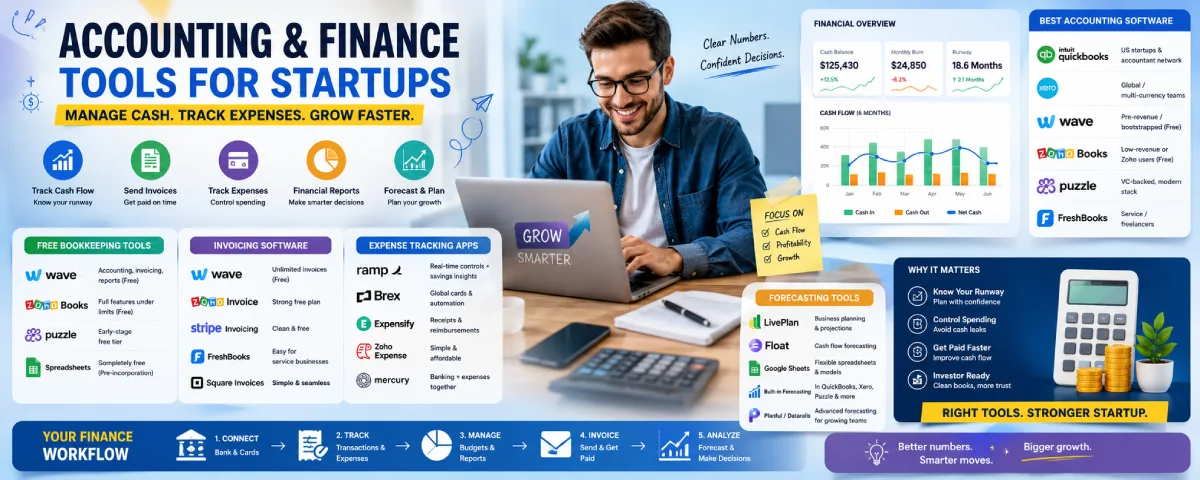
Cash is the oxygen of a startup. You can have a great product and strong traction, but if you don’t know how much runway you have, where the money is going, or whether invoices are getting paid, things get stressful fast. The right accounting and finance tools stop the spreadsheet chaos and give you clear numbers without requiring a full-time finance person on day one.
For the overarching strategy, read our complete guide on Startup Tools

Here’s a practical look at what works for startups in 2026 — from free options to the tools funded teams actually use.
Best accounting software for startups
Most early teams end up choosing between a few main options. The “best” one depends on whether you’re bootstrapped, US-based, international, or already raising money.
| Tool | Best for | Starting price (approx) | Free plan? | Key strength |
| QuickBooks Online | US startups & accountant network | From ~$35–38/mo | Trial | What most CPAs already know |
| Xero | Global / multi-currency teams | From ~$25/mo | Limited | Unlimited users on every plan |
| Wave | Pre-revenue / bootstrapped | Free | Yes (core features) | Genuinely free double-entry books |
| Zoho Books | Low-revenue or Zoho users | Free (under limits) | Yes | Strong free tier + automation |
| Puzzle | VC-backed, modern stack | Free to ~$50/mo | Yes (early) | AI-native, startup-focused metrics |
| FreshBooks | Service / freelancers | From ~$17/mo | Trial | Simple invoicing + time tracking |
QuickBooks Online is still the default for many US startups simply because almost every accountant and bookkeeper knows it. Switching later is painful, so a lot of teams just start here.
Xero often feels cleaner and is stronger if you have remote founders or revenue in multiple currencies. Unlimited users is a real plus once more people need access.
Wave remains the best truly free option for pre-revenue or very early bootstrapped companies. You get real double-entry accounting and invoicing without paying until you need payroll or payment processing.
Puzzle has grown popular with modern startups that bank with Mercury or Brex and want AI-assisted, accrual-ready books from the beginning.

Free bookkeeping tools
You can run proper books for a long time without paying. Here are the realistic free options:
| Tool | What’s free | Limits / catches | Best for |
| Wave | Accounting, invoicing, reports | Bank feeds & payments may cost later | Most bootstrapped teams |
| Zoho Books | Full features under revenue/user limits | Revenue or user caps | Very small revenue startups |
| Puzzle | Early-stage free tier | Scales with transactions | Modern startups testing AI |
| Spreadsheets | Completely free | Error-prone as you grow | Pre-incorporation only |
Wave is still the most recommended free starting point for many founders. Just remember that once you have real volume or need clean investor-ready reports, you’ll probably outgrow pure free tools.
Invoicing software for startups
Getting paid on time matters more than fancy reports in the early days. Many accounting tools include solid invoicing, but some teams prefer lighter options.
Good free or low-cost choices:
- Wave — unlimited invoices and clients on the free plan
- Zoho Invoice — strong free plan (with some client limits)
- Stripe Invoicing — clean and free (you just pay normal processing fees)
- FreshBooks — very easy for service businesses
- Square Invoices — simple if you already use Square
Startups usually stick with their primary accounting software’s invoicing service (like Wave, QuickBooks, Xero, or Zoho) instead of getting a separate invoicing app.
Expense tracking apps
This is when most of the leaks occur. Receipts are misplaced, expenses are unknown for the group, and end-of-month is a mess.
Popular options in 2026:
| Tool | Best for | Pricing model | Standout feature |
| Ramp | VC-backed US startups | Free core + cards | Real-time controls + savings insights |
| Brex | Global / higher spend | Free core + cards | Strong international support |
| Expensify | Reimbursements & receipts | Per user | Excellent receipt scanning |
| Zoho Expense | Budget-conscious teams | Free / low cost | Simple and affordable |
| Mercury / Rho | Banking + expenses together | Built into banking | Fewer tools to manage |
Ramp and Brex have become the default for many funded startups because the corporate cards + automatic expense tracking + accounting sync saves real time. For pure bootstrapped teams, Expensify or Zoho Expense (or even just the expense features inside Wave/QuickBooks) are often enough.
Financial forecasting tools for startups
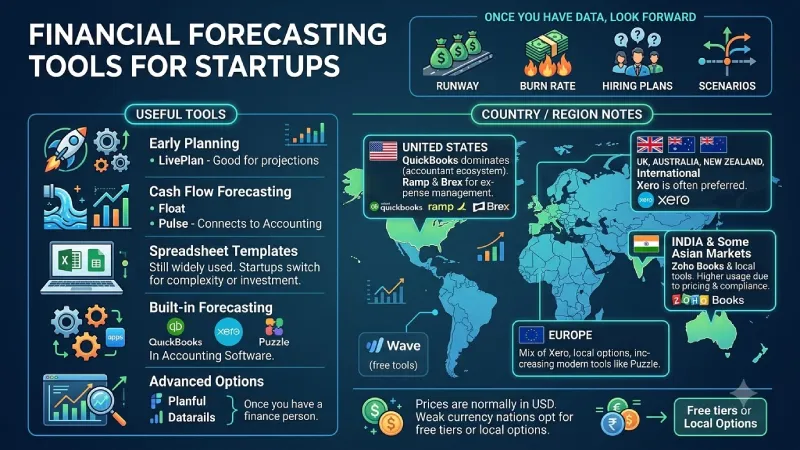
Once you have a few months of real data, you need to look forward — runway, burn rate, hiring plans, and scenarios.
Useful tools:
- LivePlan — good for early business planning and projections
- Float or Pulse — cash flow forecasting that connects to accounting software
- Spreadsheet templates (still widely used) + Google Sheets or Excel
- Built-in forecasting in QuickBooks, Xero, or Puzzle
- More advanced options like Planful or Datarails once you have a finance person
A lot of early stage startups are still using Google Sheets to do their forecasting and switch only when they need to make something more complex or get investment money.
Country / region notes
- United States → QuickBooks dominates because of the accountant ecosystem. Ramp and Brex are very common for expense management.
- UK, Australia, New Zealand, and many international teams → Xero is often preferred.
- India and some Asian markets → Zoho Books and local tools see higher usage, partly because of pricing and local compliance features.
- Europe → Mix of Xero, local options, and increasing interest in modern tools like Puzzle where available.
- Free tools like Wave work globally but may have limited banking connections outside the US and Canada.
Prices are normally in US dollars, which means that entrepreneurs from nations with a weak currency usually opt for the free tiers or local options.
How to choose without overcomplicating it
- Pre-revenue or just starting → Use Wave or Zoho Books free. Don’t pay yet.
- Raised money or need investor-ready books → QuickBooks Online (safe default) or Puzzle / Xero depending on your stack and location.
- Need better spend control → Add Ramp or Brex once you have a team spending money.
- Forecasting → Start in spreadsheets, then connect a simple cash-flow tool when the model stabilizes.
- Always check what your accountant or bookkeeper already knows. Switching systems mid-year is painful.
A clean early stack for many startups looks like:
- Accounting: Wave or QuickBooks
- Expenses: Ramp/Brex (or built-in tools)
- Invoicing: whatever comes with the accounting software
- Forecasting: Google Sheets + occasional LivePlan or Float
Get the basics solid first. Good books and cash visibility trumps great dashboards all day long. Once you have your data in order, everything else becomes a breeze (fundraising talks, hiring, pricing).
Where does your firm stand, and what is the biggest finance problem you have to deal with – invoices, expenses, runway, or something else? That usually points to the next tool worth adding.
FAQ
1. What is the best accounting software for startups?
It depends on your stage and location. Wave is best for free/bootstrapped teams, QuickBooks Online for most US startups, Xero for global/multi-currency teams, and Puzzle for modern VC-backed startups.
2. Can I do proper bookkeeping for free?
Yes, but Wave actually has free double entry accounting & invoicing. Zoho Books and Puzzle also offer good free packages for start-ups.
3. What expense tracking solutions work best?
For funded companies, there’s a tendency to go with either Ramp or Brex (corporate cards + auto tracking). For bootstrapping companies, Expensify, Zoho Expense or expense modules in Wave/QuickBooks work well.
4. Should I look for invoicing software?
In most cases, no. The invoicing component that is part of your accounting solution (Wave, QuickBooks, Xero, Zoho) will be sufficient. Alternatively, Stripe Invoicing works great and is free.
5. How should early startups deal with financial forecasting?
It should start with Google Sheets/Excel. Introduce a cash flow solution (Float, Pulse or LivePlan) once numbers are stable or when you need investor-ready projections.
Conclusion
Great books and visibility of money is better than fancy dashboards. Start with simple and free stuff like Wave and only introduce paid stuff once the volume of activity or investors demand it. Always use tools that your accountant is familiar with. Take care of the basics: runway, invoices, and expenses, and you will be able to handle everything else.
To take the next step, see our detailed guide on CRM Tools for Startups.
