

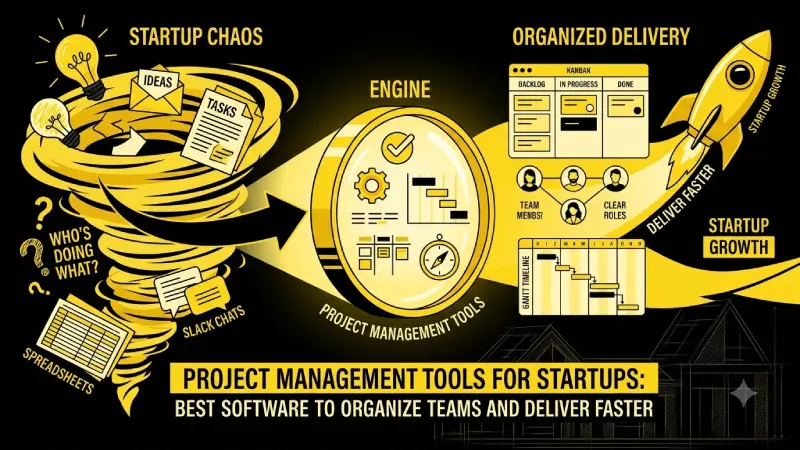
Listen, if you’re running a startup, then you must be well aware of what happens. Ideas come flying, tasks get piled up randomly in some Slack chat or Google Doc, deadlines get postponed, and then everyone starts asking, “Who’s doing what?” That’s the chaos these tools are meant to fix. The right project management software doesn’t just list tasks — it keeps everyone pointed in the same direction without turning into another full-time job.
For the overarching strategy, read our complete guide on Startup Tools
Some quick context from recent data: only about 35% of projects are considered fully successful (Standish Group). Those who properly implement PM methodologies will save lots of money in the process. About 77% of firms use some sort of project management software at present, but many start-ups still use spreadsheets or sheer chaos via Slack. The following tools are those that are indeed used by agile teams in 2026.
Best project management software for startups
There’s no single “best” tool. It depends on your stage, whether your team is mostly engineers, marketers, or a messy mix, and how much time you want to spend setting things up.
Here’s a side-by-side look at the ones startups keep recommending:
| Tool | Best for | Free plan | Starting paid price (annual) | Key strength |
| ClickUp | Early-stage / all-in-one needs | Unlimited members & tasks (limited storage) | $7/user | Most features for the money |
| Notion | Doc-heavy founding teams | Strong for 1–2 people | $10/user | Docs + tasks in one place |
| Linear | Engineering & product teams | Up to ~250 issues | $8/user | Speed & clean interface |
| Asana | Cross-functional teams | Limited users | $10.99/user | Clear ownership & structure |
| Trello | Simple visual workflows | 10 boards | $5/user | Zero learning curve |
| Monday.com | Visual / non-technical teams | Very limited | ~$9–12/seat | Colorful boards & dashboards |
ClickUp keeps showing up as a strong all-rounder for seed-stage teams. You get tasks, docs, time tracking, goals, and a bunch of views in one place. The free plan is surprisingly usable. Downside? It can feel like too many features at first.
Notion is the go-to for founding teams that live in docs. You can build your own little operating system. Free plan works fine early on.
Linear is the favorite among product and engineering teams. Fast, keyboard-first, and it just feels built for people who ship code.
Asana works well once you have a few departments that need to coordinate. Clear ownership and solid automation.
Trello is still the simplest option. Pure Kanban. Perfect when you’re three people and just need visibility. You’ll outgrow it later, but for the first 6–12 months it’s often enough.
Free project management tools that actually work
Budget is real in the early days. Here’s what the free tiers actually give you in 2026:
| Tool | Free user limit | Biggest free-plan limit | Good enough for? |
| ClickUp | Unlimited | Storage (often ~60–100 MB) | Most small teams |
| Trello | Unlimited (10 boards) | 10 boards + limited automation | Very early / simple work |
| Notion | Small teams / 10 guests | Upload size & version history | Solo or 2-person teams |
| Asana | 2 users (new accounts) | No timeline / limited automation | Testing only |
| Linear | Unlimited members | ~250 active issues | Tiny engineering teams |
| Jira | Up to 10 users | Basic features only | Teams already in Atlassian |
Most teams start free and only upgrade when they hit limits on automation, storage, guests, or advanced views. Don’t pay until the free version is clearly slowing you down.
Asana vs Trello vs ClickUp (detailed comparison)
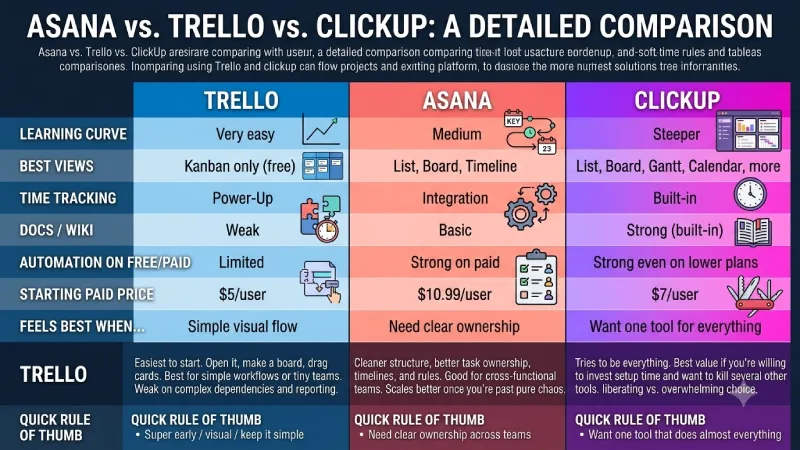
This comparison comes up constantly, so here’s a clearer breakdown:
| Feature | Trello | Asana | ClickUp |
| Learning curve | Very easy | Medium | Steeper |
| Best views | Kanban only (free) | List, Board, Timeline | List, Board, Gantt, Calendar, more |
| Time tracking | Power-Up | Integration | Built-in |
| Docs / Wiki | Weak | Basic | Strong (built-in) |
| Automation on free/paid | Limited | Strong on paid | Strong even on lower plans |
| Starting paid price | $5/user | $10.99/user | $7/user |
| Feels best when… | Simple visual flow | Need clear ownership | Want one tool for everything |
Trello is the easiest to start. Open it, make a board, drag cards. Best for simple workflows or tiny teams. Weak on complex dependencies and reporting.
Asana sits in the middle. Cleaner structure, better task ownership, timelines, and rules. Good for cross-functional teams. Scales better once you’re past pure chaos.
ClickUp tries to be everything. Best value if you’re willing to invest setup time and want to kill several other tools. While some find it liberating, others find themselves overwhelmed with the choices.
Quick rule of thumb:
- Super early / visual / keep it simple → Trello
- Need clear ownership across teams → Asana
- Want one tool that does almost everything → ClickUp
Popularity by country / region (interesting notes)
Jira leads in global market share at roughly 39%, followed by Trello (about 16%) and Smartsheet. But it changes a lot by country:
- Brazil → ClickUp ranks #1 in some recent tracking
- Vietnam → Trello is especially strong
- Italy → Redmine pops up higher than usual
- United States & Canada → Asana and Smartsheet perform better
- UK → Zoho Projects shows stronger relative usage
- India & many Asian markets → Mix of Jira, ClickUp, and local preferences, with strong growth in cloud tools
Most pricing is given in USD; however, there are some software that offer regional pricing or discounts for using local currencies. Where paying by credit cards is difficult and making overseas subscriptions is tough, open source products or free tiers are more popular.
Agile project management for startups
Most startups say they “do agile.” In practice that often means weekly stand-ups and a Kanban board. That’s fine.
Tools that support real agile practices (sprints, backlogs, story points) well:
- Linear is built for this style
- ClickUp and Jira have solid sprint support
- Asana can do it with some setup
- Trello can approximate Kanban easily but struggles with formal sprint planning
No need to push the large Scrum meetings on a three-person team. Do things gradually, start by making backlog, prioritized list, and running cycles.
Project management templates for startups
Templates save a ton of time. Almost every tool above has a template gallery. Useful ones:
- Product roadmap
- Sprint / cycle board
- Content calendar
- Hiring pipeline
- Bug tracker
- Launch checklist
- OKR or goal tracking
Notion and ClickUp have especially strong template communities. Begin with a template, and from there, mercilessly cut out any unused fields or views. Over-tapping into templates is one of the most frequent ways of overcomplicating the system.
How to actually choose
- Determine what your team is struggling with at the moment (too much communication in Slack? lack of deadlines? engineers not paying attention to the board?).
- Pick 2 tools max and run a real project in each for a week or two.
- Check free limits carefully (users, storage, automation runs, guests).
- Think about growth — will this still work at 15 people?
- Watch who actually updates the tool. The “best” tool is the one your team will use.
Conclusion
Most startups switch tools at least once as they grow. That’s normal. Don’t overthink the perfect forever system on day one.
If you’re just starting, grab something free (Trello, Notion free, or ClickUp free) and start putting tasks in it today. You’ll learn more in two weeks of real use than in another week of research.
What stage is your team at and what’s the biggest chaos right now? That usually points to the better fit.
To take the next step, see our detailed guide on Marketing Tools for Startups
