

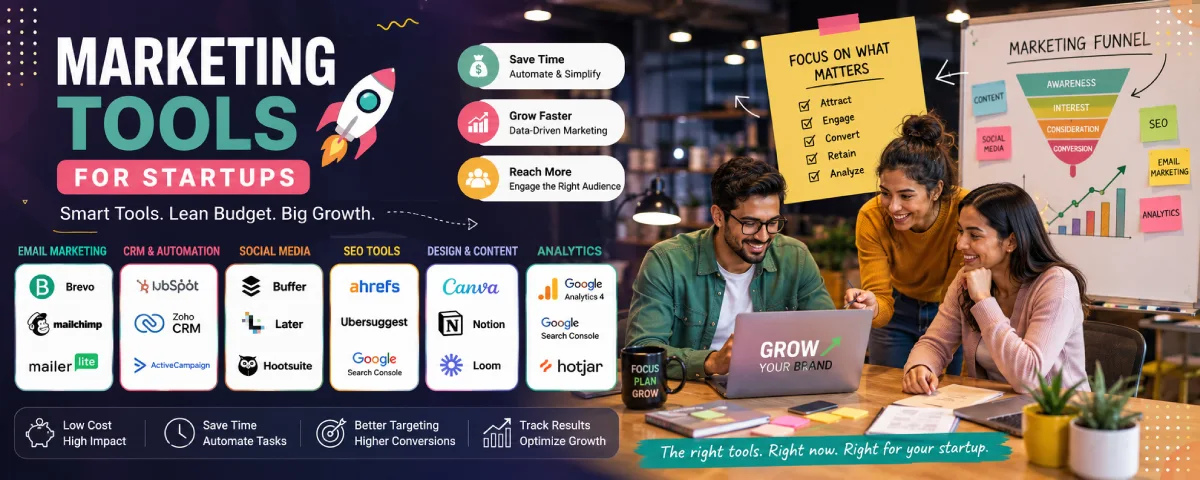
Marketing a startup business is like chaos almost all the time. You’re trying to get noticed, collect emails, post on social, rank on Google, and somehow track if any of it is working — all while the product is still being built. The good news? You don’t need a huge stack or expensive agency tools to start. A few smart choices can cover most of what early teams actually need.
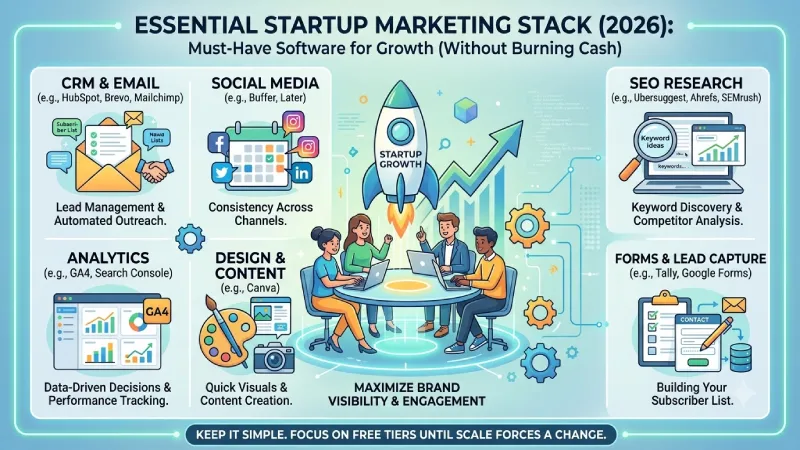
Here’s a practical breakdown of the marketing tools that startups keep using in 2026, with free options, comparisons, and what actually matters at different stages.
For the overarching strategy, read our complete guide on Startup Tools
Best marketing tools for small business / startups
There’s no perfect all-in-one tool. Most successful early teams mix 4–6 tools that each do one job well. Here’s a clear look at the ones that come up again and again:
| Tool | Best for | Free plan? | Starting paid price | Why startups like it |
| HubSpot | CRM + basic marketing | Yes (strong free CRM) | ~$15–20/seat | Forms, email, CRM in one place |
| Brevo | Email + SMS on a budget | Yes (300 emails/day) | From $9/mo | Generous free tier, multi-channel |
| Mailchimp | Simple email & newsletters | Yes (limited contacts) | From $13/mo | Easy templates, widely known |
| Buffer | Social media scheduling | Yes (3 channels) | From $6/channel | Simple and reliable |
| Google Analytics 4 + Search Console | Analytics & SEO basics | Completely free | Free | Non-negotiable starting point |
| Canva | Design & visuals | Yes (very usable) | From ~$13/mo | Fast graphics without a designer |
| Ahrefs / Ubersuggest | SEO research | Limited free tools | From $29/mo | Keyword & competitor data |
The HubSpot free CRM is definitely one of the best places to begin since it offers contacts management, forms, and emails for free. Brevo is currently the darling of bootstrapped startups since its free version actually allows sending an adequate amount of emails. Buffer remains the go-to for social when you just need to schedule posts without complexity.
Free marketing tools for startups
You can build a surprisingly solid stack for $0 (or close to it). Here’s what actually works without feeling crippled:
| Category | Tool | Free limit / notes | Good enough for? |
| Analytics | Google Analytics 4 | Full product | Everything early on |
| SEO | Google Search Console | Full product | Ranking & indexing data |
| Brevo | 300 emails/day, unlimited contacts | Most early lists | |
| Mailchimp | Limited contacts & sends | Testing & very small lists | |
| Social | Buffer | 3 channels, limited scheduled posts | Consistent posting |
| Design | Canva | Huge template library | Social posts, decks, banners |
| Forms | Tally or Google Forms | Unlimited / generous | Lead capture |
| SEO research | Ubersuggest + Ahrefs Webmaster Tools | Limited free searches / your own site | Keyword validation |
Many founders run for 6–12 months on free tools only: GA4 + Search Console + Brevo + Buffer + Canva. You only start paying when volume or features force you to.
SEO tools for startups
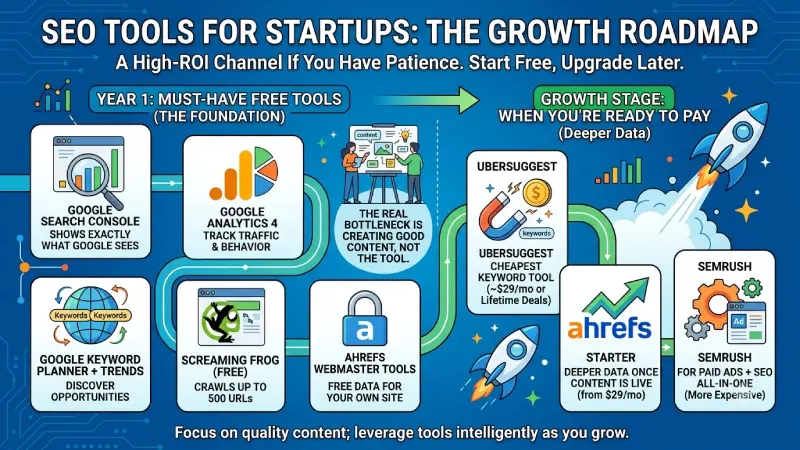
SEO is still one of the highest-ROI channels if you have patience. You don’t need the expensive tools on day one.
Must-have free tools:
- Google Search Console (shows exactly what Google sees)
- Google Analytics 4
- Google Keyword Planner + Google Trends
- Screaming Frog free (crawls up to 500 URLs)
- Ahrefs Webmaster Tools (free for your own site)
When you’re ready to pay:
- Ubersuggest → cheapest useful keyword tool (~$29/mo or lifetime deals)
- Ahrefs Starter → deeper data once you have some content live (from $29/mo)
- Semrush → if you also run paid ads and want everything in one place (more expensive)
Most pre-seed and seed teams do just fine with the free layer for the first year. The real bottleneck is usually creating good content, not the tool.
Social media marketing tools

Consistency beats fancy features here. Most startups only need to post regularly on 2–3 platforms.
Top options:
- Buffer — still the simplest for most teams. Free plan covers 3 channels. Paid is cheap and clean.
- Later — stronger if Instagram/Pinterest visuals matter more.
- Meta Business Suite — free and solid if you only care about Facebook + Instagram.
- Hootsuite — more powerful but often overkill (and pricier) for early stage.
AI features inside these tools (especially Buffer) now help turn one blog post into several social posts, which saves real time.
Email marketing platforms for startups
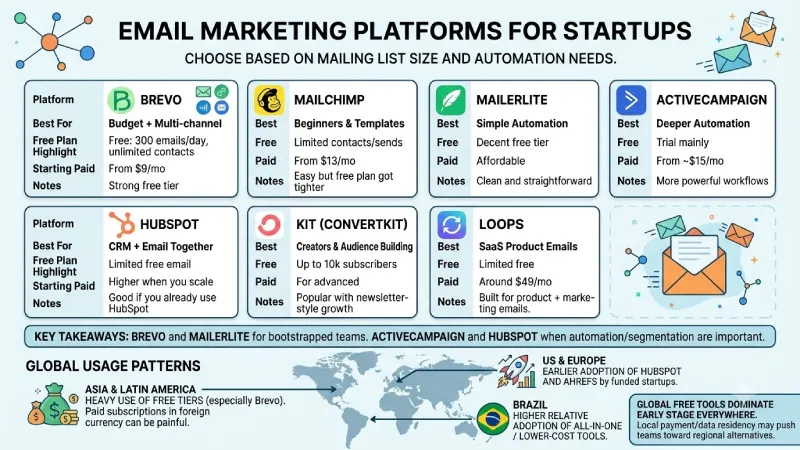
The email channel is still among the most profitable ones. Choose according to the size of your mailing list and the level of automation needed.
| Platform | Best for | Free plan highlight | Starting paid | Notes |
| Brevo | Budget + multi-channel | 300 emails/day, unlimited contacts | From $9/mo | Strong free tier |
| Mailchimp | Beginners & templates | Limited contacts/sends | From $13/mo | Easy but free plan got tighter |
| MailerLite | Simple automation | Decent free tier | Affordable | Clean and straightforward |
| ActiveCampaign | Deeper automation | Trial mainly | From ~$15/mo | More powerful workflows |
| HubSpot | CRM + email together | Limited free email | Higher when you scale | Good if you already use HubSpot |
| Kit (ConvertKit) | Creators & audience building | Up to 10k subscribers on free | Paid for advanced | Popular with newsletter-style growth |
| Loops | SaaS product emails | Limited free | Around $49/mo | Built for product + marketing emails |
Brevo and MailerLite tend to win for pure bootstrapped teams. ActiveCampaign and HubSpot are better options when automation and segmentation become important.
Country / region notes
Pricing is almost always in USD, but usage patterns differ:
- In many Asian and Latin American markets, free tiers (especially Brevo and Google tools) get heavier use because paid subscriptions in foreign currency can be painful.
- US and European funded startups lean more toward HubSpot and Ahrefs earlier.
- Brazil and some other markets show higher relative adoption of certain all-in-one or lower-cost tools.
- Local payment options and data residency sometimes push teams toward regional alternatives, but the global free tools still dominate early stage everywhere.
How to actually choose and build your stack
- Start with measurement — set up Google Analytics 4 and Search Console first.
- Pick one email tool and one social scheduler. Don’t overthink it.
- Add SEO research tools only when you start publishing content regularly.
- Use free tiers until they clearly limit you (list size, sends, channels, or features).
- Watch what your team actually opens and uses. The “best” tool is the one that doesn’t get abandoned after two weeks.
A realistic early stack for most startups looks like this:
- Analytics: GA4 + Search Console (free)
- Email: Brevo or Mailchimp free
- Social: Buffer free
- Design: Canva free
- SEO: free tools + maybe Ubersuggest later
- Optional: HubSpot free CRM for leads
FAQ
1. What marketing tools do most startups really need?
4-6 essential tools that each serve one purpose: analytics (GA4 & Search Console), email (Brevo or Mailchimp), social media scheduling (Buffer), design (Canva), and basic SEO research.
2. Can I do marketing without spending any money?
Yes, indeed. Most founders stick to free versions for 6-12 months thanks to GA4, Search Console, Brevo (300 emails per day), Buffer (3 channels), and Canva.
3. Which email tool is best for bootstrapped startups?
Brevo usually wins for its generous free plan and multi-channel options. MailerLite is a close second for simple automation.
4. Should I consider paid SEO tools initially?
Not necessarily. Free versions (Search Console, Keyword Planner, Trends, Screaming Frog free, Ahrefs Webmaster Tools) will suffice during the first year. The content quality remains a constraint, not the tool.
5. How do I go about selecting and setting up my toolset?
I should begin with measuring tools (GA4 + Search Console), then add one email tool and one social scheduler, be on free tiers until volume requires an upgrade, and keep only those tools used by the team.
Conclusion
You can do a lot with that before spending serious money.
The right marketing tools will not be able to save a bad product or poor communication strategy, but the wrong tools can definitely create some friction for you. Keep it simple and consistent, and don’t complicate things until the numbers force you to do so.
Where are you in the process and which medium seems the most blocked currently? That usually makes the next tool choice clearer.
To take the next step, see our detailed guide on Accounting and Finance Tools for Startup.
