

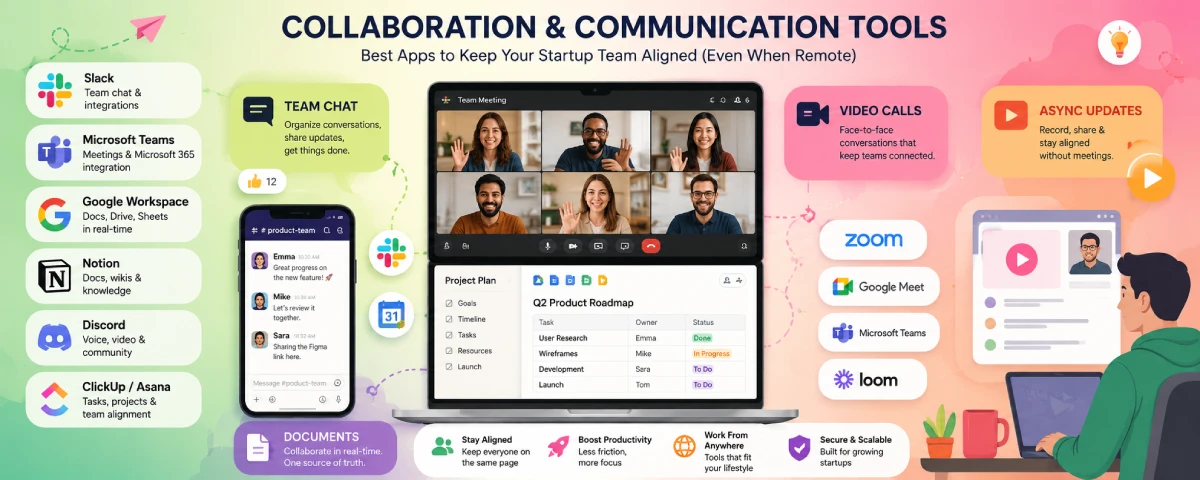
In a startup, either communication propels the process forward or it stops the ball from rolling. Communication gets lost in emails, decision making takes place in impromptu conversations, files are saved in five different locations, and video calls tend to last longer than necessary. Right communication tools cut out all that noise so people can do productive stuff.

Here’s a practical look at what startups are using in 2026 for team chat, video, documents, and remote communication.
For the overarching strategy, read our complete guide on Startup Tools
Best team collaboration software
Most teams end up with a mix rather than one perfect tool. Here’s a clear overview:
| Tool | Best for | Free plan? | Starting paid price | Standout strength |
| Slack | Fast team chat & integrations | Yes (limited history) | From ~$7–8.75/user | Channels + huge app ecosystem |
| Microsoft Teams | Microsoft 365 users | Yes | Often included in M365 | Deep Office integration + meetings |
| Google Workspace | Document-heavy teams | Limited free | From ~$6–7/user | Real-time Docs + Meet + Drive |
| Notion | Wiki + docs + light tasks | Yes (solo/small) | From ~$10/user | Flexible all-in-one workspace |
| Discord | Casual / community-style teams | Yes | Nitro optional | Free voice + screen share |
| ClickUp / Asana | Work management + light chat | Yes | From ~$7–11/user | Tasks + docs in one place |
Slack remains the default choice for many tech and product startups, with channels making the conversations organized, great search functionality, and connecting to almost all other apps.
Microsoft Teams is the best fit for those companies that operate entirely within Microsoft 365. The video calls, file collaboration, and chats come as a bundle without additional cost.
Google Workspace is the choice for teams that work mainly on documents and spreadsheets as real-time editing can’t be matched yet.
Slack vs Microsoft Teams
This is the comparison almost every startup runs at some point.
| Feature | Slack | Microsoft Teams |
| Chat experience | Faster, cleaner channels | Functional, more structured |
| Integrations | 2,600+ (strongest ecosystem) | Good, especially Microsoft tools |
| Video meetings | Huddles + Zoom/others | Native, strong for larger meetings |
| Document collaboration | Via integrations | Excellent (Word, Excel, etc.) |
| Free plan | 90-day history limit | More generous in some areas |
| Pricing (paid) | ~$7–15/user | Often cheaper if you have M365 |
| Best for | Tech startups, flexible stacks | Microsoft-centric or hybrid teams |
Select Slack if your company is looking for fast service, relies heavily on other applications (such as GitHub, Figma, Notion, Linear, et cetera), and likes a casual atmosphere for their chats.
Select Microsoft Teams if you are using Microsoft 365, require good video capability for larger conferences, or want to have everything from a single vendor.
Many companies end up using both for a while — Slack for daily team chat and Teams for formal meetings or client calls.
Video conferencing tools for startups
Reliable video is non-negotiable for remote or hybrid teams.
- Zoom — Still the most reliable and widely used. Free plan has a 40-minute limit on group calls. Paid plans add better recording, AI features, and longer meetings.
- Google Meet — Excellent if you’re on Google Workspace. Easy browser access, solid quality, and no extra app for most users.
- Microsoft Teams — Strong when you’re already in the Microsoft world. Handles large meetings well.
- Discord — Surprisingly good (and free) for internal voice + screen sharing with no time limits. Popular with smaller or more casual teams.
When calling external clients, Zoom or Google Meet would be the best option since most people already have an account.
Document collaboration platforms
This is where a lot of daily work actually happens.
| Platform | Best for | Strengths | Watch-outs |
| Google Docs/Sheets/Drive | Most startups | Real-time editing, simple sharing | Storage limits on free |
| Microsoft 365 (Word/Excel/OneDrive) | Microsoft shops | Deep formatting + version history | Heavier interface for some |
| Notion | Knowledge bases & mixed content | Flexible pages, databases, wikis | Can get messy without structure |
| Dropbox / Box | File storage + light collab | Strong sharing controls | Less real-time editing than Google |
| Coda / Notion | Advanced doc-based workflows | Docs that act like lightweight apps | Steeper learning curve |
Google Workspace continues to be the go-to tool for most start-ups since everyone is familiar with its workings and it enables real-time collaboration.
Remote team communication tools
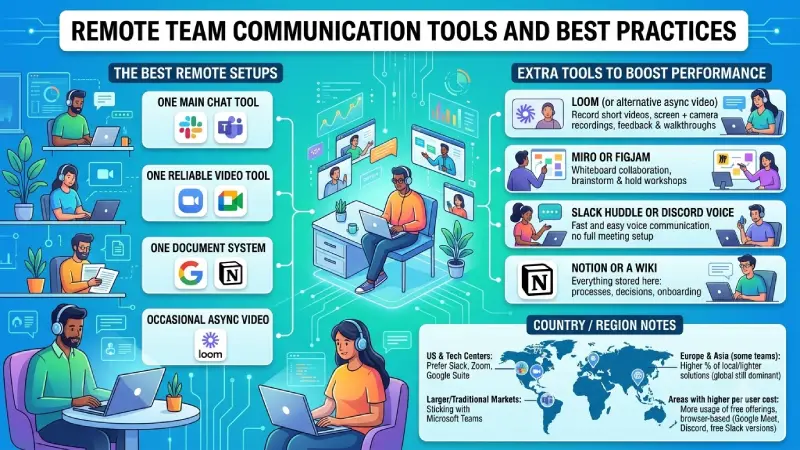
Apart from chat and video communication channels, there are a few extra tools that boost the performance of remote work teams:
- Loom (or alternative asynchronous video) – Record short videos combining screen and camera recordings rather than scheduling another meeting. Very helpful when providing feedback and walkthroughs.
- Miro or Figjam – Whiteboard collaboration to brainstorm and hold workshops.
- Slack Huddle or Discord voice – Fast and easy voice communication without setting up a whole meeting.
- Notion or a wiki – Everything is stored here – processes, decisions, onboarding.
The best remote setups usually combine:
- One main chat tool (Slack or Teams)
- One reliable video tool (Zoom or Meet)
- One document system (Google or Notion)
- Occasional async video (Loom)
Country / region notes
- The US and even most tech centers prefer Slack, Zoom, and Google Suite.
- Companies already standardized on Microsoft (common in larger or more traditional markets) stick with Teams.
- Some of the European and Asian teams utilize a higher percentage of local or lighter solutions, but the global solutions continue to be dominant.
- The free offerings, along with browser-based solutions like Google Meet, Discord, and the free versions of Slack, see more usage in areas where per user cost is higher.
How to choose without creating tool sprawl
- Start with what your team already uses or knows (Google vs Microsoft is often the first decision).
- Pick one primary chat tool and stick to it.
- Keep video simple — one main platform for external calls.
- Put important documents in one shared system and enforce it.
- Include async video (Loom style) right away – it’ll save more time during meetings than anything else.
- Evaluate your stack every six months. When a tool is not being used, remove it.
A solid early-stage stack for many startups looks like:
- Chat: Slack (or Teams if on Microsoft)
- Video: Zoom or Google Meet
- Docs: Google Workspace or Notion
- Async updates: Loom
Communication tools will not resolve the lack of clarity of priorities and processes, but using the right one eliminates many everyday problems. If you have a compact technological setup, with everybody on the same system, then you will not waste much time trying to find information.
FAQ
- What collaboration tools do most startups use?
Simple integration: Slack (or Microsoft Teams) for messaging, Zoom or Google Meet for video calls, Google Suite or Notion for documents, and Loom for asynchronous collaboration. - What works better: Slack or Microsoft Teams?
Slack wins if speed, integration capabilities, and versatility of tech stacks come first. It’s better to go for Microsoft Teams if you use Microsoft 365. - Which video tool should startups choose?
Zoom is the most reliable for external calls. Google Meet works great if you’re on Google Workspace. Discord is a solid free option for internal voice and screen sharing. - What’s the best way to handle documents and knowledge?
Google Workspace is the default for most early teams because of real-time editing. Notion is excellent for wikis, processes, and mixed content if you need more structure. - Tool Sprawl? How can I avoid it?
Select one primary tool each for chat, video calls, and documents. Include asynchronous videos (such as Loom) from day one. Set common places for important files and review the tool stack every six months, eliminating underused tools.
Conclusion
The right collaboration tools will get rid of any friction in your day so that you can build. Keep your tool stack as thin as possible, meaning one tool for chats, one for video calls, one for documents plus asynchronous video. The important thing is the form of communication, not the tool itself.
To take the next step, see our detailed guide on Analytics and Reporting Tools for Startups.
