Introduction
Most businesses purchase CRM software, assuming that they will become successful quickly, while what they end up doing is focusing on the wrong parts of CRM software implementation that can help them form good connections with their customers.
While learning about which components your CRM software needs to have, you must be aware that each element is introduced with its own objective, from managing customer contacts to automation of various time-consuming processes and sales tracking.
A newly established company with not many prospects will probably want to go for lead management and follow-ups.
This is why it is very important to know about the functionalities of CRM software prior to making a selection.
For beginners in CRM software, it is helpful to first understand What Is CRM Software and review our CRM Software Basics for Beginners guide to learn how CRM systems support customer management, sales processes, and business growth.
CRM features from our what is CRM software guide.
In this guide, we will introduce the key features of CRM software that businesses will implement in 2026 to better manage customers.
Why CRM Features Matter in 2026
CRM technology has changed significantly over the last few years.
Earlier CRM systems were mainly used to store customer information. Businesses treated them like digital address books.
Today, CRM platforms do much more.
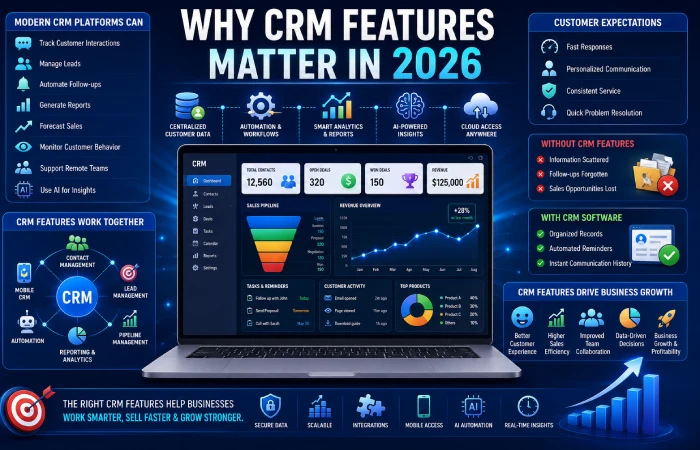
Modern CRM systems can:
- Track customer interactions
- Manage leads
- Automate follow-ups
- Generate reports
- Forecast sales
- Monitor customer behavior
- Support remote teams
- Use artificial intelligence for insights
For most businesses, customer expectations are also higher than ever.
According to Salesforce CRM Guide, new generation CRM software enables organizations to streamline their processes, automate tasks, handle customer support more efficiently, and boost sales productivity.
Customers expect:
- Fast responses
- Personalized communication
- Consistent service
- Quick problem resolution
Without the right CRM features, managing these expectations becomes difficult.
For instance, consider a sales representative dealing with thousands of clients’ questions on a monthly basis.
Without CRM features:
- Customer information may be scattered
- Follow-ups may be forgotten
- Sales opportunities may be lost
With CRM software:
- Customer records stay organized
- Reminders are automated
- Communication history is available instantly
These improvements highlight some of the most important CRM Software Benefits for Businesses, including stronger customer relationships, improved productivity, and better sales performance.
That is why businesses now compare CRM features carefully before making a purchase decision.
What Are CRM Software Features?
CRM software features are those functionalities that have been developed to assist enterprises in handling customers efficiently
Each feature solves a specific business challenge.
Some features help organize customer information.
Others help automate tasks or improve reporting.
CRM features can be considered as different departments functioning together within a single software system.
For example:
| CRM Feature | Purpose |
| Contact Management | Stores customer information |
| Lead Management | Tracks potential customers |
| Automation | Reduces manual work |
| Reporting | Provides business insights |
| Mobile CRM | Supports remote access |
| Pipeline Management | Tracks sales opportunities |
The greater number of features that a company implements in its CRM application will be, the higher its benefits from the CRM system will be.
Nevertheless, not necessarily more is equal to better.
For example, a small business does not require all kinds of enterprise-level analysis.
Similarly, a large organization may quickly outgrow a basic CRM.
The objective is to select features based on the requirements of your organization.
Before delving into each of these features, it is important to know about the Types of CRM Software Explained since there are differences in the features selected by operational, analytical, and collaborative CRM systems.
Must-Have CRM Software Features 2026
CRM systems provide a lot of features, even though some are regarded as essential by most firms.
This list contains all the features that are important to businesses when selecting a CRM software application in 2026.
- Contact Management
Stores customer details in one centralized location.
- Lead Management
Tracks potential customers throughout the sales process.
- Customer Database
Maintains organized customer records.
- Sales Pipeline Management
Visualizes sales opportunities and deal progress.
- Task Management
Organizes activities and reminders.
- Automation Tools
Reduces repetitive manual work.
- Reporting and Analytics
Provides business insights and performance data.
- Mobile CRM Access
Allows employees to work from anywhere.
- Integration Capabilities
Connects CRM software with other business tools.
- AI Features
Provides forecasting, automation, and customer insights.
CRM Feature Importance in 2026
| Feature | Importance Level |
| Contact Management | Very High |
| Lead Tracking | Very High |
| Sales Pipeline | Very High |
| Automation | High |
| Analytics | High |
| Mobile CRM | High |
| AI Features | Growing Rapidly |
| Integrations | High |
Firms usually prefer these features due to their influence on sales, customer services, and efficiency.
SMB-focused? See our CRM for small business guide.
Contact Management Features
Contact management is the foundation of every CRM system.
Without accurate customer information, other CRM functions become much less effective.
Contact management helps businesses store and organize:
- Customer names
- Phone numbers
- Email addresses
- Company details
- Communication history
- Purchase history
- Notes and preferences
There will be no need to comb through different sources of information since everything is available from one place.
The Importance of Contact Management
Maintaining relationships with customers becomes complicated when information about them is not centralized into a particular source.
Suppose a customer calls you about an old order.
Without CRM software:
Employees may spend several minutes searching for records.
With CRM software:
The customer’s entire history appears instantly.
This improves both customer experience and response speed.
Benefits of Contact Management
- Faster communication
- Better customer service
- Organized records
- Improved team collaboration
- Reduced data duplication
Traditional Records vs CRM Contact Management
| Traditional Method | CRM Contact Management |
| Multiple spreadsheets | Centralized database |
| Manual updates | Automated updates |
| Limited accessibility | Team-wide access |
| Higher risk of errors | Improved accuracy |
For many businesses, contact management is the first feature that delivers immediate value.
Lead Management Features
Lead management is one of the most important CRM software features for businesses focused on growth.
Leads refer to individuals who have demonstrated interest in the products and services of your business.
The absence of effective lead management means losing out on many opportunities.
What Is Lead Management?
Lead management is used by businesses for the purpose of tracking and organizing leads.
The system records:
- Customer inquiries
- Website form submissions
- Email interactions
- Phone calls
- Sales conversations
This allows businesses to monitor every opportunity from initial contact to final sale.
Typical Lead Journey
Most leads move through several stages:
Lead → Qualified Lead → Contacted → Proposal Sent → Negotiation → Customer
CRM software tracks each stage automatically.
Why Lead Management Matters
Many businesses lose sales because follow-ups are delayed or forgotten.
Lead management solves this problem by:
- Organizing leads
- Scheduling reminders
- Tracking communication
- Prioritizing opportunities
Lead Management Benefits
| Benefit | Business Impact |
| Better organization | Fewer missed opportunities |
| Faster follow-ups | Higher conversion rates |
| Sales visibility | Improved forecasting |
| Lead prioritization | Better productivity |
For startups and small businesses, lead management often becomes one of the most valuable CRM features.
Customer Database Features
Every CRM platform relies on a customer database.
The database is where all of the data relating to customers will be stored.
There is no need to have the information scattered in various departments.
Information Stored in a CRM Database
Most CRM databases contain:
- Contact information
- Purchase history
- Customer preferences
- Communication records
- Support tickets
- Sales activities
This creates a complete customer profile.
Why Customer Databases Matter
Businesses interact with customers through multiple channels.
For example:
- Website
- Phone
- Social media
- Live chat
A CRM database combines all this information into a single view.
Employees can quickly understand customer history before responding.
Benefits of Customer Databases
- Better personalization
- Improved customer service
- Faster issue resolution
- Better reporting accuracy
CRM Database vs Spreadsheet Tracking
| Spreadsheet System | CRM Database |
| Manual updates | Automated updates |
| Difficult reporting | Built-in reporting |
| Limited collaboration | Team access |
| Higher error risk | Better accuracy |
As customer data grows, CRM databases become increasingly valuable.
Task & Activity Management
Businesses handle hundreds of activities every week.
From meetings to calling and emailing to responding to clients, there are many tasks involved.
Task management can assist in organizing the tasks.
What Task Management Does
CRM task management helps businesses:
- Create reminders
- Assign responsibilities
- Schedule activities
- Monitor progress
- Track deadlines
This reduces the chances of important tasks being overlooked.
Activity Tracking
Activity management records customer interactions such as:
- Calls
- Emails
- Meetings
- Notes
- Follow-up actions
This provides complete visibility into customer relationships.
Benefits of Task Management
- Improved accountability
- Better organization
- Faster follow-ups
- Increased productivity
Common CRM Activities
| Activity | Purpose |
| Follow-up reminders | Customer communication |
| Call scheduling | Sales conversations |
| Meeting tracking | Relationship management |
| Task assignments | Team coordination |
Task management acquires even more significance as the organization grows and interacts with customers on a large scale.
Sales Pipeline Management in CRM
One of the most useful CRM tools for sales professionals is the sales pipeline management tool.
This shows visually where each deal stands within the pipeline.
There is no guesswork involved about whether each deal is moving forward
What Is a Sales Pipeline?
The sales pipeline highlights the process of sales starting from prospection up until closing.
Typical stages include:
Lead → Qualified Lead → Proposal → Negotiation → Closed Sale
Each opportunity moves through these stages as the sales process advances.
Why Sales Pipeline Management Matters
Without the sales pipeline process, sales opportunities can easily become disorganized.
Sales teams may:
- Miss follow-ups
- Lose track of prospects
- Misjudge future revenue
Pipeline management provides visibility into every deal.
Benefits of Sales Pipeline Management
- Better sales forecasting
- Improved follow-up consistency
- Increased conversions
- Better team accountability
- More predictable revenue
Example
A business managing fifty active opportunities can instantly see:
- Which deals are close to closing
- Which deals require follow-up
- Which deals have stalled
This helps managers allocate resources more effectively.
Sales Pipeline Comparison
| Feature | Without CRM Pipeline | With CRM Pipeline |
| Lead Tracking | Manual | Automated |
| Follow-Up Reminders | Easy to miss | Automatic |
| Deal Visibility | Limited | Real-time |
| Sales Forecasting | Difficult | Accurate |
| Team Collaboration | Moderate | Strong |
| Customer Tracking | Fragmented | Centralized |
| Conversion Monitoring | Manual | Automated |
| Revenue Planning | Limited | Improved |
Sales Pipeline Management is considered to be one of the greatest motivators for organizations to use CRM due to its direct effect on sales productivity and income generation.
Advanced CRM Features Every Business Should Understand
CRM Software Automation Features
As companies grow, managing their customers becomes increasingly difficult for salespeople who need to contact leads, support teams who need to respond to customer inquiries, and marketing teams who need to conduct marketing campaigns on a consistent basis.
Here is where automation tools in CRM software come into play.
Automating CRM ensures that firms reduce themselves of tedious tasks, and at the same time increase efficiency. It is not necessary to manually edit spreadsheets and sending reminders through emails because this will all be automated.
For instance, once you get a form submission from a customer through your website, your CRM can automatically:
- Create a new lead
- Assign the lead to a salesperson
- Send a welcome email
- Schedule a follow-up reminder
- Update the customer database
This saves time and reduces human error.
Benefits of CRM Automation
| Benefit | Business Impact |
| Saves Time | Less manual work |
| Faster Follow-Ups | Better lead conversion |
| Improved Accuracy | Fewer data entry errors |
| Better Productivity | Teams focus on customers |
| Consistent Processes | Standardized workflows |
Automation in the CRM software is a necessary feature as it helps to facilitate quicker customer management.
Workflow Automation
Workflow automation is among the most vital features of CRM software automation in 2026.
Workflows can be defined as a chain of actions executed automatically whenever an event takes place.
Example Workflow
Customer fills website form
↓
CRM creates lead record
↓
Sales representative assigned
↓
Welcome email sent
↓
Follow-up task scheduled
↓
Lead enters sales pipeline
Without automation in the workflow process, the workforce will have to execute each step themselves.
Common CRM Workflow Automations
- Lead assignment
- Customer onboarding
- Follow-up reminders
- Support ticket routing
- Task creation
- Deal stage updates
- Customer satisfaction surveys
Why Workflow Automation Matters
For most growing businesses, customer inquiries arrive from multiple sources every day.
These may include:
- Website forms
- Facebook ads
- Instagram messages
- Email campaigns
- Phone calls
In workflow automation, everything is documented and managed effectively.
Email Automation
Email is regarded as one of the most effective methods for interacting with customers.
However, emails can prove difficult to send when you have to deal with numerous clients.
CRM email automation helps businesses communicate at scale.
Common Automated Emails
- Welcome emails
- Lead nurturing emails
- Appointment reminders
- Follow-up emails
- Renewal reminders
- Customer feedback requests
Example
Imagine a customer downloads a free guide from your website.
The CRM can automatically send:
- Day 1: Welcome email
- Day 3: Educational content
- Day 7: Product information
- Day 14: Sales offer
This process happens automatically without requiring manual effort.
Benefits of Email Automation
| Feature | Benefit |
| Automated Follow-Ups | Faster communication |
| Lead Nurturing | Better conversions |
| Customer Retention | Ongoing engagement |
| Consistency | Professional communication |
| Time Savings | Less repetitive work |
Reporting and Analytics in CRM Software
Many companies accumulate customer information but fail to make full use of it.
The purpose of reporting and analytics is to turn data into something meaningful for your business.
That’s why CRM software must be equipped with reporting and analytics as critical components.
Examples of queries answered by CRM reporting include:
- Which marketing activities lead to the most leads generation?
- Who among the sales team produces the best results?
- What products are selling more frequently?
- Which customers contribute maximum profit to the company?
- At what point do leads fall out from the sales process?
Why Analytics Matter
Without reporting, businesses often make decisions based on assumptions.
Decisions made using CRM analytics are made based on factual customer information.
For example:
An organization realizes that emails bring about double the amount of sales when compared to advertisements on social media.
Consequently, the organization increases their investments in emails.
This data-driven approach improves results.
Types of CRM Reports
Modern CRM systems generate many report types.
Sales Reports
Help track:
- Revenue
- Conversion rates
- Deal progress
- Sales performance
Marketing Reports
Show:
- Campaign effectiveness
- Lead generation sources
- Customer acquisition costs
Customer Reports
Track:
- Customer behavior
- Purchase patterns
- Retention rates
- Customer lifetime value
Activity Reports
Measure:
- Team productivity
- Task completion
- Follow-up performance
CRM Dashboards Explained
A CRM dashboard is the central screen where users view important business information.
Think of it as a business control center.
You know it is not necessary to open several reports to find necessary information; all relevant information will be available in one report.
Typical Dashboard Elements
- New leads
- Open deals
- Sales pipeline value
- Tasks due today
- Support tickets
- Revenue performance
- Marketing results
Why Dashboards Are Useful
Sales managers can quickly identify:
- High-performing team members
- Stalled deals
- Missed follow-ups
- Revenue trends
This allows faster decision-making.
Example Dashboard Metrics
| Dashboard Metric | Purpose |
| New Leads | Track growth |
| Conversion Rate | Measure success |
| Open Opportunities | Monitor sales |
| Revenue Forecast | Predict future income |
| Customer Retention | Measure loyalty |
KPI Tracking
KPI stands for Key Performance Indicator.
KPIs help businesses measure success.
Current CRM solutions include built-in tracking of important metrics.
Common CRM KPIs
- Lead conversion rate
- Customer acquisition cost
- Customer lifetime value
- Average deal size
- Monthly recurring revenue
- Customer retention rate
- Response time
KPI Tracking Example
Imagine two sales representatives:
Salesperson A converts 15% of leads.
Salesperson B converts 30% of leads.
CRM KPI tracking immediately reveals the difference.
Management can then analyze why one performs better and share best practices.
KPI Tracking Benefits
| KPI Benefit | Why It Matters |
| Better Visibility | Clear performance measurement |
| Faster Decisions | Data-driven actions |
| Improved Accountability | Team transparency |
| Growth Monitoring | Track business progress |
Mobile CRM Features for Sales Teams
Sales teams no longer work only from offices.
Many professionals spend time:
- Visiting customers
- Attending meetings
- Traveling
- Working remotely
Thus, mobile CRM systems have become a necessity for salespeople.
Many of these mobile capabilities are powered by modern cloud platforms, making it useful to understand Cloud-Based CRM Software Explained before selecting a CRM solution.
Common Mobile CRM Features
- Contact management
- Lead tracking
- Task management
- Call logging
- Email access
- Sales pipeline updates
- Notifications
Example
A salesperson visits a client.
Before the meeting, they open the CRM mobile app and instantly view:
- Previous conversations
- Purchase history
- Open opportunities
- Upcoming tasks
This improves customer interactions.
Benefits of Mobile CRM
| Feature | Benefit |
| Remote Access | Work anywhere |
| Real-Time Updates | Instant information |
| Faster Response | Better customer service |
| Mobile Notifications | Never miss tasks |
| Improved Productivity | More efficient sales teams |
Mobile CRM vs Desktop CRM
Many businesses compare mobile CRM and desktop CRM systems.
Both serve important roles.
| Feature | Mobile CRM | Desktop CRM |
| Accessibility | Anywhere | Office-based |
| Convenience | High | Medium |
| Data Entry | Limited | Extensive |
| Reporting | Basic | Advanced |
| Dashboard Analysis | Limited | Comprehensive |
| Ideal Users | Field teams | Managers |
Which Is Better?
Most businesses benefit from both.
CRM Integration Features
When businesses are analyzing their software ecosystems, they sometimes compare the features of CRM Software vs ERP Software to see how each software works for customer relationship management and the operations of their business.
This process is called integration.
Common CRM Integrations
- Email platforms
- Accounting software
- Ecommerce systems
- Marketing tools
- Customer support software
- Communication platforms
Example
A CRM connected to an online store can automatically:
- Import orders
- Update customer records
- Track purchases
- Trigger marketing campaigns
Without integration, employees would need to enter information manually.
Benefits of CRM Integrations
| Integration Benefit | Impact |
| Data Synchronization | Better accuracy |
| Faster Workflows | Improved efficiency |
| Reduced Manual Work | Saves time |
| Better Customer View | Unified information |
Security Features
Customer data is one of the most valuable business assets.
As a result, CRM security features have become increasingly important.
Essential Security Features
- User permissions
- Multi-factor authentication
- Data encryption
- Secure backups
- Login monitoring
- Audit trails
Why Security Matters
Businesses store:
- Customer names
- Email addresses
- Phone numbers
- Purchase histories
- Payment information
Protecting this data is critical for maintaining customer trust.
CRM Security Feature Comparison
| Security Feature | Importance |
| Encryption | Very High |
| MFA Authentication | Very High |
| User Permissions | High |
| Backups | High |
| Audit Logs | Medium |
| IP Restrictions | Medium |
CRM Automation Adoption Growth (2022–2026)
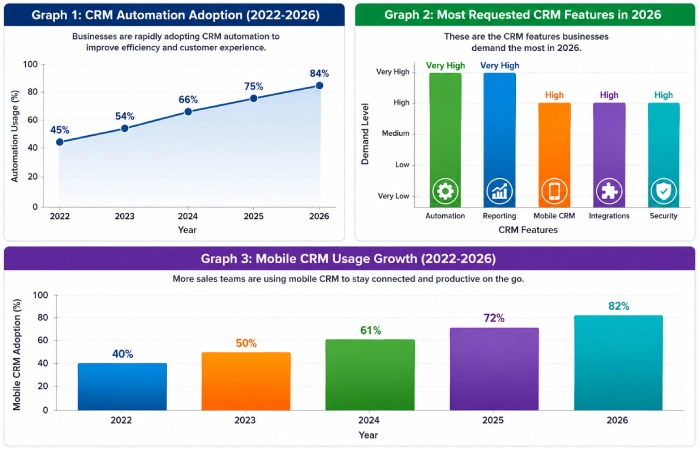
Graph 1: CRM Automation Adoption (2022–2026)
Place after CRM Software Automation Features
| Year | Automation Usage |
| 2022 | 45% |
| 2023 | 54% |
| 2024 | 66% |
| 2025 | 75% |
| 2026 | 84% |
Graph 2: Most Requested CRM Features in 2026
Place after Must-Have CRM Features
| Feature | Demand Level |
| Automation | Very High |
| Reporting | Very High |
| Mobile CRM | High |
| Integrations | High |
| Security | High |
Graph 3: Mobile CRM Usage Growth
Place after Mobile CRM Features for Sales Teams
| Year | Mobile CRM Adoption |
| 2022 | 40% |
| 2023 | 50% |
| 2024 | 61% |
| 2025 | 72% |
| 2026 | 82% |
AI CRM Features in 2026
AI is becoming one of the most important CRM technologies for enterprises of any size. Nowadays, many CRM systems have artificial intelligence to make their operations easier and more productive.
Popular AI CRM features in 2026 include:
- AI lead scoring
- Predictive sales forecasting
- AI chatbots
- Smart email suggestions
- Customer behavior analysis
- Automated task recommendations
As another example, with an AI-powered CRM, it becomes possible to know which leads have the highest chances of converting into clients. In such a case, there is no need to contact all leads one by one.
AI CRM Feature Growth (2022–2026)
| Year | AI CRM Adoption |
| 2022 | Low |
| 2023 | Medium |
| 2024 | High |
| 2025 | Very High |
| 2026 | Extremely High |
CRM Features by Business Type
Not all companies look for the same CRM features.
| Business Type | Most Important CRM Features |
| Startup | Lead management, automation |
| Small Business | Contact management, reporting |
| Ecommerce Store | Customer segmentation, integrations |
| Sales Team | Pipeline management, mobile CRM |
| Service Business | Scheduling, customer communication |
| Enterprise | Analytics, AI, workflow automation |
In many cases, selecting features according to one’s needs gives better outcomes than opting for the CRM having a long list of features.
Common CRM Feature Mistakes
Companies often buy CRM systems but do not utilize them properly.
Common mistakes include:
- Paying for features that are never used
- Ignoring employee training
- Choosing complex CRM systems too early
- Not using automation tools
- Failing to integrate other business software
- Tracking too many reports at once
A good CRM system that is used by everyone will always be more effective than an advanced system nobody knows how to work with.
Troubleshooting CRM Feature Problems
Problem: Employees Avoid Using the CRM
Solution: Choose a simpler interface and provide training.
Problem: Too Much Manual Work
Solution: Enable workflow and email automation features.
Problem: Poor Reporting
Solution: Configure dashboards and KPI tracking correctly.
Problem: Customer Data Is Disorganized
Solution: Use contact management and data cleanup tools regularly.
Problem: Sales Opportunities Are Missed
Solution: Introduce sales funnel management and automated reminders for follow-ups.
How to Choose CRM Features
Before deciding which CRM program to go for, find out the most significant problem faced by your business. Various CRM systems may be compared in terms of features, budgets, number of employees, and other business goals.
If your goal is sales growth, prioritize:
- Lead management
- Sales pipelines
- Automation
If your goal is customer retention, focus on:
- Customer history
- Reporting
- Communication tools
If your team works remotely, consider:
- Mobile CRM
- Cloud access
- Collaboration features
Start off with some simple functionalities and then gradually add on the more advanced ones.
Frequently Asked Questions
What are some of the main characteristics of CRM in 2026?
Some of the key characteristics of CRM will be automation, sales pipeline management, reporting, mobile CRM, artificial intelligence and software integration.
Why is sales pipeline management important?
It will allow businesses to track their leads and opportunities as well as convert them into sales.
Is CRM automation important for small businesses?
Yes, because CRM automation saves time and even enables small groups to handle more clients.
Is mobile CRM necessary?
Mobile CRM is greatly advantageous for organizations with remote employees or field sales forces.
Which CRM functionality contributes to enhancing customer relations?
Contact management and customer history tracking help businesses provide more personalized customer experiences.
Use our how to choose CRM software guide.
Conclusion
The best features for any CRM software would be those that provide solutions to actual business challenges. In the year 2026, contact management, lead management, sales process management, automation, analytics, mobility, integration, and artificial intelligence would still represent the most important CRM features.
It is recommended to pick up not the software that has the largest number of features but the one which offers the features that are actually required by the company. Using such CRM software can help organizations operate more efficiently, increase sales and build better customer relationships.