Introduction
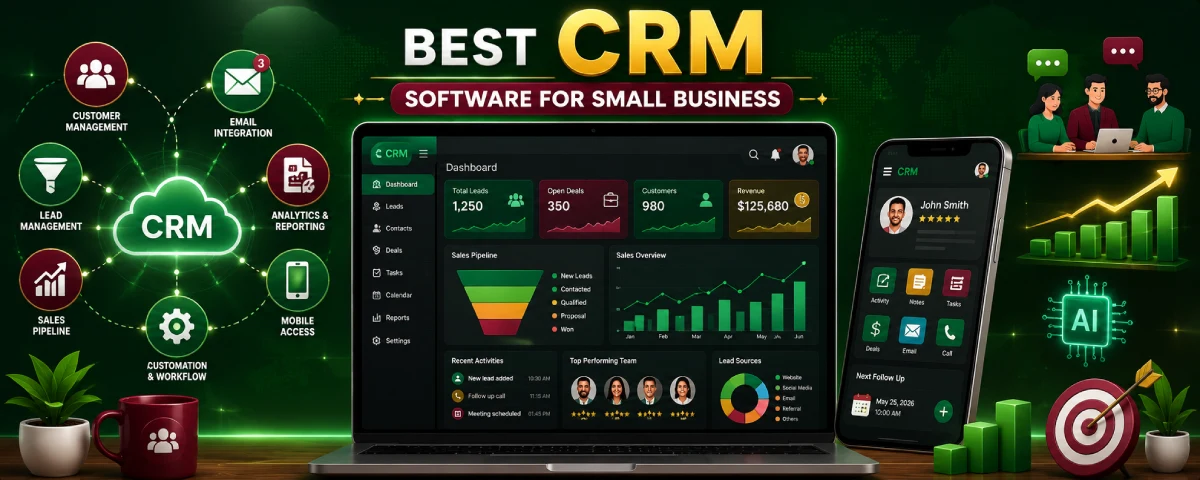
Choosing the best right CRM software matters a ton for small business owners in 2026 because there’s just so much to juggle. Customer Relationship Management (CRM) ensures that all customer information is well organized and enables lead management, as well as providing a comprehensive view of all information related to sales. If you are new to the concept of customer management systems, Using this technique enables companies to focus more on relationships and sales than paperwork.
CRM for small business from our What Is CRM Software guide.
Now, modern CRMs are actually made for the smaller guys—they’re budget-friendly and easy to use. They gather customer interactions from everywhere into one spot, smoothing out the whole comms process. Plus, newer CRMs throw in automation, AI predictions, sales forecasts, and mobile options too.
So this guide will go over some cost-effective choices for small biz owners—both affordable CRMs and free ones—that still pack a punch.
Why Small Businesses Need CRM Software
Many small business owners start without CRM software.
In the beginning, customer information is usually manageable. There may only be a few inquiries each week, and tracking conversations manually seems easy enough.
But here’s the thing: as a business grows, customer management becomes more complicated.
New leads arrive from different channels. Existing customers require support. Sales grow, but handling everything manually makes things stressful and time-consuming.
CRM software steps in to fix this, creating one central system for managing customer relations. New business owners can also explore CRM Software Basics for Beginners to understand how CRM tools work before choosing a platform.
Customer Information Becomes Difficult to Manage
One of the biggest problems small businesses face is keeping customer information organized.
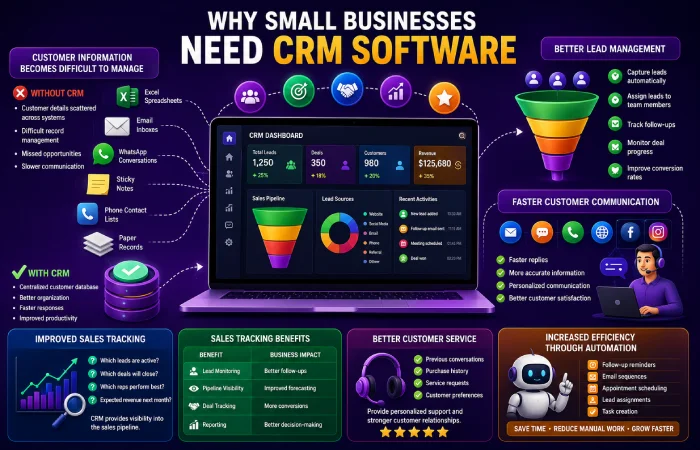
Customer data may be stored in:
- Excel spreadsheets
- Email inboxes
- WhatsApp conversations
- Sticky notes
- Phone contact lists
- Paper records
Without it, info gets spread out and that causes confusion and more mistakes.
Actually CRM keeps all data in one spot, so you can easily check customer history whenever you need to.
Without CRM
- Customer details scattered across systems
- Difficult record management
- Missed opportunities
- Slower communication
With CRM
- Centralized customer database
- Better organization
- Faster responses
- Improved productivity
Better Lead Management
Every inquiry has the potential to become a customer.
However, many businesses lose leads because there is no structured process for tracking them.
CRM software helps businesses:
- Capture leads automatically
- Assign leads to team members
- Track follow-ups
- Monitor deal progress
- Improve conversion rates
Think about it: if a customer gets in touch with your business today and doesn’t get followed up for days, they’ll likely go with a competitor instead.
CRM systems reduce that risk.
Faster Customer Communication
Modern customers expect quick responses.
Whether they contact a business through email, social media, phone, or website forms, actually they want answers without delays.
CRM software organizes communication channels into a single system.
You know employees can review previous interactions before responding, creating a smoother and best customer experience.
This helps businesses provide:
- Faster replies
- More accurate information
- Personalized communication
- Better customer satisfaction
Improved Sales Tracking
Many small businesses struggle to understand where sales opportunities stand.
Without proper tracking, it becomes difficult to answer questions like:
- Which leads are active?
- Which deals are likely to close?
- Which sales representatives perform best?
- How much revenue is expected next month?
CRM software provides visibility into the sales pipeline.
Sales Tracking Benefits
| Benefit | Business Impact |
| Lead Monitoring | Better follow-ups |
| Pipeline Visibility | Improved forecasting |
| Deal Tracking | More conversions |
| Reporting | Better decision-making |
Better Customer Service
Customer service often determines whether a customer returns or chooses another provider.
A CRM system gives support teams access to:
- Previous conversations
- Purchase history
- Service requests
- Customer preferences
You know this information allows businesses to provide more personalized support.
Actually Customers appreciate not having to explain the same issue repeatedly.
Increased Efficiency Through Automation
One reason CRM software has become popular is automation.
Many routine tasks can be automated, including:
- Follow-up reminders
- Email sequences
- Appointment scheduling
- Lead assignments
- Task creation
For small teams, automation saves valuable time and reduces manual work.
That’s why even very small businesses are investing in CRM technology.
What Makes a CRM Good for Small Businesses?
Basically not all CRM platforms are designed for small businesses.
Actually Some systems are built for large enterprises and include features that best smaller organizations may never use.
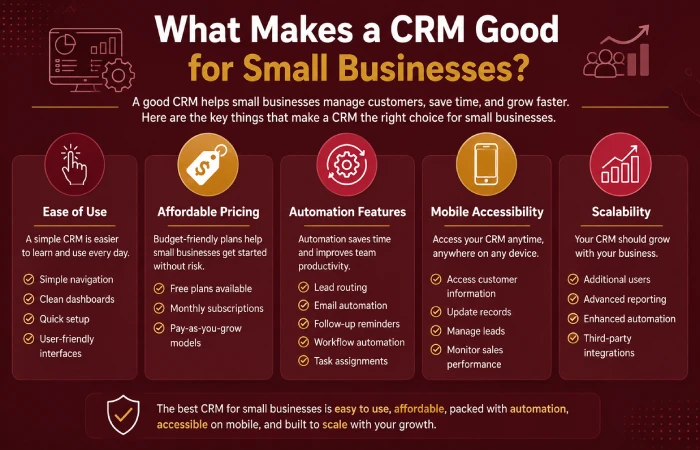
For a small business CRM system, simplicity, scalability, affordability, and usability are the best key requirements.
Understanding the different Types of CRM Software Explained can help businesses choose a system that matches their goals and growth plans.
Ease of Use
For most founders, simplicity matters.
A CRM system should be easy to understand without requiring extensive training.
Good CRM software offers:
- Simple navigation
- Clean dashboards
- Quick setup
- User-friendly interfaces
In case employees find it difficult to utilize the system, the adoption rate will be very low.
Affordable Pricing
Budget is often a major concern for small businesses.
The best CRM platforms provide flexible pricing options, including:
- Free plans
- Monthly subscriptions
- Pay-as-you-grow models
This ensures that organizations are able to begin small and grow bigger with time.
Automation Features
Automation helps businesses work more efficiently.
Common CRM automation tools include:
-
- Lead routing
- Email automation
- Follow-up reminders
- workflow automation
- Task assignments
These features reduce repetitive work and improve consistency. Automation, lead tracking, reporting, and customer management are among the most important capabilities businesses should evaluate when selecting a CRM platform. Pick the right features via our CRM software features guide.
Mobile Accessibility
Business owners increasingly work remotely.
Mobile CRM apps allow users to:
- Access customer information
- Update records
- Manage leads
- Monitor sales performance
from anywhere.
This flexibility is especially useful for service-based businesses and field teams.
Scalability
A CRM should support future growth.
As customer numbers increase, businesses may require:
- Additional users
- Advanced reporting
- Enhanced automation
- Third-party integrations
Selecting a system that scales will mean avoiding future migrations.
Best CRM Software for Small Business
Every business has its own needs, and hence there cannot be one particular CRM application that would suit every business.
There are, however, some CRM applications that seem to be favored by many small businesses.
HubSpot CRM
HubSpot CRM remains one of the most widely used CRM platforms for startups and best small businesses.
Key Features
- Contact management
- Lead tracking
- Sales pipeline management
- Email integration
- Reporting dashboards
Best For
- Startups
- Marketing teams
- Small businesses
Advantages
- Free plan available
- Easy setup
- User-friendly interface
Limitations
- Advanced features require paid plans
Zoho CRM
Zoho CRM is known for affordability and flexibility.
It provides a strong balance between functionality and cost.
Key Features
- Workflow automation
- Lead management
- Reporting tools
- Email integration
- Mobile CRM
Best For
- Small businesses
- Local companies
- Growing organizations
Advantages
- Affordable pricing
- Strong customization
- Good automation capabilities
CRM Software for Local Businesses
Local firms cannot survive without having good customer relationships. No matter whether you run a retail store, salon, gym, clinic, restaurant, repair garage, or local business, dealing with clients becomes more difficult as your firm grows.
Initially, local entrepreneurs will be able to maintain customer relationships through the use of pen-and-paper notes, spreadsheets, WhatsApp, emails, and other similar technologies. As more customers come on board, however, dealing with all this data manually.
This is where CRM software becomes valuable.
A CRM system helps local businesses:
- Store customer information
- Track inquiries
- Manage appointments
- Schedule follow-ups
- Improve customer communication
- Build customer loyalty
For instance, take an example of a local salon that gets appointment requests via phone calls, Instagram messages, and WhatsApp. In the absence of CRM, customer data may be found in several locations.
However, with CRM, all customer interactions are managed through one dashboard.
The staff can quickly view:
- Previous appointments
- Preferred services
- Contact information
- Customer notes
- Follow-up reminders
This improves customer service and reduces missed opportunities.
Benefits of CRM for Local Businesses
| Benefit | How It Helps |
| Customer Management | Stores all customer details |
| Appointment Tracking | Organizes bookings |
| Follow-Up Reminders | Improves customer retention |
| Marketing Support | Helps send offers and promotions |
| Better Communication | Keeps conversations organized |
Industries That Benefit from Local Business CRM
| Industry | CRM Use |
| Salons | Appointment management |
| Restaurants | Customer loyalty programs |
| Gyms | Membership tracking |
| Real Estate | Lead management |
| Clinics | Patient communication |
| Local Agencies | Client relationship management |
It is surprising that local business owners tend to favor cloud CRM software because they will be able to get their customer data without purchasing costly equipment.
CRM for Service-Based Small Businesses
Service-oriented organizations differ significantly from their product-focused counterparts in the way they conduct business.
Their performance relies greatly on effective communication, proper planning, and customer satisfaction.
Examples include:
- Marketing agencies
- Consulting firms
- Freelancers
- Accountants
- IT service providers
- Repair services
- Cleaning companies
Indeed, in the case of any service business, every client contact counts.
One might lose out on money as a result of missing out on a phone call or forgetting an appointment.
CRM software helps service providers stay organized.
How Service Businesses Use CRM
A CRM system can manage:
- Client records
- Project notes
- Service requests
- Meeting schedules
- Follow-up reminders
- Customer communication
Picture this.
A website design agency receives ten new inquiries every week.
Without CRM:
- Leads may get lost.
- Follow-ups may be delayed.
- Team communication may suffer.
With CRM:
- Every lead enters the system automatically.
- Tasks are assigned to team members.
- Follow-up reminders are created.
- Client conversations remain organized.
CRM Benefits for Service Businesses
| CRM Feature | Business Benefit |
| Lead Tracking | More sales opportunities |
| Appointment Scheduling | Better time management |
| Automation | Reduced manual work |
| Client History | Personalized service |
| Reporting | Better decision-making |
That’s why many service-based businesses consider CRM software one of their most valuable tools.
Cloud CRM vs Traditional CRM for Small Businesses
One of the hardest choices faced by most small businesses is deciding whether to opt for cloud-based CRM or regular CRM.
Both systems provide ways of managing customer relations, but they operate in distinct manners.
What Is Cloud CRM?
Cloud CRM stores customer information online.
Access to the system can be made by using either a web browser or a mobile app.
Examples include:
- HubSpot CRM
- Zoho CRM
- Salesforce
- Freshsales
The good thing about it all is that it does not require any server purchases and complicated installations.
Businesses comparing CRM platforms with broader business management tools may also benefit from reading CRM Software vs ERP Software.
What Is Traditional CRM?
Traditional CRM is installed on local company servers.
Businesses manage the hardware, updates, and maintenance themselves.
This approach provides greater control but usually requires more resources.
Cloud CRM vs Traditional CRM Comparison
| Feature | Cloud CRM | Traditional CRM |
| Setup Time | Fast | Slower |
| Upfront Cost | Lower | Higher |
| Maintenance | Provider handles updates | Business handles updates |
| Remote Access | Yes | Limited |
| Scalability | Easy | More complex |
| Mobile Support | Strong | Depends on setup |
Which Option Is Better for Small Businesses?
Cloud-based CRM is generally a superior option for startups and small businesses due to the following reasons:
Learn more about deployment models in our detailed guide on Cloud-Based CRM Software Explained.
- Lower costs
- Easy setup
- Remote access
- Automatic updates
- Better flexibility
CRM Pricing Comparison (2026)
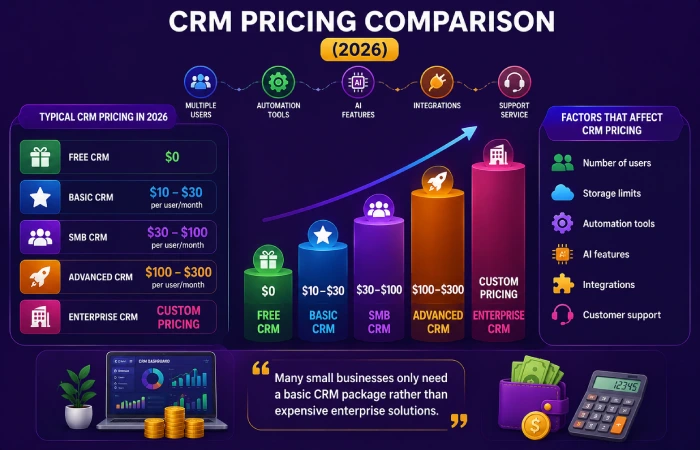
CRM price depends on the variety of features, number of users, level of automation, and support service.
Some platforms even offer free plans.
Typical CRM Pricing in 2026
| CRM Type | Typical Pricing |
| Free CRM | $0 |
| Basic CRM | $10–$30 per user/month |
| SMB CRM | $30–$100 per user/month |
| Advanced CRM | $100–$300 per user/month |
| Enterprise CRM | Custom pricing |
Factors That Affect CRM Pricing
Several factors influence CRM costs:
- Number of users
- Storage limits
- Automation tools
- AI features
- Integrations
- Customer support
Surprisingly, many small businesses discover they only need a basic CRM package rather than expensive enterprise solutions.
Free vs Paid CRM
| Feature | Free CRM | Paid CRM |
| Contact Management | Yes | Yes |
| Lead Tracking | Basic | Advanced |
| Automation | Limited | Extensive |
| Reporting | Basic | Advanced |
| Support | Limited | Priority Support |
A company must decide based on its needs and not just opt for a CRM system because it has many features.
CRM Feature Comparison
Different CRM systems provide different capabilities.
Common CRM Features Comparison
| Feature | Basic CRM | Advanced CRM |
| Contact Management | Yes | Yes |
| Lead Tracking | Yes | Yes |
| Email Integration | Limited | Advanced |
| Automation | Basic | Advanced |
| AI Insights | No | Yes |
| Reporting | Basic | Advanced |
| Mobile App | Usually | Yes |
| Integrations | Limited | Extensive |
Most Important Features for Small Businesses
If you’re like most people running a small business, focus on these features first:
- Contact management
- Lead tracking
- Follow-up reminders
- Mobile access
- Reporting
- Automation
Starting simple often leads to better CRM adoption.
CRM Adoption Trends (2022–2026)
CRM technology has evolved rapidly over the last few years.
Companies have made significant investments in CRM due to the continued rise in customer demands.
CRM Adoption Growth
| Year | CRM Adoption Trend |
| 2022 | Moderate Growth |
| 2023 | Strong Cloud Adoption |
| 2024 | AI Feature Expansion |
| 2025 | Automation Growth |
| 2026 | AI-Powered CRM Mainstream |
What Changed Between 2022 and 2026?
2022
Companies only concentrated on contact management and lead generation.
2023
Cloud CRM adoption increased significantly.
2024
AI tools started becoming standard features.
2025
Workflow automation became more advanced.
2026
Customer insights from AI, intelligent recommendations, and predictive analytics gained prominence in CRM.
CRM Evolution Comparison
| Year | Main Focus |
| 2022 | Contact Management |
| 2023 | Cloud CRM |
| 2024 | AI Integration |
| 2025 | Automation |
| 2026 | Predictive Intelligence |
CRM Selection by Business Type
Different businesses require different CRM capabilities.
CRM Recommendations by Business Type
| Business Type | Recommended CRM |
| Freelancer | Simple CRM |
| Startup | Free CRM |
| Local Business | Operational CRM |
| Ecommerce Store | Operational + Analytical CRM |
| Service Business | Operational CRM |
| Agency | Collaborative CRM |
| Medium Business | Operational + Analytical CRM |
| Enterprise | Strategic CRM |
Why Business Type Matters
A freelancer managing ten clients has very different requirements than a company managing ten thousand customers.
Actually Choosing the right CRM type improves efficiency while avoiding unnecessary costs.
How to Choose the Right CRM Software
If you’re still evaluating different options, our complete guide on How to Choose the Right CRM Software provides a step-by-step framework for selecting the best solution.
You know choosing CRM software can feel overwhelming because there are many best options available.
Basically, the best CRM is the one that solves your biggest good business problems.
Step 1: Define Your Goals
Ask yourself:
- Do you want more sales?
- Better customer support?
- Improved organization?
- Automation?
Your answer helps narrow the options.
Step 2: Determine Your Budget
Some businesses need only a free CRM.
Others require advanced automation and reporting.
Set a realistic budget before comparing software.
Step 3: Check Ease of Use
A CRM should simplify work, not create additional complexity.
Choose software with:
- Easy navigation
- Simple dashboards
- Clear reporting
Step 4: Review Essential Features
Look for:
- Contact management
- Lead tracking
- Email integration
- Automation
- Reporting
Step 5: Test Before Buying
Most CRM providers offer:
- Free trials
- Product demos
- Free plans
Testing helps ensure the platform fits your workflow.
Simple CRM Buying Checklist
| Question | Importance |
| Easy to use? | High |
| Fits budget? | High |
| Mobile access? | High |
| Automation included? | Medium |
| AI features available? | Medium |
| Scalable for growth? | High |
Selecting CRM software carefully can save significant time and money in the future.
Common CRM Buying Mistakes
CRM software is bought prematurely by many small firms only to find out that the product does not suit them at all.
Common mistakes include:
- Buying expensive CRM software too early
- Ignoring employee training
- Choosing features that are never used
- Not testing free trials first
- Focusing only on price instead of value
Taking an easy route to start with CRM usually leads to more success than starting with a complicated system right away.
Signs Your Small Business Needs a CRM
If the handling of customer data is proving problematic, then CRM software should be purchased soon.
Common signs include:
- Customer details are stored in spreadsheets
- Follow-ups are frequently missed
- Sales opportunities are lost
- Team communication is disorganized
- Customer history is difficult to track
Such issues, when arising frequently, indicate that a CRM can help out.
CRM Implementation Tips for Beginners
Successful CRM adoption starts with a simple approach.
Helpful tips include:
- Define clear business goals
- Import customer data carefully
- Train employees properly
- Start with basic features
- Automate tasks gradually
- Monitor performance regularly
Companies that adopt CRM gradually generally see better outcomes in the long run.
AI CRM Trends for Small Businesses in 2026
AI is becoming an important part of modern CRM platforms.
Popular AI CRM trends include:
- AI-powered chatbots
- Automated follow-up reminders
- Predictive sales forecasting
- Smart customer segmentation
- Personalized recommendations
CRM technology helps small business owners increase efficiency and improve the experience of their customers.
Frequently Asked Questions
What is the Best CRM Software for Small Business Owners?
It depends upon various aspects like budget, company size, and other specifications. However, many small businesses opt for affordable and cloud-based CRM systems.
How good is free CRM software for startups?
Yes, it is very effective for managing the contact, leads, and customer interaction process of the startup.
Could the local businesses take advantage of the CRM solutions?
Yes. CRM allows organizing customer data, appointments, and follow-ups more effectively.
Cloud-based CRM is better than traditional one.
In most cases, the answer would be yes. Cloud CRM is much easier and cheaper, while also being available everywhere.
Does CRM software help increase sales?
Yes. CRM technology helps in better tracking of leads and follow-ups with customers.
See ROI in our CRM software benefits guide.
Conclusion
For today’s small business that intends to improve its customer relations, handle sales, and make its operations efficient, CRM software has become an absolute necessity. No matter what type of business you run, be it a start-up, a local business, a services business, or a small yet growing one, having the right CRM solution would help you gather customer data, automate processes, and communicate better.
Thanks to the development of CRM systems, with new capabilities offered by such technologies as cloud computing, automation, and artificial intelligence, there are a number of alternatives available for modern small businesses and build its sustainable foundation for the future.