Introduction
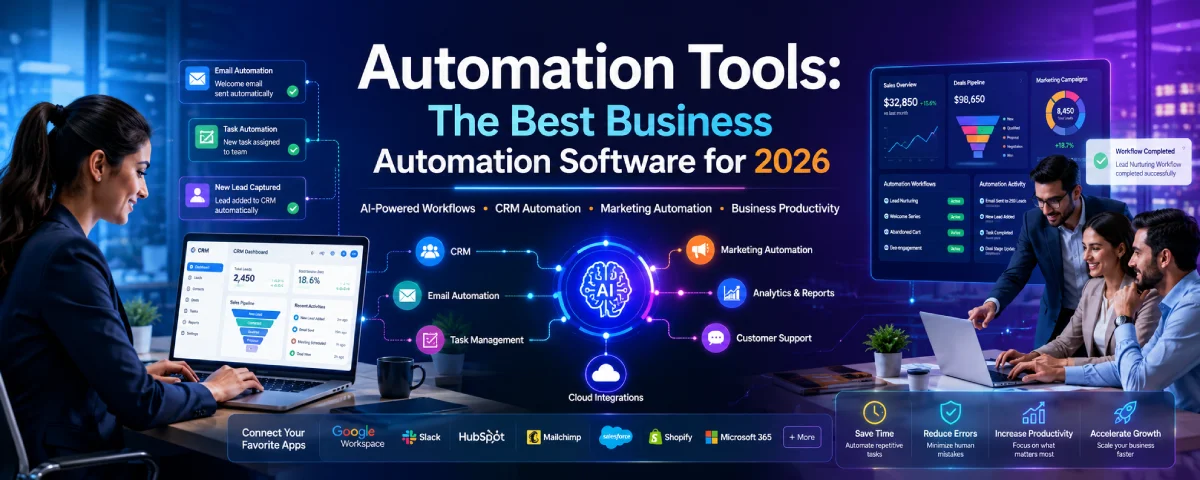
Businesses in 2026 are working faster than ever before. In businesses today, communication with customers, sales, marketing initiatives, employee task execution, analysis of data, and online transactions all take place through various systems.
That’s why automation tools are becoming an integral part of contemporary business processes.
Automation applications assist businesses in saving time on repetitive work through automatic execution. It also helps teams work faster and reduce manual effort. From small startups to huge corporations, businesses today use automation to optimize their business activities and improve the work process.
Over the past several years, automation has progressed beyond the scope of basic task management. Today, automation tools are becoming smarter because of AI, cloud software, and easy no-code platforms.
Today, companies use automation tools for:
- Workflow management
- Email campaigns
- Marketing operations
- Sales processes
- Customer support
- Data entry
- Team collaboration
- AI-powered business operations
This guide discusses the major kinds of automation tools, their advantages, business applications, software, and future trends in 2026.
What Are Automation Tools?
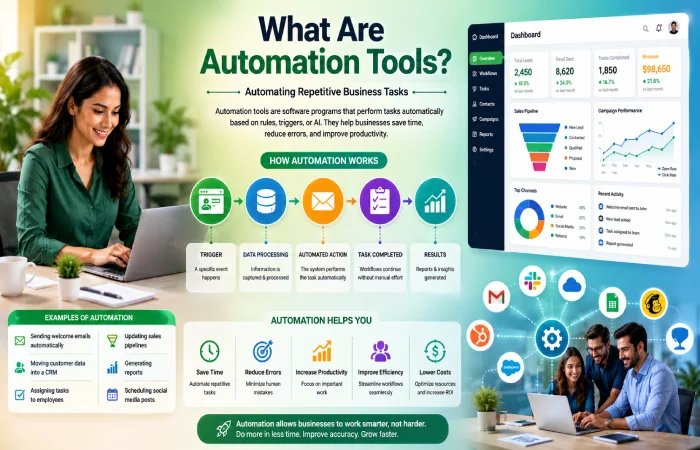
Automation tools are things that help us do tasks on our own. They are, like computer programs, that can do things over and over without needing someone to do them every time. IBM explains automation as the use of technology to perform tasks with reduced human intervention.
Instead of doing the same thing every single day, companies can make systems that do these tasks for them. These systems follow rules. get started by certain things happening, or they can even use artificial intelligence to figure out what to do. Automation tools do these tasks for them, so they do not have to.
For example:
- Sending welcome emails automatically
- Moving customer data into a CRM
- Assigning tasks to employees
- Updating sales pipelines
- Generating reports
- Scheduling social media posts
Automation ensures that business processes are done more quickly and consistently. It ensures efficiency and increases performance.
Automation Tools Resource Center
Explore our complete collection of guides covering workflow automation, marketing automation, sales automation, email automation, robotic process automation, and AI-powered automation tools for modern businesses.
How Automation Works
Most automation systems work using triggers and actions.
Simple Example
| Trigger | Automated Action |
| Customer fills form | CRM creates lead |
| User buys product | Invoice generated |
| Employee submits leave request | HR manager notified |
| Email opened | Follow-up email scheduled |
Software automation connects various applications and makes the workflows automatic without human intervention.
Why Businesses Need Automation Tools in 2026
Businesses have changed drastically in recent years. In today’s business environment, businesses operate with virtual teams, customers, cloud technologies, artificial intelligence software, and many other processes.
Manual work creates several challenges:
- Slow response times
- Human errors
- Missed opportunities
- Employee burnout
- Higher operational costs
Automation software helps solve these problems.
Major Reasons Businesses Use Automation
Savings of time through automation of dull tasks such as reporting, emails, scheduling and data entry.
Increased Productivity: The workers will be able to do more meaningful things.
Error Elimination: The automation process utilizes the same process that eliminates human errors.
Business Growth Facilitation: Automation allows a business to develop while not requiring additional manual effort.
Customer Service Improvement: – Better service is provided to customers.
Types of Business Automation Tools
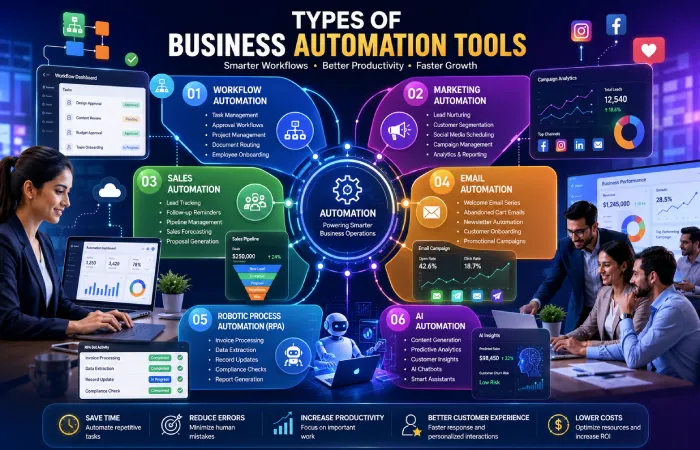
Automation software is designed to support various aspects of business operations. Understanding this categorization enables companies to choose the proper software.
Workflow Automation Tools
Work process automation software enables businesses to automate different tasks.
These tools are commonly used for:
- Employee onboarding
- Approval systems
- Project management
- Document routing
- Task assignments
Popular workflow automation platforms include:
- Zapier
- Monday.com
- Asana
- ClickUp
- Make
Such software is particularly useful for organizations dealing with many internal activities.
Marketing Automation Tools
Marketing automation tools help with digital marketing activities.
These tools support:
- Lead nurturing
- Customer segmentation
- Social media scheduling
- Campaign management
- Analytics tracking
Marketers employ marketing automation systems to help in generating leads and creating better engagement opportunities.
Common marketing automation platforms include:
- HubSpot
- ActiveCampaign
- Mailchimp
- Brevo
- Marketo
Sales Automation Tools
Sales automation software helps in making customer relations and the sales process easier.
Businesses use these tools for:
- Lead tracking
- Follow-up reminders
- Pipeline management
- Sales forecasting
- Proposal generation
Email automation software enables companies to create automated email series and communication workflows.
Email Automation Tools
Email automation software enables companies to create automated email series and communication workflows.
Common examples include:
- Welcome email series
- Abandoned cart reminders
- Newsletter automation
- Customer onboarding emails
- Promotional campaigns
The email automation continues to be among the best ROI marketing tools used by businesses.
Robotic Process Automation (RPA)
Robotic process automation refers to bots that undertake repetitive business processes.
RPA systems are commonly used in:
- Banking
- Healthcare
- Insurance
- Finance
- Manufacturing
Examples of RPA tasks include:
- Invoice processing
- Data extraction
- Record updates
- Compliance checks
RPA reduces manual workload and improves operational accuracy.
AI Automation Tools
AI Automation is the combination of automation software and artificial intelligence technology.
Modern AI tools can:
- Generate content
- Analyze data
- Predict customer behavior
- Create reports
- Automate conversations
- Assist customer support
AI automation is one of the rapidly growing sectors in the business technology in 2026.
Business Automation Software Comparison (2026)
| Automation Category | Main Purpose | Best For | Popular Tools | Technical Skill Needed | Pricing Range | Ideal Business Size |
| Workflow Automation | Automating internal business tasks | Operations teams | Zapier, Make, Monday.com | Low to Medium | Affordable to Medium | Small to Large Businesses |
| Marketing Automation | Managing campaigns and customer journeys | Marketing teams | HubSpot, ActiveCampaign, Marketo | Medium | Medium to High | Startups to Enterprises |
| Sales Automation | Automating CRM and sales processes | Sales departments | Salesforce, Pipedrive, Zoho CRM | Medium | Medium to High | Growing Businesses |
| Email Automation | Sending automated email sequences | Ecommerce and marketers | Mailchimp, Brevo, ConvertKit | Low | Affordable | Small to Medium Businesses |
| Robotic Process Automation (RPA) | Automating repetitive enterprise tasks | Finance, banking, healthcare | UiPath, Automation Anywhere, Blue Prism | High | Expensive | Large Enterprises |
| AI Automation | AI-powered workflows and decision making | Modern digital businesses | ChatGPT, Jasper, Notion AI | Medium | Medium | All Business Sizes |
| Customer Support Automation | Automating customer interactions | Support teams | Zendesk, Freshdesk, Intercom | Low to Medium | Medium | Ecommerce and SaaS |
| HR Automation | Automating HR operations | Human resource teams | BambooHR, Rippling | Medium | Medium | Medium to Large Companies |
| Ecommerce Automation | Managing online store operations | Ecommerce businesses | Shopify Flow, Klaviyo | Low | Affordable to Medium | Ecommerce Stores |
| Finance Automation | Automating accounting and reporting | Finance teams | QuickBooks, Xero | Medium | Medium | Small to Medium Businesses |
Growth of Automation Software Adoption
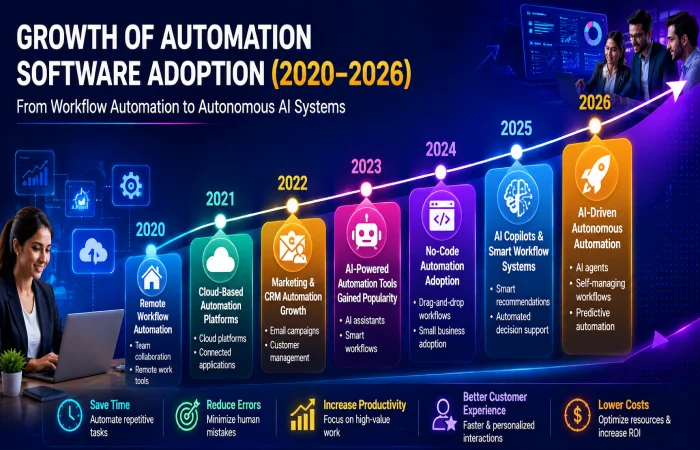
| Year | Major Automation Trend |
| 2020 | Businesses started adopting remote workflow automation |
| 2021 | Cloud-based automation platforms became more popular |
| 2022 | Marketing and CRM automation usage increased rapidly |
| 2023 | AI-powered automation tools gained mainstream attention |
| 2024 | Small businesses adopted no-code automation platforms |
| 2025 | AI copilots and smart workflow systems expanded |
| 2026 | Businesses focus on AI-driven autonomous automation |
In the recent years, business automation technology has advanced from simple workflow management technology to advanced technology which helps individuals work efficiently. Below is a chart showing how the use of automation technology has developed from remote workflow automation technology in the year 2020 to autonomous automation in the year 2026.
Best Automation Software Categories
| Category | Best For | Popular Platforms |
| Workflow Automation | Internal operations | Zapier, Make |
| Marketing Automation | Campaign management | HubSpot, ActiveCampaign |
| Sales Automation | CRM workflows | Salesforce, Pipedrive |
| Email Automation | Email campaigns | Mailchimp, Brevo |
| RPA | Enterprise automation | UiPath, Automation Anywhere |
| AI Automation | AI workflows | ChatGPT, Jasper |
A lot of companies are using automation technologies around the world. These companies are investing in intelligence, processes and other digital technologies. The companies are using automation technologies to make things easier for them. Automation technologies are really helpful, for the companies. The companies that use automation technologies are also investing in intelligence and digital technologies.
| Country | Common Automation Focus |
| United States | AI automation and enterprise software |
| India | IT services and workflow automation |
| Germany | Manufacturing and industrial automation |
| Japan | Robotics and process automation |
| United Kingdom | Marketing and fintech automation |
| China | AI-powered business automation |
Automated software is well utilized in countries that have industries in technology, manufacturing, and digital services. Some regions have an emphasis on AI and enterprise systems, some others on industrial robotics, process automation, or business automation in the cloud.
Benefits of Automation Tools
The following are some of the advantages of automation software.
- Increased efficiency
Jobs are done faster without any delays.
- Reduced operating costs
Fewer people are required to do the work.
- Improved Accuracy
Automated workflows reduce human mistakes.
- Better Team Collaboration
Employees can manage projects and communication more effectively.
- Faster Decision-Making
Automation platforms generate analytics and reports quickly.
- Better Customer Support
Businesses can respond to customers faster through automated communication systems.
- Automation Tools for Small Business
Small companies have limited funds and manpower.
- Affordable Automation Solutions
There are many systems providing affordable pricing for startups and solo professionals.
Popular Small Business Automation Tools
| Tool | Best Use |
| Zapier | Workflow automation |
| Mailchimp | Email automation |
| Trello | Task management |
| HubSpot | CRM and marketing |
| Notion | Team organization |
No Code Automation
- Nowadays, we can create processes through no-code technology without writing any code.
- This is extremely helpful since it allows no-code automation for those who cannot program.
- No-code automation is extremely beneficial for people who would like to automate things. They do not have knowledge in coding.
Which Businesses Use Automation Tools?
Businesses from all types of sectors make use of automation tools. This can be anything ranging from a small startup to a multinational corporation.
Different industries apply automation in their respective fields for different reasons. Although some have used automation to help communicate with customers, there are other industries that use automation to boost their sales.
The below section describes how automation is being used by different sectors of business.
| Business Type | Common Automation Usage | Popular Automation Types |
| Ecommerce Stores | Order updates, abandoned cart emails, inventory management | Email automation, workflow automation |
| Marketing Agencies | Campaign scheduling, lead tracking, reporting | Marketing automation |
| SaaS Companies | Customer onboarding, CRM updates, support tickets | Sales and workflow automation |
| Small Businesses | Invoice generation, appointment reminders, email marketing | No-code automation tools |
| Enterprises | Large-scale business process management | RPA and AI automation |
| Healthcare Organizations | Patient scheduling, records management | Workflow and RPA automation |
| Financial Services | Invoice processing, fraud monitoring, reporting | RPA and AI automation |
| Educational Platforms | Student communication and course workflows | Email and workflow automation |
| HR Teams | Employee onboarding and leave approvals | Workflow automation |
| Customer Support Teams | Chatbots and automated ticket routing | AI automation |
| Manufacturing Companies | Supply chain and production tracking | Industrial automation and RPA |
| Real Estate Businesses | Lead management and follow-up emails | CRM and email automation |
Different companies can consider several types of automation depending on the various goals they have, their size, and the company structure.
How to Choose the Best Automation Software
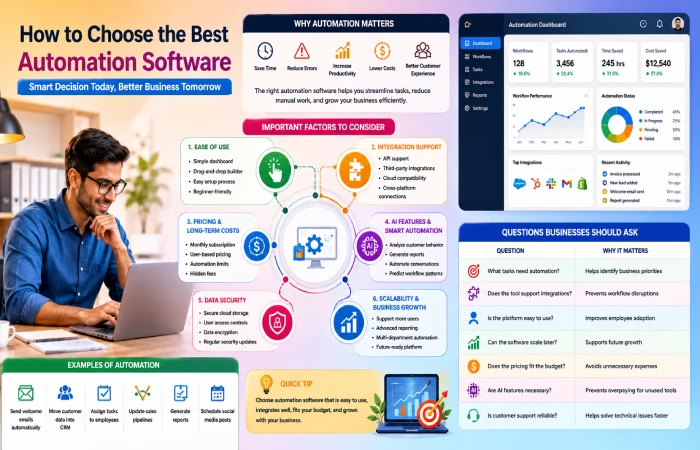
It is essential that you select the proper automation software for your organization because each organization has its unique objectives. While some businesses require automation of only their processes and workflows, other companies would prefer AI-enabled software solutions to support their larger-scale businesses.
Businesses have to understand which issues they want to solve by using automation. For instance, one small start-up could have the need to automate emails, while another large business would have to automate processes and workflows in various departments.
A good automation software should increase efficiency without complicating work.
Important Factors to Consider Before Choosing Automation Software
Ease of Use
The automation platform must be something that is easily understandable by the users. Most organizations are unable to implement automation due to its complex nature, which requires high technical skills.
Currently, the type of automation that is used by most organizations is the no-code/low-code automation since it does not require programming.
Businesses should look for software with:
- Simple dashboard interface
- Drag-and-drop workflow builders
- Easy setup process
- Beginner-friendly navigation
- Clear reporting systems
If employees struggle to use the platform, automation can actually slow down operations instead of improving them.
Integration Support
Automation tools work best when they connect easily with existing business software.
For example, a company may already use:
- CRM platforms
- Email marketing tools
- Accounting software
- Ecommerce platforms
- Customer support systems
The automation platform should integrate smoothly with these tools to avoid manual work and data transfer problems.
Businesses should always check:
- API support
- third-party integrations
- cloud compatibility
- cross-platform connections
Good integration support helps businesses create a connected digital workflow across departments.
Pricing and Long-Term Costs
Price is a key element in choosing automation software. Some solutions may appear to be affordable initially but later prove to be quite expensive due to growth in business operations.
Companies should compare:
- monthly subscription costs
- user-based pricing
- automation limits
- premium feature costs
- hidden upgrade fees
A startup company shouldn’t buy high-end tools that will be underutilized by the organization.
Rather, scalable software should be selected in order to accommodate any future requirements.
AI Features and Smart Automation
Artificial intelligence features are found in most current automation platforms.
AI-powered automation can help businesses:
- analyze customer behavior
- generate reports
- automate conversations
- improve decision-making
- predict workflow patterns
But not every business requires advanced AI at the outset.
Businesses need to get their workflow issues sorted out before investing in complex AI solutions.
AI assistance becomes an added advantage for those businesses that are planning to take up long-term digital transformation.
Data Security
Automated systems may deal with private information related to customers, bills, employees, and finances of a company.
Therefore, it is important to guarantee security.
Businesses need to choose software solutions that provide:
- secure cloud storage
- user access controls
- data encryption
- frequent updates for security
It is particularly true when we talk about healthcare, financial services, and ecommerce businesses.
Scalability and Business Growth
A good automation platform should support business growth over time.
Some businesses start with simple automation needs but later require:
- larger workflows
- more users
- advanced reporting
- AI integrations
- multi-department automation
When you pick software that can grow with your business, you do not have to change systems. Changing systems can be very expensive. It takes a lot of time.
Organizations need to think about the future. Do not select software based on present needs. Select software that will be appropriate for many years. It is important for future success.
Questions Businesses Should Ask Before Choosing Automation Software
Before investing in automation tools, companies should ask:
| Question | Why It Matters |
| What tasks need automation? | Helps identify business priorities |
| Does the tool support integrations? | Prevents workflow disruptions |
| Is the platform easy to use? | Improves employee adoption |
| Can the software scale later? | Supports future growth |
| Does the pricing fit the budget? | Avoids unnecessary expenses |
| Are AI features necessary? | Prevents overpaying for unused tools |
| Is customer support reliable? | Helps solve technical issues faster |
Common Automation Mistakes Businesses Should Avoid
Automation technology can assist organizations in increasing their efficiency and ease of processes; However, some organizations fail to achieve the desired success because they do not apply the right automation technique.
s Automation is not only about reducing manual work. It involves planning, awareness, management of workflows, and having an effective strategy.
The following are the most frequent automation blunders to prevent
Over-Automating Everything
There is one major error that many companies make – automating everything immediately.
Not all activities require automation. There are some activities where human intelligence and decision-making are required.
For example:
- customer complaints may need personal responses
- creative marketing ideas require human input
- strategic decisions cannot rely completely on automation
Over-automation can sometimes create:
- confusing workflows
- poor customer experiences
- unnecessary system complexity
- reduced flexibility
Businesses are advised to start off with automating repetitive and time-consuming activities and not with the idea of automating all departments.
An approach that is in balance usually performs better compared to extensive automation.
Ignoring Employee Training
The best software available will not serve its purpose when used wrongly by its users.
Firms often purchase automated systems without providing enough training to their employees. Employees may:
- avoid using the software
- create workflow errors
- misunderstand automation processes
- continue manual work unnecessarily
Automation systems should support employees, not confuse them.
Businesses should provide:
- proper onboarding sessions
- workflow documentation
- hands-on training
- technical support
- simple user guidelines
It will be easy for them to adapt to automation technology once they realize its benefits in their work environment.
Choosing Complex Software Too Early
Small businesses tend to purchase complex automation software which is designed for large organizations but not needed by them.
Large automation platforms may include:
- AI analytics
- enterprise workflow systems
- advanced integrations
- complex reporting dashboards
- large-scale process management tools
While these features are useful for large organizations, smaller businesses may struggle with:
- high costs
- difficult setup
- employee confusion
- maintenance challenges
Businesses should select software solutions based on their processes and abilities instead of following trends.
Complexity of Automation Software is Overrated
Lack of Workflow Planning
Automation must make the process better rather than make the process itself unnecessary.
It happens sometimes when an organization automates the wrong process or does so in a wrong way by not analyzing the process well.
Before implementing automation, businesses should identify:
- repetitive tasks
- workflow bottlenecks
- communication gaps
- approval delays
- manual errors
Automation really does its job when companies take the time to sort out their processes in a way. They need to make sure everything is laid out clearly. Then they can automate the tasks that they have to do over and again. This way automation can really help companies. The companies should automate the activities that take up a lot of time. Automation is very good, at doing these kinds of tasks. So companies should use automation to do the activities and the tasks that they have to do every day
Good workflow planning helps businesses avoid unnecessary automation problems later.
Ignoring Integration Compatibility
Various companies utilize different software applications concurrently, including CRM software, accounting software, email marketing software, e-commerce software, and project management software.
Should there be poor integration between automation software and these applications, then the business could experience:
- data synchronization problems
- duplicate work
- workflow interruptions
- reporting errors
It is important to ensure that the software is able to integrate with the existing systems before choosing the automation system.
Having an integration capability enables easy operation within the organization’s digital processes.
Focusing Only on Cost Instead of Value
Some companies choose automation software only because it is cheap.
While budget is important, low-cost software may sometimes:
- lack important features
- provide weak customer support
- limit scalability
- create future migration problems
Businesses should focus on long-term value instead of only short-term pricing.
Expensive software does not necessarily imply that it is the best for automation. Neither is it that cheap software is the best.
Automating Poor Customer Communication
Automation is supposed to make things better for the customer. It should not make conversations feel like they are with a machine.
If the tools that are automated like emails that are sent automatically or those chatbots or when customers talk to a company are not designed in a way it can be really frustrating for people. This happens when the responses they get do not make any sense. Automation, like this is not helping the customer experience it is actually making it worse.
Businesses should regularly review:
- automated email quality
- chatbot responses
- customer support workflows
- follow-up sequences
Automation should work to aid human conversation rather than completely replace it.
A good balance of both is essential for building stronger customer relations.
Future of Automation Technology
There is rapid development of automation technology due to the adoption of cloud computing, artificial intelligence, machine learning, and improved workflow management.
Automation technology in contemporary times is not only limited to performing simple tasks but is capable of performing data analysis, improving processes, and making decisions.
There are various important trends forecasted for the future of business automation.
AI Agents
AI agents are becoming one of the most important developments in modern automation technology.
Unlike traditional automation systems that follow fixed rules, AI agents can:
- analyze information
- make recommendations
- complete tasks independently
- respond dynamically to changing situations
Businesses are beginning to use AI agents for:
- customer support
- content generation
- workflow assistance
- business analytics
- scheduling
- research tasks
With the advent of technology, companies may use intelligent digital assistants for performing their everyday tasks.
Predictive Automation
Predictive automation involves the combination of automation and data analytics with machine learning.
Instead of responding to events, predictive models involve understanding patterns that can assist organizations in making proactive decisions.
Examples include:
- predicting customer behavior
- forecasting inventory demand
- identifying sales opportunities
- detecting workflow inefficiencies
- reducing operational risks
Predictive automation helps businesses make faster and more informed decisions using real-time data.
Autonomous Workflows
Future automation platforms are expected to manage more complex workflows with less human involvement.
Autonomous workflows may:
- assign tasks automatically
- optimize schedules
- monitor operations
- generate reports
- resolve repetitive issues independently
This can help cut down on the need for people to watch over things and make big organizations work faster.
However people will still need to be involved in planning things dealing with customers and making important decisions that affect the organization because human oversight is still very important for these things, like strategic planning, customer relationships and sensitive decision-making processes.
Voice-Based Automation
Voice automation is becoming more common with the growth of AI assistants and conversational technologies.
Businesses are increasingly using voice commands for:
- scheduling meetings
- managing workflows
- controlling smart systems
- generating reports
- customer service interactions
Voice-enabled automation may improve accessibility and simplify daily business operations in the future.
Hyperautomation
Hyperautomation is an emerging technology trend that integrates various tools into one automated process.
This may include:
- AI automation
- robotic process automation (RPA)
- machine learning
- analytics platforms
- workflow automation
- cloud computing
As against automating each task independently, hyperautomation helps create automated and smart operating systems for businesses.
It is no secret that big companies are now spending a lot on hyperautomation technology.
No-Code and Low-Code Automation Growth
Automation through no-code and low-code solutions has become more available to people who lack technical proficiency.
Today, organizations can develop their workflows using drag-and-drop interface rather than relying on programmers alone.
This trend is helping:
- startups
- freelancers
- small businesses
- marketing teams
- HR departments
build automation systems without advanced programming knowledge.
As these platforms improve, automation adoption may continue growing among smaller businesses worldwide.
Human and AI Collaboration
The future of automation will likely focus on collaboration between humans and intelligent systems rather than complete replacement.
Automation can handle:
- repetitive work
- data processing
- reporting
- workflow management
while humans continue focusing on:
- creativity
- leadership
- strategy
- relationship building
- complex decision-making
Businesses that balance automation with human expertise may achieve better long-term operational success.
Best Thoughts
- Technology based on automation will keep changing the business processes of tomorrow.
- Organizations are stepping from mere automation to more intelligent technologies such as AI-based applications that help in making decisions, optimizing workflows and undergoing digital transformation.
- Nonetheless, automation cannot work without careful planning and selection of the right technology as well as employee training.
- Business organizations that implement automation effectively and wisely will be better placed to handle upcoming technological shifts in the future.
Automation Tools Comparison Table
| Feature | Workflow Automation | Marketing Automation | Sales Automation | AI Automation |
| Main Purpose | Process automation | Campaign management | Lead management | Intelligent automation |
| Best For | Operations teams | Marketing teams | Sales teams | Advanced workflows |
| AI Support | Medium | Medium | High | Very High |
| Learning Curve | Easy | Medium | Medium | Advanced |
F&Q
What is the use of automation tools?
Automation tools assist organizations in automating repetitive activities such as emails, workflows, reporting, sales monitoring, and customer communication.
Are automation tools costly?
Many automation software provides inexpensive plans for startups and small firms.
Difference between AI automation and workflow automation
While workflow automation depends on the rules provided, AI automation can analyze information and make decisions out of that analysis.
What are the industries that apply automation tools?
The following industries utilize automation software: healthcare industry, financial services, ecommerce, education, logistics, manufacturing, and IT.
Are automation tools appropriate for small businesses?
Yes, many automation tools designed without code are made for small businesses.
Conclusion
Automation technologies are revolutionizing the way modern companies do business in 2026. Automation software is used today by companies to increase their efficiency, eliminate manual labor, and scale operations.
From workflow automation and marketing platforms to business operations based on artificial intelligence, automation technology keeps becoming more available for organizations of all sizes.
Companies that use the right approach to automation can benefit from improved customer experience, lowered expenses, and efficient business processes.
The development of artificial intelligence and automation technologies will make it easier for those companies that have embraced automation to cope with future digital transformation.