

Introduction
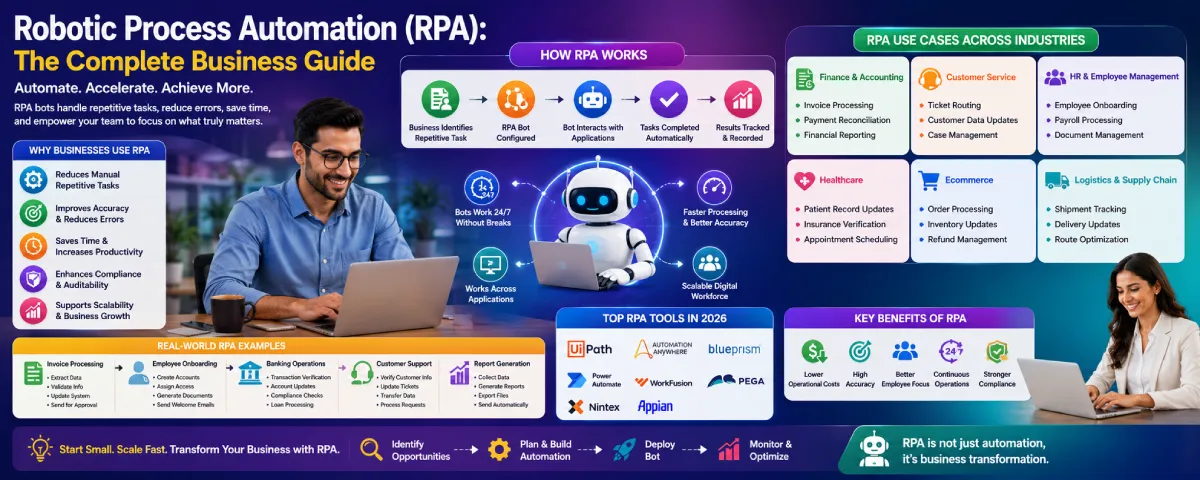
Current robotic process automation companies deal with large volumes of repetitive digital tasks on a daily basis. Staff members may take several hours for data copying, invoice processing, spreadsheet updating, record checking, information transfer between systems, and other similar tasks.
But not only do such processes bring value to the company; they take a lot of time, causing human mistakes.
This is when robotic process automation comes to the rescue.
RPA guide from our automation tools pillar.
Robotic process automation utilizes software robots to automate rule-based repetitive tasks in business systems and applications. Instead of performing similar tasks manually over and over again, companies can automate them using the bots and get them done faster and consistently.
By 2026, more and more organizations in different industries including banking, healthcare, ecommerce, logistics, customer service, and manufacturing will be leveraging the power of robotic process automation.
This article sheds light on what is robotic process automation, how it works, RPA tools, RPA applications, RPA strategy and its future directions.
What Is Robotic Process Automation?
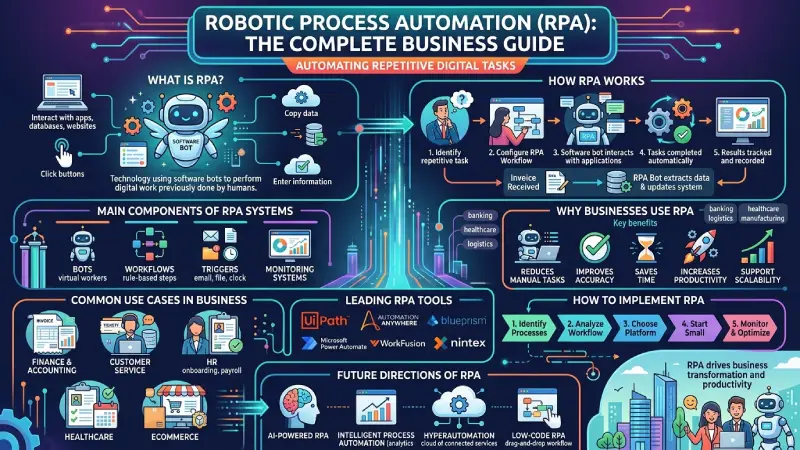
Robotic Process Automation is a technology. It uses software bots. These bots automate tasks. They do digital work. Humans normally do this work.
These bots interact with:
- applications
- databases
- websites
- spreadsheets
- business systems
in the same way employees do.
RPA systems can:
- click buttons
- copy data
- enter information
- generate reports
- process transactions
- move files
- validate records
without requiring constant human involvement.
Whereas physical robots work in the factory setting, RPA bots are software-based virtual workers who work within the computer system.
How Robotic Process Automation Works
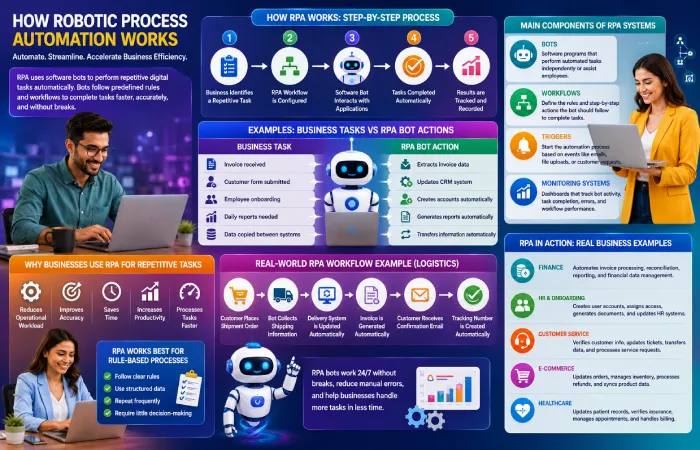
RPA bots are software bots which automate the process of doing repetitive tasks through predefined business rules and workflow.
In RPA bots, there is no involvement of people performing manual work like entering information, modifying records, processing documents, and moving information from one computer program to another.
The process usually works like this:
- Business identifies a repetitive task
- RPA workflow is configured
- Software bot interacts with applications
- Tasks are completed automatically
- Results are tracked and recorded
For example:
| Business Task | RPA Bot Action |
| Invoice received | Extracts invoice data |
| Customer form submitted | Updates CRM system |
| Employee onboarding | Creates accounts automatically |
| Daily reports needed | Generates reports automatically |
| Data copied between systems | Transfers information automatically |
An important benefit of RPA bots is that they have continuous performance without any interruption. Businesses can automate processes which would normally consume hours of an employee’s working time each day.
For example, a finance department may receive hundreds of invoices daily. Instead of manually opening every invoice and entering information into accounting software, an RPA bot can automatically:
- read invoice details
- extract important data
- update financial systems
- send approval requests
This helps reduce repetitive manual work and improves processing speed.
An equally typical case in point is onboarding of an employee. As soon as an employee is hired by a company, the organization has to:
- create user accounts
- assign software access
- generate documents
- update HR systems
Many of these activities associated with setting up the new employee in the system can be automated by RPA bots.
Customer service operations also use RPA for repetitive tasks. Bots may:
- verify customer information
- update support tickets
- transfer customer data between systems
- process simple service requests
In this way, the teams providing customer support can spend more time on communicating with customers than processing data.
Typically, most RPA platforms integrate well with current business applications without needing any modification of the company’s infrastructure.
Main Components of RPA Systems
Most robotic process automation platforms include several important components.
Bots
Bots are the software programs that perform automated tasks.
Some robots work independently while some help employees in their daily tasks.
Workflows
Workflows define the rules and step-by-step actions the bot should follow.
For example:
- open application
- copy data
- validate information
- update records
- generate report
Triggers
Triggers start the automation process.
Common triggers include:
- email received
- file uploaded
- form submitted
- scheduled task
- customer request
Monitoring Systems
Most RPA platforms include dashboards that help businesses monitor:
- bot activity
- task completion
- errors
- workflow performance
This helps organizations track operational efficiency more effectively.
Why Businesses Use RPA for Repetitive Tasks
Many companies use RPA because repetitive digital tasks often consume large amounts of employee time.
Tasks such as:
- data entry
- report generation
- invoice processing
- account updates
- document verification
can become slow and repetitive when handled manually every day.
RPA helps businesses:
- reduce operational workload
- improve accuracy
- save time
- increase productivity
- process tasks faster
This ensures that there is sufficient time for the employees to do their customer service, thinking, problem solving and business development tasks.
RPA Works Best for Rule-Based Processes
RPA is most effective for tasks that:
- follow clear rules
- use structured data
- repeat frequently
- require little decision-making
For example:
- transferring spreadsheet data
- processing forms
- generating reports
- validating records
- updating databases
Creative, judgmental and emotional jobs can be done much better by human beings.
Real-World Example of an RPA Workflow
A logistics company may use RPA like this:
- Customer places shipment order
- Bot collects shipping information
- Delivery system is updated automatically
- Invoice is generated
- Customer receives confirmation email
- Tracking number is created automatically
In the absence of RPA, employees have to go through each and every task manually within many different systems.
This makes sure that operations become faster and delays in manual processing are avoided.
With the increased amount of digital operations being done by businesses, RPA is becoming increasingly significant.
Why Businesses Use RPA
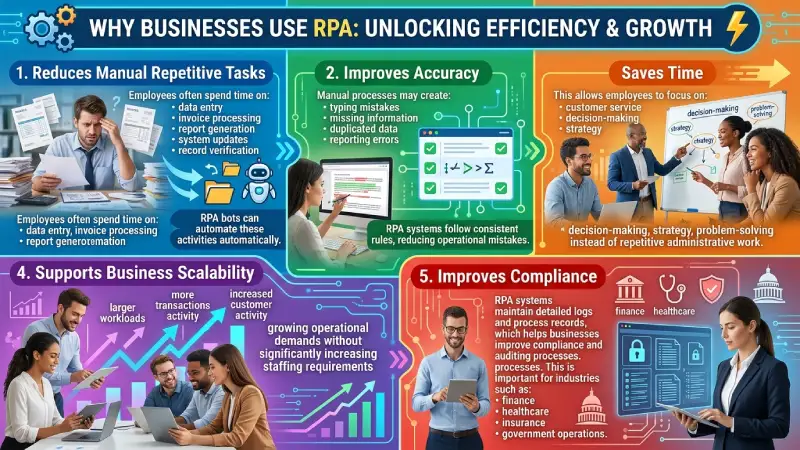
Many organizations adopt robotic process automation to reduce repetitive work and improve operational accuracy.
Reduces Manual Repetitive Tasks
Employees often spend time on:
- data entry
- invoice processing
- report generation
- system updates
- record verification
RPA bots can automate these activities automatically.
Improves Accuracy
Manual processes may create:
- typing mistakes
- missing information
- duplicated data
- reporting errors
RPA systems follow consistent rules, reducing operational mistakes.
Saves Time
RPA bots can perform tedious jobs much more quickly than traditional methods.
This allows employees to focus on:
- customer service
- decision-making
- strategy
- problem-solving
instead of repetitive administrative work.
Supports Business Scalability
As companies grow, manual operations become harder to manage.
RPA helps businesses handle:
- larger workloads
- more transactions
- increased customer activity
- growing operational demands
without significantly increasing staffing requirements.
Improves Compliance
RPA systems maintain detailed logs and process records, which helps businesses improve compliance and auditing processes.
This is important for industries such as:
- finance
- healthcare
- insurance
- government operations
Best RPA Tools in 2026
Different RPA platforms support different automation requirements depending on business size and operational complexity.
| RPA Tool | Best For | Main Features |
| UiPath | Enterprise automation | Advanced RPA workflows |
| Automation Anywhere | Large organizations | Cloud automation platform |
| Blue Prism | Secure enterprise automation | Scalable digital workforce |
| Microsoft Power Automate | Microsoft ecosystem users | Workflow and desktop automation |
| WorkFusion | AI-powered automation | Intelligent document processing |
| Pega | Business process automation | AI decision workflows |
| Nintex | Process management | Workflow and RPA integration |
Businesses should compare tools based on:
- scalability
- integrations
- AI capabilities
- pricing
- security
- ease of implementation
RPA Use Cases in Business
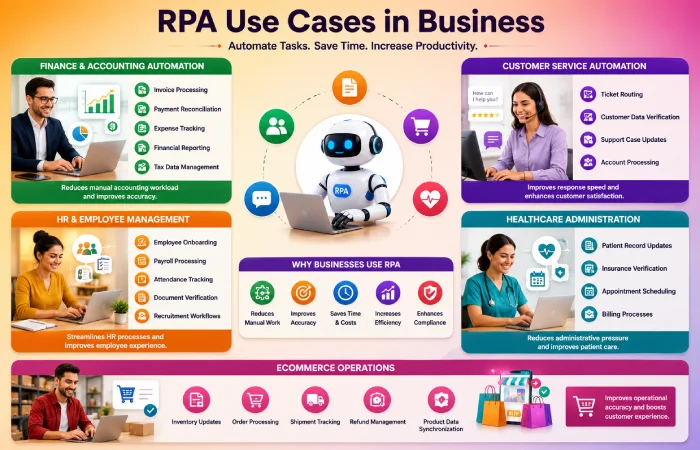
RPA is used across multiple industries for different operational tasks.
Finance and Accounting Automation
Finance teams use RPA for:
- invoice processing
- payment reconciliation
- expense tracking
- financial reporting
- tax data management
This reduces manual accounting workload.
Customer Service Automation
Businesses automate:
- ticket routing
- customer data verification
- support case updates
- account processing
This improves response speed and operational efficiency.
HR and Employee Management
HR departments use RPA for:
- employee onboarding
- payroll processing
- attendance tracking
- document verification
- recruitment workflows
Healthcare Administration
Healthcare organizations automate:
- patient record updates
- insurance verification
- appointment scheduling
- billing processes
This helps reduce administrative pressure.
Ecommerce Operations
Online businesses use RPA for:
- inventory updates
- order processing
- shipment tracking
- refund management
- product data synchronization
Real-World RPA Examples
Practical examples help businesses understand how RPA works in daily operations.
Example: Invoice Processing
A company receives hundreds of invoices daily.
Instead of manually entering invoice information:
- RPA bot reads invoice data
- Extracts important details
- Updates accounting software
- Sends approval request automatically
This reduces manual data entry work significantly.
Example: Employee Onboarding
When a new employee joins:
- user accounts are created
- software access is assigned
- HR documents are generated
- onboarding emails are sent
RPA handles these repetitive setup tasks automatically.
Example: Banking Operations
Banks use RPA for:
- transaction verification
- account updates
- compliance checks
- loan processing
This improves operational speed while reducing manual processing delays.
RPA vs Traditional Automation
Many businesses confuse RPA with traditional workflow automation.
Although both improve efficiency, they work differently.
| RPA | Traditional Automation |
| Uses software bots | Uses workflow systems |
| Mimics human actions | Automates predefined workflows |
| Works across multiple applications | Usually works inside one system |
| Handles repetitive rule-based tasks | Focuses on process management |
| Requires minimal system changes | Often needs deeper integration |
RPA is most useful when businesses have older systems which may not be compatible with new software solutions
How to Implement RPA
Successful RPA implementation requires planning and process analysis.
Step 1: Identify Repetitive Processes
Businesses should identify tasks that:
- are repetitive
- follow fixed rules
- require high manual effort
- involve structured data
Step 2: Analyze Workflow Complexity
Simple processes are usually easier to automate successfully.
Businesses should avoid starting with highly complex workflows.
Step 3: Choose the Right RPA Platform
Companies should compare:
- integrations
- scalability
- security
- pricing
- support services
before selecting software.
Step 4: Start with Small Automation Projects
Businesses should start small and scale their automation initiatives to a full-scale operation.
This reduces implementation risk.
Step 5: Monitor and Optimize Bots
RPA systems should be monitored regularly to:
- improve performance
- reduce workflow issues
- maintain compliance
- update automation rules
Common RPA Mistakes Businesses Should Avoid
Businesses sometimes fail with RPA because of poor planning.
Automating Unstable Processes
Processes that constantly change are difficult to automate effectively.
Ignoring Employee Training
Employees should understand how automation works alongside human operations.
Choosing Large Projects Too Early
Businesses should avoid automating highly complex operations during the initial implementation stage.
Lack of Process Documentation
Poor workflow documentation often creates automation errors and maintenance problems.
Benefits of RPA for Different Industries
| Industry | Common RPA Usage |
| Banking | Transaction processing |
| Healthcare | Patient administration |
| Ecommerce | Order management |
| Logistics | Shipment tracking |
| Insurance | Claims processing |
| HR | Employee onboarding |
Future of Robotic Process Automation
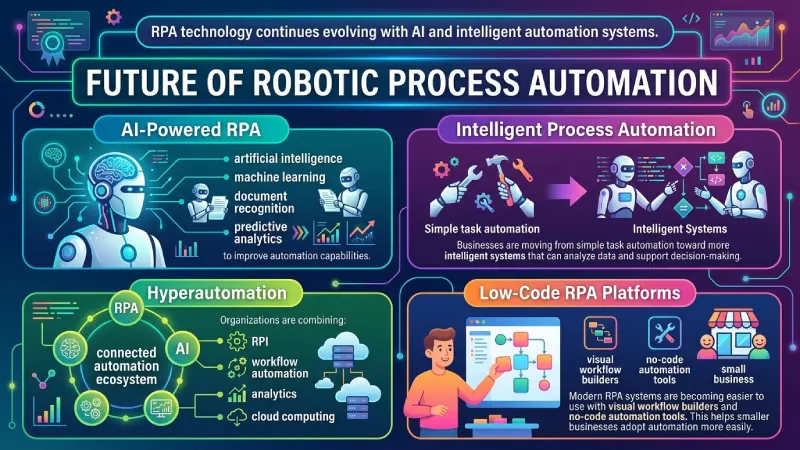
RPA technology continues evolving with AI and intelligent automation systems.
AI-Powered RPA
Modern RPA platforms increasingly combine:
- artificial intelligence
- machine learning
- document recognition
- predictive analytics
to improve automation capabilities.
Enhance RPA with AI automation tools.
Intelligent Process Automation
Businesses are moving from simple task automation toward more intelligent systems that can analyze data and support decision-making.
Hyperautomation
Organizations are combining:
- RPA
- AI
- workflow automation
- analytics
- cloud computing
into connected automation ecosystems.
Integrate with workflow automation software.
Low-Code RPA Platforms
Modern RPA systems are becoming easier to use with visual workflow builders and no-code automation tools.
This helps smaller businesses adopt automation more easily.
Frequently Asked Questions
What is Robotic Process Automation?
Robotic Process Automation (RPA) involves using software bots to automate repetitive digital business processes.
Which sectors use RPA?
RPA technology is applied in the financial services, healthcare, e-commerce, logistics, customer services, human resources, and manufacturing sectors.
Why is RPA important?
RPA leads to increased efficiency, reduced manual tasks, improved accuracy and scaling of operations.
Is RPA equal to artificial intelligence?
No. RPA works based on set rules but artificial intelligence analyzes data and makes adaptive decisions.
Is RPA costly?
RPA cost depends on business size and complexity among others.
Conclusion
Robotic Process Automation helps organizations to automate their repetitive digital activities effectively in 2026.
With invoice processing, customer services, human resource management, and ecommerce process, RPA software allows organizations to cut down their manual efforts, improve accuracy, and simplify their processes.
RPA can help businesses become productive while enabling them to concentrate on other meaningful activities for employees.
With ongoing advancements in artificial intelligence and intelligent automation technologies, RPA will be an essential aspect of modern organizational transformations.
