

Introduction
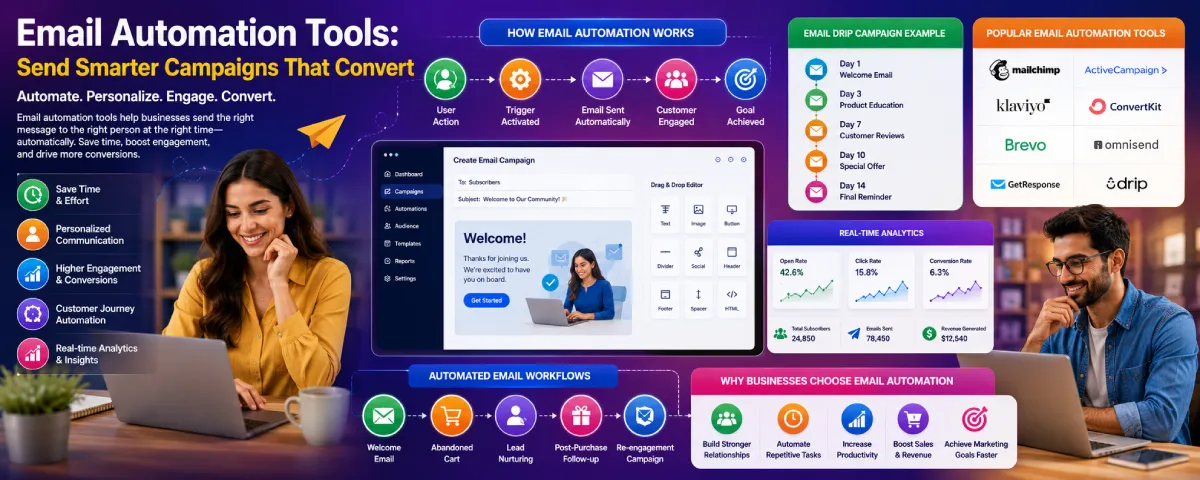
Email still happens to be among the most powerful channels of digital communication for businesses in 2026. Emails assist in bringing on board new clients, marketing products, recovering abandoned cart, nurturing leads, informing, and developing relations with customers.
The problem with doing all this manually lies in the challenge involved in sending each email to the customers on their own.
And that is why email automation solutions become very significant.
Email automation solutions help to automate the process of sending targeted emails on the basis of customer actions, timing, behaviors, and other factors. This way, there would not be any need to create and send emails on an individual level.
Whether it is ecommerce brands, startups, agencies, or even SaaS companies – today every organization relies on email automation for better customer engagement, increased conversions, and saving time.
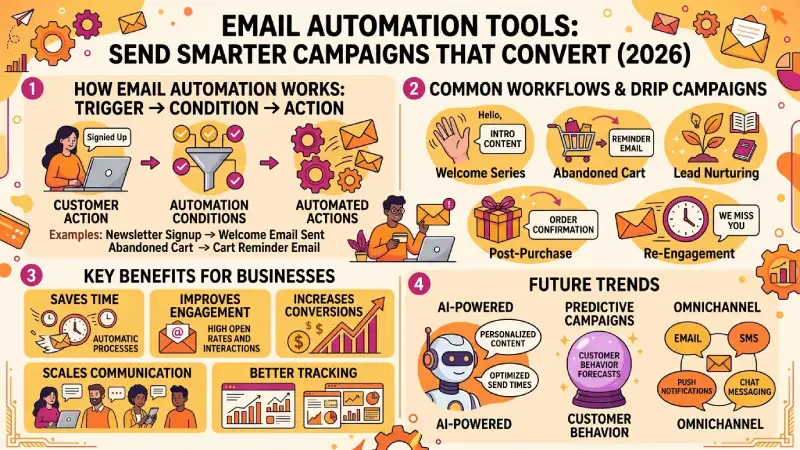
This article describes how email automation solutions work, popular email automation platforms, drip email campaign tactics, ecommerce email automation, example of workflows, and future email marketing trends.
Email automation from our automation tools guide.
What Are Email Automation Tools?
Email automation systems are web-based applications that automatically generate emails according to triggers, schedules, customer activities, and workflow conditions.
These tools help businesses:
- automate email campaigns
- nurture subscribers
- send follow-up emails
- personalize communication
- schedule email sequences
- track engagement
Automation through emails saves time and effort and helps businesses communicate consistently with their customers.
How Email Automation Works
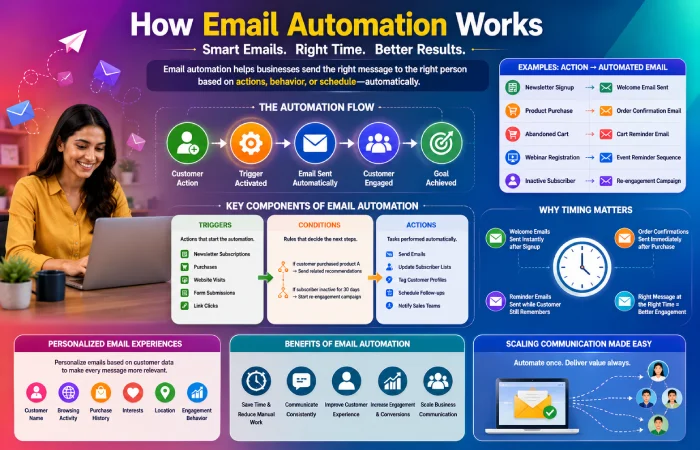
An email automation process is a mechanism used by businesses where emails are sent automatically by the company once the customer takes a certain action. The action may include purchasing of products or viewing of the product or opening the email.
The email automation process monitors the actions of the customer while in the website, with the product or while using the email or in the shop. Once the customer takes action such as purchase, the email automation process triggers and sends the email out. This is because the email automation process is programmed to perform certain tasks at certain time such as sending a thank you email once purchase is made.
In this way, communication can be managed without having to manually manage each step..
For example:
| Customer Action | Automated Email Response |
| Newsletter signup | Welcome email sent |
| Product purchase | Order confirmation email |
| Abandoned shopping cart | Cart reminder email |
| Webinar registration | Event reminder sequence |
| Inactive subscriber | Re-engagement email campaign |
For instance, there is a form for registering for newsletters. Upon subscribing to a site, the automation process allows sending the welcoming email which may present the company, offer some useful materials or give out a discount code. Thus, one gets engaged in the interaction immediately without doing anything manually.
Online stores also widely use email automation. The customers who put items into their carts but then fail to purchase anything will be contacted through reminder emails encouraging them to continue and complete the process of purchasing the goods. In this way, the business tries to save its customers’ money.
Email automation may be used in customer onboarding. For instance, software companies develop onboarding series for customers which guide them during the first interactions with the site, offering some tutorials, instructions or descriptions of the product features.
Webinar automation is another great example. After registering for an online event, the customer receives confirmation emails, reminders and even emails after the completion of the webinar..
Modern email automation platforms usually work through three main elements:
Triggers
Triggers are actions that start the automation process.
Common triggers include:
- newsletter subscriptions
- purchases
- link clicks
- website visits
- account registrations
- form submissions
Set triggers via workflow automation software
Conditions
Conditions help the system decide which emails should be sent.
For example:
- if customer purchased product A → send related recommendations
- if subscriber inactive for 30 days → start re-engagement campaign
Conditions make email workflows more personalized and relevant.
Actions
Actions are the automated tasks performed by the system.
These actions may include:
- sending emails
- updating subscriber lists
- tagging customer profiles
- scheduling follow-ups
- notifying sales teams
Why Timing Matters in Email Automation
Timing is one of the greatest benefits of email automation.
Emails can be sent when customers are actively involved without having to wait for a reply manually.
For example:
- welcome emails arrive instantly after signup
- order confirmations are sent immediately after purchase
- reminder emails appear while customers still remember the product
It aids organizations to keep in touch with their customers
Personalized Email Experiences
Modern automation tools also support personalization.
Businesses can customize emails using:
- customer names
- browsing activity
- purchase history
- interests
- location
- engagement behavior
People like getting emails that are written for them. These emails feel more real. Are more likely to be read by customers than emails that are sent to a lot of people at the same time. Personalized emails are better than mass emails because they are more relevant, to the customer.
Automation Helps Businesses Scale Communication
As businesses grow, manually managing thousands of customer emails becomes difficult.
Email automation allows companies to:
- communicate consistently
- manage larger audiences
- reduce repetitive work
- improve efficiency
- maintain customer engagement
This is why email automation is really important for digital marketing strategies.
It is used by startups, ecommerce brands, agencies and enterprise businesses because email automation makes things easier, for them.
Email automation is a part of what they do to reach their customers and it helps them grow.
Real-World Email Automation Examples
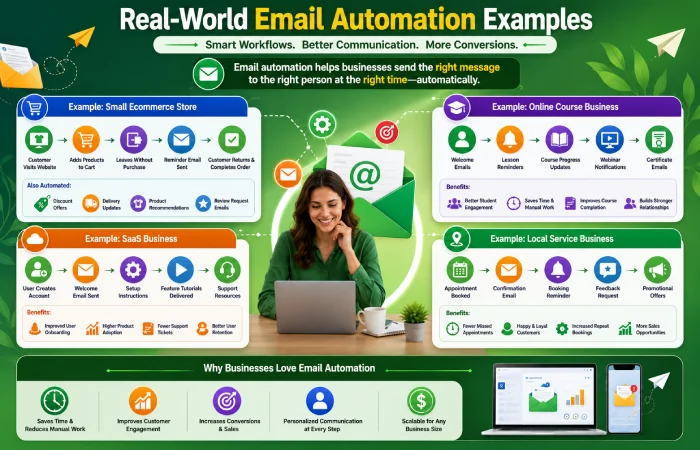
Practical examples help businesses understand how email automation works in daily operations.
Different industries use automation workflows in different ways depending on customer communication needs.
Example: Small Ecommerce Store
A small online clothing store may use email automation like this:
- Customer visits website
- Adds products to shopping cart
- Leaves without completing purchase
- Automation system sends reminder email after a few hours
- Customer returns and completes order
This helps ecommerce businesses recover potential lost sales automatically.
Many online stores also automate:
- discount offers
- delivery updates
- product recommendations
- review request emails
Example: Online Course Business
An online course creator may automate:
- welcome emails
- lesson reminders
- course progress updates
- webinar notifications
- certificate emails
This improves communication with students without requiring manual follow-ups every day.
Example: SaaS Business
Some software firms use email automation in customer onboarding.
When a new user creates an account:
- welcome email is sent
- setup instructions are shared
- feature tutorials are delivered gradually
- customer support resources are provided
This helps new users understand the platform more easily.
Example: Local Service Business
A local business such as a salon, gym, or repair service may automate:
- appointment confirmations
- booking reminders
- feedback requests
- promotional offers
It helps avoid scheduling errors and engages the customers.
The following workflows illustrate how businesses benefit from using email automation tools in terms of saving time and still communicating consistently with their customers.
Why Businesses Use Email Automation Tools
The reason companies need email automation is that such software allows them to communicate with people effectively. It becomes easier for companies to connect with their customers. Its are very effective when it comes to communicating with people and involving them in the conversation. The company needs email automation software because it allows them to deliver the message to their customers effectively.
Saves Time
Businesses can automate:
- welcome emails
- customer follow-ups
- promotional campaigns
- reminders
- onboarding sequences
This reduces repetitive marketing tasks.
Improves Customer Engagement
Automated emails enable companies to keep in touch with their subscribers and clients on a continuous basis.
Timely and relevant emails often improve:
- open rates
- click-through rates
- customer interaction
- brand engagement
Supports Personalized Communication
Modern email automation tools allow businesses to personalize:
- customer names
- product recommendations
- promotions
- content
- behavioral triggers
Personalized emails often perform better than generic campaigns.
Helps Increase Conversions
Automated follow-up campaigns enable companies to make it easier for their clients to go through the purchasing process.
This can improve:
- lead nurturing
- customer retention
- repeat purchases
- ecommerce sales
Provides Better Campaign Tracking
Email automation platforms provide analytics for:
- open rates
- click rates
- unsubscribe rates
- conversion tracking
- subscriber engagement
This helps businesses improve future campaigns.
Best Email Automation Software in 2026
Various businesses opt for various email automation software based on their needs.
| Platform | Best For | Main Features |
| Mailchimp | Small business email marketing | Email automation and templates |
| ActiveCampaign | Advanced email workflows | Customer experience automation |
| Klaviyo | Ecommerce email automation | Behavioral targeting |
| ConvertKit | Creators and bloggers | Subscriber management |
| Brevo | Affordable email automation | Email and SMS workflows |
| Omnisend | Ecommerce businesses | Multichannel campaigns |
| GetResponse | Marketing campaigns | Email sequences and webinars |
| Drip | Ecommerce personalization | Customer journey automation |
Businesses should compare software based on:
- pricing
- automation features
- subscriber limits
- analytics
- integrations
- ease of use
Email Automation Workflows
Email automation workflows help businesses create structured customer communication systems.
These workflows automatically send emails based on user behavior or predefined conditions.
Welcome Email Workflow
When someone subscribes:
- welcome email is sent
- introduction content is shared
- onboarding sequence begins
This creates a positive first impression.
Abandoned Cart Workflow
Ecommerce stores automatically remind customers about products left in shopping carts.
This helps recover lost sales opportunities.
Lead Nurturing Workflow
Businesses send educational and promotional content gradually to build customer trust and encourage conversions.
Re-Engagement Workflow
Inactive subscribers receive emails encouraging them to return or interact with the business again.
Post-Purchase Workflow
Customers receive:
- order confirmations
- delivery updates
- product recommendations
- review requests
This improves customer experience after purchases.
Feed into marketing automation tools for nurture.
Email Drip Campaign Automation
Drip campaigns are automated email sequences sent over time to guide subscribers through a customer journey.
Unlike one-time campaigns, drip automation delivers emails gradually based on schedules or customer behavior.
Benefits of Drip Campaigns
Businesses use drip campaigns to:
- nurture leads
- educate subscribers
- improve engagement
- build trust
- increase conversions
Common Drip Campaign Types
| Campaign Type | Purpose |
| Welcome series | Introduce new subscribers |
| Educational series | Share useful information |
| Product onboarding | Teach customers product usage |
| Promotional drip | Promote products gradually |
| Re-engagement sequence | Win back inactive users |
Drip Campaign Best Practices
Businesses should:
- keep emails relevant
- avoid excessive messaging
- personalize content
- monitor engagement data
- test subject lines
Good drip campaigns feel helpful instead of overly promotional.
Email Automation for Ecommerce
Ecommerce businesses heavily rely on email automation to improve customer communication and increase sales.
Common Ecommerce Email Automations
| Automation Type | Purpose |
| Abandoned cart emails | Recover unfinished purchases |
| Order confirmations | Improve customer trust |
| Shipping updates | Provide delivery information |
| Product recommendations | Encourage repeat purchases |
| Review requests | Collect customer feedback |
Benefits for Ecommerce Stores
Email automation helps ecommerce businesses:
- increase repeat sales
- improve customer retention
- recover abandoned carts
- automate promotions
- personalize offers
Popular Ecommerce Email Platforms
- Klaviyo
- Omnisend
- Mailchimp
- Drip
- ActiveCampaign
These platforms support ecommerce integrations and customer behavior tracking.
Free Email Automation Tools
Many businesses start with free email automation software before upgrading to advanced platforms.
Popular Free Email Automation Platforms
| Platform | Free Features |
| Mailchimp | Basic email campaigns |
| Brevo | Email and SMS automation |
| MailerLite | Simple automation workflows |
| ConvertKit | Creator-focused email tools |
| HubSpot Free | CRM and email marketing |
Free plans are useful for:
- startups
- freelancers
- bloggers
- small ecommerce stores
However, advanced automation features often require paid plans.
Common Email Automation Mistakes
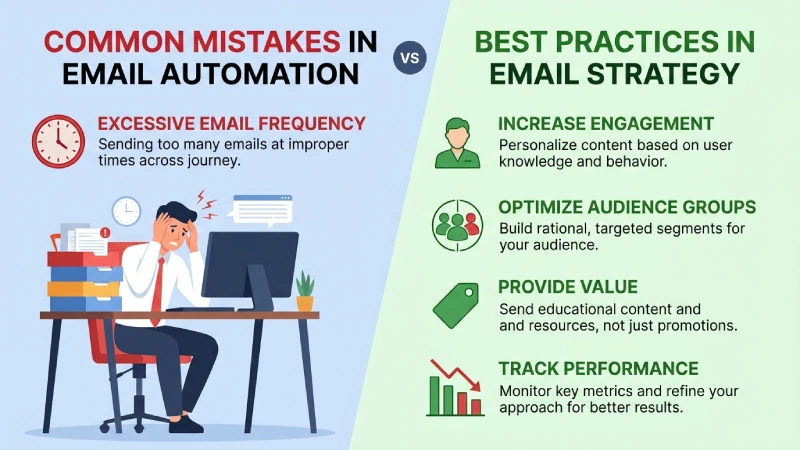
When businesses use email automation they often do it the way. This can make people less interested in what they have to say and hurt the trust between the business and the customer.
Sending Many Emails
If you send too many automated emails, people who get your emails may get really annoyed and decide to stop getting them. This is not what you want to happen.
Ignoring Personalization
When you send emails that are not personalized they usually do not work well as emails that are meant just for the person who gets them.
Poor Audience Segmentation
If you send emails to people who’re not interested in what you have to say they will not pay attention to what you are saying. You need to make sure you are sending the emails to the right people.
Focusing on Promotions
Businesses should not just send emails that try to sell people things. They should also send emails that teach people things and give them information. This will make people like getting emails from you.
Not Monitoring Analytics
If you do not pay attention to how your email campaignsre doing you will not know how to make them better in the future. Email automation is, like email automation you have to watch it and make changes to make it work right.
Email Automation vs Traditional Email Marketing
| Traditional Email Marketing | Email Automation |
| Manual campaign sending | Automated workflows |
| One-time campaigns | Ongoing sequences |
| Limited personalization | Behavioral targeting |
| Manual scheduling | Trigger-based automation |
| Basic reporting | Advanced analytics |
Automation allows businesses to scale communication more efficiently.
Future of Email Automation
Email automation technology continues evolving with AI and predictive analytics.
AI-Powered Email Personalization
AI tools increasingly help businesses:
- generate subject lines
- personalize content
- optimize send times
- predict customer behavior
Predictive Email Campaigns
Modern platforms analyze subscriber behavior to improve campaign timing and engagement.
Interactive Emails
Businesses are beginning to use:
- polls
- surveys
- embedded forms
- interactive product previews
inside emails.
Omnichannel Automation
Future systems may combine:
- SMS
- push notifications
- chat messaging
into connected customer communication workflows.
Frequently Asked Questions
What is Email Automation Tool?
Email automation tool sends emails automatically depending on actions, schedule or workflow trigger from the customers.
Where is Email Automation Used?
Email automation tool is used in ecommerce, startups, agencies, SaaS, blogs and online business firms.
What is a drip email campaign?
Drip campaigns are a series of automated email messages sent at different intervals to help take the subscribers through their customer journey.
Can free email automation services be helpful for small businesses?
There are many free service providers that provide features which can benefit the startups and small businesses who have fewer subscribers on their list.
Why is email automation necessary for your business?
Email automation saves time, increases engagement, helps in personalization, and enables businesses to scale customer communication.
Conclusion
There are numerous ways in which email automation tools help companies improve their customer communication and email marketing in 2026.
Whether it is automated email sequences for welcomes and ecommerce transactions or drip campaigns and personal email engagement, email automation enables business organizations to be smarter in sending emails and eliminate any manual efforts.
Email automation solutions are essential in helping business organizations establish better customer relations, make conversions, and build more organized communication platforms.
