

Facebook is still one of the platforms, in the world. I see that the ways brands can succeed on platform Facebook have changed a lot. Organic reach from Page posts is minimal. Ads are more competitive. And the real opportunities now sit in a mix of smart paid campaigns, active Groups, clean tracking, and content that people actually want to interact with.
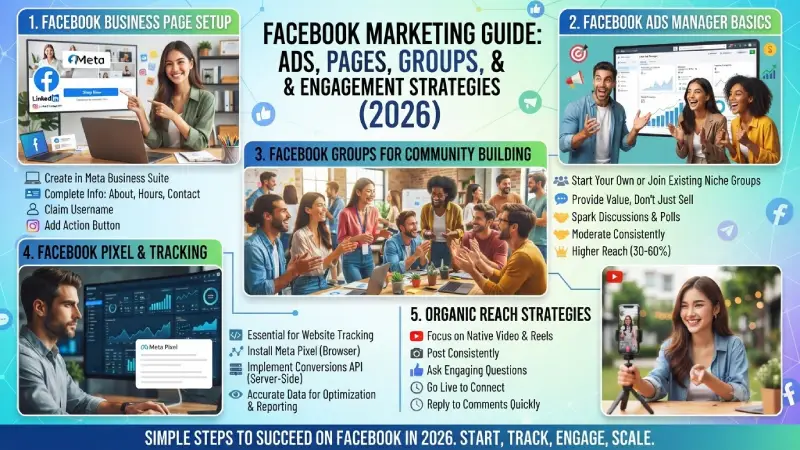
This guide covers the practical side of Facebook marketing in 2026. You’ll learn how to set up a proper Business Page, navigate Ads Manager, build community through Groups, install tracking the right way, and get the most from organic posts even when reach is limited.
No complicated theory. Just clear steps you can follow.
For the overarching strategy, read our complete guide on Social Media.
Facebook Business Page Setup
Everything starts with a solid Facebook Page. Personal profiles have limits. Find out more information on Facebook Pages for businesses before you create your page.
How to create a Facebook Business Page in 2026
- Log into Facebook with a personal account.
- Go to the menu → Pages → Create new Page.
- Enter your exact business name.
- Select the best category (this will affect search and functionality).
- Add a brief description, profile picture (logo or photo) and cover photo.
- Add contact information, website, hours, and location when necessary.
- Add a WhatsApp number if used to chat with customers.
- Claim a username (facebook.com/yourbrand) if available.
What a strong Page looks like
- Clear profile photo that works small
- Cover photo that shows what you offer or your brand personality
- Complete About section with keywords people might search
- Action buttons (Book Now, Contact Us, Shop Now, etc.)
- At least a few posts so the Page doesn’t look empty
- Linked Instagram account if you have one
Take 20–30 minutes to complete every section. Incomplete Pages look less trustworthy and can limit some ad features.
After the Page is live go to Meta Business Suite at business.facebook.com. Make sure that the Page is added to the Business Portfolio. The Business Portfolio is the place where you manage the Page, ad accounts, pixels and team access.
Facebook Ads Manager Basics
Meta Ads Manager formerly known as Facebook Ads Manager, is the platform that I use for designing and managing my paid advertising campaigns on Facebook, Instagram, Messenger, and Audience Network.
Key things to know in 2026
Meta simplified campaign objectives. You’ll usually see these main options:
| Objective | Best Used For | Common Goal |
| Awareness | Getting your brand in front of new people | Reach and brand recall |
| Traffic | Sending people to your website or app | Clicks and page views |
| Engagement | Likes, comments, shares, video views | Building interaction |
| Leads | Collecting contact info | Form fills or messages |
| App Promotion | App installs and events | Mobile app growth |
| Sales | Purchases and conversions | Revenue |
Choose the objective that matches your real business goal. Don’t pick Traffic if you actually want sales — the system optimizes differently for each one.
Basic structure of a campaign
- Campaign → overall goal and budget strategy
- Ad Set → audience, placements, budget, schedule
- Ad → the creative (image, video, carousel) and text
Practical setup tips for beginners
- Start with one campaign and one clear goal.
- Use Advantage+ features when you have clean data — Meta’s system is often better at finding the right people than heavy manual interest stacking.
- Begin with a daily budget you can afford to test ($20–50/day is common for learning).
- Create 5–10 different creatives so the system has options to test.
- Leave campaigns alone during the learning phase (usually the first few days). Constant edits reset learning.
Ads should always be created using a Business Portfolio account rather than an individual one for more control and recovery in case anything happens.
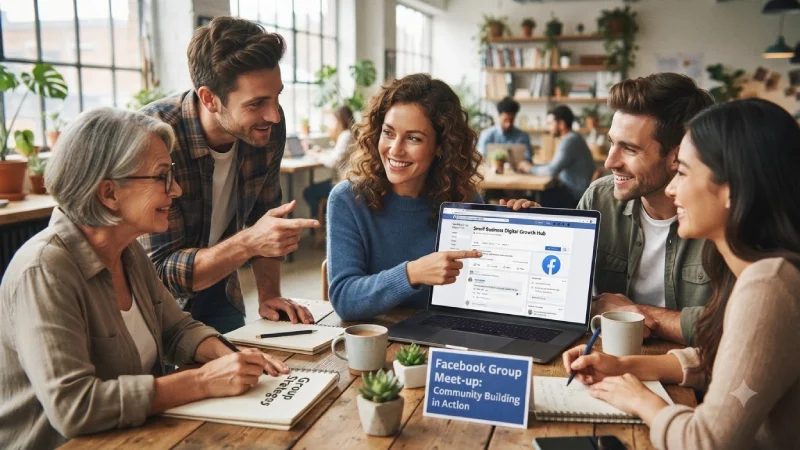
Facebook Groups for Community Building
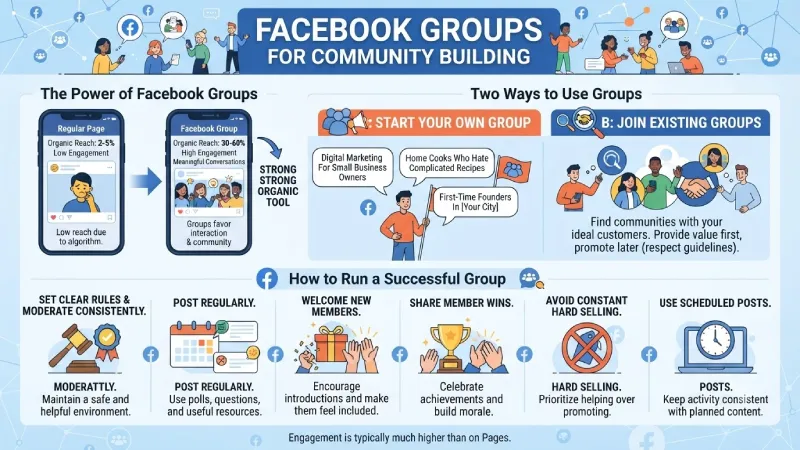
Organic reach on regular Pages is low — often just 2–5% of followers. Groups are different. Active Group posts can reach 30–60% of members because the algorithm favors meaningful conversations.
Groups remain one of the strongest organic tools left on Facebook.
Two ways to use Groups
- Start Your Own Group Form a group based on your industry or your target customers. Some examples are “Digital Marketing For Small Business Owners”, “Home Cooks Who Hate Complicated Recipes”, or “First-Time Founders In [Your City]”.
- Join Existing Groups Join Groups that are relevant to you and where your ideal customers hang out. Provide value first, then promote only if you can do so in accordance with the Group guidelines.
How to run a successful Group
- Set clear rules and moderate consistently.
- Post discussion questions, polls, and useful resources regularly.
- Welcome new members and encourage introductions.
- Share member wins and questions.
- Avoid constant hard selling. The best Groups feel helpful, not salesy.
- Use scheduled posts and member questions to keep activity steady.
Most organizations regard their Facebook Group as an integral community platform and not just another place to share links. Engagement is typically much higher than on their page.
Facebook Pixel and Tracking
If you run ads to a website, clean tracking is non-negotiable in 2026.
The Meta Pixel (now often called a dataset in Events Manager) is a small piece of code that tells Meta what people do on your site — page views, add to cart, purchases, leads, etc.
Because of privacy changes and ad blockers, the browser Pixel alone is no longer enough. Best practice is to run both:
- Meta Pixel (browser-side)
- Conversions API (CAPI) — server-side tracking that is more reliable
Basic setup steps
- Go to Meta Events Manager.
- Create a new dataset / Pixel.
- Deploy the basic code to your website (manual installation, through partner integration such as Shopify or WordPress, or through Google Tag Manager).
Configure the standard events (ViewContent, AddToCart, Purchase, Lead, and so forth). - Implement Conversions API for more accurate data.
- Test everything with the Meta Pixel Helper browser extension and Events Manager test tools.
Without the correct metric, Meta will not be able to optimize your ads, whereas your reporting will not be credible. This happens to be one of the most common causes of poor-performing advertising campaigns.
Facebook Organic Reach Strategies
Organic reach on Pages is limited, but it’s not zero. Here’s what still works in 2026:
What performs better organically
- Native video (especially short vertical video and Reels-style content)
- Posts that spark comments and discussion
- Content shared inside Groups
- Live video
- Posts that keep people on Facebook longer (dwell time matters)
What usually underperforms
- Plain link posts that take people off Facebook quickly
- Purely promotional content with no value
- Low-effort image posts with little text or conversation
Practical organic tactics
- Post videos on a regular basis.
- Ask questions that lead to answers not just simple “yes” or “no” replies.
- Share tips, personal stories or behind-the-scenes moments that people can relate to.
- Post valuable content in Groups making sure to follow the group rules each time.
- Reply to comments soon as possible to keep the conversation going.
- Use Facebook. Short videos to stay in touch more often with a light casual feel.
- Team up, with Pages or creators when it fits naturally and adds value.
Your Page functions as an engagement channel while your Group(s) or your activity, within Group(s) serve as your engagement organic platform.
Putting It All Together
A practical Facebook marketing system in 2026 usually looks like this:
- Clean Business Page + Business Portfolio setup
- Proper Pixel + Conversions API tracking
- Consistent organic posting focused on video and conversation
- Active Group (owned or participated in) for deeper community
- Paid campaigns that start simple, test creatives, and scale what works
Everything doesn’t need to be done at It all begins with the Page and tracking. Consistency is what you need next. Ads and Groups can come next after that.
Frequently Asked Questions
Facebook organic reach strategies ?
Yes, if you are planning to do any kind of advertising because most ad campaigns by Meta need a Facebook Page.
How much should I budget for Facebook ads when starting?
Many businesses start testing with $20–50 per day. The exact amount depends on your industry and goals. Focus on learning what creatives and offers work before scaling spend.
Is it still worth joining Facebook Groups in 2026?
Absolutely. Groups provide higher levels of reach and engagement compared to normal posts. This strategy is particularly effective for niche communities and relationship marketing businesses.
Is the Meta Pixel enough on its own?
Not ideally. Pair the Pixel with the Conversions API for more accurate tracking, especially with privacy restrictions and ad blockers.
Why is my Page reach so low?
The Organic Reach of Pages has always been very small. The emphasis should be on video content, posts that spark conversations, and Groups. When needed, go with paid ads.
Conclution
Marketing on Facebook in 2026 should be simple and straightforward, not gimmicky. Take care of the basics, like the page, tracking, and business suite; create engaging content; leverage groups for communities; and launch targeted advertising campaigns that you can analyze.
Pick 1 or 2 of these aspects, make them work, and gradually add more elements. This is how most companies achieve success in marketing on the platform.
This is the master version of Cluster 2 (Facebook Marketing). Same depth, same tone as the guide to Instagram marketing, just tailored specifically for Facebook marketing in 2026. If there is any section that needs tweaking or expansion, let me know.
To take the next step, see our detailed guide on LinkedIn Marketing
