

There cannot be anything more helpful for companies than free AI software. With automation, design, data analysis, customer service improvements, there is nothing that the correct software cannot provide. Anyone whether he is a startup, a freelancer, or a businessman can use these free plans of AI software.
Free AI tools from our AI tools for business guide.
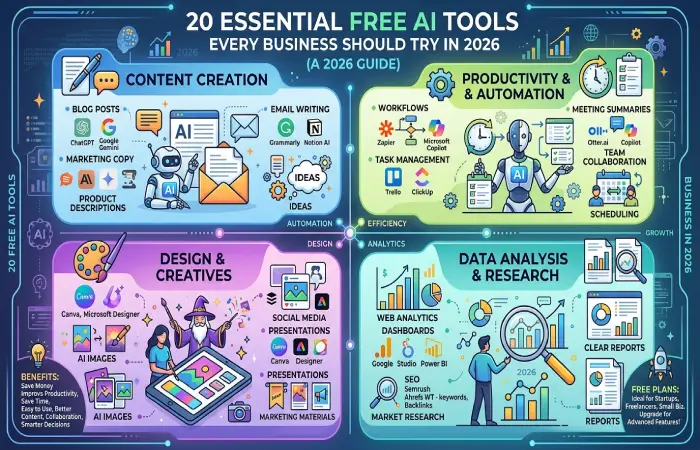
There is an infinite number of possibilities when it comes to writing blog posts, managing social media, designing graphics or automating processes for free using AI-powered software. Although there are certain restrictions, free AI is an excellent way of integrating AI technology into your business.
In the upcoming sections, you will find the best free AI tools to see how they can help your business and the right tool to meet your specific requirements.
What Are Free AI Tools for Business?
AI tools for business free of charge are computer programs which apply artificial intelligence in assisting companies perform their duties without having to purchase a license to do so. They are useful in saving time and money for the firms.
Most of the free AI software offers basic features which are adequate for handling routine business functions. With business expansion, you will need to go for paid subscriptions to access additional features.
Businesses use free AI tools for:
-
- Content creation
- Graphic design
- Email writing
- Social media management
- Workflow automation
- Customer support
- Project management
- SEO optimization
- Data analysis
- Meeting summaries
- Business research
- Team collaboration
Benefits of Free AI Tools
There are many benefits that free AI software provides for organizations that seek to enhance productivity while avoiding additional expenses.
Save Money
There is no need to subscribe monthly for almost all free AI software.
Improve Productivity
The use of AI enables tasks to be done quickly, giving people time for more critical jobs.
Save Time
Companies can utilize automation to perform mundane functions such as drafting emails, developing content, and organizing projects.
Easy to Use
The majority of AI applications are user-friendly with an easy-to-use interface.
Better Content Creation
AI is able to create blog posts, emails, product descriptions, and social media content within minutes.
Improve Team Collaboration
There are many examples of AI that can help to organize tasks within the team.
Better Decision Making
AI interprets business data and offers insight, leading to informed decision-making for businesses.
Try Before Upgrading
Free plans allow businesses to test AI tools before purchasing a premium subscription.
Supports Business Growth
As your business grows, you can upgrade to advanced plans with more features and higher usage limits.
These sections naturally include your target keyword “free AI tools for business” and prepare readers for the following H2 sections:
- Free AI Tools for Content Creation
- Free AI Tools for Productivity
- Free AI Tools for Design
- Free AI Tools for Data Analysis
- Free vs Paid AI Tools Comparison
Track data via AI tools for business analytics.
20 Free AI Tools Every Business Should Try in 2026
Free AI Tools for Content Creation
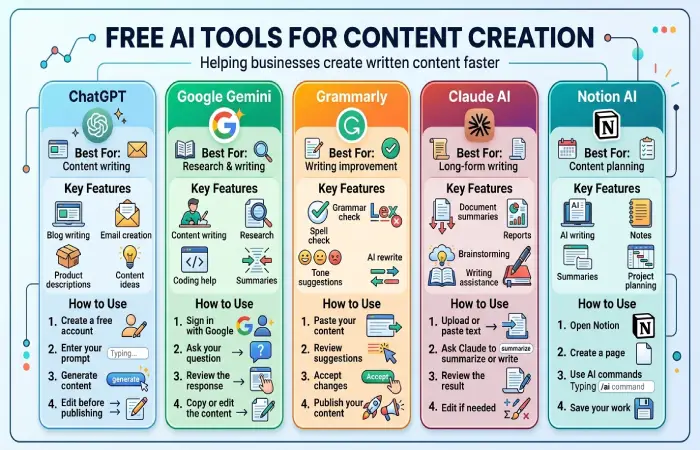
These AI-based solutions help organizations develop their blogs, emails, marketing content, social media content, product descriptions, and other written content more quickly.
ChatGPT
Best For: Content writing
Key Features
- Blog writing
- Email creation
- Product descriptions
- Content ideas
How to Use
- Create a free account.
- Enter your prompt.
- Generate content.
- Edit before publishing.
Google Gemini
Best For: Research & writing
Key Features
- Content writing
- Research
- Coding help
- Summaries
How to Use
- Sign in with Google.
- Ask your question.
- Review the response.
- Copy or edit the content.
Grammarly
Best For: Writing improvement
Key Features
- Grammar check
- Spell check
- Tone suggestions
- AI rewrite
How to Use
- Paste your content.
- Review suggestions.
- Accept changes.
- Publish your content.
Claude AI
Best For: Long-form writing
Key Features
- Document summaries
- Reports
- Brainstorming
- Writing assistance
How to Use
- Upload or paste text.
- Ask Claude to summarize or write.
- Review the result.
- Edit if needed.
Notion AI
Best For: Content planning
Key Features
- AI writing
- Notes
- Summaries
- Project planning
How to Use
- Open Notion.
- Create a page.
- Use AI commands.
- Save your work.
Free AI Tools for Productivity
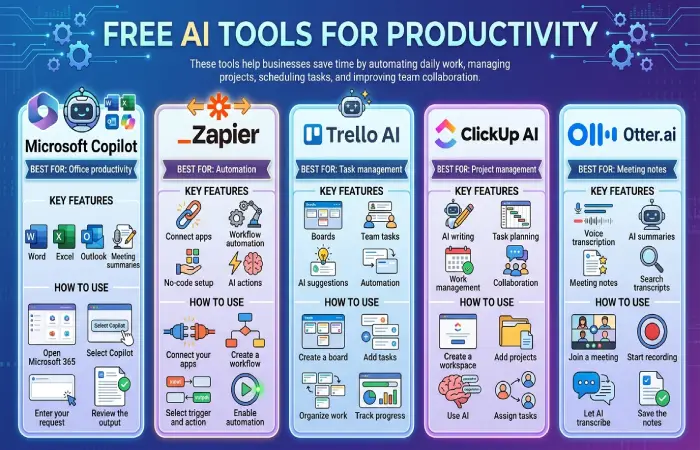
These tools assist businesses in saving time through automation of their day-to-day activities, project management, task scheduling, and teamwork.
Microsoft Copilot
Best For: Office productivity
Key Features
- Word
- Excel
- Outlook
- Meeting summaries
How to Use
- Open Microsoft 365.
- Select Copilot.
- Enter your request.
- Review the output.
Zapier
Best For: Automation
Key Features
- Connect apps
- Workflow automation
- No-code setup
- AI actions
How to Use
- Connect your apps.
- Create a workflow.
- Select trigger and action.
- Enable automation.
Trello AI
Best For: Task management
Key Features
- Boards
- Team tasks
- AI suggestions
- Automation
How to Use
- Create a board.
- Add tasks.
- Organize work.
- Track progress.
ClickUp AI
Best For: Project management
Key Features
- AI writing
- Task planning
- Work management
- Collaboration
How to Use
- Create a workspace.
- Add projects.
- Use AI.
- Assign tasks.
Otter.ai
Best For: Meeting notes
Key Features
- Voice transcription
- AI summaries
- Meeting notes
- Search transcripts
How to Use
- Join a meeting.
- Start recording.
- Let AI transcribe.
- Save the notes.
Free AI Tools for Design
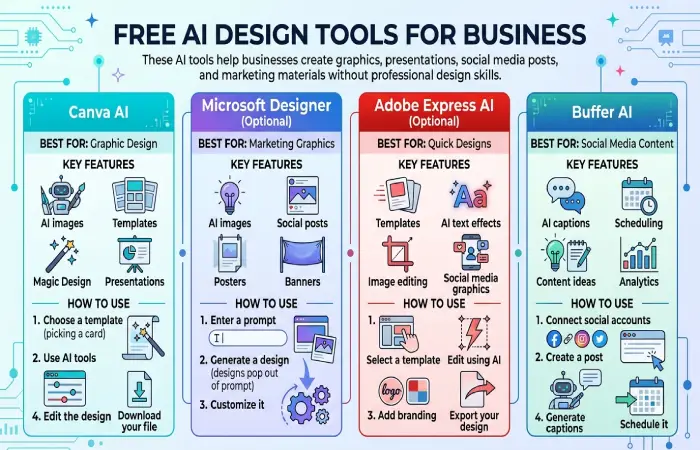
This kind of AI technology helps organizations create graphics, presentations, social media postings, and marketing content without needing design skills.
Canva AI
Best For: Graphic design
Key Features
- AI images
- Templates
- Magic Design
- Presentations
How to Use
- Choose a template.
- Use AI tools.
- Edit the design.
- Download your file.
Microsoft Designer (Optional)
Best For: Marketing graphics
Key Features
- AI images
- Social posts
- Posters
- Banners
How to Use
- Enter a prompt.
- Generate a design.
- Customize it.
Adobe Express AI (Optional)
Best For: Quick designs
Key Features
- Templates
- AI text effects
- Image editing
- Social media graphics
How to Use
- Select a template.
- Edit using AI.
- Add branding.
- Export your design.
Buffer AI
Best For: Social media content
Key Features
- AI captions
- Scheduling
- Content ideas
- Analytics
How to Use
- Connect social accounts.
- Create a post.
- Generate captions.
- Schedule it.
Free AI Tools for Data Analysis
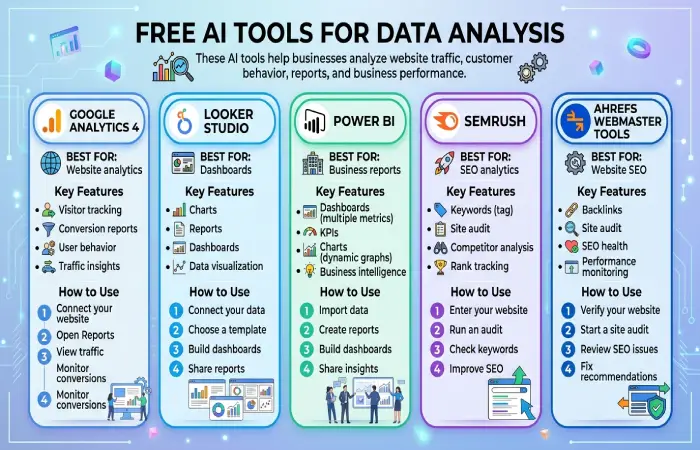
These AI tools enable companies to study their website traffic, behavior, reports, and company performance.
Google Analytics 4
Best For: Website analytics
Key Features
- Visitor tracking
- Conversion reports
- User behavior
- Traffic insights
How to Use
- Connect your website.
- Open Reports.
- View traffic.
- Monitor conversions.
Looker Studio
Best For: Dashboards
Key Features
- Charts
- Reports
- Dashboards
- Data visualization
How to Use
- Connect your data.
- Choose a template.
- Build dashboards.
- Share reports.
Power BI
Best For: Business reports
Key Features
- Dashboards
- KPIs
- Charts
- Business intelligence
How to Use
- Import data.
- Create reports.
- Build dashboards.
- Share insights.
Semrush
Best For: SEO analytics
Key Features
- Keywords
- Site audit
- Competitor analysis
- Rank tracking
How to Use
- Enter your website.
- Run an audit.
- Check keywords.
- Improve SEO.
Ahrefs Webmaster Tools
Best For: Website SEO
Key Features
- Backlinks
- Site audit
- SEO health
- Performance monitoring
How to Use
- Verify your website.
- Start a site audit.
- Review SEO issues.
- Fix recommendations.
Free vs Paid AI Tools Comparison
Every organization does not require an AI tool with a fee. Free AI tools can be used by those organizations who want to automate their work without having to pay any fee. There are some benefits that come with paid AI tools.
Select a free plan if you are a beginner. Switch to a premium plan only if your organization requires additional functionalities or your team expands.
Free vs Paid AI Tools Comparison
| Feature | Free AI Tools | Paid AI Tools |
| Cost | Free | Monthly or yearly subscription |
| AI Features | Basic features | Advanced AI capabilities |
| Usage Limits | Limited | Higher or unlimited usage |
| Customer Support | Community or basic support | Priority customer support |
| Integrations | Limited | More business integrations |
| Team Collaboration | Basic | Advanced collaboration tools |
| Automation | Simple workflows | Complex automation |
| Security | Standard | Advanced security and compliance |
| Best For | Freelancers, startups, small businesses | Growing businesses and enterprises |
When Should You Upgrade?
Consider upgrading to a paid AI tool if you:
- Need more AI requests or higher usage limits
- Want advanced automation features
- Manage a large team
- Require premium customer support
- Need business integrations like Salesforce, Slack, or Microsoft 365
- Handle large amounts of business data
F&Q
What are free AI tools for business?
Free AI tools for business are applications that help you to automate such tasks as content creation, graphic design, project management, marketing, customer support, and data analysis by offering free plans without paid subscriptions.
Which is the best free AI tool for businesses?
There is no one tool that works well in every scenario. ChatGPT will be very useful in generating written content, Canva AI will be ideal for designing, Zapier can assist you in streamlining the process, Google Analytics 4 will help in data analysis, and Grammarly will improve your writing.
Are free AI tools enough for small businesses?
Definitely. Small businesses, freelancers, startups, etc., can work with their regular tasks using free AI tools. Once they grow, they will be able to upgrade their subscriptions to paid ones with additional capabilities.
Compare with best AI tools for small business.
What is the difference between free and paid AI tools?
Though free AI tools can be used with basic AI functionalities, paid AI tools come equipped with advanced AI functionalities, more integrations, higher limits of use, enhanced security, and priority customer support.
Can I use multiple free AI tools simultaneously?
Sure. Many companies use various AI tools for different purposes. For example, ChatGPT for writing, Canva
Conclusion
Since free AI tools are available, companies can implement productivity enhancing programs without having to deal with additional costs. AI tools with free programs provide invaluable help with content creation, graphic design, workflow and project automation and management, and business data analysis.
Choose one or two tools and implement them within your business to learn how to use them effectively. AI tools can be added as your business grows. The combination of free AI tools can help increase your business productivity in 2026 and beyond.
