

Table of Contents
ToggleIntroduction
Businesses generate mountains of data every day — from websites, sales systems, customer interactions, marketing campaigns, and internal operations. It is usually difficult for any person to make informed decisions by just observing raw figures. The important thing is what becomes of those figures.
That is what AI-driven analytics software is all about. They collect data from different sources, detect patterns and make predictions about future events and provide you with the information that you really need. In other words, you spend less time creating reports and more time implementing actions based on them.
Analytics AI from our AI tools for business pillar.
If you manage a small team or a big company, you know that proper analytics configuration can increase the level of efficiency, ensure profit margins and help your company to grow steadily. This article discusses the functions of such software, their main benefits, most effective solutions for 2026 and how to pick the right one for your case.
What Is AI-Powered Business Analytics?
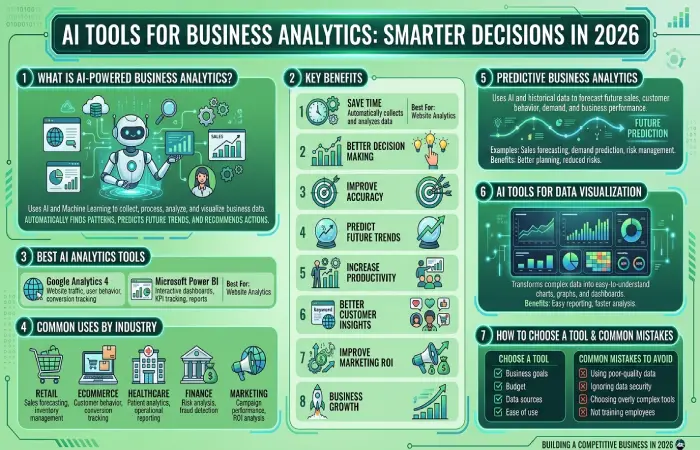
Artificial Intelligence-based Business Analytics makes use of Artificial Intelligence and Machine Learning in order to gather, process, analyze and visualize business data. AI does not require manual generation of any reports and automatically discovers patterns, predictions and recommendations for the future.
Businesses apply AI analytics software in order to comprehend customer behavior, sales tracking, enhance marketing campaigns, finance management and optimize business processes.
Common Uses of AI Business Analytics
- Sales forecasting
- Customer behavior analysis
- Website analytics
- Marketing performance
- Financial reporting
- Inventory management
- Business dashboards
- KPI monitoring
- Revenue forecasting
- Risk analysis
- Customer segmentation
- Employee performance tracking
- Demand prediction
- Operational analytics
- Real-time reporting
Benefits of AI Tools for Business Analytics
These systems provide tangible benefits that are evident in daily practice.
Save Time
AI handles data collection, cleaning, and basic analysis. Teams spend far less time exporting spreadsheets and building the same reports every week.
Improve Accuracy
Machine learning reduces common reporting errors that happen when people copy data between systems by hand.
Predict Future Trends
Systems that utilize past data perform better at predicting demand, revenue or churn than trend lines do.
Become More Efficient
After automation of the reporting process, time will be available for analysis and decision-making.
Automate data with AI tools for business automation.
Get to Know your Customers Better
You will know about their history of purchases, search queries and support tickets – more personalized marketing is possible.
Become More Efficient in your Marketing Campaigns
Thanks to artificial intelligence, you will find out what works and what doesn’t.
Business Growth
Data-driven decisions enable business growth.
Best AI Analytics Tools for Business
| AI Tool | Best For | Key Features | Free Plan |
| Google Analytics 4 | Website Analytics | User behavior, traffic reports | Yes |
| Microsoft Power BI | Business Intelligence | Dashboards, KPIs, reports | Trial |
| Tableau AI | Data Visualization | Interactive dashboards, AI insights | Trial |
| Looker Studio | Reporting | Free dashboards and reports | Yes |
| Semrush | SEO Analytics | Keywords, traffic, competitors | Trial |
| Zoho Analytics | Business Reporting | AI reports, dashboards | Trial |
| IBM Cognos Analytics | Enterprise Analytics | Predictive analytics, dashboards | Trial |
| Qlik Sense | Data Discovery | AI-powered visual analytics | Trial |
| ThoughtSpot | Search Analytics | AI search and business insights | Trial |
| Salesforce Einstein Analytics | CRM Analytics | Sales forecasting, customer insights | Trial |
| SAP Analytics Cloud | Enterprise Planning | BI, planning, forecasting | Trial |
| Oracle Analytics Cloud | Enterprise Analytics | Machine learning, dashboards | Trial |
| Domo | Business Intelligence | Cloud dashboards, alerts | Trial |
| Sisense | Embedded Analytics | AI visualization, reporting | Trial |
| AWS QuickSight | Cloud Analytics | Machine learning insights | Pay-as-you-go |
Best AI Analytics Tools for Business
Google Analytics 4
Best For: Website analytics
Key Features
- Website traffic
- User behavior
- Conversion tracking
- Event reporting
Best Uses
Google Analytics 4will aid in identifying the source of their traffic, user engagement on their site, and which pages have been contributing to conversions.
Microsoft Power BI
Best For: Business intelligence
Key Features
- Interactive dashboards
- KPI tracking
- Business reports
- AI insights
Best Uses
Power BI consolidates all data from different sources to form a dashboard with business data.
Tableau AI
Best For: Data visualization
Key Features
- Interactive charts
- AI insights
- Predictive analytics
- Business dashboards
Best Uses
Tableau AI makes sense out of complicated business information by creating visually appealing reports.
Looker Studio
Best For: Free dashboards
Key Features
- Google integration
- Custom reports
- Charts
- Dashboards
Best Uses
Looker Studio is employed for creating real-time business dashboards based on data from Google Analytics, Google Search Console, among other tools.
Semrush
Best For: SEO analytics
Key Features
- Keyword tracking
- Competitor analysis
- Site audit
- Traffic analysis
Best Uses
Semrush assists companies in increasing web traffic and evaluating SEO results.
Zoho Analytics
Best For: Business reporting
Key Features
- AI assistant
- Dashboards
- Reports
- Data blending
Best Uses
Zoho Analytics generates business reports and offers AI-based insights.
IBM Cognos Analytics
Best For: Enterprise analytics
Key Features
- Predictive analytics
- Dashboards
- AI reporting
- Data preparation
Best Uses
The IBM Cognos software enables organizations to analyze big data sets.
Qlik Sense
Best For: Self-service analytics
Key Features
- AI insights
- Dashboards
- Data discovery
- Interactive reports
Best Uses
Qlik Sense allows for data analysis regardless of the user’s technical expertise.
ThoughtSpot
Best For: Search-driven analytics
Key Features
- AI search
- Dashboards
- Data visualization
- Business intelligence
Best Uses
ThoughtSpot enables users to ask questions in plain language and receive instant business insights.
Salesforce Einstein Analytics
Best For: CRM analytics
Key Features
- Sales forecasting
- Customer insights
- AI predictions
- CRM reporting
Best Uses
Salesforce Einstein helps sales teams predict opportunities and improve customer relationships.
AI for Predictive Business Analytics
Predictive Analytics applies Artificial Intelligence for predicting the future outcomes of business using past data and machine learning technology.
Businesses use predictive analytics for:
- Sales forecasting
- Demand prediction
- Inventory planning
- Customer churn prediction
- Revenue forecasting
- Marketing optimization
- Financial planning
- Risk management
Benefits
- Better planning
- Reduced business risks
- Improved forecasting
- Smarter investments
- Increased profitability
AI Tools for Data Visualization
Data visualization is a process of converting data into charts, graphs, and dashboards.
Popular Data Visualization Tools
- Tableau AI
- Power BI
- Looker Studio
- Qlik Sense
- Domo
- Sisense
Common Visualization Types
- Line charts
- Bar graphs
- Pie charts
- Heat maps
- KPI dashboards
- Geographic maps
- Funnel reports
- Revenue dashboards
Benefits
- Easy reporting
- Faster analysis
- Better presentations
- Improved decision-making
- Real-time monitoring
AI Analytics Use Cases by Industry
| Industry | AI Analytics Use Cases | Recommended Tools |
| Retail | Sales forecasting, inventory management | Power BI, Tableau AI |
| Ecommerce | Customer behavior, conversion tracking | Google Analytics 4, Semrush |
| Healthcare | Patient analytics, operational reporting | IBM Cognos, Power BI |
| Finance | Fraud detection, financial forecasting | Oracle Analytics, SAP Analytics |
| Manufacturing | Supply chain analytics, quality monitoring | Qlik Sense, Sisense |
| Marketing | Campaign performance, ROI analysis | Semrush, Looker Studio |
| Education | Student performance analysis | Power BI, Tableau AI |
| Real Estate | Lead tracking, market analysis | Salesforce Einstein, Looker Studio |
| Logistics | Route optimization, delivery analytics | SAP Analytics Cloud |
| Hospitality | Customer satisfaction, booking analysis | Tableau AI, Power BI |
AI tools for business’ | ‘AI tools for business automation’
How to Choose the Right AI Analytics Tool
Before selecting an AI analytics platform, consider the following factors:
- Business goals
- Budget
- Data sources
- Ease of use
- Dashboard customization
- AI capabilities
- Integrations
- Security
- Scalability
- Customer support
Use a tool which corresponds to your present need for reporting and grow from there.
Common Mistakes to Avoid
- Using poor-quality data
- Ignoring data security
- Choosing overly complex tools
- Not training employees
- Focusing only on reports instead of insights
- Failing to monitor KPIs regularly
- Skipping dashboard customization
- Not reviewing AI-generated recommendations
Frequently Asked Questions
What are business analytics AI tools?
The AI tools for business analytics are AI-based solutions used to analyze data, produce reports, detect trends, and support businesses in making decisions.
What AI analytics tool should I choose?
Google Analytics 4, Microsoft Power BI, Tableau AI, Looker Studio, and Semrush are the most popular AI analytics tools available today.
Are AI analytics tools available to small businesses?
Yes. Many AI analytics tools have free and cheap versions for startups and small businesses.
Are AI analytics tools difficult to code?
No. The majority of modern AI analytics tools provide a drag-and-drop dashboard.
Conclusion
The AI-based business analytics software helps companies make use of data for gaining insights by converting data into insights that can be put to action. The tools used in the business context range from web analytics to sales forecast, dashboards, and predictive analytics and many more.
Firstly, choose the right AI analytics solution according to your company’s needs and goals. As your company grows, develop your analytics solutions to add predictive insights, reporting, and dashboards to beat the competition in the year 2026 and onwards.