Introduction
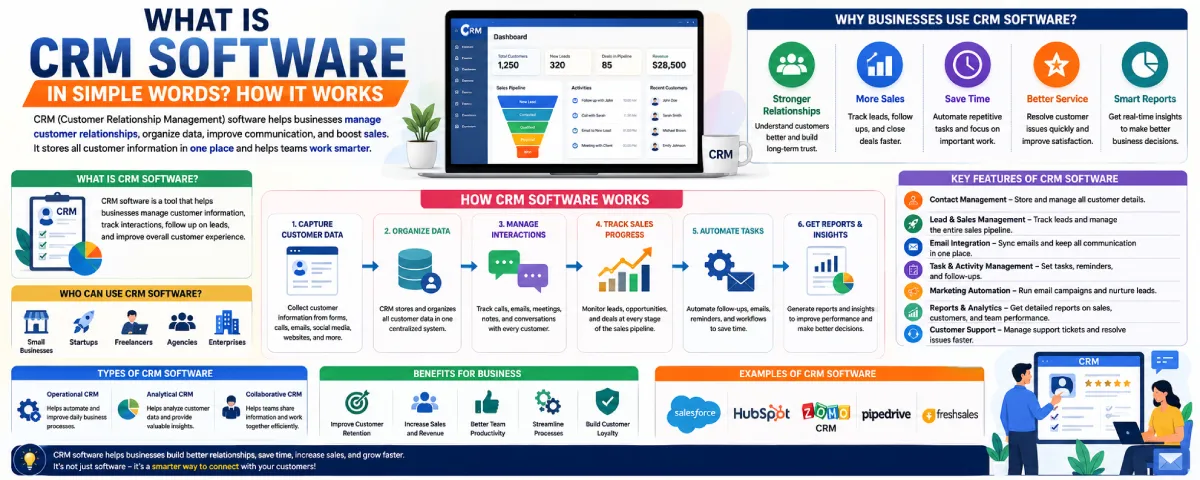
CRM software plays a significant role in ensuring that organizations of all sizes manage their customers, sales, and communications effectively. It should be pointed out that contrary to popular belief, CRM software is quite user-friendly with elements like customer grouping, communication tracking, leads management, and sales improvement being some of the functionalities available. . Unlike using a variety of tools such as Excel sheets and emails to handle customer data, companies leverage CRM software because this software makes it easier to manage data in an organized manner while increasing the chances of missing something. In addition to aiding in sales processes, CRM can also be used for marketing and customer service purposes, among others.
What is CRM Software in Simple Words
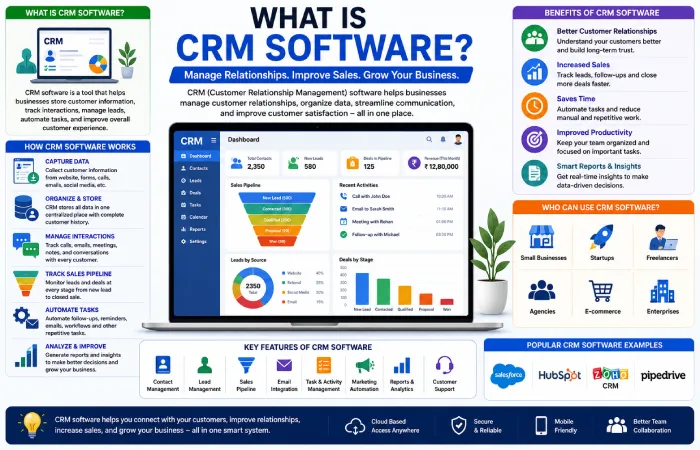
Customer Relationship Management is an application that helps firms manage customer relationships and organize customer data, acting as a system through which all the customer and sales data can be stored.
If you want a more detailed explanation of CRM systems, benefits, types, and implementation, read our complete guide on CRM software.
Instead of using:
- spreadsheets
- notebooks
- sticky notes
- emails
- manual reminders
a business can use CRM software to keep customer information organized in one place.
A CRM system helps businesses remember:
- customer names
- phone numbers
- email addresses
- previous conversations
- sales history
- support requests
- follow-up tasks
For example, there is the case of the small businessperson who deals with hundreds of clients each month.
Without CRM software, it becomes difficult to remember:
- who contacted the business
- which customers need follow-ups
- who already purchased
- which leads are interested
- when to send emails
CRM software solves these problems by organizing everything automatically.
CRM Software Is Not Just for Large Companies
Many beginners think CRM software is only useful for big corporations.
That is no longer true.
Today, even:
- freelancers
- startups
- small businesses
- ecommerce stores
- consultants
- agencies
use CRM tools.
Many CRM systems now offer:
- free plans
- beginner-friendly dashboards
- cloud-based access
- automation features
This makes CRM software accessible to almost every business type.
Main Goal of CRM Software
The main goal of CRM software is simple:
Help businesses manage customer relationships more effectively.
Everything inside a CRM system supports that goal.
How CRM Software Works
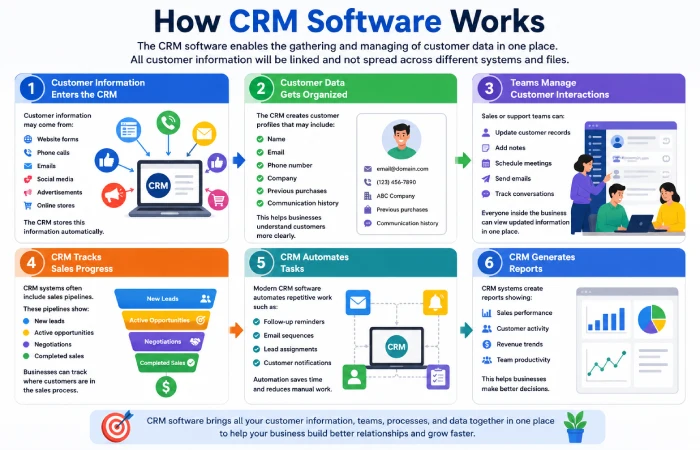
The CRM software enables the gathering and managing of customer data in one place. All customer information will be linked and not spread across different systems and files.
Step 1: Customer Information Enters the CRM
Customer information may come from:
- website forms
- phone calls
- emails
- social media
- advertisements
- online stores
The CRM stores this information automatically.
Step 2: Customer Data Gets Organized
The CRM creates customer profiles that may include:
- name
- phone number
- company
- previous purchases
- communication history
This helps businesses understand customers more clearly.
Step 3: Teams Manage Customer Interactions
Sales or support teams can:
- update customer records
- add notes
- schedule meetings
- send emails
- track conversations
Everyone inside the business can view updated information in one place.
Step 4: CRM Tracks Sales Progress
CRM systems often include sales pipelines.
These pipelines show:
- new leads
- active opportunities
- negotiations
- completed sales
Businesses can track where customers are in the sales process.
Step 5: CRM Automates Tasks
Modern CRM software automates repetitive work such as:
- follow-up reminders
- email sequences
- lead assignments
- customer notifications
Automation saves time and reduces manual work.
Step 6: CRM Generates Reports
CRM systems create reports showing:
- sales performance
- customer activity
- revenue trends
- team productivity
This helps businesses make better decisions.
CRM Software Definition and Examples
CRM Software Definition
CRMs are short for Customer Relationship Management softwares.
They are basically software tools that facilitate management of customer relationship and business dealings.
The aim of CRMs is to enable businesses to:
- organize customer information
- improve customer communication
- increase sales efficiency
- strengthen customer relationships
Simple CRM Examples
Example 1: Ecommerce Store
An online store uses CRM software to:
- track customer purchases
- send marketing emails
- manage support requests
- recommend products
Example 2: Real Estate Agency
A real estate company uses CRM software to:
- track property inquiries
- manage leads
- schedule property visits
- follow up with buyers
Example 3: Freelance Consultant
A consultant uses CRM software to:
- store client information
- track invoices
- manage appointments
- organize projects
Example 4: SaaS Startup
A software startup uses CRM tools to:
- manage leads
- track subscriptions
- monitor customer onboarding
- improve retention
CRM software adapts to many industries.
CRM Software Features Explained for Beginners
Many beginners feel confused when they first see CRM dashboards because CRM systems include many different tools and features. If you want a deeper understanding of these tools, read our guide on CRM software features and functions..
| CRM Feature | What It Does | Why It Matters |
| Contact Management | Stores customer names, emails, phone numbers, and history | Keeps all customer information organized in one place |
| Lead Management | Tracks potential customers before they buy | Helps businesses follow up with leads properly |
| Sales Pipeline | Shows stages of the sales process | Makes it easier to track deals and sales progress |
| Email Integration | Connects emails with the CRM system | Saves communication history automatically |
| Task Management | Creates reminders for follow-ups and meetings | Reduces missed opportunities |
| Marketing Automation | Automates emails and campaigns | Saves time and improves marketing consistency |
| Customer Support Tracking | Manages support tickets and customer issues | Improves customer service quality |
| Reporting & Analytics | Generates business reports and sales insights | Helps businesses make better decisions |
| Mobile Access | Allows CRM access from smartphones | Teams can work from anywhere |
| Team Collaboration | Lets employees share customer information | Improves communication inside the company |
| Workflow Automation | Automates repetitive business tasks | Reduces manual work |
| Calendar Integration | Syncs meetings and schedules | Keeps appointments organized |
| File Storage | Stores contracts, documents, and files | Keeps customer records centralized |
| Deal Tracking | Monitors ongoing business opportunities | Helps businesses close more sales |
| Customer Segmentation | Groups customers into categories | Helps create targeted marketing campaigns |
| Chat Integration | Connects live chat systems with CRM | Improves communication speed |
| Invoice Tracking | Tracks payments and invoices | Helps businesses manage finances |
| AI Recommendations | Suggests actions based on customer behavior | Improves decision-making |
| Activity Tracking | Monitors calls, emails, and interactions | Gives a full view of customer engagement |
| Cloud Access | Stores CRM data online | Makes remote access easier |
Core CRM Concepts Explained
Understanding basic CRM concepts helps beginners use CRM systems more effectively.
Leads
A lead is a potential customer who shows interest in a business.
Examples:
- website inquiry
- phone call
- email signup
CRM software helps businesses track and organize leads.
Contacts
Contacts are people or companies stored inside the CRM system.
Each contact profile may include:
- name
- phone number
- notes
- communication history
Sales Pipeline
A sales pipeline shows where leads are in the buying process.
Example pipeline:
- New Lead
- Contacted
- Proposal Sent
- Negotiation
- Closed Deal
CRM software visually tracks this process.
Opportunities
An opportunity is a possible sale.
Businesses track opportunities to estimate future revenue and sales progress.
Tasks and Reminders
CRM systems help businesses schedule:
- follow-up calls
- meetings
- emails
- reminders
This prevents missed opportunities.
Automation
Automation allows CRM systems to complete repetitive tasks automatically.
Examples:
- welcome emails
- follow-up reminders
- lead assignment
- notifications
Reporting
CRM reports help businesses analyze:
- sales performance
- lead conversion
- customer activity
- team productivity
When a Business Needs a CRM
Many businesses delay using CRM software for too long.
There are several signs that a business may need a CRM system.
Customer Information Is Disorganized
If customer details exist across:
- spreadsheets
- emails
- notebooks
- messaging apps
a CRM can improve organization.
Follow-Ups Get Missed
Missed follow-ups often lead to lost sales opportunities.
CRM reminders help solve this problem.
The Business Has Too Many Leads to Track Manually
As customer inquiries increase, manual tracking becomes difficult.
CRM systems simplify lead management.
Teams Cannot Share Customer Information Easily
CRM systems improve collaboration between employees.
Sales Performance Is Difficult to Measure
CRM reports help businesses track:
- sales performance
- conversion rates
- team activity
Customer Support Is Becoming Difficult
CRM systems organize customer communication history and support requests.
Common CRM Features
Most CRM systems include similar core features.
Contact Management
Stores customer details and communication history.
Lead Management
Tracks potential customers through the sales process.
Sales Pipeline
Visualizes sales progress and opportunities.
Email Integration
Connects CRM software with email systems.
Task Management
Schedules reminders and follow-ups.
Reporting and Analytics
Measures sales and customer performance.
Automation
Automates repetitive business processes.
Mobile Access
Allows teams to access CRM systems from smartphones and tablets.
FAQ
CRM software definition in easy terms
CRM software is a software program that allows organizations to effectively handle customer relations, store information about customers, and keep records of the sales process.
What does CRM mean?
CRM stands for Customer Relationship Management.
Why do companies need CRM software?
CRM software helps organizations manage their customers, create leads, increase sales, and improve communication.
Conclusion
Customer Relationship Management software is really useful for businesses. It helps them manage their customer relations in a way. This software brings together all the information, sales process, communications and follow-ups on one platform. This saves businesses a lot of time. Helps them be more organized. They can make sales and have better relationships, with their customers.
Customer Relationship Management software can be used by all kinds of organizations. These include companies, small firms and even people who work for themselves. The best Customer Relationship Management applications are the ones that fit the needs of a business. This depends on the size of the business what it wants to achieve and how it operates. For example a small business can start with Customer Relationship Management tools. As the business grows it can use advanced tools. This way the Customer Relationship Management software grows with the business.