


Introduction
It is hard to imagine a business without productivity tools. Good productivity tools enable businesses to perform tasks with greater speed and efficiency. This is true for freelancers, small and medium enterprises and large conglomerates. Advanced productivity tools give users the ability to organize work systems and enables them to perform work better.
There are many productivity tools available that assist with project management, internal and external business communication, sharing documents, tracking time, managing customers, as well as automating processes. Productivity tools give employees the ability to focus on work and collaborate with fellow employees in order to meet deadlines. Productivity tools even aid companies in the automation of work processes that are tedious and even repetitive, thus allowing employees to spend time on valuable work.
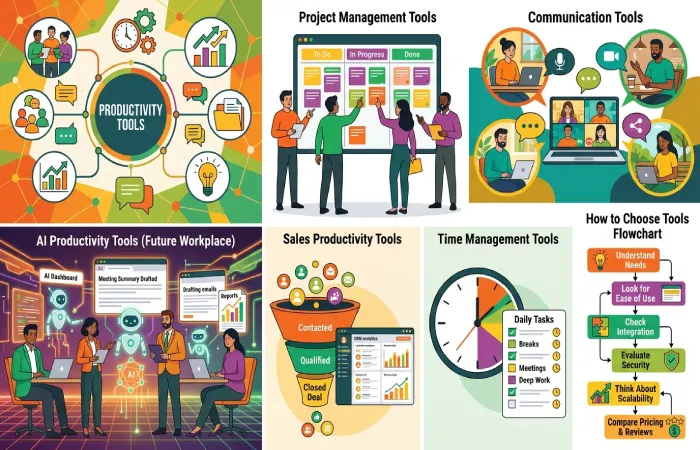
AI is expected to assist with the automation of productivity tools in 2026. At this point, productivity tools will have the ability to draft and send emails, record and send meeting notes, generate and send reports, perform work related data analysis and even automate the scheduling and responding to inquiries and work tasks of a customer.
Selecting the right tools is dependent upon the goals of a business, the size of a business, and the daily work processes of a business. Some businesses may need advanced tools for project management, while others may require tools that enhance communication, assist with sales or even software development. A digital workspace that is efficiently designed is typically the result of a combination of several tools.
This guide aims at providing the reader with a comprehensive understanding of productivity tools. It offers insight into the workings of productivity tools, the significance of productivity tools, and most importantly the influence of AI in the modern work systems as well as the tools that assist businesses in meeting their varied work functions.
Productivity Tools Resource Center
Explore our complete collection of guides covering AI productivity tools, sales productivity, business operations, developer workflows, time management, and free productivity tools for small businesses.
What Are Productivity Tools and Why Do They Matter?
Productivity tools are programs and digital tools that help people and teams work faster and make the most of their time at work. They help simplify and optimize tasks and allow improved organization, and collaboration, and help cut down on manual tasks.
Companies used to have to manage everything through emails, paper documents, and even spreadsheets. Now that productivity tools exist, companies can better manage their data through these tools.
What Do Productivity Tools Do?
Productivity tools help businesses by:
- Organizing daily tasks
- Managing projects
- Scheduling meetings
- Tracking work progress
- Sharing files securely
- Improving team communication
- Automating repetitive tasks
- Managing customer relationships
- Creating reports
- Tracking employee performance
These features help teams work smarter instead of harder.
Types of Productivity Tools
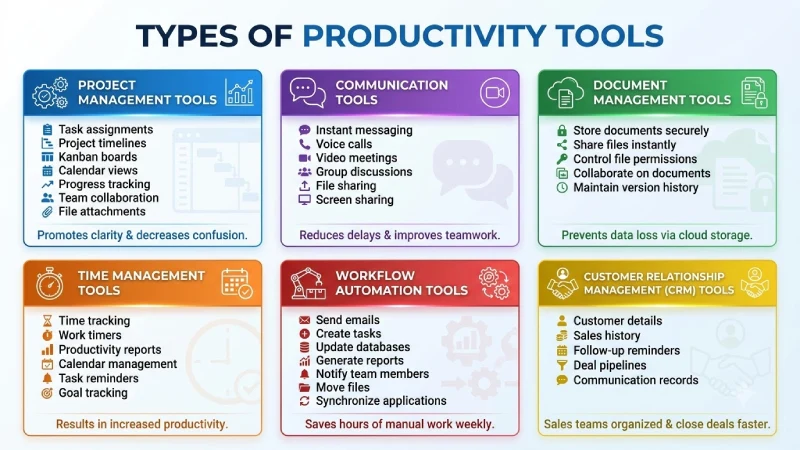
Different businesses require different productivity solutions. Here are the main categories.
Project Management Tools
Project management tools assist teams in project planning, task allocation, monitoring deadlines, and tracking their progress.
Common features include:
- Task assignments
- Project timelines
- Kanban boards
- Calendar views
- Progress tracking
- Team collaboration
- File attachments
Such tools promote clarity and decrease confusion among the team members.
Communication Tools
The communication platforms ensure that the employees remain connected regardless of where they work.
Features include:
- Instant messaging
- Voice calls
- Video meetings
- Group discussions
- File sharing
- Screen sharing
Good communication reduces delays and improves teamwork.
Document Management Tools
Businesses generate thousands of files every year. Document management tools keep everything organized.
These tools help users:
- Store documents securely
- Share files instantly
- Control file permissions
- Collaborate on documents
- Maintain version history
Cloud storage also prevents data loss.
Time Management Tools
Time management software helps employees understand how they spend their working hours.
Common features include:
- Time tracking
- Work timers
- Productivity reports
- Calendar management
- Task reminders
- Goal tracking
Effective time management results in increased productivity.
Workflow Automation Tools
Many business activities are repetitive.
Automation tools can automatically:
- Send emails
- Create tasks
- Update databases
- Generate reports
- Notify team members
- Move files
- Synchronize applications
Automation saves hours of manual work every week.
Customer Relationship Management (CRM) Tools
CRM software helps businesses manage customer interactions.
CRM systems store:
- Customer details
- Sales history
- Follow-up reminders
- Deal pipelines
- Communication records
Sales teams become more organized and close deals faster.
Why Productivity Tools Matter
Modern businesses face many challenges:
- Heavy workloads
- Tight deadlines
- Remote teams
- Multiple communication channels
- Large amounts of data
- Increasing customer expectations
Without proper tools, these challenges become difficult to manage.
Productivity tools solve these problems by creating organized workflows and improving collaboration.
Benefits of Productivity Tools
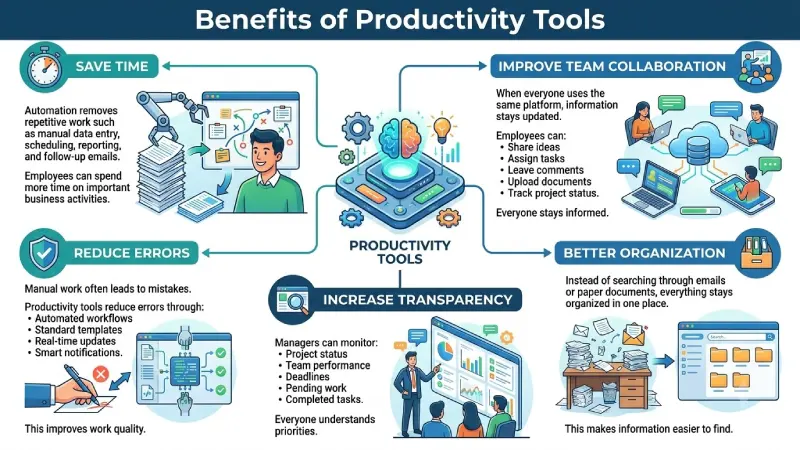
Save Time
Automation removes repetitive work such as manual data entry, scheduling, reporting, and follow-up emails.
Employees can spend more time on important business activities.
Improve Team Collaboration
When everyone uses the same platform, information stays updated.
Employees can:
- Share ideas
- Assign tasks
- Leave comments
- Upload documents
- Track project status
Everyone stays informed.
Reduce Errors
Manual work often leads to mistakes.
Productivity tools reduce errors through:
- Automated workflows
- Standard templates
- Real-time updates
- Smart notifications
This improves work quality.
Better Organization
Instead of searching through emails or paper documents, everything stays organized in one place.
This makes information easier to find.
Increase Transparency
Managers can monitor:
- Project status
- Team performance
- Deadlines
- Pending work
- Completed tasks
Everyone understands priorities.
Support Remote Work
Many organizations now have remote or hybrid employees.
Cloud-based productivity tools allow people to work from anywhere while staying connected.
Improve Customer Service
Employees can respond faster because customer information is available instantly.
This creates a better customer experience.
Who Uses Productivity Tools?
Productivity software provides advantages for most industries.
Examples include:
Small Businesses
Small firms employ productivity tools for optimal utilization of scarce resources.
Startups
Companies require cost-effective methods for building high-performing teams.
Enterprises
Organizations operate with numerous staff members and processes in place.
Sales Teams
Salespeople manage leads, client information, appointments, and follow-up contacts.
Marketing Teams
Marketing experts handle campaigns, calendar management, social media, and data analytics.
Developers
Productivity tools are employed by software developers for writing code, working together, solving problems, and deploying software applications.
HR Teams
HR departments use productivity software to help with recruiting, records management, orientation, and performance assessment.
Key Features to Look For
In selecting productivity tools, organizations must think about:
- Easy interface
- Cloud access
- Mobile compatibility
- Strong security
- AI features
- Automation
- Integrations
- Reporting
- Collaboration options
- Affordable pricing
- Reliable customer support
The best way is to make work easier, not harder.
How AI Productivity Tools Are Changing The Workplace
As technology evolves and develops into artificial intelligence, innovations in productivity within the workplace have become more prevalent. In contrast to previous workplace tools, today’s AI tools are able to create content, analyze information, and even make decisions, and can help employees carry out complex tasks.
In 2026, everyone will be able to use artificial intelligence, not just major corporations. Artificial intelligence gives companies a way to improve the productivity of employees and reduce the costs of operation. AI will not replace employees. Rather, AI is meant to absorb the tedious and repetitive work, thus allowing teams to direct their efforts to the more creative and strategic aspects of the work.
What Are AI Productivity Tools?
AI productivity tools are examples of workplace software that integrate various technologies of artificial intelligence like machine learning, natural language processing, and automation to assist employees in the performance of the work.
These tools can:
- Write emails and reports
- Summarize long documents
- Create meeting notes
- Generate content ideas
- Analyze business data
- Organize schedules
- Prioritize tasks
- Answer customer questions
- Translate languages
- Automate repetitive workflows
Rather than spending hours doing tasks manually, workers get smart help within a matter of seconds.
How Work Will Change in the Future with AI
There are a few key ways AI is changing how we work:
Speeding Up Drafting
AI programs draft so much faster than humans. Emails, slides, blog posts, copy, and reports are just some of the things people will draft less of and review more.
Automation of Meeting Reqs
AI programs will take meeting notes and assign tasks for the next meeting. This will reduce the need for people to take notes.
Adaptive Tasking
AI programs offer tasking suggestions based on past behavior. These programs will help work groups stay organized and will reduce damage from tasks of lesser importance.
Meeting Customer Needs
AI programs have the ability to recognize common customer inquiries, classify customer requests, and provide an answer in a reasonable time. This will allow customer agents to answer more in-depth questions.
Facilitation of Advanced Thinking
AI programs help users recognize data trends through the analysis of large data sets. This will help managers hypothesize and reduce time spent on data analysis.
Benefits of AI Productivity Tools
Businesses that adopt AI productivity tools often experience several advantages:
- Increased efficiency across teams
- Reduced manual and repetitive work
- Faster decision-making
- Improved collaboration
- Better accuracy with fewer human errors
- Enhanced customer experiences
- Cost savings through automation
- Greater scalability as the business grows
AI will continue to create further opportunities for smarter automation and tailored suggestions for productivity tools. Businesses that use AI will have a better ability to compete in an increasingly attainable market.
Best Productivity Tools for Sales Teams
The selling profession’s time-consuming and performance-driven nature makes productivity software important feature. Sales teams segment their employees to handle the discussions and follow-ups. Productivity software eliminates the need for tedious administrative workflows and allows employees to focus on more crucial aspects of closing deals.
Sales software of today integrates all the components of customer relations, conversations, automation, and analytics. With all these components in one tool, sales staff get a complete view of the sales funnel and make the development of sales software simpler.
Customer Relationship Management (CRM) Systems
One of the most vital productivity systems for any sales team is a CRM system. It captures all the details of every single customer interaction and thus enables sales representatives to streamline the management of every stage of the sales process.
CRM tools help teams:
- Store customer contact details
- Track sales opportunities
- Record customer interactions
- Schedule follow-up activities
- Manage sales pipelines
- Generate sales reports
With a CRM system, collaboration improves because the most up-to-date customer information is available to and accessible by every member of the sales team.
Sales Automation Systems
Because many sales activities are repetitive, e.g., sending follow up emails, updating customer records, etc., automation systems for sales perform these tasks automatically.
Benefits include:
- Faster response times
- Reduced manual work
- Better lead management
- Consistent customer communication
- Improved productivity
Automation gives sales representatives more opportunity to interact with clients rather than work on spreadsheets.
Email Productivity Tools
Emails are still the main form of communication used by salespeople. Productivity software allows salespeople to send emails, schedule them, and track customer interactions through them.
Useful features include:
- Email templates
- Scheduled sending
- Open tracking
- Click tracking
- Automatic reminders
- Contact management
These features make email communication faster and more effective.
Meeting and Scheduling Tools
Manual scheduling can result in delay and unnecessary emails. Scheduling software makes the process simple for customers to make appointments from the available slots.
Advantages include:
- Automatic calendar synchronization
- Meeting reminders
- Video conferencing integration
- Time zone support
- Reduced scheduling conflicts
This creates a smoother experience for both customers and sales teams.
Sales Analytics Tools
Data helps sales managers to know how the sales team is performing.
Sales analytics tools provide information about:
- Conversion rates
- Revenue performance
- Sales trends
- Customer behavior
- Team productivity
- Forecasting
With better insights, businesses can make informed decisions and improve future sales strategies.
Collaboration Tools for Sales Teams
Sales usually entails working in tandem with marketing, customers service, and management functions. Collaboration applications enhance communication by creating common areas through which information is shared.
Benefits include:
- Faster communication
- Shared customer information
- Better project coordination
- Real-time updates
- Improved teamwork
Benefits of Sales Productivity Tools
Sales productivity tools help businesses:
- Close deals faster
- Improve customer relationships
- Increase revenue
- Reduce administrative work
- Improve sales forecasting
- Enhance team collaboration
- Track performance accurately
CRM, automation, communication, and analysis will ensure that sales staff can become more efficient and provide a good experience for customers.
Essential Productivity Tools for Modern Businesses

Today’s businesses rely on computer applications to carry out day-to-day tasks. No matter if the company is made up of five people or five thousand, productivity software increases efficiency.
Companies tend to integrate various productivity tools to create an integrated digital office environment.
Project Management Tools
Projects entail several activities, deadlines, and people to be involved. All these are handled using project management software.
Common features include:
- Task creation
- Team assignments
- Progress tracking
- Project timelines
- Calendar views
- File sharing
- Notifications
They assist the businesses to accomplish their projects within the given time period.
Communication and Collaboration Tools
Communications play a very important role in ensuring effective teamwork. Communications technologies link the staff irrespective of their location.
Key features include:
- Instant messaging
- Video meetings
- Group discussions
- Voice calls
- Screen sharing
- File sharing
They help save time and increase cooperation among different departments.
Document and File Management Tools
Businesses produce large amounts of digital data every day. The document management software helps in organizing the documents and collaboration.
Advantages include:
- Centralized storage
- Cloud access
- Version control
- Permission management
- Secure file sharing
- Easy document retrieval
The employees always get to view the latest documents without having to rummage through their emails.
Workflow Automation Tools
With automation, it is very easy for firms to minimize the necessity of performing boring jobs. Automation gets these boring jobs done rather than doing them.
Workflow automation can:
- Send notifications
- Approve requests
- Update records
- Move files
- Generate reports
- Synchronize applications
Automation increases efficiency while reducing human error.
Knowledge Management Tools
Valuable data is generated by the organizations in the process of its functioning. Tools of knowledge management will record all the processes.
These systems help employees:
- Find information quickly
- Learn company processes
- Share best practices
- Reduce duplicate work
Knowledge becomes available to the entire organization instead of remaining with individual employees.
Cloud Storage Solutions
Cloud storage enables companies to gain remote access to their files while creating safe backups at the same time.
Benefits include:
- Remote access
- Automatic backup
- File synchronization
- Collaboration
- Improved security
- Easy sharing
Cloud-based systems support hybrid and remote work environments.
AI Productivity Tools
Artificial intelligence is an important element for business productivity. AI helps workers by creating content, data analysis, document summaries, and performing routine tasks.
AI improves:
- Writing
- Customer support
- Scheduling
- Reporting
- Data analysis
- Meeting summaries
- Workflow automation
Businesses using AI often complete work faster while improving accuracy.
Productivity Tools Every Developer Should Know
Software development requires concentration, teamwork, and efficient workflow. Software developers use source code repositories, testing frameworks, release management systems, and documentation daily. Productivity software helps in managing these processes and enables development teams to develop better software.
AI Coding Assistants
AI-enabled code generators have become a necessity for developers, as they help them in writing code, understanding its features, bug detection, documentation generation, and faster software development.
Benefits include:
- Faster coding
- Fewer repetitive tasks
- Improved code quality
- Better documentation
- Reduced debugging time
They will be able to concentrate on solving problems rather than coding.
Version Control Systems
Version control helps the programmer in dealing with change management as well as working with others in a collaborative way.
Key features include:
- Code history
- Branch management
- Collaboration
- Rollback support
- Conflict resolution
Version control prevents code loss and keeps development organized.
Code Review Tools
The code reviews help in improving software quality through examining code before release.
Advantages include:
- Better code quality
- Knowledge sharing
- Fewer bugs
- Improved security
- Consistent coding standards
Regular reviews help teams maintain reliable and maintainable applications.
CI/CD Tools
Tools for continuous integration and continuous deployment (CI/CD) automate software testing and deployment.
These tools:
- Run automated tests
- Detect errors early
- Deploy applications faster
- Reduce manual deployment work
- Improve software reliability
With automation, developers can be assured about the deployment of frequent updates.
Bug Tracking Tools
All software projects contain bugs. The bug tracking tool helps to organize bugs and prioritize their fixes.
Common features include:
- Issue reporting
- Task assignment
- Priority management
- Status tracking
- Progress monitoring
A structured bug management process improves software quality and customer satisfaction.
Documentation Tools
Proper documentation is very important in ensuring that the software remains operational. Proper documentation will be very instrumental in helping understand the structure of the application, API, installation, and development process.
Benefits include:
- Faster onboarding
- Easier maintenance
- Better collaboration
- Knowledge sharing
- Reduced confusion
Good documentation makes the development process faster.
Time Tracking and Focus Tools
Developers may require continuous time in order to tackle technical issues. Tools for productivity assist developers in tracking their working sessions and minimize interruptions.
Features may include:
- Time tracking
- Focus timers
- Task planning
- Productivity reports
- Daily goals
These tools instill good working practices and increase efficiency as well.
Collaboration Platforms
Software developers often work with other people, including designers, testers, and project managers, among others. Software for collaboration allows effective communication and project management.
Benefits include:
- Faster decision-making
- Shared project information
- Better teamwork
- Reduced misunderstandings
- Improved project visibility
Strong collaboration helps development teams deliver projects on time.
Measuring Developer Productivity
Productivity of developers is measured on efficiency of development of quality software rather than number of lines of code produced. The following criteria should be used for productivity measurement:
- Feature delivery
- Code quality
- Test coverage
- Deployment frequency
- Bug resolution time
- Team collaboration
- Customer satisfaction
This emphasis on such measurements results in sustainable growth and continuous improvement.
Time Management Tools to Improve Productivity
And it is worth noting that time is the most precious asset in business. Proper time management helps people and teams achieve much, de-stress themselves, and meet deadlines. The time management productivity software makes it possible for everyone to plan his or her schedule and concentrate on the work.
Be it entrepreneur, employee, freelancer or student – using proper time management techniques will make your life more efficient and productive.
Why Time Management Matters
Poor time management can lead to:
- Missed deadlines
- Increased stress
- Lower productivity
- Poor work quality
- Disorganized schedules
- Reduced team performance
Time management systems assist in overcoming these challenges through a proper workflow system and distraction prevention.
Calendar and Scheduling Tools
The digital calendar can also be used by people to organize meetings, appointments, deadlines, and other activities.
Common features include:
- Meeting scheduling
- Event reminders
- Shared calendars
- Recurring events
- Time zone support
- Mobile synchronization
A common calendar helps with coordination between teams and avoids schedule clashes.
Time Tracking Tools
Time tracking software calculates the amount of time spent on different tasks and projects. This helps businesses evaluate their productivity levels and also plan resources accordingly.
Benefits include:
- Accurate work-hour tracking
- Project costing
- Employee productivity reports
- Billing support for freelancers
- Performance analysis
Time tracking also helps identify tasks that consume more time than expected.
Task Management Tools
Task management software helps users organize daily responsibilities and monitor progress.
Typical features include:
- Task creation
- Priority levels
- Due dates
- Checklists
- Progress tracking
- Notifications
Dividing larger projects into smaller pieces makes them easier to do.
Focus and Pomodoro Tools
Distractions limit productivity. Focus software allows users to focus on their work by scheduling focused sessions.
Popular features include:
- Pomodoro timers
- Focus sessions
- Website blocking
- Break reminders
- Daily focus reports
These tools improve concentration and reduce multitasking.
Goal Tracking Tools
Goal setting enables people to be motivated and track their progress.
Goal management tools allow users to:
- Set daily objectives
- Track weekly targets
- Monitor long-term goals
- Measure achievements
- Review productivity trends
Clear goals make it easier to prioritize important work.
Benefits of Time Management Tools
Using time management tools offers several advantages:
- Better planning
- Higher productivity
- Improved focus
- Reduced stress
- Better deadline management
- Increased accountability
- Improved work-life balance
Firms that encourage effective time management show high rates of productivity among employees and enhanced customer satisfaction.
Free Productivity Tools for Small Businesses
Though small businesses might have limited budgets, they need proper software to function effectively. Luckily, there are lots of productivity tools that provide free versions with all the necessary functions.
Free productivity tools allow businesses to improve efficiency without making a large financial investment.
Free Project Management Tools
Task management software can be used by small firms for organizing and tracking tasks.
Free plans usually include:
- Task boards
- Team collaboration
- Due dates
- File attachments
- Project tracking
- Basic reporting
These features are enough for many startups and small teams.
Free Communication Tools
Teamwork requires communication. The instant messaging tool and video conferencing applications allow people to communicate regardless of where they are located.
Common features include:
- Instant messaging
- Group chats
- Video meetings
- Voice calls
- Screen sharing
- File sharing
These tools improve collaboration while reducing communication costs.
Free Document and Cloud Storage Tools
Cloud storage services provide secure online storage for documents and business files.
Benefits include:
- Secure backups
- File synchronization
- Easy sharing
- Remote access
- Team collaboration
Cloud storage reduces the risk of losing important business information.
Free Note-Taking Tools
Notetaking applications assist companies in arranging thoughts, meeting minutes, and project information.
Useful features include:
- Text notes
- Checklists
- Images
- Document attachments
- Search functionality
- Cross-device synchronization
Organized notes improve productivity and knowledge sharing.
Free Time Tracking Tools
Free time tracking applications help businesses monitor working hours without additional expenses.
Typical features include:
- Time recording
- Manual entries
- Work summaries
- Daily reports
- Weekly reports
Freelancers and small teams benefit from accurate work tracking.
Free AI Productivity Tools
Many AI-powered productivity platforms now offer free plans that assist with daily work.
Free AI features may include:
- Content generation
- Email drafting
- Grammar suggestions
- Text summarization
- Meeting summaries
- Brainstorming ideas
They assist small firms in being productive while ensuring that they do not spend much on software.
Free vs Paid Productivity Tools
Choosing between free and paid software depends on business requirements.
Free Tools
Advantages:
- No initial investment
- Easy to start
- Suitable for small teams
- Basic productivity features
- Simple setup
Limitations:
- Storage restrictions
- Limited automation
- Fewer integrations
- Basic reporting
- Smaller user limits
Paid Tools
Advantages:
- Advanced automation
- Better security
- More integrations
- Detailed analytics
- Priority support
- Larger storage capacity
- Scalability
Many businesses begin with free plans and upgrade as they grow.
How to Choose the Right Productivity Tools
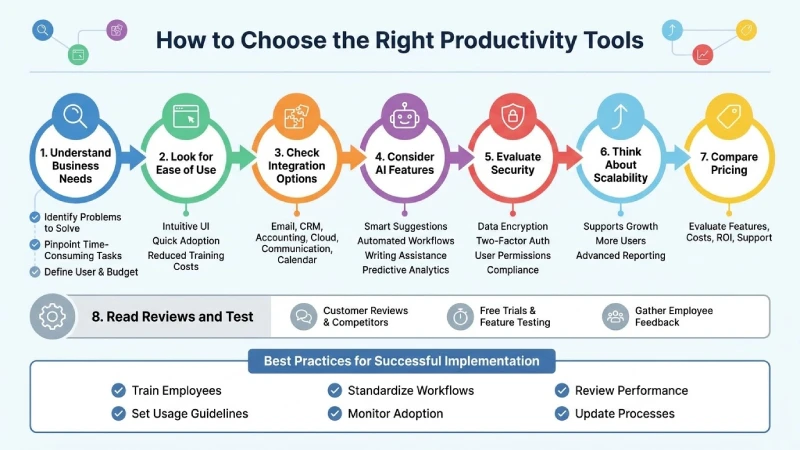
Selection of productivity tools is among the main aspects in business. The best tool should simplify all the daily activities, promote cooperation and stimulate development in the future.
Prior to selecting a tool, companies need to assess their needs first.
Understand Your Business Needs
Every business is different.
Ask questions such as:
- What problems are we trying to solve?
- Which tasks consume the most time?
- Which departments need support?
- How many employees will use the software?
- What is our available budget?
Clear goals help narrow the available options.
Look for Ease of Use
A productivity tool should be easy to learn and use.
Intuitive UI design reduces costs associated with employee training and encourages the quick adoption of software by employees.
Complicated systems often reduce productivity instead of improving it.
Check Integration Options
Businesses usually use multiple software applications.
Choose tools that integrate with:
- Email platforms
- CRM systems
- Accounting software
- Cloud storage
- Communication tools
- Calendar applications
Good integrations eliminate duplicate work and improve efficiency.
Consider AI Features
Modern productivity software increasingly includes artificial intelligence.
Useful AI capabilities include:
- Smart task suggestions
- Automated workflows
- Writing assistance
- Meeting summaries
- Predictive analytics
- Workflow recommendations
AI can significantly reduce repetitive work.
Evaluate Security
Business information must remain secure.
Look for features such as:
- Data encryption
- Two-factor authentication
- User permissions
- Automatic backups
- Compliance certifications
Strong security protects sensitive company information.
Think About Scalability
Choose software that can grow with your business.
As your team expands, the tool should support:
- More users
- Additional storage
- Advanced reporting
- Increased automation
- New integrations
Scalable software reduces the need for future migrations.
Compare Pricing
Do not focus only on the lowest price.
Instead, evaluate:
- Features included
- Monthly costs
- Annual discounts
- Upgrade options
- Customer support
- Return on investment
Sometimes a slightly higher price delivers much greater business value.
Read Reviews and Test the Software
Before making a final decision:
- Read customer reviews
- Compare competitors
- Request free trials
- Test important features
- Gather employee feedback
Testing helps ensure the software matches your business needs.
Best Practices for Successful Implementation
After selecting a productivity tool:
- Train employees properly
- Set clear usage guidelines
- Standardize workflows
- Monitor adoption
- Review performance regularly
- Update processes as business needs change
Effective implementation guarantees that firms get the most out of their productivity software.
Common Productivity Challenges and How Tools Solve Them
Regardless of how large the organization could be, there will be certain challenges that would stop the organization from making any additional progress. Poor communication, lack of automation, missed deadlines, and ineffective workflow are just some of the elements that could decrease the effectiveness of the organization. Productivity tools help overcome all those challenges by optimizing processes, collaborating and automating tasks. With the help of productivity tools, organizations could work much more effectively and productively since they could accomplish much more within a shorter period of time. By means of productivity tools, organizations could work smart, not hard. Proper use of productivity tools could have a significant impact on the success of the organization, which is why they need to be used effectively.
With knowledge of what issues are likely to arise, firms will be able to choose the right technology to complete tasks effectively and achieve their objectives.
Poor Communication
Another major barrier to productivity is poor communication. People can communicate through endless strings of emails that are not effective at all. Also, people can use outdated information.
titive processes like data entry, report writing, and email follow-ups.
Frequently Asked Questions About Productivity Tools
What are productivity tools?
These are software applications which help both individuals and organizations manage their activities in order to achieve greater productivity.
What makes productivity tools essential?
These programs assist organizations in saving time, collaborating effectively, minimizing manual work, making fewer mistakes, and becoming more efficient.
What are AI productivity tools?
AI productivity tools are those which employ artificial intelligence in order to help in writing emails, meeting summaries, report creation, data analysis, and workflow management.
Which productivity tools will be helpful for small business organizations?
Small business organizations may find productivity tools useful when it comes to project management, communication, cloud storage, time management, file sharing, and workflow automation. Also, there are many free versions of productivity tools offered by various service providers.
How do productivity tools improve teamwork?
They help create shared workspaces for collaboration, communication, management of tasks and documents, and also allow one to track projects.
Can productivity tools support remote work?
Yes. Actually, majority of today’s productivity tools are cloud-based, and therefore, the employee will be able to access his documents and get his work done no matter where he is.
Are free productivity tools sufficient for business?
The above mentioned points should be kept in mind while making a selection: your objective, your employee strength, your budget, usability, security, integrability, scalability, artificial intelligence, and customer support.
How to select a suitable productivity tool?
Consider the following factors in making a decision:
Your business objectives, the number of employees you have, your budget, usability, security, integration, scalability and artificial intelligence features.
Which industries utilize productivity software?
Productivity software can be used for any kind of company irrespective of the field, be it IT, medicine, finance, teaching, production, trade, advertising, consultancy, or any other profession.
Is AI meant to replace the worker?
No, AI will never replace workers. It will help them automate mundane tasks and enable them to be more creative, solve problems strategically, manage customers, etc.
Conclusion
Today, productivity tools play an essential role in any modern business since they help teams collaborate effectively, communicate, perform various tasks, and reduce unnecessary activities. Regardless of whether you operate a small or a big enterprise or a startup, there are productivity tools that may be used to save your time and make processes more efficient.
In 2026, productivity tools powered by AI become even more useful as they are capable of generating content, summarizing meetings, automating routine work, and providing some helpful information. Therefore, employees have an opportunity to carry out some vital activities instead of wasting time performing manual operations.
It is essential to consider the requirements of your business when selecting productivity tools as well as their usability, safety, and scalability. A proper mixture of project management, communication, time-tracking, and AI tools could be really helpful for team collaboration and productivity.