

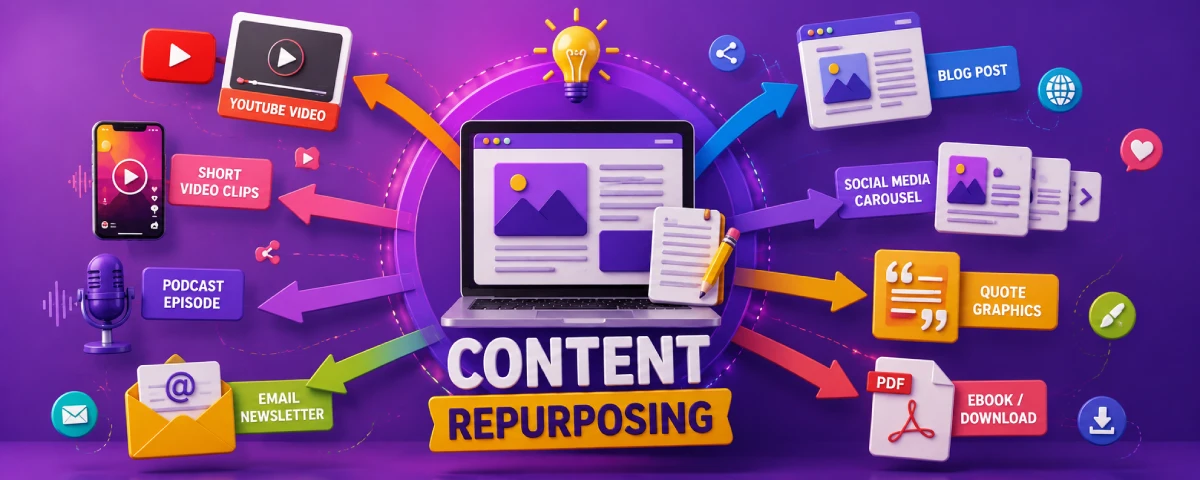
Most groups of people come up with their content, release it once and forget all about it. There’s lots of opportunities lost. Just one good blog post or podcast episode can provide enough material to feed your social media sites, e-mail messages and other forms of communication for weeks.
Repurposing content does not mean that you copy and paste the exact same material everywhere. The essence is to adapt the material to fit different forms of media and the preferences of your target audience. If done right, this process will save time and extend the lifespan of your best ideas..
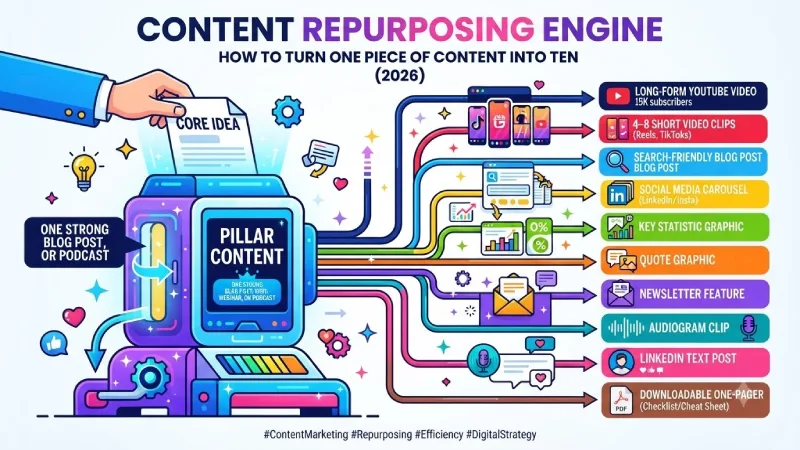
This guide highlights effective methods of using one content source to produce multiple pieces of content. This includes repurposing blogs to videos, repurposing webinars to multiple forms of content, repurposing content for social media, creating a podcast repurposing process, and tools that help make it happen.
Repurposing Blogs into Videos
Blogs can be one of the easiest pieces of content to start with when producing videos.
Simple process
- Pick a blog post that did well or has a topic that works with visuals or teaching.
- Find the sections or the key points from it.
- Use those points to create a script or outline for a video.
- Choose the style: talking-head explanation, screen recording, voiceover with background footage or a mix of these.
- Make a video in YouTube style then split it into shorter clips, for Shorts, Reels or LinkedIn.
What works
- How-to posts and step-, by-step posts become clear tutorial videos.
- List articles turn into videos titled “X things you need to know.”
- Opinion posts and insight posts become talking‑head commentary videos.
- Data-heavy posts become explainers that use charts and callouts.
Tips for better results
- Keep the video focused. One blog can often support one main long video plus several short clips.
- Add a strong hook in the first 10–15 seconds.
- Use on-screen text for key points so people can follow with the sound off.
- End with a clear next step (subscribe, read the full post, download related resource).
Repurposing blogs, into video is one of the powerful steps you can take. It helps you reach people on YouTube search. It also helps you get noticed on short-form platforms. This process makes the blog post seen by more people.
Turning Webinars into Content
A single webinar is a content goldmine. One 45–60 minute session can fuel a month of assets if you plan the repurposing in advance.
What you can create from one webinar
| Original Asset | Repurposed Outputs |
| Full recording | YouTube video, gated replay page |
| Key sections | 4–8 short video clips |
| Main teachings | Blog post or series of posts |
| Quotes and insights | Social graphics and text posts |
| Q&A portion | FAQ blog post or short videos |
| Frameworks shown | Carousel posts or downloadable one-pagers |
| Audience questions | Future content ideas or email series |
Practical workflow
- Record the webinar with the intention of repurposing the webinar. Keep the slides clean keep the audio clear keep the pacing good.
- Get a transcript. Most webinar tools or AI transcription help you get a transcript easily.
- Identify the strongest 5–8 moments or teachings.
- Turn those into short video clips first (highest reach potential).
- Write a blog post that expands on the core framework or key lessons.
- Extract quotes and statistics for social graphics.
- Use the Q&A to create short content or an FAQ page. Use the Q&A again to guide that content.
- Send a follow‑up email series that digs deeper into points. Send a follow‑up email series that goes into detail about each point.
I find webinars work well because the content is already spoken in a natural teaching style. That makes clipping and rewriting easier, than starting from a written document.
Repurposing Content for Social
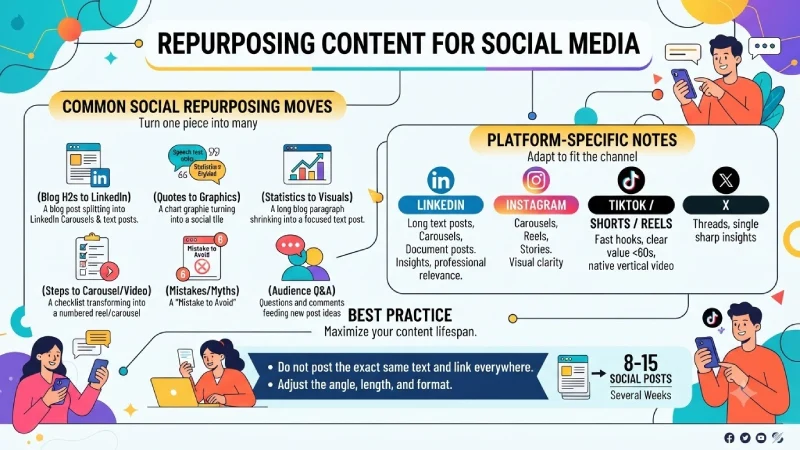
Social platforms reward content that feels native. The goal is to adapt ideas so content fits the way people consume content on each channel.
Common social repurposing moves
- Turn blog H2 sections into individual LinkedIn posts or a carousel.
- Pull strong quotes and create graphic posts.
- Convert key statistics into simple visual posts.
- Rewrite the introduction as a short, scroll-stopping text post.
- Turn steps into a numbered carousel or short video series.
- Create “one mistake to avoid” or “one thing most people get wrong” posts from the content.
- Use audience questions or comments about the original piece as new post ideas.
Platform-specific notes
- LinkedIn: text posts, carousels and document posts tend to perform well. Content that offers insights and connects with relevance gets the best results.
- Instagram: Carousels, Reels and Stories work well on Instagram. Visual clarity is important, for engagement.
- TikTok / Shorts / Reels: Fast hooks, clear value in under 60 seconds, native vertical video.
- X: Threads that expand on one core idea, or single sharp insights.
Best practice
Do not post the exact same text and link everywhere. Adjust the angle, length, and format. A single blog post can easily support 8–15 social posts over several weeks when you break it down properly.
Podcast Repurposing Workflow
Podcasts are full of ideas. They remain hidden, from search engines until you provide them with a text and a visual presence.
Step-by-step podcast repurposing workflow
- Transcribe the episode
Use a reliable transcription tool. Clean up the text so it is readable. - Create a blog post or show notes article
Turn the episode into an article. Add timestamps, takeaways and a summary. This captures search traffic and gives the episode a permanent home. - Extract short audio or video clips
Pull 3–6 strong moments (insights, stories, or debates). These become audiograms or short video clips for social and YouTube Shorts. - Write social posts
Use quotes, questions raised, or key lessons as standalone posts or threads. - Create quote graphics
Design simple visuals with the best lines from the conversation. - Newsletter feature
Summarize the episode or highlight one major insight in your email. - Repurpose into other formats
A powerful episode can also turn into a LinkedIn article, a set of emails or content used for a future webinar.
Tip: When you are recording, make sure to ask your guests questions. Give them space to provide meaningful answers. This makes it much easier to use the recording in ways later. Always ask questions and make sure the answers are easy to use. It helps a lot when you want to use the recording in different ways.
Tools for Content Repurposing
The right tools reduce the time between original content and finished derivative assets.
Helpful tool categories
| Need | Tool Types / Examples | Notes |
| Transcription | Descript, Otter, built-in platform tools | Foundation for most repurposing |
| Video editing & clipping | CapCut, Descript, Premiere, Final Cut | Turning long videos into shorts |
| Text-to-video | Pictory, InVideo, similar AI tools | Faster creation from blog content |
| Design & graphics | Canva, Figma | Quote cards, carousels, simple thumbnails |
| Social scheduling | Native schedulers, Buffer, Hootsuite, etc. | Planning the distribution of repurposed assets |
| AI assistance | ChatGPT, Claude, or similar (used carefully) | Outlining, rewriting angles, summarizing |
| All-in-one repurposing | Various specialized platforms | Can speed up multi-format output |
How to use tools without losing quality
- Start with the core message and audience value. Tools should support that, not dictate it.
- Always go back. Review or edit content that comes from AI or auto-clipped sources.
- Create templates for things, like carousels quote graphics and video intros so your output always matches your brand.
- Use tools to handle the parts of the job so you can save your energy for the parts that need judgment and creativity.
You do not need every tool. Many teams do well with a transcription tool, a solid video editor, Canva, and a scheduling platform.
Building a Sustainable Repurposing System
A practical repurposing system usually looks like this:
- Create one strong “pillar” piece (blog, webinar, podcast, or long video).
- Immediately extract the key ideas, quotes, and sections.
- Produce the highest-reach formats first (short video clips and social posts).
- Create the search-friendly version (blog post or optimized YouTube video).
- Fill email and other owned channels.
- Schedule the derivative content over days or weeks instead of dumping everything at once.
- Review what performed best and feed those insights into future original content.
Repurposing is most effective when it is thought about from the start of being considered later. When you make content, with sharing in mind one piece of content easily helps support pieces.
The goal is not to create more noise. It is to give your best ideas more chances to reach the people who need them — in the formats they already consume.
Start with one recent piece of content that performed reasonably well. Break it into five to ten derivative assets. Publish them over the next two weeks. Measure what happens. Then refine the process.
Consistent repurposing changes content from an event, into a system that keeps working long after the original publish date. Repurposing turns content into a system that stays active beyond the original publish date. The system remains working after the original publish date.
Frequently Asked Questions
How pieces can I realistically get from one blog post?
Solid blog posts can support eight to fifteen posts. It can also support one to two videos, an email and sometimes a carousel or quote series all without feeling forced.
Should I repurpose everything I create?
No. Focus, on content that already showed some traction or covers topics. Not every piece deserves the repurposing treatment.
Is it better to create content or repurpose?
Both. Original native content often performs best on a platform. Repurposing utilizes your concepts and makes them work even harder. It is a way of keeping your channels working without having to restart everything from scratch. You get value out of what you already created. It’s a way to stay active and reach more people.
How soon after publishing should I repurpose?
Begin within a days while the content is still fresh. You can continue pulling angles from strong pieces for weeks or months.
Does repurposing hurt SEO?
Not when done correctly. Creating a new blog post from a webinar or podcast, or using different angles on social, generally helps rather than hurts. Just avoid thin duplicate content on your own site.
Conclusion
For the most part, content is posted once and never again. But repurposing flips this script. With just one great blog, webinar, or podcast, you can be creating social media posts, short video clips, emails, and more across weeks by adapting the main messages to suit other mediums and channels.
Repurposing is fairly simple: start with an amazing original piece, extract the key messages and quotes, and produce the widest reach mediums first (clips and social media). Then, fill out the rest with SEO-focused mediums. Schedule the posting process over the span of days or weeks rather than one-off posts.
Not every piece of content must be repurposed. Only repurpose those pieces of content that were already successful. That still resonate with your target audiences. Maintain a high quality of repurposed content, choose the right medium for the right platform, and evaluate performance.
Done systematically, repurposing allows you to get more mileage out of a single piece of content.
To take the next step, see our detailed guide on Storytelling in Content Marketing.
