

Introduction
Having an innovative idea for a company is not the sole requirement needed to start a business. You should also consider who your clients are, what do you offer to them, how you will reach them and how your business will make profit.
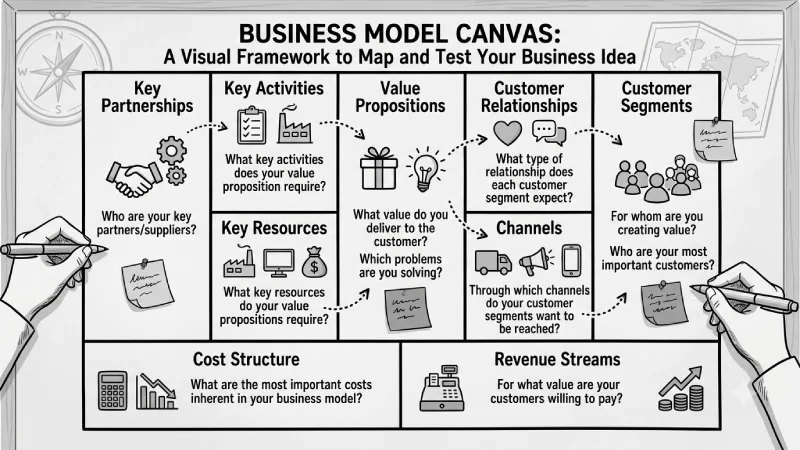
Business Model Canvas provides a way to combine all these aspects into one document. With the help of this model, you can understand how your business will be working and where you might face difficulties in the future.
You can apply this model at the beginning of your business journey or when you have a desire to introduce a completely new business model. This guide will give you information about Business Model Canvas, its nine elements, how to make this document and possible pitfalls.
For the overarching strategy, read our complete guide on Business Planning.
Business Model Canvas Explained
BMC or Business Model Canvas is a simple and single-page tool that can be utilized for creating a business model. This tool will enable you to consider the key elements of your business model without having to write an extensive business plan.
The canvas has nine main parts:
- Customer Segments
- Value Propositions
- Channels
- Customer Relationships
- Revenue Streams
- Key Resources
- Key Activities
- Key Partnerships
- Cost Structure
Putting all these nine elements together results in a simple representation of how your business model operates.
It is valuable for start-ups in that the canvas can be easily modified whenever new information is obtained regarding the consumers or market environment.
Why Use a Business Model Canvas?
A Business Model Canvas can help you:
- Understand your target customers
- Find the main problem you want to solve
- Explain what makes your product useful
- Decide how you will make money
- Understand your main business costs
- Find the resources you need
- Identify important business partners
- Find weak points in your business idea
It is also easy to share with your team because everything is shown on one page.
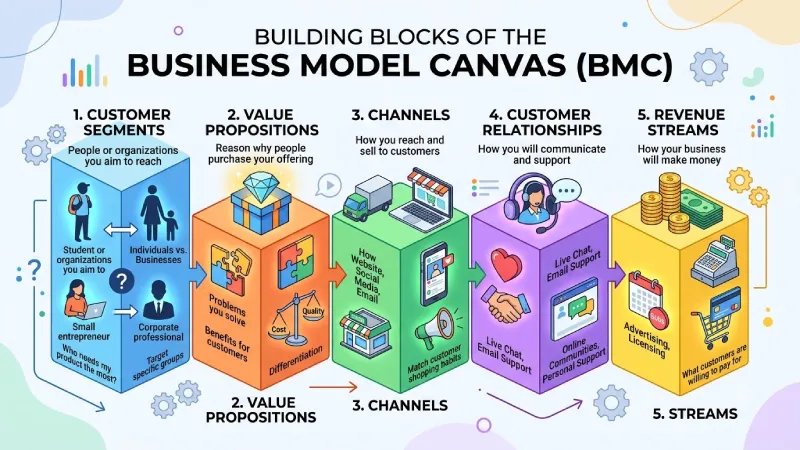
The Nine Building Blocks of the BMC
1. Customer Segments
Customer Segments are the people or organizations you aim to reach with your products and services. These are the groups you want to attract and serve. They can be individuals, businesses or other entities.
Ask yourself:
- Who are my customers?
- What problems do they have?
- Who needs my product the most?
- Are my customers individuals or businesses?
For instance, you might target students, parents, small entrepreneurs, working professionals, or big organizations.
It’s better if you don’t target everybody. It’s easier for you to create a useful product when you are sure who your beneficiaries are.
2. Value Propositions
Your value proposition is the reason why people should purchase your offering.
Think about:
- What problem am I solving?
- What benefit will customers get?
- What makes my product different?
- Why would someone choose me over another company?
A value proposition may come about through high quality, low cost, high speed, convenience, or anything that is different.
Try to focus on what the customer needs instead of only talking about your product features.
3. Channels
Channels are the ways you reach your customers and sell your product.
Some examples are:
- Website
- Social media
- Mobile apps
- Online marketplaces
- Physical stores
- Sales teams
Think about where your customersre spending their time and how they prefer to buy things. Pay attention to the platforms they use. The way they make their decisions. Look at the habits they have when shopping. See what feels natural, to them. This helps you reach them in a way that works.
4. Customer Relationships
This section explains how you will communicate with and support your customers.
You may use:
- Live chat
- Email support
- Phone support
- Self-service
- Online communities
- Personal support
The right approach depends on your business and your customers.
5. Revenue Streams
Revenue Streams explain how your business will make money.
Some common options are:
- Product sales
- Monthly subscriptions
- Memberships
- Advertising
- Licensing
- Consulting
- Transaction fees
Think about what your customers are willing to pay for and how you will charge them.
6. Key Resources
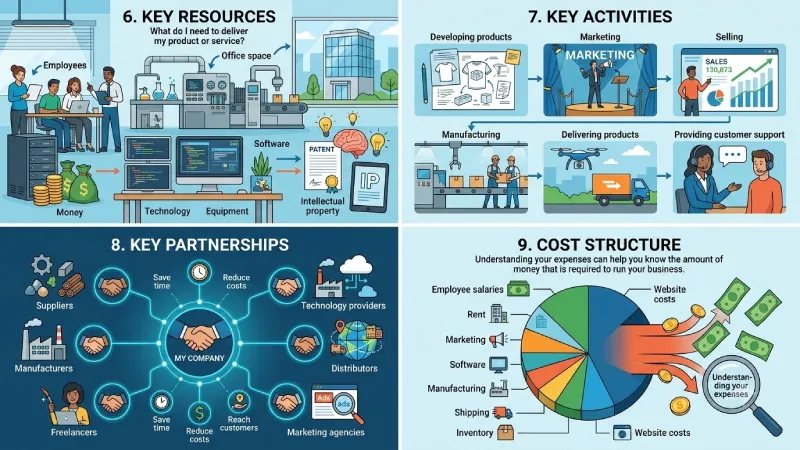
Key Resources are the important things your business needs to operate.
These may include:
- Employees
- Money
- Technology
- Equipment
- Office space
- Intellectual property
- Software
Ask yourself:
What do I need to deliver my product or service to customers?
7. Key Activities
Key Activities are the main things your business needs to do.
For example:
- Developing products
- Marketing
- Selling
- Manufacturing
- Delivering products
- Providing customer support
Your activities will depend on the type of business you are running.
8. Key Partnerships
Key Partnerships are the people or companies that help your business.
These may include:
- Suppliers
- Manufacturers
- Technology providers
- Distributors
- Freelancers
- Marketing agencies
Positive relationships will be helpful to save your time, reduce costs, and reach customers.
9. Cost Structure
Cost Structure shows the main expenses of your business.
These may include:
- Employee salaries
- Rent
- Marketing
- Software
- Manufacturing
- Shipping
- Inventory
- Website costs
Understanding your expenses can help you know the amount of money that is required to run your business.
Business Model Canvas at a Glance
| BMC Part | Simple Question | Example |
| Customer Segments | Who are my customers? | Small business owners |
| Value Proposition | What do I offer them? | Easy business software |
| Channels | How will I reach them? | Website and social media |
| Customer Relationships | How will I support them? | Email and live chat |
| Revenue Streams | How will I make money? | Monthly subscriptions |
| Key Resources | What do I need? | Software and employees |
| Key Activities | What do I need to do? | Product development |
| Key Partnerships | Who can help me? | Technology providers |
| Cost Structure | What will I spend money on? | Salaries and marketing |
How to Fill Out a Business Model Canvas
There is no special skill required for designing a Business Model Canvas. It can be designed using paper, whiteboard or any online tool.
Step 1: Choose Your Customers
- First, decide who you want to serve.
- Try to be specific.
- Instead of saying:
- Anyone who needs financial help
- You could say:
- Freelancers who need an easy way to create invoices and receive payments.
Step 2: Explain Your Value
Next, write down the main problem you solve and the benefit you give customers.
For example:
Simple invoicing software that helps freelancers send invoices and get paid faster.
Step 3: Decide How to Reach Customers
Think about how people will find your business.
You could use:
- Google search
- Social media
- Online advertising
- Partnerships
- Sales teams
Choose the channels that your customers actually use.
Step 4: Decide How You Will Support Customers
Think about how you will help customers after they buy from you.
You could offer:
- Email support
- Live chat
- Phone support
- Online guides
- Free onboarding
Step 5: Decide How You Will Make Money
Choose your main revenue model.
For example:
- Monthly subscription
- Annual subscription
- One-time payment
- Commission
- Premium features
Step 6: List Your Resources
Write down the things you need to run the business.
This could include people, money, technology, equipment, and software.
Step 7: List Your Main Activities
Write down the important work your business needs to do every day.
This could be product development, marketing, sales, delivery, or customer service.
Step 8: Find Your Partners
Think about companies or people who can help your business.
These could be suppliers, payment providers, technology companies, or other partners.
Step 9: List Your Costs
Finally, write down your main expenses.
Include things like salaries, marketing, software, rent, and other business costs.
Once you finish all nine sections, look at the complete canvas. Check if all the parts work together and make sense.
Business Model Canvas Examples for Startups
Let’s look at a simple example of a startup that creates project management software for small businesses.
| BMC Part | Example |
| Customer Segments | Small businesses and remote teams |
| Value Proposition | Simple project management software |
| Channels | Website, Google, and social media |
| Customer Relationships | Online support and self-service |
| Revenue Streams | Monthly subscriptions |
| Key Resources | Software and development team |
| Key Activities | Product development and marketing |
| Key Partnerships | Cloud and payment providers |
| Cost Structure | Salaries, hosting, and marketing |
This example shows how the different parts of the business connect.
The startup chooses its customers first, after which the product is developed to solve the customers’ problem. Different communication channels are used to get to the customers, and money is made from subscriptions.
Business Model Canvas Example: Online Marketplace
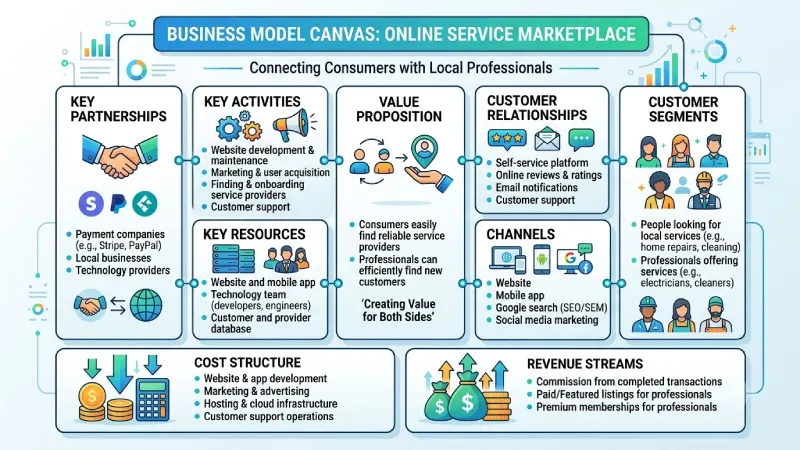
Assume that you are designing a website to link consumers with local service providers.
Customer Segments
- People looking for local services
- Professionals offering services
Value Proposition
- Customers can easily find service providers.
- Professionals can find new customers.
Channels
- Website
- Mobile app
- Google search
- Social media
Customer Relationships
- Self-service
- Online reviews
- Email notifications
- Customer support
Revenue Streams
- Commission from transactions
- Paid listings
- Premium memberships
Key Resources
- Website and app
- Technology team
- Customer database
Key Activities
- Website development
- Marketing
- Finding service providers
- Customer support
Key Partnerships
- Payment companies
- Local businesses
- Technology providers
Cost Structure
- Website development
- Marketing
- Hosting
- Customer support
This type of business works by bringing two groups together and creating value for both.
Business Model Canvas vs. Traditional Business Plan
The Business Model Canvas and a traditional business plan are not the same thing.
| Feature | Business Model Canvas | Traditional Business Plan |
| Format | One-page visual plan | Detailed document |
| Length | Short | Long |
| Main Use | Test a business idea | Detailed business planning |
| Best For | Early-stage startups | Funding and formal planning |
| Easy to Change | Yes | Usually takes more time |
| Financial Details | Basic | More detailed |
In case you want to develop a full business plan after creating a canvas, it is recommended to use the Guide called Write a business plan offered by the U.S. Small Business Administration.
Most of the entrepreneurs usually start working with the Business Model Canvas, and then when the ideas become clear, they develop a business plan.
Common Mistakes When Using the Business Model Canvas
Trying to Target Everyone
Trying to sell to everyone can make your business idea too broad.
Better approach: Start with a specific customer group.
Focusing Only on the Product
A product may have many features, but customers care about the problem it solves.
Better approach: Explain the benefit your customers receive.
Forgetting About Competitors
Your business is not working alone in the market.
Better approach: Look at competitors and understand what makes your idea different.
Making Unrealistic Revenue Plans
Do not assume that everyone will buy your product.
Better approach: Talk to real customers and test your pricing.
Forgetting About Costs
Some founders focus only on revenue and forget about expenses.
Better approach: List all major costs before making your business decisions.
Never Updating the Canvas
Your first idea may change after talking to customers.
Better approach: Update the canvas whenever you learn something important.
Adding Too Much Information
The canvas should be simple and easy to understand.
Better approach: Use short points and focus on the most important information.
How to Test Your Business Model Canvas
- Developing a canvas is the first step that you must complete. However, it is necessary for you to test the viability of your assumptions as well.
- Speak to potential customers in order to establish if they actually suffer from the problem that you seek to address.
- Test your offering in order to establish customer interest.
- Experiment with various price points in order to gauge customer willingness to pay.
- Analyze the strategies that your competitors employ in addressing the same issue.
- Contact potential partners in order to gauge their readiness to work together.
When Should a Startup Use a Business Model Canvas?
A Business Model Canvas can be useful when:
- You have a new business idea.
- You are starting a new company.
- You are launching a new product.
- You want to enter a new market.
- You are changing your business model.
- You want to test a new way of making money.
You can also use it when an existing business wants to try something new.
Business Model Canvas Checklist
Before you finish your canvas, ask yourself:
- Do I know who my customers are?
- Do I understand their main problem?
- Is my value proposition clear?
- Do I know how to reach my customers?
- Do I know how I will support them?
- Do I know how the business will make money?
- Have I listed the resources I need?
- Have I listed the main activities?
- Do I know which partners I need?
- Have I listed my main costs?
- Have I tested my main assumptions?
- Am I ready to change the canvas if needed?
Frequently Asked Questions
Business Model Canvas
Here, we have a single-page template which makes it easier for anyone to understand how the company makes money and the value proposition for its clients.
Is the Business Model Canvas suitable for startups?
Yes, it is suitable for startups because it is easy to use and modify as one acquires information about their customers and the market.
What is the difference between a Business Model Canvas and a business plan?
While the Business Model Canvas gives an overview of your business model in visual form, a business plan is a document covering various aspects such as marketing, operations, strategy, and finance among others.
When should I update the Business Model Canvas?
There is no specific timeframe. One can modify the canvas as they acquire new information about their customers, competitors, pricing and
Conclusion
The Business Model Canvas is an easy tool that gives you a clear understanding of how your business works. Using this tool allows you to see all aspects of your customer, product, revenue model, cost structure, resources, and partnerships in one picture.
There is no need to make all aspects perfect from the very beginning. Start with what you have now, test it, and change it if required.
The more you know about your market and customers, the more your business model will be improved. The Business Model Canvas is a good starting point for many startups before making a business plan.
To take the next step, see our detailed guide on Pitch Deck Creation
