

Sending the Same Email to Every Contact on Your List is the Quickest Way to Lower Engagement. Everyone will ignore emails that are not relevant to them and the over-sending of irrelevant emails will cause people to unsubscribe, mark your emails as spam and affect deliverability negatively.
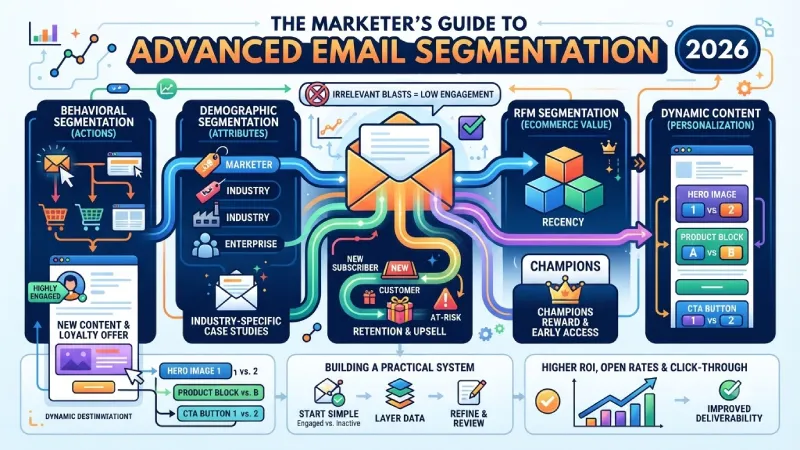
Segmentation involves splitting your mailing list into smaller groups so as to send more relevant emails. Those who receive emails which are relevant to their behavior or lifecycle stage will engage more and click through more often.
This Guide Details the Most Useful Techniques of Email Segmentation in 2026: Behavioral Segmentation, Demographic Segmentation, Lifecycle Stage Segmentation, RFM Segmentation for eCommerce, and Dynamic Content.
For the overarching strategy, read our complete guide on Email Marketing
Behavioral Email Segmentation
The behavioral approach segments consumers on the basis of how they act rather than who they are. This is generally considered to be the strongest form of segmentation since actions are an indicator of intentions.
Common behavioral data points
- Email opens and clicks (recent and historical)
- Website pages visited
- Content downloaded or watched
- Products viewed or added to cart
- Purchase history and frequency
- Feature usage (for software products)
- Webinar or event attendance
Useful behavioral segments
| Segment Example | Who Belongs Here | What to Send |
| Highly engaged | Frequent openers and clickers | New content, advanced tips, loyalty offers |
| Recently engaged | Opened or clicked in last 30 days | Relevant follow-ups and next steps |
| Inactive / at-risk | No opens or clicks for 60–90+ days | Re-engagement or win-back campaigns |
| Cart abandoners | Added items but did not buy | Reminder and recovery emails |
| Content consumers | Download leads or blog readers | Nurture sequences related to that topic |
| Product users vs non-users | Active users vs trial or free users | Onboarding, feature education, or upgrade |
Why behavioral segmentation works well
It fits the content with their interest and intention at present. The individual who has downloaded the guideline on email marketing should not be receiving the same emails as the one who has been a client for two years.
Start simple. Even basic splits such as “engaged in the last 30 days” versus “not engaged” can improve results noticeably.
Demographic Segmentation
Demographic segmentation uses stable attributes about the person or company. It is useful, but usually works best when combined with behavioral data rather than used alone.
Common demographic and firmographic data
- Job title or role
- Industry
- Company size
- Location or region
- Language preference
- Age range or other personal attributes (when relevant and properly collected)
- Signup source
When demographic segmentation helps
- Tailoring examples and language to different industries
- Adjusting offers by company size (startup vs enterprise)
- Sending location-specific information
- Matching content to seniority level (practitioner vs executive)
Limitations
The need and engagement level of two people may be vastly different despite the fact that they are both under the same job designation. Demographic information will give you information about whom a person is, not about what his current interests are. That is why most teams use it as a supplemental layer.
Lifecycle Stage Segmentation
Life Cycle segmentation divides consumers based on how far they have reached in their life cycle with regard to your business. It goes without saying that the message that would work for a new subscriber will not work for an old customer.
Typical lifecycle stages
| Stage | Description | Email Focus |
| New subscriber | Just joined the list | Welcome, set expectations, introduce value |
| Lead / prospect | Showing interest but not yet a customer | Education, trust-building, soft offers |
| First-time buyer | Made their first purchase | Onboarding, usage tips, related products |
| Active customer | Buying or using regularly | Retention, upsell, loyalty, new features |
| At-risk / lapsed | Activity or purchases have dropped | Win-back, feedback requests, special offers |
| Churned | No longer active | Last-attempt win-back or exit surveys |
Why lifecycle segmentation matters
This avoids uncomfortable situations like sending out “welcome” messages to longtime clients or aggressive sales messages to someone who signed up yesterday. This way, mapping the main email streams according to the life cycle is done more efficiently.
Most marketing automation software lets you change stage according to certain activities automatically (first purchase, when signed up, when inactive, and so on).
RFM Segmentation for Ecommerce
RFM is a classic and still highly effective method for ecommerce and any business with repeat purchase behavior. It stands for:
- Recency – How recently did they buy?
- Frequency – How often do they buy?
- Monetary – How much do they spend?
By scoring customers on these three factors, you can create clear groups with different needs and potential value.
Common RFM-inspired segments
| Segment | Characteristics | Recommended Approach |
| Champions | Bought recently, buy often, spend a lot | Reward, early access, loyalty programs |
| Loyal customers | Buy regularly | Retention and upsell |
| Potential loyalists | Recent buyers with growing frequency | Encourage second and third purchases |
| At-risk | Used to buy often but have slowed down | Win-back campaigns |
| Hibernating | Have not purchased in a long time | Stronger re-engagement or special offers |
| New customers | First purchase only | Onboarding and second-purchase focus |
How to use RFM
No perfect model is needed to begin the segmentation process. Even basic rules (purchased in last 30 days, made more than three purchases, spending more than X dollars in total) would form viable segments. Most of the e-commerce email marketing solutions offer RFM or similar scoring capabilities
RFM helps you stop treating every customer the same and start allocating effort according to value and risk.
Dynamic Content by Segment
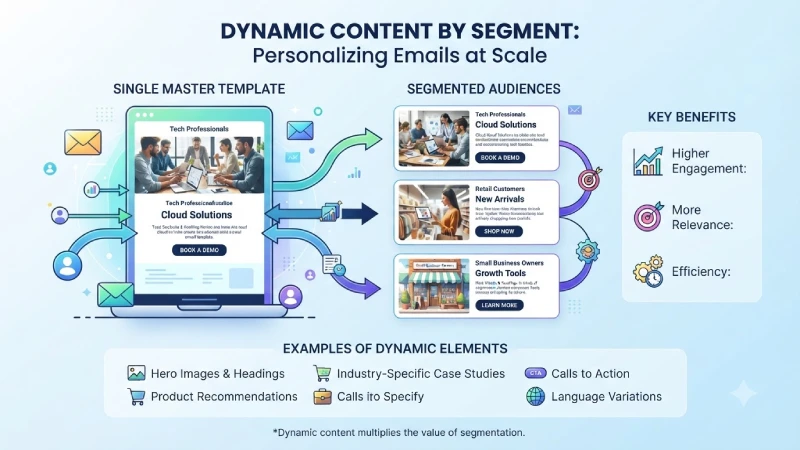
Dynamic content refers to elements of the email that will change automatically based on the recipient of the email. Rather than developing a whole new email for each segment, you can develop one email with changing parts.
Examples of dynamic content
- • Different hero images or headings by market segment
- • Recommendation of products based on previous actions
- • Industry-specific case studies or examples
- • Difference in calls to action (schedule a demo versus buy now)
- • Personalization of product blocks for e-commerce
- • Language differences
Benefits
- More relevant emails without managing dozens of separate campaigns
- Higher engagement when the content feels tailored
- Easier testing and optimization inside a single template
Practical tips
- Use 1 or 2 dynamic factors rather than going with a fully dynamic email.
- Make sure there is always a default version that will work for everyone else.
- Ensure that your design remains consistent even if some elements are dynamic.
- Test dynamic emails to ensure that they work better than static ones.
Dynamic content works best when your segments are already meaningful. It multiplies the value of good segmentation rather than replacing it.
Building a Practical Segmentation System
You don’t require a multitude of segments to get started. A good place to begin for most groups is:
- Separate engaged vs. inactive subscribers
- Add basic lifecycle stages (new, active, at-risk)
- Layer on one or two behavioral or RFM segments that match your business
- Use dynamic content for the highest-impact personalization
- Review segment performance regularly and refine
Good quality data is vital. If the data is not reliable and current, then segmentation is not possible.
Start with clean behavioral and transactional data, and then extend from there.
The basic idea behind segmentation is very simple – reduce the number of irrelevant emails and increase the number of relevant emails.
But if you do this consistently, you will notice that your open rates, click-through rates, and ROI on your email marketing efforts will be significantly better.
Frequently Asked Questions
Which form of segmentation is easy to begin with?
Behavioral engagement (engagement versus non-engagement) and basic lifecycle segments are typically the easiest and most impactful starting points.
How many segments should I have?
Start with a small number you can actually manage and create relevant content for. Three to seven core segments is enough for most teams at the beginning.
Is demographic segmentation still useful?
Yes, especially when combined with behavioral or lifecycle data. Used alone, it is usually weaker than behavior-based approaches.
How often should I update my segments?
Dynamic segments auto-update. If you use static segments, check and update them on a regular basis, monthly or quarterly.
Does segmentation improve deliverability?
Indirectly, indeed. Emails that are more relevant result in higher engagement levels and lower numbers of spam reports, thus ensuring a good sender reputation.
To take the next step, see our detailed guide on Email A/B Testing
