

Introduction
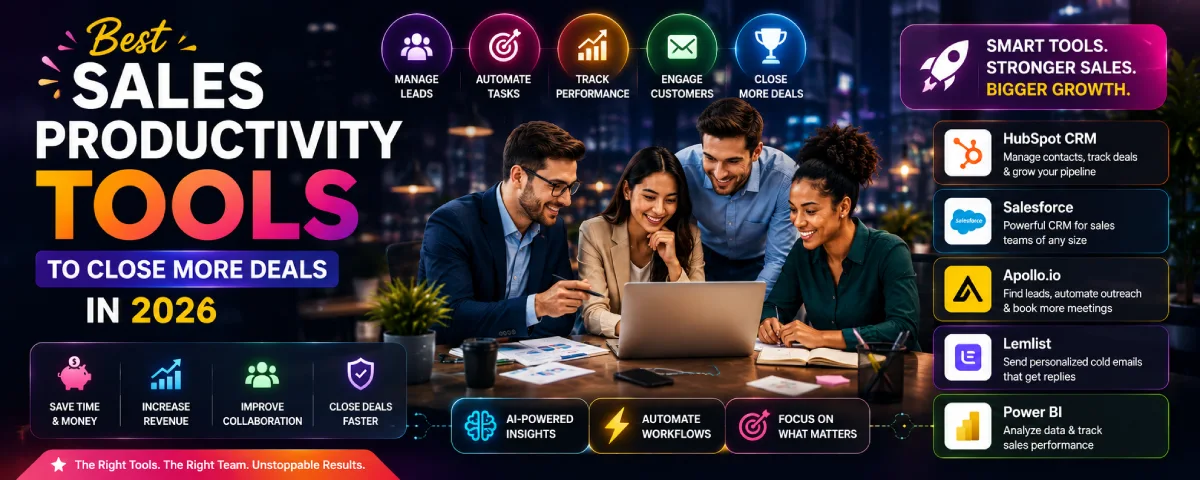
Best Sales Productivity Tools for Efficient Deal Closing For efficient deal closing, salespeople need to be fast and well-organized. It is here that sales productivity tools become important because they help manage customer data, automate processes, monitor sales performance, and communicate.. By 2026, a lot of businesses have adopted AI-driven sales tools to improve their efficiency and boost their sales revenues. Here is a guide that will help you learn about the top sales productivity tools.
For the overarching strategy, read our complete guide on Productivity Tools
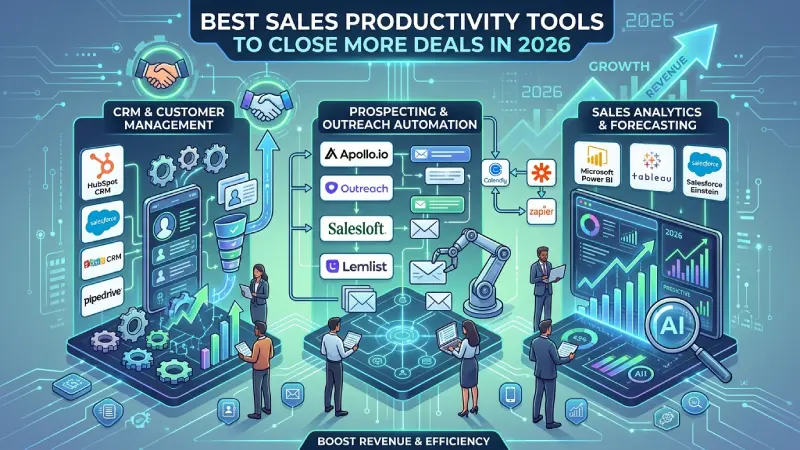
This helps readers quickly compare popular tools.
| Tool | Best For | Free Plan | AI Features |
| HubSpot CRM | Small Business | Yes | Yes |
| Salesforce | Enterprise | No | Yes |
| Zoho CRM | SMBs | Yes | Yes |
| Apollo.io | Prospecting | Yes | Yes |
| Lemlist | Cold Email | Trial | Limited |
| Power BI | Analytics | No | Yes |
What Are Sales Productivity Tools?
The sales productivity tool is a kind of application that makes the work of salespeople easier and more efficient. It automates certain processes and offers insightful information that allows the salesperson to make more sales.
Common Features
- Contact management
- Lead tracking
- Email automation
- Task management
- Meeting scheduling
- Sales reporting
- AI-powered recommendations
- Mobile access
Benefits of Sales Productivity Tools
- Save time
- Increase sales
- Improve customer relationships
- Better team collaboration
- Faster follow-ups
- More accurate reporting
- Higher conversion rates
Key Features to Look for
- Easy-to-use dashboard
- AI-powered automation
- CRM integration
- Email tracking
- Sales reporting
- Mobile access
- Workflow automation
- Analytics and forecasting
- Third-party integrations
- Data security
CRM-Based Sales Productivity Tools
Customer Relationship Management (CRM) system is one of the most essential systems for every sales team. It helps to maintain customer data and interactions and manage the sales pipeline.
Popular CRM Tools
| CRM Tool | Best For | Main Features | Free Plan |
| HubSpot CRM | Small businesses | Contact management, email tracking, reports | Yes |
| Salesforce | Large businesses | Sales automation, AI insights, forecasting | No |
| Zoho CRM | Growing businesses | Lead management, workflow automation | Yes |
| Pipedrive | Sales teams | Visual sales pipeline, automation | Trial |
| Freshsales | SMBs | AI lead scoring, email tracking | Trial |
CRM-Based Sales Productivity Tools
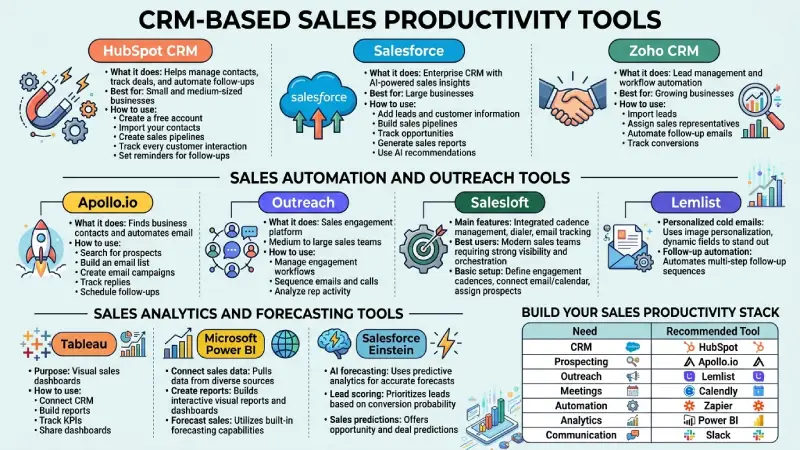
HubSpot CRM
It can be utilized for managing contacts, monitoring deals, and automating follow-ups.
Best for: Small and medium-sized businesses.
How to use:
- Create a free account.
- Import your contacts.
- Create sales pipelines.
- Track every customer interaction.
- Set reminders for follow-ups.
Salesforce
What it does: Enterprise CRM with AI-powered sales insights.
Best for: Large businesses.
How to use:
- Add leads and customer information.
- Build sales pipelines.
- Track opportunities.
- Generate sales reports.
- Use AI recommendations.
Zoho CRM
What it does: Lead management and workflow automation.
Best for: Growing businesses.
How to use:
- Import leads.
- Assign sales representatives.
- Automate follow-up emails.
- Track conversions.
Sales Automation and Outreach Tools
Apollo.io
How it works: Contacting businesses and sending emails automatically.
How to use:
- Search for prospects.
- Build an email list.
- Create email campaigns.
- Track replies.
- Schedule follow-ups.
Outreach
Explain:
- What it does
- Best for
- How to use
Salesloft
Explain:
- Main features
- Best users
- Basic setup
Lemlist
Explain:
- Personalized cold emails
- Follow-up automation
Sales Analytics and Forecasting Tools
Tableau
Purpose: Visual sales dashboards.
How to use:
- Connect CRM.
- Build reports.
- Track KPIs.
- Share dashboards.
Microsoft Power BI
Explain:
- Connect sales data
- Create reports
- Forecast sales
Salesforce Einstein
Explain:
- AI forecasting
- Lead scoring
- Sales predictions
Build Your Sales Productivity Stack
Include a visual table:
| Need | Recommended Tool |
| CRM | HubSpot |
| Prospecting | Apollo.io |
| Outreach | Lemlist |
| Meetings | Calendly |
| Automation | Zapier |
| Analytics | Power BI |
| Communication | Slack |
Sales Automation and Outreach Tools
These sales automation technologies minimize the routine tasks that help increase selling time for salespeople.
Common Automation Features
- Automated emails
- Follow-up reminders
- Lead assignment
- Meeting scheduling
- Workflow automation
- Contact updates
Popular Sales Automation Tools
| Tool | Best For | Features |
| Apollo.io | Lead generation | Prospecting, email outreach |
| Outreach | Enterprise sales | Sales engagement |
| Salesloft | Sales communication | Email sequences |
| Lemlist | Cold email | Personalized outreach |
| Zapier | Workflow automation | Connects business apps |
Sales Analytics & Forecasting Tools for Startups

For most young companies, deal tracking is done via a CRM, and people take a look at the monthly revenue numbers on Stripe or QuickBooks. This works great until the board wants to know about next quarter’s forecast, a new sales rep doesn’t perform as expected, or until you realize that half your pipeline is stalled out, and no one saw that coming. These sales analytics and forecasting tools help you understand what is really going on.
Here’s a practical look at what works for startups in 2026.
Best Sales Analytics & Forecasting Tools for Startups
| Tool | Best for | Free plan? | Starting paid price | Why startups use it |
| HubSpot | All-in-one CRM + analytics | Strong free CRM | From ~$15–20/user | Native reports, pipeline health, basic forecasts |
| Pipedrive | Visual pipeline + forecasting | Trial only | From ~$14/user | Cleanest deal stages and forecast view |
| Salesforce | Complex or enterprise sales | Trial | From ~$25/user | Powerful forecasting and custom reports |
| Clari | Serious revenue forecasting | No | Higher (sales teams) | AI-assisted pipeline inspection & forecasts |
| InsightSquared / Gong (analytics side) | Conversation + performance insights | Limited | Mid to high | Deeper win/loss and coaching data |
| Google Sheets + CRM export | Early-stage simple forecasting | Completely free | Free | Still the most common starting point |
HubSpot and Pipedrive cover most early needs. Clari and the heavier tools usually appear once you have a real sales team and investors asking for accurate forecasts.
What Good Sales Analytics Actually Shows
Useful tools surface:
- Revenue trends (actual vs target)
- Conversion rates by stage
- Pipeline coverage and health (how much pipeline vs quota)
- Deal velocity (how long deals stay in each stage)
- Win rates by source, rep, or product
- Forecast accuracy over time
- Individual and team performance
The goal is not more charts. It’s faster answers to questions like “Will we hit this quarter?” and “Where are deals dying?”
Free and Low-Cost Options
You can go surprisingly far without expensive software:
| Approach | What’s free / cheap | Limits | Good for |
| HubSpot free CRM | Basic reports, deal stages, email tracking | Advanced forecasting locked | Most pre-Series A teams |
| Pipedrive trial + basic plan | Strong visual pipeline and simple forecast | History and advanced features limited | Sales-focused early teams |
| CRM export + Google Sheets | Completely free | Manual updates | Pre-revenue or founder-led sales |
| Native CRM dashboards | Built into HubSpot, Pipedrive, Close | Limited customization | Day-to-day pipeline reviews |
Many startups stay on HubSpot free or a basic Pipedrive plan plus a well-built Google Sheet forecast for a long time.
Forecasting Approaches That Work
Early-stage forecasting is usually a mix of:
- Pipeline-weighted forecast — Probability by stage (e.g., 20% at discovery, 60% at proposal).
- Historical close rates — What percentage of deals at each stage normally close.
- Rep judgment — Commit / upside / pipeline categories.
- Simple coverage ratio — 3–4x pipeline coverage is a common rule of thumb.
Begin by performing all the analysis using an Excel spreadsheet. After getting the process stabilized and acquiring historical data, implement the same approach in the CRM or forecasting software.
How to Choose Without Overcomplicating
- Still founder-led or very small team → HubSpot free or Pipedrive + Google Sheets.
- First sales hires and clear pipeline stages → Pipedrive or HubSpot paid for better forecasting views.
- Multiple reps, board-level forecasts, or complex deals → Look at Clari or Salesforce.
- Always connect the tool to your CRM. Double entry kills accuracy.
- Compare your forecast versus actuals on a monthly basis. It is essential that you improve through the exercise, rather than your initial output.
A realistic early stack:
- CRM: HubSpot or Pipedrive
- Basic analytics: Native CRM reports
- Forecasting: Google Sheets (or built-in CRM forecast)
- Later: Dedicated forecasting layer only when the sales team and data volume justify it
How to Choose the Best Sales Productivity Tool
When selecting a sales productivity tool, consider:
- Business size
- Budget
- Ease of use
- AI features
- CRM compatibility
- Customer support
- Reporting features
- Mobile app availability
- Security
- Scalability
Best Analytics Tools
| Tool | Main Purpose |
| Tableau | Business dashboards |
| Power BI | Sales reporting |
| Salesforce Einstein | AI forecasting |
| HubSpot Analytics | Sales performance |
| Zoho Analytics | Business insights |
To take the next step, see our detailed guide on business productivity tools
How to Build a Sales Productivity Stack
Sales productivity stack refers to an array of tools that function together during the entire sales process.
A simple stack might include:
| Business Need | Recommended Tool Type |
| Customer Management | CRM |
| Lead Generation | Prospecting Tool |
| Email Outreach | Sales Engagement Tool |
| Meetings | Calendar & Meeting Tool |
| Automation | Workflow Automation |
| Reporting | Analytics Dashboard |
| Communication | Team Chat Software |
Tips for Choosing the Right Stack
- Understand your sales process.
- Choose tools that integrate well.
- Start with essential software.
- Automate repetitive tasks.
- Train your sales team.
- Review performance regularly.
Frequently Asked Questions
What are sales productivity tools?
Sales Productivity Applications are computer software used by the sales personnel to manage their leads, perform their work efficiently, communicate effectively, and increase sales.
Which CRM is best for sales?
Popular choices include HubSpot CRM, Salesforce, Zoho CRM, and Pipedrive.
Do small businesses need sales productivity tools?
Indeed.They help small companies save time, organize their customer information, and increase their sales efficiency.
What is sales automation?
Sales automation refers to the application of software in executing the mundane tasks of email campaigns, appointments, and customer data updating.
How do sales analytics tools help?
They track sales performance, measure the productivity of the sales team, and identify trends.
Conclusion
The tools of sales productivity have become an absolute must-have for contemporary sales teams in 2026. Whether it is CRM systems, sales productivity software, or sales forecasting and analytics solutions, all these tools enable businesses to become more productive and make more sales. With the proper choice of tools and their integration into your sales process, you will achieve success.
