
Introduction
Workflow automation software helps businesses. They handle repetitive tasks daily. These tasks include managing approvals, customer inquiries and employee onboarding.
Project management, invoicing and emails are also part of these tasks. Internal communication happens through platforms. Managing these tasks manually can cause delays and inefficiency.
Workflow automation software can help with these problems. This is where workflow automation software becomes valuable.
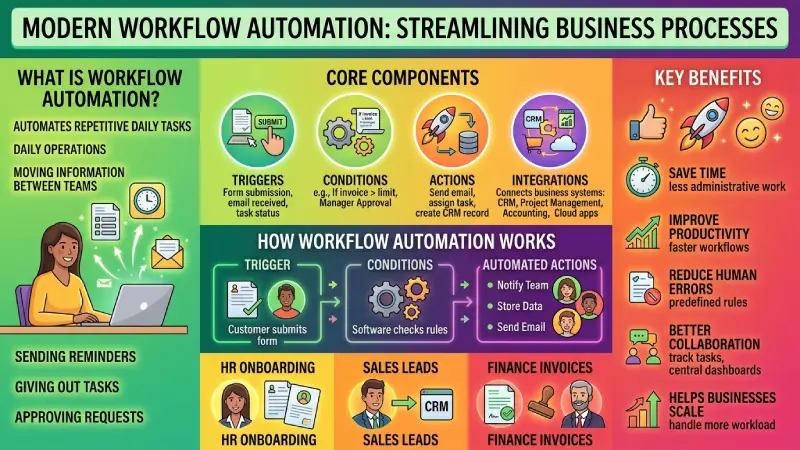
According to IBM, workflow automation assists organizations in making repetitive business processes more efficient through automation.
The tools for workflow automation assist organizations in automating repetitive processes, reducing manual labor, improving collaboration, and organizing operations. Rather than performing the same tasks over and over again, organizations can create automated workflows, which automatically execute tasks depending on triggers
In 2026 workflow automation is becoming a part of how businesses work online for startups, agencies, ecommerce brands, big companies and teams that work from home.
This guide tells us how workflow automation software works what is good, about it what tools people like to use what real businesses are doing with it how to make it work for us and what we can expect from workflow automation in the future.
This workflow guide is part of our automation tools pillar
What Is Workflow Automation?
Workflow automation is a way to use software to make repetitive office tasks and daily operations easier.
When you automate workflows the software takes care of moving information between teams sending out reminders giving out tasks and approving requests. This way you do not have to do these things
Workflow automation systems do all these activities, on their own. They help in getting things done quickly and correctly.
Workflow automation usually works through:
- Triggers
- Conditions
- Actions
- Integrations
For example:
| Trigger | Automated Action |
| Employee submits leave request | Manager receives approval notification |
| Customer fills contact form | CRM creates lead automatically |
| Invoice uploaded | Finance team receives approval request |
| New ecommerce order | Inventory system updates stock |
Workflow automation minimizes redundancy and increases efficiency.
How Workflow Automation Software Works
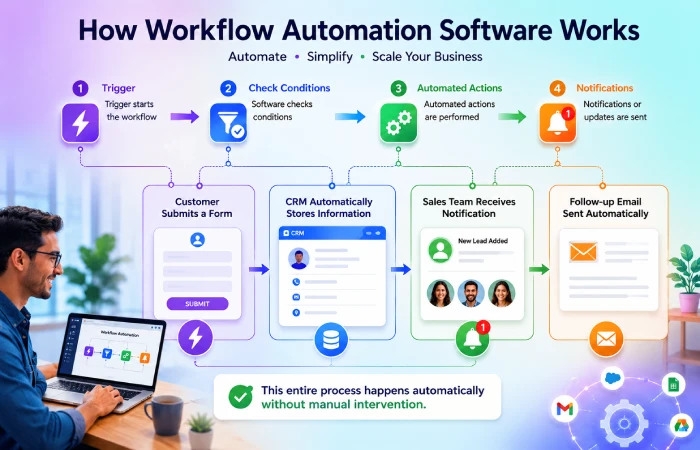
Workflow automation software links up business applications and automates actions among them.
Most systems follow a simple process:
- Trigger starts the workflow
- Software checks conditions
- Automated actions are performed
- Notifications or updates are sent
For example:
- A customer submits a form
- CRM automatically stores customer information
- Sales team receives notification
- Follow-up email is sent automatically
This entire process can happen without manual intervention.
Common Workflow Components
Triggers
Triggers start the workflow process.
Examples:
- form submission
- email received
- payment completed
- task status updated
Conditions
Conditions decide what happens next in the workflow.
Example:
- if invoice amount exceeds limit → manager approval required
Actions
Actions are the automated tasks performed by the system.
Examples:
- send email
- assign task
- create CRM record
- generate report
Integrations
Workflow automation platforms connect with:
- CRM systems
- project management tools
- accounting software
- ecommerce platforms
- cloud applications
Integrations allow workflows to move data between different business systems automatically.
Benefits of Workflow Automation Software
Workflow automation offers several advantages for businesses of all sizes.
Saves Time
Employees spend less time handling repetitive administrative work.
Tasks like:
- approvals
- reminders
- data entry
- reporting
- notifications
can run automatically.
This allows teams to focus on more valuable business activities.
Improves Productivity
Workflow automation enables businesses to perform workflows quicker and with reduced interruptions.
Workflows occur automatically between departments rather than waiting for approval and update.
This improves operational speed and team productivity.
Reduces Human Errors
Manual workflows often create:
- data entry mistakes
- missed approvals
- communication gaps
- duplicated work
Automation systems follow predefined rules consistently, reducing operational errors.
Better Team Collaboration
Workflow automation improves communication between departments.
Teams can:
- track tasks
- receive updates
- manage approvals
- monitor progress
from centralized dashboards.
Helps Businesses Scale Operations
As organizations expand, manual processes become harder to manage.
Workflow automation allows companies to handle:
- more customers
- more projects
- larger teams
- higher workloads
without increasing manual operational pressure.
Types of Workflow Automation
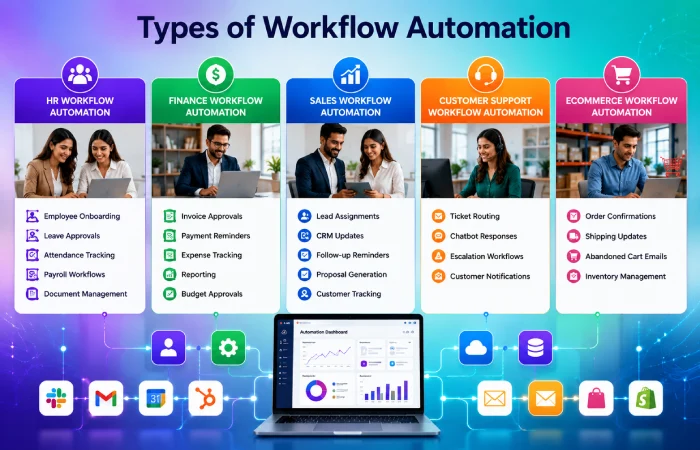
Different businesses use workflow automation for different operational needs.
HR Workflow Automation
HR teams automate:
- employee onboarding
- leave approvals
- attendance tracking
- payroll workflows
- document management
Finance Workflow Automation
Finance departments automate:
- invoice approvals
- payment reminders
- expense tracking
- reporting
- budget approvals
Sales Workflow Automation
Sales teams automate:
- lead assignments
- CRM updates
- follow-up reminders
- proposal generation
- customer tracking
Layer marketing automation tools on top
Customer Support Workflow Automation
Support teams automate:
- ticket routing
- chatbot responses
- escalation workflows
- customer notifications
Ecommerce Workflow Automation
Online stores automate:
- order confirmations
- shipping updates
- abandoned cart emails
- inventory management
Best Workflow Automation Tools in 2026
Different workflow automation tools support different business requirements.
| Tool | Best For | Main Features |
| Zapier | Small businesses | App integrations and no-code workflows |
| Make | Advanced automation | Visual workflow builder |
| Monday.com | Team workflows | Project and task automation |
| ClickUp | Productivity management | Workflow and collaboration tools |
| Asana | Project workflows | Task automation |
| Trello | Simple workflow management | Board-based automation |
| Airtable | Data-driven workflows | Database automation |
| Notion | Team organization | Workflow and documentation systems |
How to Choose Workflow Automation Software

The selection of automation technologies should be done by considering business needs and technological requirements.
Important factors include:
| Factor | Why It Matters |
| Ease of Use | Helps employees adopt workflows faster |
| Integrations | Connects existing business systems |
| Scalability | Supports future business growth |
| Pricing | Matches operational budgets |
| Automation Features | Improves workflow flexibility |
| Reporting | Helps monitor workflow performance |
Businesses should avoid selecting software only because it is popular. The best platform depends on workflow complexity and company goals.
Real Workflow Automation Examples
Real business examples help companies understand how workflow automation improves operations.
Employee Onboarding Workflow
When a new employee joins:
- HR receives notification
- onboarding checklist is created
- documents are shared automatically
- manager receives setup tasks
This reduces manual coordination.
Invoice Approval Workflow
Finance teams automate:
- invoice uploads
- approval routing
- payment notifications
- accounting updates
This speeds up financial processing.
Lead Management Workflow
When customers fill contact forms:
- CRM stores lead data
- sales representative is assigned
- follow-up emails are scheduled
- lead status updates automatically
This improves sales efficiency.
Automate follow-ups with email automation tools
Customer Support Workflow
Support systems can:
- route tickets
- assign priorities
- send automated replies
- escalate urgent requests
This improves response times.
How to Implement Workflow Automation
Successful workflow automation requires proper planning.
Step 1: Identify Repetitive Tasks
Businesses should first identify tasks that:
- consume time
- create delays
- require repetitive manual actions
Step 2: Map Existing Workflows
Before automation, businesses should understand:
- current workflow structure
- bottlenecks
- approval processes
- communication gaps
Step 3: Choose the Right Automation Tool
Companies should compare:
- integrations
- pricing
- scalability
- ease of use
before selecting software.
Step 4: Start with Small Workflows
Automation should start with small operations and then go big.
This reduces implementation risks.
Step 5: Monitor and Improve Workflows
Regular assessments should be made of the automation systems.
Businesses should analyze:
- workflow speed
- employee feedback
- operational bottlenecks
- automation errors
Common Workflow Automation Mistakes
Many businesses fail to achieve good automation results because of poor implementation.
Automating Broken Processes
Automation cannot fix disorganized workflows.
Businesses should improve workflow structure before automating tasks.
Overcomplicating Workflows
Very complex workflows become difficult to manage and maintain.
Simple workflows are often more effective.
Ignoring Employee Training
Employees need proper onboarding and workflow understanding.
Choosing the Wrong Tool
Some businesses purchase enterprise software they do not fully use.
Companies should choose software that matches operational needs.
Workflow Automation vs Traditional Manual Processes
| Manual Workflows | Automated Workflows |
| Slow approvals | Faster processing |
| Repetitive tasks | Automated actions |
| Higher error rates | Better consistency |
| More manual communication | Automated notifications |
| Difficult scaling | Easier growth management |
Future of Workflow Automation
Workflow automation technology continues evolving rapidly.
Several trends are shaping the future of automated business operations.
AI-Powered Workflows
AI systems can now:
- analyze workflow data
- optimize processes
- predict bottlenecks
- automate decisions
No-Code Automation Platforms
Drag-and-drop automation toolkits, which do not require any coding skills, have become popular in organizations.
This makes workflow automation more accessible for smaller companies.
Smart Workflow Analytics
Modern systems provide:
- workflow insights
- performance tracking
- operational analytics
- efficiency monitoring
Autonomous Workflow Systems
It is possible that in the future, workflow systems could control entire operations processes autonomously, with little need for human intervention.
Frequently Asked Questions
What is workflow automation software?
Workflow automation software involves the automation of business processes and operational activities through triggers, conditions, and automated actions.
Who uses workflow automation?
Workflow automation is applied by startups, enterprises, ecommerce companies, healthcare firms, marketing companies, and finance teams.
Is workflow automation expensive?
There are plenty of workflow automation software available which are quite economical and designed for startups.
Why should you implement workflow automation?
Workflow automation can make your business more productive, reduces errors, saves time and makes it scalable.
How does workflow automation differ from RPA?
Workflow automation involves process management, whereas robotic process automation involves task automation with the help of bots.
Conclusion
Workflow automation tools have become an important aspect of modern-day businesses in 2026.
Firms today automate their workflow processes to increase efficiency, eliminate tedious tasks, facilitate communication, and manage their processes effectively.
Whether it is recruiting employees, managing clients, making sales, and so forth, automation in workflow process helps firms to be more productive.
In light of the advancement in automation technology, those firms which adopt workflow automation wisely will be better prepared for future changes.