Introduction
Businesses today manage large amounts of repetitive digital work every day. Employees often spend hours copying data, processing invoices, updating spreadsheets, checking records, moving information between systems, and handling repetitive administrative tasks.
These activities are important for business operations, but they also consume time and increase the risk of human errors.
This is where Robotic Process Automation (RPA) becomes valuable.
RPA technology uses software bots to automate repetitive rule-based tasks across business systems and applications. Instead of manually performing the same actions repeatedly, businesses can use automation bots to complete tasks faster and more consistently.
In 2026, companies across industries such as banking, healthcare, ecommerce, logistics, customer support, and manufacturing are increasingly adopting RPA to improve operational efficiency and reduce manual workload.
This guide explains what robotic process automation is, how it works, popular RPA tools, real business use cases, implementation strategies, and future trends shaping enterprise automation.
What Is Robotic Process Automation?
Robotic Process Automation (RPA) is a technology that uses software bots to automate repetitive digital tasks normally performed by humans.
These bots interact with:
- applications
- databases
- websites
- spreadsheets
- business systems
in the same way employees do.
RPA systems can:
- click buttons
- copy data
- enter information
- generate reports
- process transactions
- move files
- validate records
without requiring constant human involvement.
Unlike physical robots used in factories, RPA bots are software-based digital workers operating inside computer systems.
How Robotic Process Automation Works
Robotic Process Automation works by using software bots to perform repetitive digital tasks automatically. These bots follow predefined rules and workflows created by the business.
Instead of employees manually copying information, updating records, processing files, or moving data between systems, RPA bots complete these tasks automatically inside computer applications.
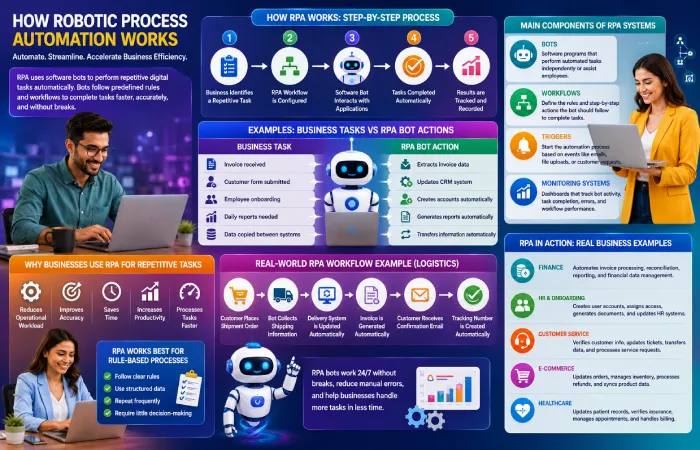
The process usually works like this:
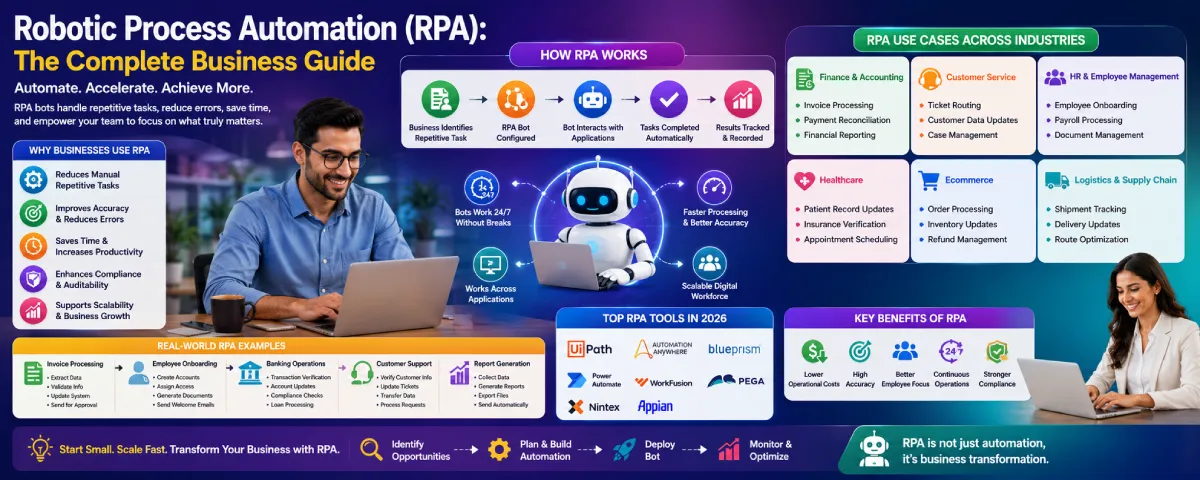
- Business identifies a repetitive task
- RPA workflow is configured
- Software bot interacts with applications
- Tasks are completed automatically
- Results are tracked and recorded
For example:
| Business Task | RPA Bot Action |
| Invoice received | Extracts invoice data |
| Customer form submitted | Updates CRM system |
| Employee onboarding | Creates accounts automatically |
| Daily reports needed | Generates reports automatically |
| Data copied between systems | Transfers information automatically |
One of the main advantages of RPA is that bots can work continuously without breaks. Businesses can automate tasks that normally take employees many hours every day.
For example, a finance department may receive hundreds of invoices daily. Instead of manually opening every invoice and entering information into accounting software, an RPA bot can automatically:
- read invoice details
- extract important data
- update financial systems
- send approval requests
This helps reduce repetitive manual work and improves processing speed.
Another common example is employee onboarding. When a new employee joins a company, businesses often need to:
- create user accounts
- assign software access
- generate documents
- update HR systems
RPA bots can handle many of these setup activities automatically, reducing delays and administrative workload for HR teams.
Customer service operations also use RPA for repetitive tasks. Bots may:
- verify customer information
- update support tickets
- transfer customer data between systems
- process simple service requests
This allows support teams to focus more on customer communication instead of repetitive data handling.
Most RPA systems work with existing business software without requiring major changes to company infrastructure. This makes RPA useful for organizations using older applications that may not support modern integrations.
Main Components of RPA Systems
Most robotic process automation platforms include several important components.
Bots
Bots are the software programs that perform automated tasks.
Some bots work independently in the background, while others assist employees during daily operations.
Workflows
Workflows define the rules and step-by-step actions the bot should follow.
For example:
- open application
- copy data
- validate information
- update records
- generate report
Triggers
Triggers start the automation process.
Common triggers include:
- email received
- file uploaded
- form submitted
- scheduled task
- customer request
Monitoring Systems
Most RPA platforms include dashboards that help businesses monitor:
- bot activity
- task completion
- errors
- workflow performance
This helps organizations track operational efficiency more effectively.
Why Businesses Use RPA for Repetitive Tasks
Many companies use RPA because repetitive digital tasks often consume large amounts of employee time.
Tasks such as:
- data entry
- report generation
- invoice processing
- account updates
- document verification
can become slow and repetitive when handled manually every day.
RPA helps businesses:
- reduce operational workload
- improve accuracy
- save time
- increase productivity
- process tasks faster
This allows employees to spend more time on customer service, strategy, problem-solving, and business growth instead of repetitive administrative work.
RPA Works Best for Rule-Based Processes
RPA is most effective for tasks that:
- follow clear rules
- use structured data
- repeat frequently
- require little decision-making
For example:
- transferring spreadsheet data
- processing forms
- generating reports
- validating records
- updating databases
Complex tasks requiring creativity, judgment, or emotional understanding are usually still handled better by humans.
Real-World Example of an RPA Workflow
A logistics company may use RPA like this:
- Customer places shipment order
- Bot collects shipping information
- Delivery system is updated automatically
- Invoice is generated
- Customer receives confirmation email
- Tracking number is created automatically
Without RPA, employees may need to complete each step manually across multiple systems.
Automation helps speed up operations while reducing manual processing delays.
As businesses continue handling larger amounts of digital work, RPA is becoming an important technology for improving operational efficiency and reducing repetitive administrative tasks.
Why Businesses Use RPA
Many organizations adopt robotic process automation to reduce repetitive work and improve operational accuracy.
Reduces Manual Repetitive Tasks
Employees often spend time on:
- data entry
- invoice processing
- report generation
- system updates
- record verification
RPA bots can automate these activities automatically.
Improves Accuracy
Manual processes may create:
- typing mistakes
- missing information
- duplicated data
- reporting errors
RPA systems follow consistent rules, reducing operational mistakes.
Saves Time
RPA bots can complete repetitive tasks much faster than manual workflows.
This allows employees to focus on:
- customer service
- decision-making
- strategy
- problem-solving
instead of repetitive administrative work.
Supports Business Scalability
As companies grow, manual operations become harder to manage.
RPA helps businesses handle:
- larger workloads
- more transactions
- increased customer activity
- growing operational demands
without significantly increasing staffing requirements.
Improves Compliance
RPA systems maintain detailed logs and process records, which helps businesses improve compliance and auditing processes.
This is important for industries such as:
- finance
- healthcare
- insurance
- government operations
Best RPA Tools in 2026
Different RPA platforms support different automation requirements depending on business size and operational complexity.
| RPA Tool | Best For | Main Features |
| UiPath | Enterprise automation | Advanced RPA workflows |
| Automation Anywhere | Large organizations | Cloud automation platform |
| Blue Prism | Secure enterprise automation | Scalable digital workforce |
| Microsoft Power Automate | Microsoft ecosystem users | Workflow and desktop automation |
| WorkFusion | AI-powered automation | Intelligent document processing |
| Pega | Business process automation | AI decision workflows |
| Nintex | Process management | Workflow and RPA integration |
Businesses should compare tools based on:
- scalability
- integrations
- AI capabilities
- pricing
- security
- ease of implementation
RPA Use Cases in Business
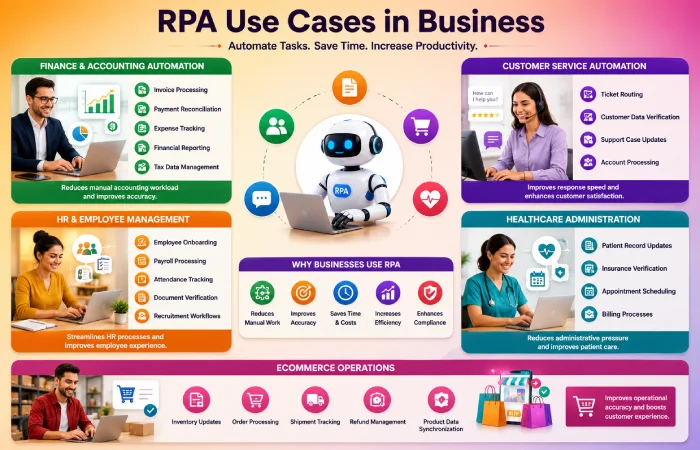
RPA is used across multiple industries for different operational tasks.
Finance and Accounting Automation
Finance teams use RPA for:
- invoice processing
- payment reconciliation
- expense tracking
- financial reporting
- tax data management
This reduces manual accounting workload.
Customer Service Automation
Businesses automate:
- ticket routing
- customer data verification
- support case updates
- account processing
This improves response speed and operational efficiency.
HR and Employee Management
HR departments use RPA for:
- employee onboarding
- payroll processing
- attendance tracking
- document verification
- recruitment workflows
Healthcare Administration
Healthcare organizations automate:
- patient record updates
- insurance verification
- appointment scheduling
- billing processes
This helps reduce administrative pressure.
Ecommerce Operations
Online businesses use RPA for:
- inventory updates
- order processing
- shipment tracking
- refund management
- product data synchronization
Real-World RPA Examples
Practical examples help businesses understand how RPA works in daily operations.
Example: Invoice Processing
A company receives hundreds of invoices daily.
Instead of manually entering invoice information:
- RPA bot reads invoice data
- Extracts important details
- Updates accounting software
- Sends approval request automatically
This reduces manual data entry work significantly.
Example: Employee Onboarding
When a new employee joins:
- user accounts are created
- software access is assigned
- HR documents are generated
- onboarding emails are sent
RPA handles these repetitive setup tasks automatically.
Example: Banking Operations
Banks use RPA for:
- transaction verification
- account updates
- compliance checks
- loan processing
This improves operational speed while reducing manual processing delays.
RPA vs Traditional Automation
Many businesses confuse RPA with traditional workflow automation.
Although both improve efficiency, they work differently.
| RPA | Traditional Automation |
| Uses software bots | Uses workflow systems |
| Mimics human actions | Automates predefined workflows |
| Works across multiple applications | Usually works inside one system |
| Handles repetitive rule-based tasks | Focuses on process management |
| Requires minimal system changes | Often needs deeper integration |
RPA is especially useful when businesses use older systems that cannot easily integrate with modern software.
How to Implement RPA
Successful RPA implementation requires planning and process analysis.
Step 1: Identify Repetitive Processes
Businesses should identify tasks that:
- are repetitive
- follow fixed rules
- require high manual effort
- involve structured data
Step 2: Analyze Workflow Complexity
Simple processes are usually easier to automate successfully.
Businesses should avoid starting with highly complex workflows.
Step 3: Choose the Right RPA Platform
Companies should compare:
- integrations
- scalability
- security
- pricing
- support services
before selecting software.
Step 4: Start with Small Automation Projects
Businesses should begin with smaller automation tasks before expanding to enterprise-wide automation.
This reduces implementation risk.
Step 5: Monitor and Optimize Bots
RPA systems should be monitored regularly to:
- improve performance
- reduce workflow issues
- maintain compliance
- update automation rules
Common RPA Mistakes Businesses Should Avoid
Businesses sometimes fail with RPA because of poor planning.
Automating Unstable Processes
Processes that constantly change are difficult to automate effectively.
Ignoring Employee Training
Employees should understand how automation works alongside human operations.
Choosing Large Projects Too Early
Businesses should avoid automating highly complex operations during the initial implementation stage.
Lack of Process Documentation
Poor workflow documentation often creates automation errors and maintenance problems.
Benefits of RPA for Different Industries
| Industry | Common RPA Usage |
| Banking | Transaction processing |
| Healthcare | Patient administration |
| Ecommerce | Order management |
| Logistics | Shipment tracking |
| Insurance | Claims processing |
| HR | Employee onboarding |
Future of Robotic Process Automation
RPA technology continues evolving with AI and intelligent automation systems.
AI-Powered RPA
Modern RPA platforms increasingly combine:
- artificial intelligence
- machine learning
- document recognition
- predictive analytics
to improve automation capabilities.
Intelligent Process Automation
Businesses are moving from simple task automation toward more intelligent systems that can analyze data and support decision-making.
Hyperautomation
Organizations are combining:
- RPA
- AI
- workflow automation
- analytics
- cloud computing
into connected automation ecosystems.
Low-Code RPA Platforms
Modern RPA systems are becoming easier to use with visual workflow builders and no-code automation tools.
This helps smaller businesses adopt automation more easily.
Frequently Asked Questions
What is robotic process automation?
Robotic Process Automation (RPA) uses software bots to automate repetitive digital business tasks.
Which industries use RPA?
RPA is used in banking, healthcare, ecommerce, logistics, customer service, HR, and manufacturing industries.
What are the benefits of RPA?
RPA improves efficiency, reduces manual work, increases accuracy, and helps businesses scale operations.
Is RPA the same as AI?
No. RPA follows predefined rules, while AI systems can analyze data and make adaptive decisions.
Is RPA expensive?
RPA costs depend on business size, automation complexity, and software platform requirements.
Conclusion
Robotic Process Automation is helping businesses automate repetitive digital work more efficiently in 2026.
From invoice processing and customer service to HR management and ecommerce operations, RPA systems allow organizations to reduce manual workload, improve accuracy, and streamline operational processes.
Businesses that implement RPA strategically can improve productivity while allowing employees to focus on more valuable and creative work.
As AI and intelligent automation technologies continue evolving, RPA will remain an important part of modern business transformation strategies.