

A lot of people search for an “AI image generator no restrictions” because they want a tool that lets them create images freely without constant refusals, heavy filters, or daily limits. Some want a free AI image generator with no restrictions. Others look for options discussed on Reddit, tools like Perchance, or simply the best AI image generator without restrictions.
This article explains the topic in plain language. It covers what these tools are, how they started, the main types available, free vs paid options, popular tools, how to use them, and what to expect in the future. The goal is to give useful information so you can understand what is actually available right now.
What People Mean by “AI Image Generator No Restrictions”
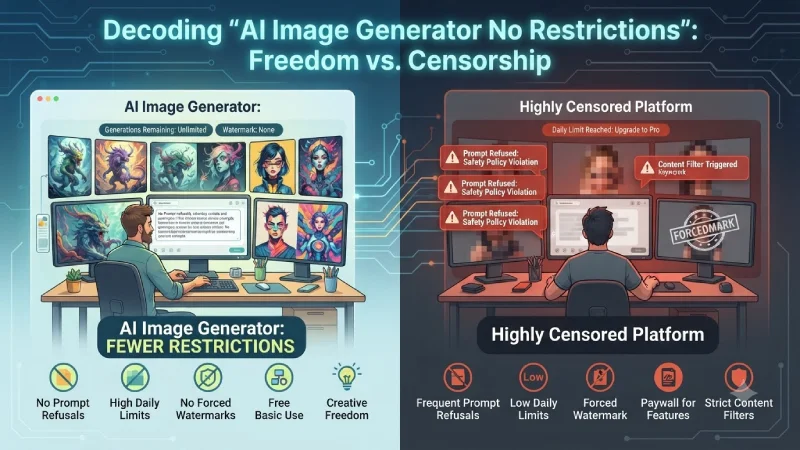
When people search for an “AI image generator no restrictions,” they are usually not looking for a tool with zero rules of any kind. In reality, almost every public platform still blocks clearly illegal content. What people want is something which appears to be free in comparison to the highly censored forms that can be accessed through the mainstream media.
Here is what people commonly mean when they use this phrase:
- Fewer prompt refusals
Popular AI image generators will block many different types of requests even if they are not illegal. People get annoyed when they cannot use their tool for any kind of artistry, creativity, or adult material. “No restrictions” means that the tool allows far more types of prompts than it rejects. - No or very high daily limits
Some free tools only allow a few images per day. People looking for an unrestricted experience usually want to generate many images without hitting a low ceiling quickly. - No forced watermarks
Some platforms add a visible watermark or logo on every free image. Users prefer tools that give clean images without branding. - Ability to use the tool without immediately paying
Many people want a free AI image generator with no restrictions for basic use. They do not wish to be coerced into paying for the plan before testing the tool. - Local or open-source control
A growing number of users prefer running models on their own computer (such as Stable Diffusion or FLUX). When the tool runs locally, the user has much more control and faces almost no platform-level restrictions. - Less aggressive content filtering
Some tools are known for lighter filters compared to big-name platforms. These are often discussed on Reddit and in communities looking for more creative freedom.
Important Reality Check
No major public AI image generator is completely unrestricted. Even tools marketed as “uncensored” or “no restrictions” usually still prohibit illegal content. The real difference is how strict the filters are and how much control the user has.
In simple terms:
- Heavily filtered tools → Refuse many creative or mature prompts
- More flexible tools → Allow a wider range of legal creative requests
- Local/open-source tools → Give the highest level of personal control
It is also worth noting that any technology can never be employed in generating illegal content. Even the most versatile AI image generators will not condone illegal activities. Using any AI tool responsibly is always the better approach.
So when someone searches for an AI image generator no restrictions, they are usually looking for more freedom, fewer refusals, higher limits, and cleaner output — not a complete absence of any rules.
When Did AI Image Generators Start?
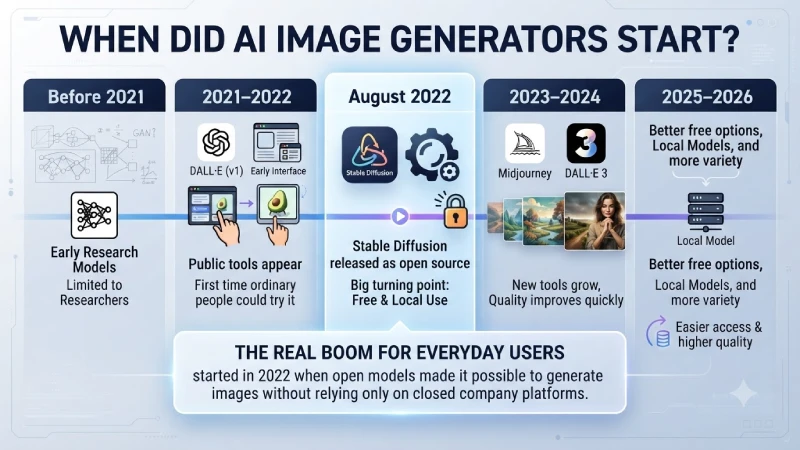
AI image generation did not appear overnight. Here is a simple timeline:
| Period | What Happened | Importance |
| Before 2021 | Early research models (GANs and others) | Mostly limited to researchers |
| 2021–2022 | DALL·E and early public tools appear | First time ordinary people could try it |
| August 2022 | Stable Diffusion is released as open source | Big turning point for free and local use |
| 2023–2024 | Midjourney, DALL·E 3, and many new tools grow | Quality improves quickly |
| 2025–2026 | Better free options, local models, and more variety | Easier access and higher quality |
The real boom for everyday users started in 2022 when open models made it possible to generate images without relying only on closed company platforms.
Main Types of AI Image Generators
Not all tools work the same way. Here are the common types:
| Type | How It Works | Level of Freedom | Best For |
| Online free tools | Work in browser, some need no sign-up | Medium to high | Quick and easy use |
| Free tier of big platforms | Limited daily images | Medium | Good quality with some limits |
| Local / open-source models | Run on your own computer | Very high | Full control and no limits |
| Paid premium tools | Subscription for higher limits and quality | Controlled but powerful | Professional or heavy use |
| Community / Reddit-style tools | Often simpler web tools | Varies | Experimenting and free access |
Free AI Image Generator Options (Including No Sign-Up and Unlimited Style)
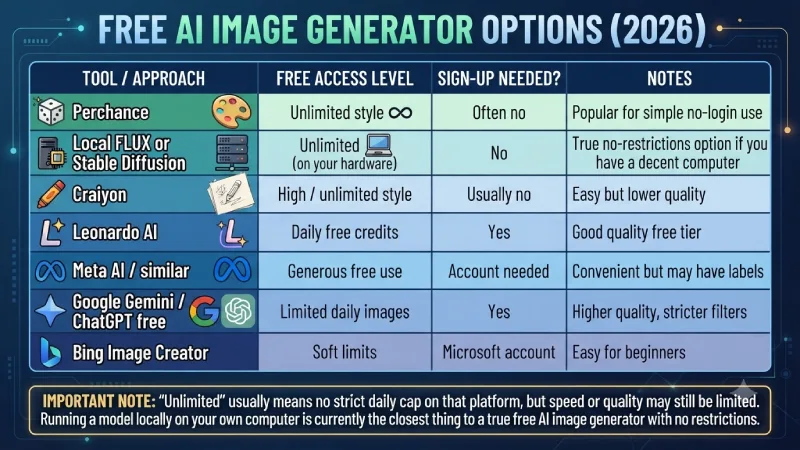
There are numerous individuals who deliberately look for an unrestricted AI image generator or a 100% free AI image generator. Here is an insight into what you can practically find in 2026.
| Tool / Approach | Free Access Level | Sign-up Needed? | Notes |
| Perchance | Unlimited style | Often no | Popular for simple no-login use |
| Local FLUX or Stable Diffusion | Unlimited (on your hardware) | No | True no-restrictions option if you have a decent computer |
| Craiyon | High / unlimited style | Usually no | Easy but lower quality |
| Leonardo AI | Daily free credits | Yes | Good quality free tier |
| Meta AI / similar | Generous free use | Account needed | Convenient but may have labels |
| Google Gemini / ChatGPT free | Limited daily images | Yes | Higher quality, stricter filters |
| Bing Image Creator | Soft limits | Microsoft account | Easy for beginners |
Important note: “Unlimited” usually means no strict daily cap on that platform, but speed or quality may still be limited. Running a model locally on your own computer is currently the closest thing to a true free AI image generator with no restrictions.
Popular Tools People Discuss (Including Reddit Mentions)
On places like Reddit, people often talk about:
- Perchance for quick, no-account generation
- Local Stable Diffusion or FLUX setups for full control
- Leonardo AI for a balance of free credits and quality
- Various open tools that appear and disappear
Searches for “AI image generator no restrictions Reddit” or “AI image generator no restrictions Perchance” usually lead people toward community-recommended free or low-restriction options.
Free vs Paid AI Image Generators
| Feature | Free Tools | Paid Tools |
| Cost | $0 | Monthly or yearly fee |
| Daily limits | Often present | Much higher or unlimited |
| Image quality | Good to very good | Usually higher and more consistent |
| Content filters | Varies (some lighter) | Usually stricter |
| Commercial use | Check each tool’s terms | Often clearer commercial rights |
| Speed | Can be slower | Usually faster |
| Extra features | Basic | Editing, higher resolution, priority |
The majority of individuals opt to use the freeware first before switching to the paid version in case the need arises for increased capacity.
Who Uses Free vs Paid AI Image Generators (and For What Purpose)
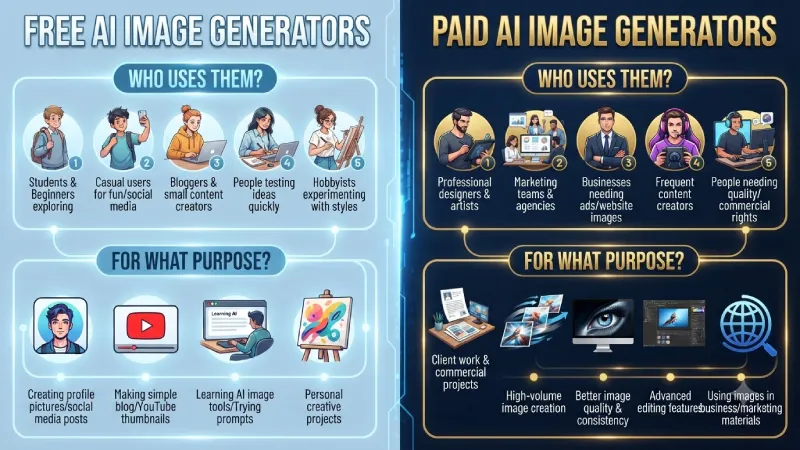
Not everyone needs the same type of AI image generator. People choose free or paid tools based on how often they create images and what they plan to do with them.
Who usually uses free AI image generators?
- Students and beginners who are just exploring
- Casual users making images for fun or social media
- Bloggers and small content creators who need occasional images
- People who want to test ideas quickly without spending money
- Hobbyists experimenting with different styles
Common purposes for free tools:
- Creating profile pictures or social media posts
- Making simple blog or YouTube thumbnails
- Trying out prompts and learning how AI image tools work
- Personal creative projects
- Low-volume use (a few images per day or week)
Who usually uses paid AI image generators?
- Professional designers and digital artists
- Marketing teams and agencies
- Businesses that need regular images for ads, websites, or products
- Content creators who publish frequently
- People who need higher quality, faster generation, or commercial rights
Common purposes for paid tools:
- Client work and commercial projects
- High-volume image creation
- Better image quality and consistency
- Advanced editing features
- Removing daily limits and watermarks
- Using images in business or marketing materials
Free Tools vs Paid Tools – Simple Comparison
| Aspect | Free Tools | Paid Tools |
| Cost | Free | Monthly or yearly subscription |
| Daily limits | Usually limited | Much higher or unlimited |
| Image quality | Good for most casual use | Generally higher and more consistent |
| Speed | Can be slower | Usually faster |
| Best for | Learning, personal use, light work | Professional and regular use |
| Commercial use | Sometimes allowed (check terms) | Usually clearer commercial rights |
Examples of Free AI Image Generator Tools
Here are some commonly used free or free-tier options:
- Perchance (often no sign-up needed)
- Craiyon
- Leonardo AI (free daily credits)
- Google Gemini (free image generation with limits)
- ChatGPT free tier (limited images)
- Bing Image Creator
- Meta AI
- Local tools such as Stable Diffusion or FLUX (unlimited if run on your own computer)
Examples of Paid AI Image Generator Tools
Popular paid options include:
- Midjourney
- Leonardo AI (paid plans for more credits)
- Adobe Firefly (paid plans)
- Ideogram (paid plans)
- ChatGPT Plus / higher plans
- Other premium platforms that offer higher limits, better quality, and priority access
How to Use an AI Image Generator (Simple Steps)
- Choose a tool (web-based or local)
- Write a clear prompt describing what you want
- Generate the image
- Adjust the prompt if the result is not right
- Download or edit the image further if needed
For photo-style or complex images, adding details about style, lighting, and composition usually improves results.
Best Features and Common Uses
Common useful features:
- Text-to-image generation
- Image-to-image editing
- Style control
- Upscaling
- Inpainting (editing parts of an image)
Popular uses:
- Creating social media graphics
- Concept art and design ideas
- Blog and website images
- Personal creative projects
- Mockups and presentations
- Exploring ideas quickly
Year-Wise Growth and What to Expect in the Future
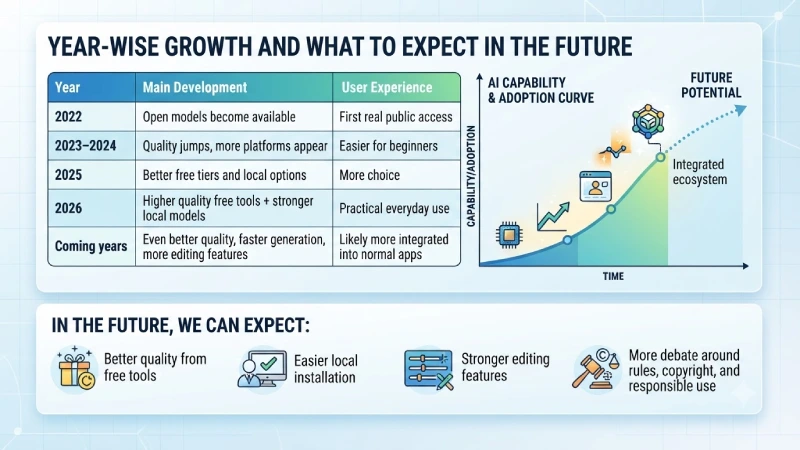
| Year | Main Development | User Experience |
| 2022 | Open models become available | First real public access |
| 2023–2024 | Quality jumps, more platforms appear | Easier for beginners |
| 2025 | Better free tiers and local options | More choice |
| 2026 | Higher quality free tools + stronger local models | Practical everyday use |
| Coming years | Even better quality, faster generation, more editing features | Likely more integrated into normal apps |
In the future, we can expect:
- Better quality from free tools
- Easier local installation
- Stronger editing features
- More debate around rules, copyright, and responsible use
What I Personally Think
As far as I understand, the concept of unrestricted AI image generator is appealing, but most users actually desire to get more approvals and larger quotas than having no restrictions at all.
For starters, the use of basic free web-based software will be more than enough. If a user is looking for total freedom, then the ability to train an open model locally is the best strategy available nowadays. Since the tools keep getting better, there is no reason why this gap won’t keep shrinking.
In my opinion, the optimal path is to begin with simple and free tools, try a couple of options and only switch to advanced ones if needed.
Quick Recommendations
| Your Need | Suggested Direction |
| Completely free + no sign-up | Perchance or similar web tools |
| Best free quality with some limits | Leonardo AI, Gemini, or ChatGPT free tier |
| True no daily limits | Local FLUX or Stable Diffusion |
| Easy for beginners | Bing Image Creator or Meta AI |
| Professional / commercial work | Check paid tools with clear usage rights |
FAQs
- Is there a completely free AI image generator with no restrictions?
There is no major public tool that is 100% unrestricted. However, some free tools (like Perchance) and local models (Stable Diffusion or FLUX) offer much more flexibility and higher limits than mainstream platforms. - What is the best free AI image generator without restrictions in 2026?
For no sign-up use, Perchance is popular. For full control and no daily limits, running FLUX or Stable Diffusion locally is currently one of the best options. - Are AI image generators on Reddit reliable?
Reddit discussions can be helpful for discovering new tools, but quality and safety vary. Always check the tool yourself and avoid anything that looks suspicious. - Can I use images from free AI generators for commercial work?
It depends on the tool’s terms of use. Some free tools allow commercial use, while others do not. Always read the license before using images for business. - Is it better to use free or paid AI image generators?
Free tools are good for learning and light use. Paid tools are better if you need higher quality, faster generation, or regular commercial work.
Final Thoughts
Looking for an “AI image generator no restrictions” has become popular because people are looking for something flexible and unlimited. In 2026, you can actually find more solutions than ever before – starting with simple unrestricted websites up to sophisticated local models not limited by the platform.
The best way of proceeding is trying several free tools first and using them for as long as they work for you; then you can turn to paid tools or even install local models if needed. Good prompts and reasonable expectations always help more than any specific tool.
When you know the difference between various types of generators, choosing the right one will be much simpler.
