


Most email clients send all campaigns to the whole list using one version only. However, this method misses the opportunity for optimization. A/B testing allows for the comparison of two email variants in order to see which variant works best with the audience.
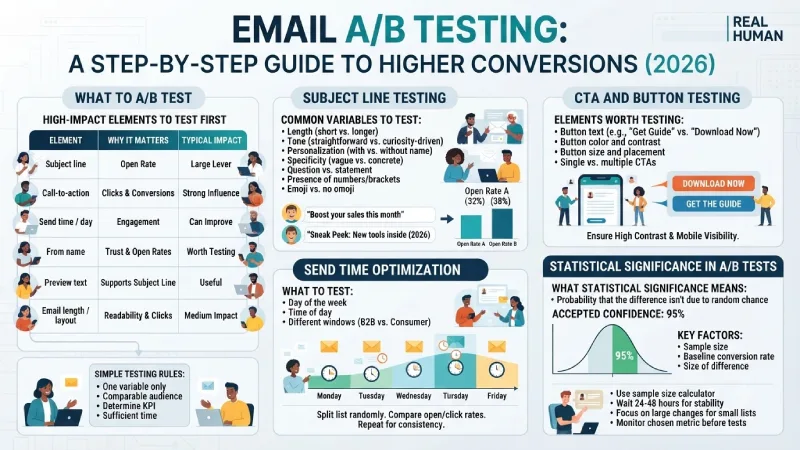
When performed correctly, testing brings open rate and click-through rate improvements. When performed incorrectly, it generates wrong confidence and waste of efforts. This guide gives an insight into an efficient way of A/B testing of emails in 2026, such as what to test, how to test the subject line and calls-to-action, how to deal with the send time, and how to assess statistical significance.
What to A/B Test in Emails
Not all elements deserve testing. Concentrate on variables that can make an impact on your opens, clicks, or conversions.
high-impact elements to test first
| Element | Why It Matters | Typical Impact |
| Subject line | Controls whether the email gets opened | Often the largest single lever |
| Call-to-action | Directly affects clicks and conversions | Strong influence on results |
| Send time / day | Affects when people see the email | Can improve engagement |
| From name | Influences trust and open rates | Worth testing periodically |
| Preview text | Supports the subject line | Secondary but useful |
| Email length / layout | Affects readability and clicks | Medium impact |
Lower-priority tests
In small design aspects like button shape or color, the amount of items needed for showing a statistically valid difference is very high. Test them once the larger elements have been perfected.
Simple testing rules
Conduct tests on one variable only. When you test a subject line, CTA, and design at once, you can’t be sure which is responsible for the different result.
- The audience should be comparable for all the variants.
- Determine your KPI before starting (open rate, click-through rate, click to open rate, conversion rate, and others).
- Test for a sufficient amount of time.
Start with the elements most likely to improve results for your specific goals.
Subject Line Testing
The subject lines impact the open rate directly; thus, everything else follows after that. Subject lines are generally the first point of testing..
Common Variables to Test
- Length (short vs. longer)
- Tone (straightforward vs. curiosity-driven)
- Personalization (with vs. without name or company details)
- Specificity (vague vs. concrete benefit or topic)
- Question vs. statement
- Presence or absence of numbers or brackets
- Emoji vs. no emoji (results vary widely by audience)
Practical Approach
Craft two subject lines which have one difference between them. Send them to similar size groups of your list and wait till there is enough time to measure the open rate (for instance, it is better to wait for 24-48 hours than measuring it right away).
Take notes on those that perform better. Gradually, you will notice trends which work best for your unique audience (such as short subject lines or ones which focus on benefits).
Note that open rate measurement is less reliable now than it was before due to privacy options and image blocks. However, subject line testing is still worth doing when you evaluate click-through rate as well.
CTA and Button Testing
Once the email is opened by people, what follows next is based on the call-to-action.
Elements Worth Testing
- Button text (for example “Get the Guide” vs. “Download Now” vs. “See Pricing”)
- Button color and contrast
- Button size and placement
- Single CTA vs. multiple CTAs
- Text link vs. button style
- Urgency or benefit framing in the CTA copy
Tips For Better CTA Tests
- Make the primary CTA easy to find, especially on mobile.
- Ensure high contrast so the button stands out.
- Test language that matches the stage of the reader (educational vs. ready-to-buy).
- Track clicks and, when possible, actual conversions rather than clicks alone.
Small changes in CTA copy and CTA visibility have been found to impact click-through rates greatly, especially in automation such as welcome email series and abandoned cart emails.
Send Time Optimization
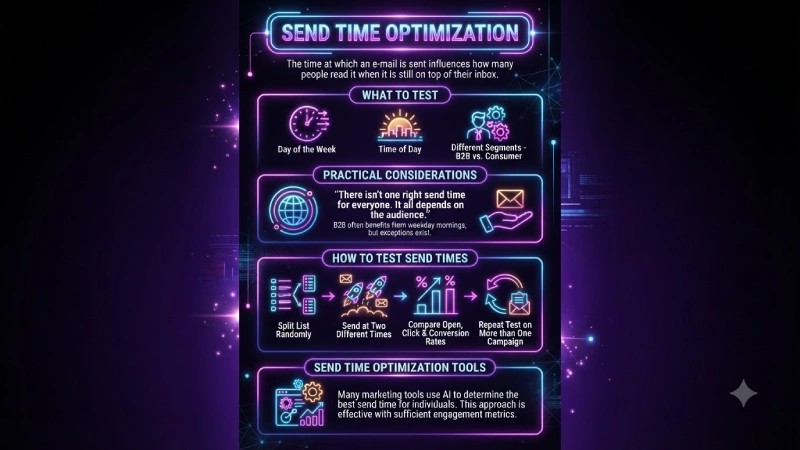
The time at which an e-mail is sent influences how many people read it when it is still on top of their inbox.
What to test
- Day of the week
- Time of day
- Different windows for different segments (for example, B2B vs. consumer audiences)
Practical considerations
There isn’t one right send time for everyone. It all depends on the audience you are working with. Sometimes it is better to send emails on weekdays in the morning for business-to-business, but there are exceptions.
How to test send times
- Split your list randomly.
- Send the same email at two different times or on two different days.
- Compare open rates, click rates, and conversions.
- Repeat the test on more than one campaign before drawing firm conclusions.
Many email marketing tools have options for send-time optimization that attempt to send emails at the time when individuals are most receptive. This approach is effective, but it only works well if you have engagement metrics.
Statistical Significance in A/B Tests
This is the part many teams skip, and it is the reason many “winners” are not real.
What statistical significance means
It gives you the probability that the difference observed between version A and B is due to random chance. 95% confidence is generally considered acceptable. Anything below is not considered reliable.
Key factors that affect significance
- Sample size (how many people received each version)
- Baseline conversion rate
- The size of the difference you want to detect
More data is required for small samples and small discrepancies. One of the most prevalent mistakes made when testing is to proclaim a winner prematurely.
Practical Guidelines
- Whenever possible, use a sample size calculator.
- Do not end an A/B test just because one of the versions appears to be winning.
- Most email performance measures stabilize when you wait at least 24-48 hours (sometimes even more).
- In case your list is small, concentrate on larger changes that are more likely to prove significant, or perform several A/B tests for similar campaigns.
- Monitor the metric you have chosen before starting your tests.
In most e-mail programs, confidence levels or automatic winners are indicated. However, take these as just signs and not conclusions especially if you have a small sample size.
Building a Sustainable Testing Habit
A/B testing for emails does not imply carrying out endless experiments. It implies carrying out continuous improvement processes.
A simple process many teams follow:
- Choose one high-impact element to test.
- Create two clear variants.
- Split the audience evenly and randomly.
- Run the test long enough to collect reliable data.
- Record the result and the learning.
- Apply the winner and move to the next test.
Write down what you learn. In time, these incremental successes translate into better results.
The effectiveness of testing depends largely on other aspects of your emailing program being in good shape—quality of the list, relevance of the content, and strong deliverability. Nothing can save your emails from failure if no one wants to read them.
Begin testing from subject lines or call-to-action buttons; keep tests simple and respect the requirement of having sufficient data. This is how you turn testing into a science.
Frequently Asked Questions
What size should my list be to conduct A/B testing?
Large lists make it easier to achieve statistical significance. For small lists, concentrate on large improvements and don’t rush to proclaim any winners prematurely.
Should I test for open rates or click-through rates?
This is a function of your goals. Open rate is usually the key metric when you test subject lines. The click-through rate would be more relevant for other types of tests.
How long should I run an email A/B test?
Many tests need at least 24–48 hours. Click and conversion metrics often need more time than open rates. Avoid calling a winner too early.
Am I able to test more than two variations simultaneously?
It is possible, though it involves using larger sample sizes. In most cases, the conventional A/B (two variations) testing is simpler.
What if my test shows no clear winner?
It is useful information. It shows that the change did not make a significant difference, so the more complex version can be simplified or something else tested.
