


Introduction
Developer productivity tools help software developers write code, manage projects, fix bugs, and work collaboratively with their teams. Developer productivity tools cut down on repetitive activities and promote cooperation, thus improving the speed at which the software development process can be carried out. Whether you are a beginner, freelance developer, or part of a huge development team, the use of the right developer tools will help you finish your project faster.
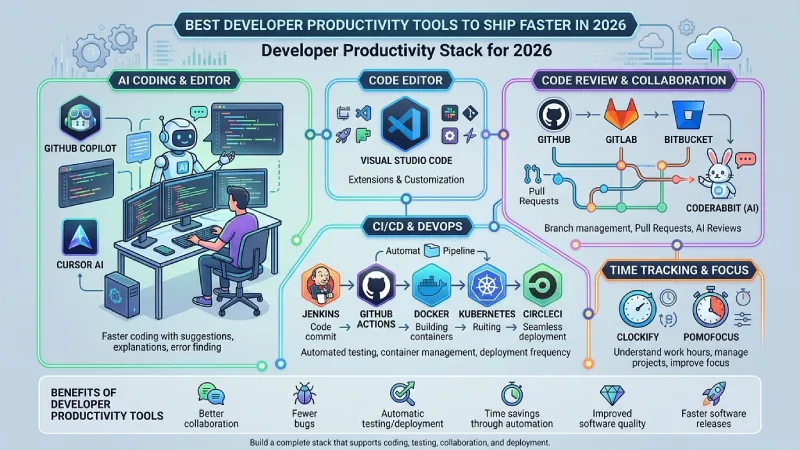
Software development today is more than coding. It entails activities like code reviewing, issue tracking, version management, testing, and deployment. Using separate tools for each of these activities can save time and make things more organized. software development best practices ensure that the team builds a quality and secure application.
Best Developer Productivity Tools in 2026
| Tool | Category | Best For | Free Plan |
| GitHub Copilot | AI Coding | Developers | Trial |
| Cursor AI | AI Editor | Developers | Yes |
| Visual Studio Code | Code Editor | All Developers | Yes |
| GitHub | Code Review | Teams | Yes |
| Jenkins | CI/CD | Enterprises | Yes |
| Docker | Containers | Developers | Yes |
| Kubernetes | Container Management | Large Teams | Yes |
| Clockify | Time Tracking | Individuals | Yes |
What Are Developer Productivity Tools?
Developer productivity tools are software tools used by programmers to develop, test, manage, and deliver software. They include tools that help in various stages of software development such as coding, debugging, collaboration, version control, testing, and deployment.
Certain tools aid developers in coding through intelligent suggestions, while other tools aid teams in the reviewing and management of code or automation of testing and deployment
Why Developers Need Productivity Tools in 2026
Software development is growing increasingly more complicated and larger each year. The developer works within a remote team, handles many projects, and makes frequent updates to the product. Productivity applications assist developers in accomplishing their tasks effectively and efficiently.
The year is 2026, and now artificial intelligence forms an essential part of software development. Code suggestions, function definitions, finding errors, and creating documentation – all these can be done using AI code assistants. Additionally, the use of automation saves on manual effort and takes care of tasks like testing, deploying codes, and managing workflows.
Benefits of Using Developer Productivity Software
The benefits of developer productivity software include those which are both personal and professional to the developer and team development as well. This includes increased efficiency and decreased redundancy.
Some of the main benefits include:
- Faster coding with AI assistance.
- Better collaboration between developers.
- Easier code reviews and version control.
- Automatic testing and deployment.
- Fewer coding errors and bugs.
- Better project organization.
- Time savings through automation.
- Improved software quality.
- Support for remote development teams.
- Faster software releases.
Through the right choice of developer productivity tools, the developer will be more efficient and build better programs. The advancement in technology will cause the developer productivity tools to become more important in future.
Code Review and Collaboration Tools
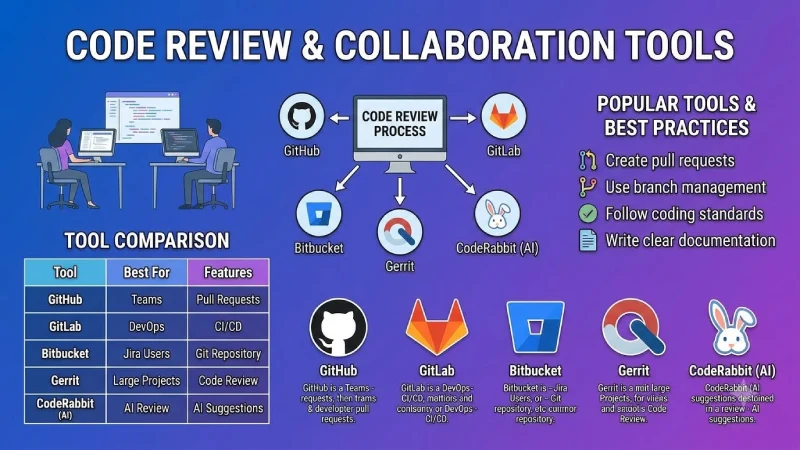
Code review is an extremely important activity in software engineering. This process allows engineers to analyze the code written by their peers prior to its integration into the software project. In this way, any errors are detected, the quality of the code is improved, and the coding standards are observed.
Code Review and Collaboration Tools Comparison
| Tool | Best For | Features |
| GitHub | Teams | Pull Requests |
| GitLab | DevOps | CI/CD |
| Bitbucket | Jira Users | Git Repository |
| Gerrit | Large Projects | Code Review |
| CodeRabbit (AI) | AI Review | AI Suggestions |
Popular Code Review Tools
- GitHub provides developers a platform where they can host their code, maintain their repositories and check their pull requests before merging.
- GitLab brings in version control, code review, and CI/CD in one place, which makes GitLab the best platform for developers.
- Bitbucket has been integrated with Jira and offers teams the capability of managing their source code, branches and pull requests.
- Gerrit is used in managing large-scale development projects and requires code reviews before merging the code.
- CodeRabbit makes use of artificial intelligence in reviewing the code and detecting any possible errors in it.
Best Practices
- Create pull requests for every code change.
- Use branch management to separate new features from the main code.
- Follow coding standards across the team.
- Write clear documentation for future reference.
CI/CD and DevOps Productivity Tools
CI/CD is the abbreviation of “Continuous Integration and Continuous Deployment.” This is an approach used by developers to automate the testing, building, and deployment of their software.
CI/CD and DevOps Tools Comparison
| Tool | Purpose | Best For |
| Jenkins | CI/CD | Enterprises |
| GitHub Actions | Automation | GitHub Users |
| GitLab CI/CD | DevOps | GitLab Users |
| CircleCI | CI/CD | Cloud Apps |
| Docker | Containers | Developers |
| Kubernetes | Container Management | Large Teams |
Jenkins automates software builds and testing.
GitHub Actions creates automated workflows directly inside GitHub repositories.
GitLab CI/CD provides complete DevOps automation from coding to deployment.
CircleCI helps teams build, test, and release cloud applications faster.
Docker packages applications into containers that run consistently across different environments.
Kubernetes manages and scales containerized applications for large development teams.
Developer Time Tracking and Focus Tools
Time tracking tools help developers understand how they spend their work hours and improve focus.
| Tool | Main Purpose |
| Clockify | Time Tracking |
| Toggl Track | Project Time Management |
| RescueTime | Productivity Monitoring |
| Pomofocus | Focus Sessions |
Measuring Developer Productivity
Productivity in developers is gauged based on various performance metrics rather than just through lines of codes.
Common metrics include:
- Code quality
- Pull request cycle time
- Deployment frequency
- Lead time for changes
- Bug resolution speed
- Code review speed
- Team collaboration
Features to Look for in Developer Productivity Tools
- AI coding assistance
- Git integration
- Cloud support
- Extensions and plugins
- Strong security
- Workflow automation
- Team collaboration
- Performance monitoring
Benefits of Developer Productivity Tools
- Faster coding
- Better collaboration
- Fewer software bugs
- Faster deployments
- Better code quality
- Improved workflows
- Save development time
- Easier project management
Advantages and Limitations
| Advantages | Limitations |
| Faster coding | Learning curve |
| AI assistance | Paid features |
| Better collaboration | Setup time |
| Better code quality | Internet connection required |
Frequently Asked Questions
What are developer productivity tools?
These are software programs used to assist programmers in developing software in an efficient manner.
Which AI coding assistant is best?
Examples of programming assistants that had already gained popularity by 2026 are GitHub Copilot and Cursor AI.
Are developer productivity tools free?
There are many software which provides you with free versions while offering premium options for a fee.
What is CI/CD?
CI/CD refers to a method of software development which includes testing, building, and deployment of codes automatically.
How do developers measure productivity?
They employ metrics like code quality, deployment frequency, time to fix bugs, and team collaboration.
Which tool is best for code reviews?
The common code review tools include GitHub, GitLab, Bitbucket, Gerrit, and CodeRabbit.
Conclusion
Tools for developer productivity make software development more efficient and improve the quality of software produced. Coding AI assistants save developers from doing routine coding, whereas code reviewing and CI/CD tools enhance collaboration and help to deliver software automatically. Time tracking tools enable developers to remain concentrated and manage their tasks. Rather than using one tool, companies need to create a full-stack developer productivity environment covering coding, testing, collaboration, and delivery. With further development of AI and automation, developer productivity tools will become increasingly important for software development.
