


Introduction
Cloud computing adoption is transforming how businesses manage technology, data, communication, and daily operations. Previously, there were many instances of organizations depending heavily on physical servers, office systems, hardware configurations, back-ups manually done, and software installed locally. This process demanded huge resources and was difficult to manage.
Presently, business are embracing cloud computing because they are endowed with features such as flexibility, scalability, speed of deployment, ease of collaboration, and efficiency.
In simple terms, cloud computing allows firms to use applications such as software, storage services, servers, databases, and various other business applications via the Internet as opposed to using purely hardware that is set up at the company’s site.
By the year 2026, the use of cloud computing will be one of the most important technological strategies that firms of all sizes can embrace. Firms have been using cloud computing for various reasons such as efficiency, remote work, management of customers’ data, automation, among others.
Cloud computing is now widely used by:
- Small businesses
- Startups
- Ecommerce brands
- Healthcare providers
- Educational institutions
- Financial companies
- Manufacturing firms
- Marketing agencies
- Remote work teams
- Enterprise organizations
Businesses are adopting cloud systems for many purposes, including:
- Online file storage
- Business software access
- Team collaboration
- Customer relationship management
- Video conferencing
- Data backup
- Cybersecurity monitoring
- Ecommerce operations
- Business analytics
- Automation systems
No longer do Business have to buy costly servers and invest heavily in IT infrastructure, because they now have cloud computing at their fingertips.
It also enhances business continuity since workers can use systems from remote locations and coordinate activities from different geographical regions.
The use of cloud computing is not only the process of storing data on the Internet. Organizations will need planning, cyber security tactics, staff training, migration, and budgeting to implement cloud computing technologies.
In this guide, we will explain cloud computing adoption in layman’s terms.
- Cloud Computing Service Models
- Cloud Computing Migration Cloud
- Computing Security Cloud
- Computing Cost
- Cloud Computing Benefits
- Cloud Computing
- Drawbacks Comparison of cloud computing
- Business Cases for Cloud Computing
- Future Trends of Cloud Computing
How Cloud Computing Supports Digital Transformation Strategies
Cloud computing is an important element of digital transformation plans. Various business employ cloud computing in order to boost their agility, allow for working remotely, avoid managing infrastructure, and create a better experience for customers.
The contemporary approach to digital transformation is impossible without the application of cloud computing technology due to its scalability capabilities, improved business data management capabilities, automation, and collaboration.
Businesses adopting digital transformation usually combine cloud computing with:
- automation systems
- business analytics
- digital communication platforms
- cybersecurity tools
- customer management software
Cloud computing provides the technical foundation that supports many modern digital business operations.
What is Cloud Computing?
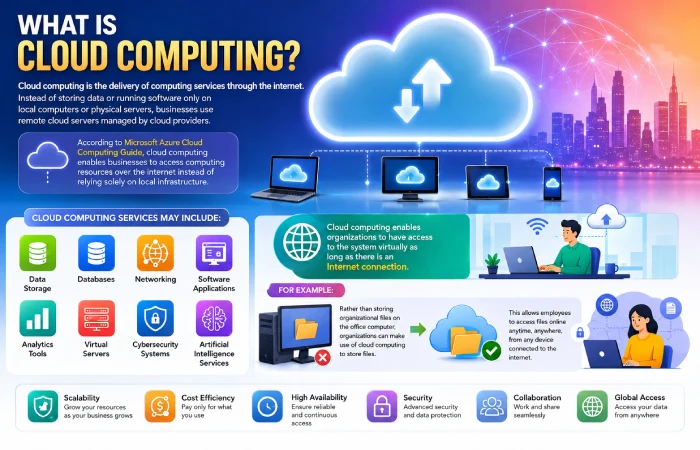
Cloud computing is the delivery of computing services through the internet. Instead of storing data or running software only on local computers or physical servers, businesses use remote cloud servers managed by cloud providers.
According to Microsoft Azure Cloud Computing Guide, cloud computing enables businesses to access computing resources over the internet instead of relying solely on local infrastructure.
These services may include:
- Data storage
- Databases
- Networking
- Software applications
- Analytics tools
- Virtual servers
- Cybersecurity systems
- Artificial intelligence services
Cloud computing enables organizations to have access to the system virtually as long as there is an Internet connection.
For example:
Rather than storing organizational files on the office computer, organizations can make use of cloud computing to store files so that they can access the files online.
Why Businesses Are Adopting Cloud Computing
Organizations are embracing cloud computing as a result of the shortcomings associated with IT systems.
Common problems with traditional infrastructure include:
- Expensive hardware maintenance
- Limited storage capacity
- Slow system upgrades
- Data backup difficulties
- High IT management costs
- Limited remote access
- Downtime risks
Cloud computing is able to help solve a wide variety of problems through providing flexible and scalable digital infrastructure.
Main Reasons Businesses Move to the Cloud
Greater Flexibility
Companies can scale up or down cloud capabilities depending on demand.
Remote Working
Workers can be located anywhere but still have secure access to company networks.
Quick Implementation
Cloud-based solutions can be turned on quickly compared to the setup of physical servers.
Less Physical Setup
There is no need for companies to have server rooms and hardware infrastructure in-house.
Facilitated Cooperation
Employees can easily share documents and collaborate online.
Advanced Data Backup
Cloud-based platforms normally provide data backup services automatically.
Types of Cloud Computing Services
Cloud computing services are mostly categorized depending on their uses in businesses.
Infrastructure as a Service (IaaS)
IaaS offers computing infrastructure virtually in the cloud.
Businesses can rent:
- Virtual servers
- Storage systems
- Networking infrastructure
Common Uses
- Hosting websites
- Running business applications
- Managing virtual machines
Example
PaaS provides platforms for development of applications.
Platform as a Service (PaaS)
PaaS provides platforms where developers can build and manage applications.
The cloud provider manages:
- Infrastructure
- Operating systems
- Security updates
Common Uses
- Software development
- Application testing
- Web application deployment
Software as a Service (SaaS)
SaaS allows users to access software through the internet.
Most businesses pay subscription fees rather than purchasing the software.
Examples
- Email platforms
- Video meeting tools
- CRM software
- Accounting software
Benefits
- Easy access
- Automatic updates
- Lower maintenance
Public vs Private vs Hybrid Cloud
Different cloud computing models are used by organizations depending on their security requirements, budget, scalability, and business practices.
| Cloud Type | Description | Advantages | Challenges |
| Public Cloud | Shared cloud infrastructure managed by providers | Lower cost, scalable | Less customization |
| Private Cloud | Dedicated infrastructure for one organization | Better control and security | Higher cost |
| Hybrid Cloud | Mix of public and private | Complicated Management | More complex management |
Benefits of Cloud Computing for Business
There are many benefits that come with cloud computing for businesses.
Reduced Infrastructure Costs
Businesses spend less on:
- Hardware purchases
- Physical server maintenance
- Data center management
- Cooling systems
Better Scalability
Cloud systems can scale resources up or down quickly.
For example:
An ecommerce business can increase cloud capacity during holiday sales seasons.
Improved Collaboration
Employees can:
- Share files
- Work remotely
- Communicate in real time
- Access systems across locations
Faster Software Updates
Cloud providers usually manage updates automatically.
This reduces:
- Manual maintenance
- Downtime risks
- Technical workload
Better Business Continuity
Cloud backup solutions aid in the recovery of information when there are technical issues.
Increased Productivity
Staff members have more time to focus on work rather than solving issues.
Why Cloud Computing Is Important for Digital Transformation
Digital transformation strategy often relies on cloud architecture due to the need for flexibility and scalability of the systems for modern business operations.
Without cloud computing, businesses may struggle with:
- remote access limitations
- slow software deployment
- difficult collaboration
- high infrastructure maintenance
- limited scalability
Digital technologies can be deployed by businesses through cloud computing solutions, which increase flexibility of operations and reduce complexity.
Cloud Migration Strategy
Cloud migration refers to transfer of business applications, systems, or data from conventional infrastructure to cloud-based platforms.
Businesses should approach cloud migration carefully.
Step 1: Assess Existing Systems
Businesses should first evaluate:
- Current infrastructure
- Storage requirements
- Security needs
- Software compatibility
Step 2: Define Migration Goals
Common goals include:
- Reducing infrastructure costs
- Improving remote access
- Increasing scalability
- Improving security
Step 3: Choose the Right Cloud Model
Businesses should decide between:
- Public cloud
- Private cloud
- Hybrid cloud
Step 4: Create a Migration Plan
The migration process should include:
- Timelines
- Risk management
- Backup planning
- Employee training
Step 5: Test Systems
Businesses should test:
- Performance
- Security
- Compatibility
- Backup recovery
before full deployment.
Cloud Migration as Part of Digital Transformation
Migrating to the cloud is generally one of the early major milestones for digital transformation of a firm.
It involves moving their systems, applications, and data to the cloud infrastructure rather than relying on conventional IT only.
Businesses usually migrate cloud systems gradually by moving:
- file storage
- communication systems
- business software
- analytics platforms
- customer management systems
A well thought-out strategy will ensure that your organization does not encounter issues such as downtime, security concerns, and additional disruptions due to migration.
Common Cloud Migration Challenges
Despite the many advantages that come with using the cloud, there are some organizations that struggle when it comes to migrating to the cloud.
Data Security Concerns
Sensitive business data requires strong protection.
Downtime Risks
Poor migration planning may temporarily affect operations.
Employee Resistance
Employees may need time to adapt to new systems.
Compatibility Issues
Older software may not work properly with cloud systems.
Cost Mismanagement
Poor planning can increase cloud spending unnecessarily.
Cloud Computing Security
Cloud security is one of the most important parts of cloud adoption.
Businesses store valuable information in cloud systems, including:
- Customer records
- Financial data
- Internal documents
- Employee information
Common Cloud Security Risks
Phishing Attacks
Hackers may try to steal login credentials.
Weak Passwords
Poor password practices increase security risks.
Misconfigured Systems
Incorrect settings may expose sensitive data.
Malware Attacks
Malicious software may target cloud systems.
Best Practices for Cloud Security
Businesses should follow strong cybersecurity practices.
Use Multi-Factor Authentication
Extra verification improves account protection.
Update Software Regularly
Updates often fix security vulnerabilities.
Train Employees
Employees should understand:
- Phishing risks
- Password safety
- Secure file sharing
Backup Important Data
Businesses should maintain backup systems regularly.
Cost of Cloud Computing Services
Cloud computing costs vary depending on:
- Storage usage
- Computing power
- Data transfer
- Security features
- Business size
While some firms have a monthly subscription, others use usage-based pricing.
Factors Affecting Cloud Costs
| Cost Factor | Impact on Pricing |
| Storage usage | Higher storage increases cost |
| Data transfer | Large transfers may increase expenses |
| Advanced security | Premium security features cost more |
| User accounts | More users may require larger plans |
| Computing resources | High-performance systems cost more |
How Businesses Reduce Cloud Costs
Businesses can control costs by:
- Monitoring usage regularly
- Removing unused resources
- Choosing scalable pricing plans
- Using automation tools efficiently
Industries Using Cloud Computing the Most
Cloud computing adoption is growing across almost every industry.
Retail Industry
Retail businesses use cloud systems for:
- Ecommerce platforms
- Inventory management
- Payment processing
- Customer analytics
Healthcare Industry
Healthcare organizations use cloud platforms for:
- Patient records
- Telemedicine
- Appointment systems
- Medical collaboration
Education Sector
Educational institutions use cloud systems for:
- Virtual classrooms
- Online learning
- Digital assignments
- Student portals
Financial Services
Banks and financial companies use cloud computing for:
- Mobile banking
- Fraud detection
- Customer management
- Transaction processing
Manufacturing Industry
Manufacturers use cloud technologies for:
- Supply chain management
- Production monitoring
- Smart factory systems
- Automation platforms
How Small Businesses Use Cloud Computing
Small business adopts cloud computing solutions due to simplicity of their infrastructures.
Common cloud tools used by small businesses include:
- Cloud storage platforms
- Billing software
- CRM systems
- Accounting tools
- Collaboration software
Cloud computing helps smaller businesses compete more effectively without requiring large IT budgets.
Remote Work and Cloud Computing
Cloud computing became extremely important during remote and hybrid work expansion.
Businesses now use cloud platforms for:
- Video meetings
- Team communication
- File sharing
- Remote project management
Cloud computing allows employees to remain in touch wherever they are.
Cloud Computing vs Traditional Infrastructure
| Feature | Traditional Infrastructure | Cloud Computing |
| Hardware ownership | Business-owned | Provider-managed |
| Scalability | Limited | Flexible |
| Maintenance | Internal IT teams | Cloud provider |
| Remote access | Limited | Easy |
| Initial cost | High | Lower upfront cost |
| Deployment speed | Slower | Faster |
Common Mistakes Businesses Make During Cloud Adoption
Moving Too Fast
Businesses sometimes migrate systems without proper planning.
Ignoring Security
Poor security practices increase risks.
Choosing the Wrong Cloud Model
Not every business needs the same type of cloud infrastructure.
Lack of Employee Training
Employees must understand how cloud systems work.
Poor Cost Monitoring
Unmanaged cloud resources can increase expenses.
Future of Cloud Computing Adoption
Cloud computing continues growing rapidly across industries.
Future trends may include:
- AI-powered cloud services
- Edge computing
- Advanced cybersecurity systems
- Smarter automation
- Multi-cloud strategies
- Improved cloud analytics
Businesses will depend on cloud computing more due to an increase in digital transactions.
Cloud Computing Adoption Across Different Countries
Countries adopt cloud computing differently.
| Country | Major Cloud Focus |
| United States | Enterprise cloud infrastructure |
| China | Smart manufacturing cloud systems |
| Germany | Industrial cloud technologies |
| Japan | Robotics and automation platforms |
| Singapore | Smart city cloud infrastructure |
| United Kingdom | Financial cloud services |
How to Measure Cloud Computing Success
Businesses should track cloud adoption performance regularly.
Important performance indicators include:
- Reduced operational costs
- Faster application performance
- Improved customer support
- Better employee productivity
- Reduced downtime
- Increased scalability
Performance tracking can assist companies in developing cloud strategies for future use.
Frequently Asked Questions (FAQs)
What is cloud computing adoption?
The use of cloud computing involves the usage of cloud-based technology and web applications rather than depending solely on hardware.
Why do businesses move to cloud computing?
Here are some of the reasons for adopting cloud computing services:
What are the main types of cloud computing?
The three main types are:
- Infrastructure as a Service (IaaS)
- Platform as a Service (PaaS)
- Software as a Service (SaaS)
What is a cloud migration strategy?
This is a basic roadmap for the company on how to migrate the systems, applications or the data from the traditional IT to cloud environment step-by-step.
Is cloud computing safe?
Yes, but the business should practice proper security techniques such as multi-factor authentication, training employees and regularly updating software among others.
How do I differentiate between public and private cloud?
In public cloud, the resources are shared where they are controlled by the provider while the private cloud utilizes dedicated infrastructure.
Can small businesses adopt cloud computing?
Yes, small firms can use cloud computing platforms due to its cost-effective nature.
Conclusion
Cloud computing plays a crucial role in the current business world. Utilization of cloud computing makes it possible for businesses to become flexible, reduce the need for hardware management, facilitate remote working, collaborate easily, and be scalable.
Cloud technologies provide organizations with access to technology resources without depending on expensive hardware solutions. All from local companies to global organizations can benefit from fast and efficient cloud computing services.
However, cloud migration is not simply about storage and transfer of files. In addition to other aspects of the process, organizations must consider such issues as security, planning, employee training, migration strategy, and cost monitoring.